






Quick Summary
BoloSign is a strong option for education teams that need mass document collection from students and parents, faculty contract management, and enrollment paperwork automation. Schools collect signed permission slips and policy acknowledgments via shareable QR code links, distribute faculty contracts via Bulk Send, and track completion rates in Google Sheets — all while meeting FERPA requirements.. It works well for organizations handling student enrollment forms, faculty contracts, permission slips, financial aid agreements, and other critical education documents. Pricing starts at just $49/month with unlimited signatures — no per-user fees. Trusted by 50,000+ businesses with ISO 27001, SOC 2 Type II, GDPR, and ESIGN Act compliance. Rated 4.5/5 on Capterra.
What Paperwork Problems Are Slowing Down Education Teams Right Now?
Education organizations waste hours every week chasing signatures, managing document versions, and dealing with compliance gaps caused by paper-based or outdated digital workflows. These are the most common bottlenecks.
Student enrollment forms sit unsigned for days while deadlines approach
speedWhen student enrollment forms are sent via email as PDF attachments, recipients need to download, print, sign, scan, and email back. Most people do not complete this workflow on the same day — if they complete it at all. Meanwhile, deadlines approach and the education team spends time sending follow-up emails instead of doing productive work.
No centralized system to track which faculty contracts are signed
visibilityWithout a tracking dashboard, education teams piece together document status from email threads and file folders. The question 'Has this been signed?' should take 2 seconds to answer from a dashboard — not 10 minutes of searching through email chains and shared drives.
Compliance documentation has gaps that auditors find
complianceFERPA compliance compliance requires signed acknowledgments, training records, and documented policies. When these are scattered across filing cabinets and email, auditors find gaps. Every gap is a potential finding, fine, or corrective action — and the cost of remediation always exceeds the cost of getting it right the first time.
Per-user e-signature costs scale with your team and do not make sense
costDocuSign charges $25-50 per user per month. A 10-person education team pays $250-500/month for the privilege of sending documents electronically — and hits envelope limits during busy periods. For growing teams, this cost model is unsustainable. Flat-rate unlimited pricing makes more financial sense.
Remote and mobile team members cannot sign paper documents
accessEducation teams increasingly work remotely, travel to client sites, or operate from multiple locations. Paper-based signing requires physical presence. When team members or clients are mobile, the only practical solution is electronic signing that works on any phone, tablet, or laptop from any location.
How Do Schools and Universities Use BoloSign for Student and Faculty Documents?
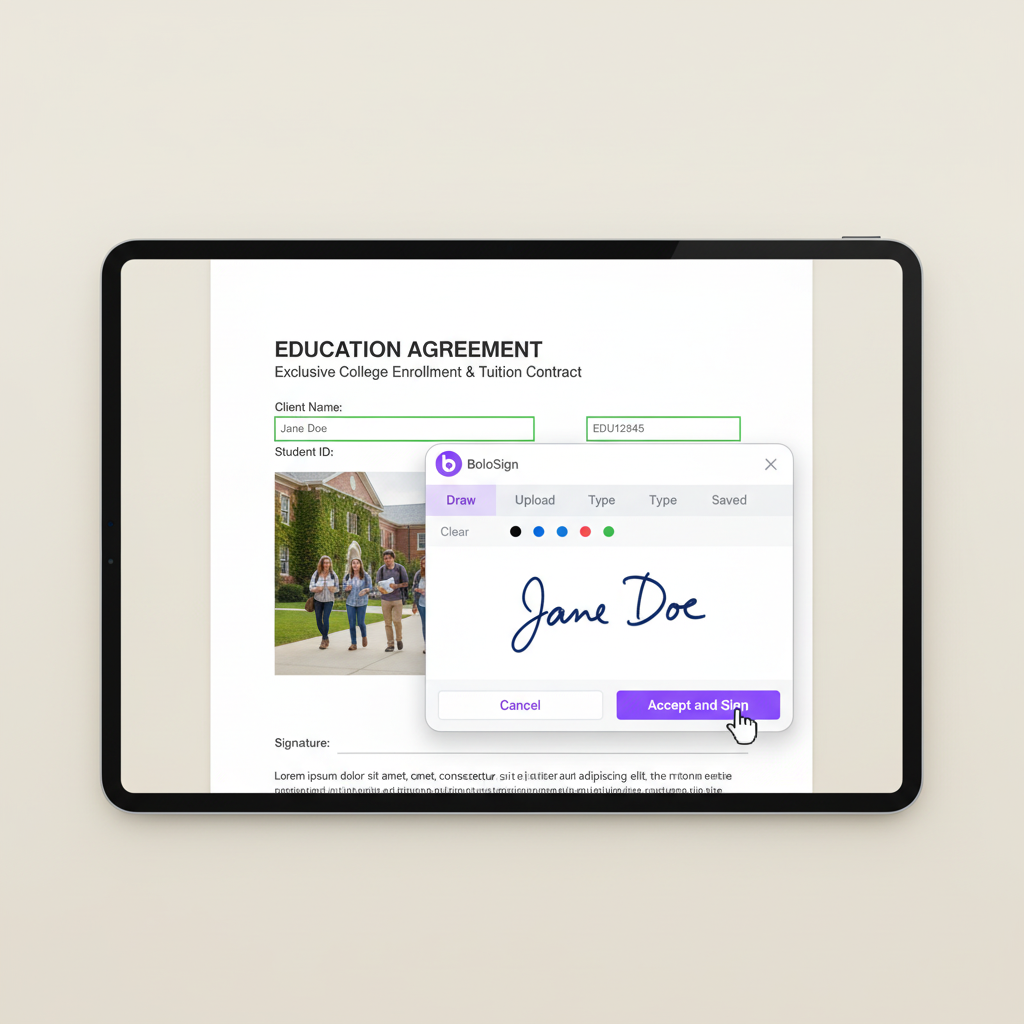
BoloSign helps education teams eliminate paperwork bottlenecks by replacing manual document signing with instant electronic signatures. Teams create reusable templates for their most common education documents, send them for signing via email or SMS, and track completion in real time through Google Sheets integration — all from one platform starting at $49/month.
Create reusable templates for every education document type
Build your education template library once and reuse forever. Upload your student enrollment forms, place signature and date fields, save as template, and send to any recipient in 10 seconds. BoloSign supports unlimited templates on the Team plan ($49/mo) — create templates for student enrollment forms, faculty contracts, permission slips and every other document your team uses regularly.
Send student enrollment forms for instant mobile signing
Upload your student enrollment forms PDF, place signature fields, and send via email or SMS. Recipients sign on their phone in under 2 minutes — no app download, no printing, no scanning. BoloSign's mobile-responsive signing works on every iPhone, Android, tablet, and desktop.
Distribute faculty contracts to hundreds of recipients via Bulk Send
Upload a CSV with recipient names and emails, and BoloSign sends personalized faculty contracts to every person in one batch. Each recipient gets their own copy with their specific details pre-filled. Send to 10, 100, or 500 people simultaneously.
Route education documents through the correct approval sequence
Set up signing order so each education document goes through the right approval chain. Signer 1 receives the document first, signs, and it automatically advances to Signer 2, then Signer 3. No one signs out of order, and you see real-time status for every signer.
Track every education document in Google Sheets automatically
Connect BoloSign to Google Sheets so every document event — sent, viewed, signed, declined — creates a new row automatically. Build a free real-time dashboard showing all active education documents and their status. No CRM subscription needed.
Ready to streamline Education workflows?
Join thousands of Education who use BoloSign to close deals 5x faster.
Is BoloSign FERPA Compliant for Educational Institutions?
Yes. BoloSign is ISO 27001:2022 certified, SOC 2 Type II compliant, and meets ESIGN Act, UETA, GDPR, and eIDAS requirements. Every signed document includes a tamper-proof audit trail with signer identity, timestamps, and IP addresses. FERPA compliance compliance features are available to meet education regulatory needs.
ISO 27001:2022 certified security infrastructure
BoloSign holds ISO 27001:2022 certification — the international gold standard for information security. This means your education documents, client data, and signatures are protected by independently audited enterprise-grade security controls. Not a self-attestation — a real certification.
SOC 2 Type II compliance verified by independent auditors
An independent auditor has verified that BoloSign consistently protects education data across five trust principles: security, availability, processing integrity, confidentiality, and privacy. SOC 2 Type II is the highest standard for SaaS data protection.
Tamper-proof audit trail on every signed document
Every education document signed through BoloSign generates a Certificate of Completion showing: who signed, when they signed (timestamp), their IP address, their email address, and the exact document version. This is admissible as evidence in legal proceedings.
ESIGN Act and UETA compliance for legal enforceability
BoloSign meets all requirements for legally enforceable electronic signatures under US federal (ESIGN Act) and state (UETA) laws: intent to sign, consent to electronic business, association of signature with record, and record retention. Your education agreements are as legally binding as ink signatures.
FERPA compliance compliance documentation
BoloSign supports FERPA compliance requirements for education organizations. Maintain signed compliance records, generate audit-ready documentation, and ensure your education document workflows meet regulatory standards.
Pro Tips
Expert advice for Education
Create a template bundle for your 5 most-used education documents so your team sends complete packages in one click — this alone saves 30+ minutes per transaction and eliminates the risk of missing a required form.
Use SMS delivery for time-sensitive education documents — SMS has a 98% open rate vs. 20% for email, which means you'll get signatures back in minutes instead of hours when deadlines matter.
Connect BoloSign to Google Sheets to build a free real-time education document tracker — you'll see every document's status without paying for CRM software and your entire team can access it.
Enable automatic reminders at 24 and 48 hours for all unsigned education documents — this single setting recovers 30-40% of stalled signatures without any manual follow-up from your team.
Embed signing forms on your website so education prospects can submit and sign documents without leaving your site — capturing signed commitments at the point of highest interest instead of emailing forms back and forth.
Frequently Asked Questions
Everything you need to know about e-signatures in Education
Built for Education
Top features that make BoloSign perfect for Education workflows
QR Code Signing
Why it matters
Generate scannable QR codes that link to your education signing forms. Place them on websites, printed materials, or displays — anyone who scans can sign instantly on their phone.
Use case
A education business places QR codes at their front desk. Visitors scan and sign waivers or agreements on their own phones in under a minute.
Bulk Send
Why it matters
Distribute student enrollment forms to dozens or hundreds of recipients in one batch. Upload a CSV with recipient details and BoloSign generates personalized documents for each person and sends them simultaneously.
Use case
A education manager sends updated policy acknowledgments to 200 team members in one click instead of 200 individual emails.
Reusable Templates
Why it matters
Create student enrollment forms and other education documents once — reuse forever. Pre-map signature fields, date fields, and custom data fields so your team sends professional documents in 10 seconds flat.
Use case
A education team creates templates for their 5 most-used documents. Every new document is sent in seconds instead of being rebuilt from scratch.
Google Sheets Integration
Why it matters
Auto-populate a Google Sheet every time a education document is sent, viewed, or signed. Build real-time tracking dashboards showing document status across your team without expensive software.
Use case
The education team tracks all active documents in a Google Sheet that auto-updates — the manager sees the complete status without asking anyone.
Form Analytics
Why it matters
Track how many people view, start, and complete your education signing forms. Identify where drop-offs happen and optimize for higher completion rates.
Use case
A education team discovers that 30% of people drop off at page 3 of their intake form — they shorten it and completion rates jump by 25%.
Compliance
Document Types
What Our Customers Say
“We switched from DocuSign to BoloSign because we were paying $400/month for a 10-person team and hitting envelope limits constantly. BoloSign gives us unlimited student enrollment forms and faculty contracts for $49/month flat. The templates save us 30+ minutes per day — we set them up once with all the right fields and now anyone on the team can send a perfectly formatted student enrollment forms in under 10 seconds. The Google Sheets integration was the surprise winner — we built a live document tracker without writing a single line of code.”
Daniel R.
Senior Manager, Education, Dallas, TX
“What sold me on BoloSign was the Bulk Send feature. During our busy season, we need to send faculty contracts to 50-100 people at once. On our old platform, that meant 100 individual sends with manual data entry each time. Now I upload a CSV and everything goes out in one click — personalized for each recipient. The audit trail has also been critical for our ferpa compliance compliance documentation. Auditors love the timestamped records.”
Nicole B.
Department Head, Education, Tampa, FL
“The mobile signing experience is what our clients comment on most. They receive an SMS, tap the link, sign in under 90 seconds, and they are done. No app download, no account creation, no friction. Before BoloSign, getting signatures back on student enrollment forms took an average of 3 days. Now it is under 4 hours. For $49/month with unlimited everything, it is not even a close comparison to what we were paying before. I wish we had switched sooner.”
Lisa K.
Team Lead, Education, Phoenix, AZ
Why Education Teams Switch from DocuSign to BoloSign
A 10-person education team pays $400+/month on DocuSign with per-user and per-envelope fees. BoloSign costs $49/month flat for the same team — unlimited users, unlimited documents, unlimited templates.
| Feature | BoloSign | Competitor |
|---|---|---|
| Unlimited student enrollment forms templates | Included | Limited envelopes |
| Bulk Send for faculty contracts (CSV upload) | Included | $60+/mo add-on |
| Google Sheets live document tracking | Included (free) | Not available |
| SMS signing delivery (98% open rate) | Available (SMS credits) | Extra cost add-on |
| Signing order for education approval workflows | Included | Business Pro required |
Conclusion
BoloSign gives education teams the tools to eliminate paperwork delays, stay compliant, and deliver a modern signing experience — all at a price that makes sense for growing businesses. Start your free 7-day trial and see why 50,000+ businesses trust BoloSign.