

Automate Your eSignatures with BoloSign and Make.com
Automate complex signing requests, instantly sync signed documents with your CRM, and build powerful workflows with BoloSign and Make.com.
10,000+ Companies Use BoloSign around the world.
BoloSign + Make.com empowers teams to design and automate their entire document signing ecosystem. By seamlessly linking BoloSign to your daily tools, including CRMs, forms, spreadsheets, Slack, Google Drive, and email, you can completely eliminate manual data entry. Use Make's visual canvas to build custom scenarios that automatically dispatch contracts, track signature statuses, update customer records, alert your team, and securely archive completed PDFs. Trusted by 50,000+ businesses with ISO 27001, SOC 2 Type II, GDPR, and ESIGN Act compliance. Rated 4.5/5 on Capterra.
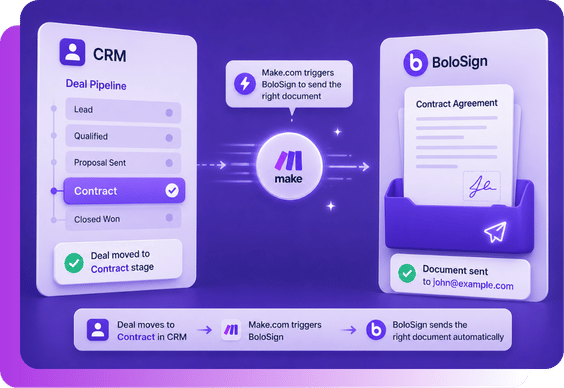
How are contracts sent automatically?
When a deal moves to the contract stage in your CRM, Make.com can trigger BoloSign to send the right document automatically. No need to manually prepare and send every agreement.
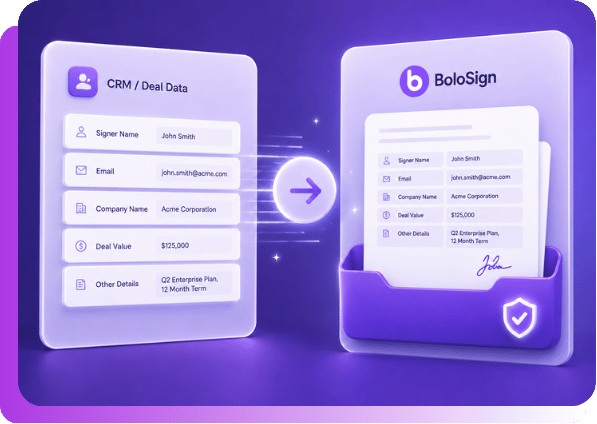
How are customer details filled without copy-paste?
Signer name, email, company name, deal value, and other details can be mapped directly into the document. This reduces manual work and avoids small mistakes that slow deals down.
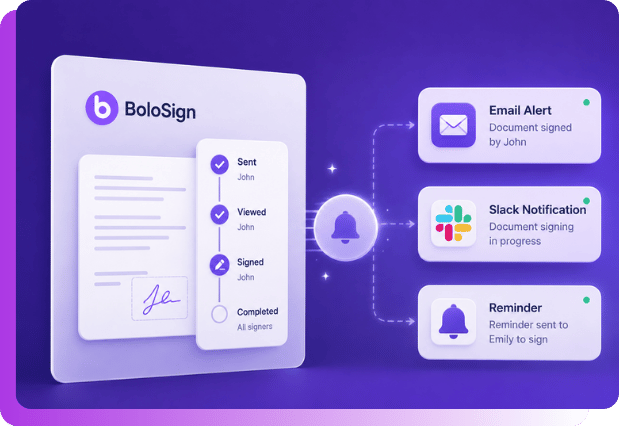
How do Follow-ups happen without chasing?
Sales teams do not have to keep checking who signed and who has not. Make.com can trigger reminders, status updates, or Slack/email alerts based on the signing progress.
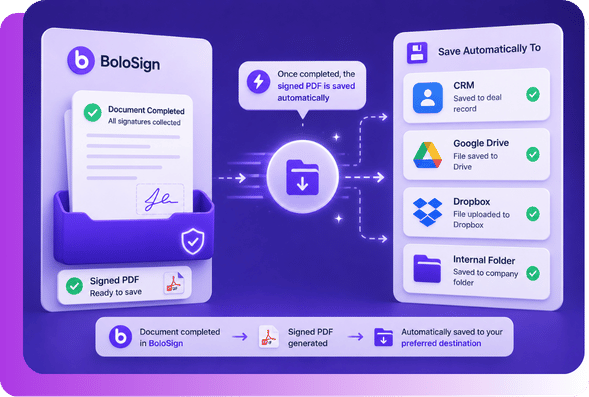
How do signed documents go back to the right place?
Once the document is completed, the signed PDF can be saved automatically in your CRM, Google Drive, Dropbox, or internal folder. Everything stays organized without extra admin work.
Set up in minutes
No code needed. Follow the guided steps and go live fast.
Turn contract tasks into automated workflows
With BoloSign and Make.com, you can connect document signing with your CRM, forms, spreadsheets, email tools, and internal apps.
- Send documents when a deal is created
- Notify your team when a contract is signed
- Save signed PDFs to Google Drive or Dropbox
- Update CRM stages after completion
Before and After Make.com Automation
Before Make.com Automation
Your team does everything manually
- Copy signer details manually
- Prepare and send each document one by one
- Track signing status manually
- Download signed PDFs yourself
- Upload files back to CRM or Drive
- Delays, missed follow-ups, and more mistakes
After Make.com Automation
The workflow runs automatically
 Make
Make BoloSign
- Make.com captures the trigger automatically
- BoloSign sends the document for signature
- Signer details are mapped automatically
- Signing status updates automatically
- Signed PDFs are saved automatically
- Faster, cleaner, and more reliable process
What Security and Compliance Features Does BoloSign Offer for Sales Teams?
Yes. BoloSign is ISO 27001:2022 certified, SOC 2 Type II compliant, and meets ESIGN Act, UETA, GDPR, and eIDAS requirements. Every signed document includes a tamper-proof audit trail with signer identity, timestamps, and IP addresses. ISO 9001 documentation compliance features are available to meet supply chain regulatory needs.
ISO 27001:2022 certified security infrastructure
BoloSign holds ISO 27001:2022 certification — the international gold standard for information security. This means your supply chain documents, client data, and signatures are protected by independently audited enterprise-grade security controls. Not a self-attestation — a real certification.
SOC 2 Type II compliance verified by independent auditors
An independent auditor has verified that BoloSign consistently protects supply chain data across five trust principles: security, availability, processing integrity, confidentiality, and privacy. SOC 2 Type II is the highest standard for SaaS data protection.
Tamper-proof audit trail on every signed document
Every signed document includes a Certificate of Completion showing who signed, when they signed (timestamp), their IP address, their email address, and the exact document version. This is admissible as evidence in legal proceedings.
ESIGN Act and UETA compliance for legal enforceability
BoloSign meets all requirements for legally enforceable electronic signatures under US federal (ESIGN Act) and state (UETA) laws, intent to sign, consent to electronic business, association of signature with record, and record retention. Your supply chain agreements are as legally binding as ink signatures.
ISO 9001 documentation compliance documentation
ISO 9001 documentation compliance requirements for supply chain organizations. Maintain signed compliance records, generate audit-ready documentation, and ensure your supply chain document workflows meet regulatory standards.
Frequently Asked Questions
Make.com acts as the automation layer between BoloSign and your other business tools. For example, when a deal reaches the contract stage in your CRM, Make.com can trigger BoloSign to send the right agreement for signature.
Yes. You can set up notifications in Slack, email, or other communication tools whenever a document is sent, viewed, signed, or completed.
Yes. You can create workflows where documents are sent automatically based on specific actions, such as a new form submission, a CRM stage change, a spreadsheet update, or a completed payment.
Yes. Make.com can send customer details like name, email, company name, deal value, address, and other fields into BoloSign documents. This helps you generate ready-to-sign documents without manual copy-pasting.
Yes. You can connect BoloSign with CRMs supported by Make.com. This allows your team to automate contract sending, update deal stages, save signed documents, and trigger follow-up actions from your CRM.
Once a document is completed, Make.com can trigger follow-up actions. For example, the signed PDF can be saved to Google Drive, Dropbox, OneDrive, your CRM, or an internal folder. You can also send email alerts, Slack notifications, or update records automatically.
No. Make.com is a no-code automation platform. You can build workflows visually using triggers, actions, and conditions. This makes it easier for business teams to automate signing processes without depending on developers.
You can automate workflows such as sending contracts, NDAs, waivers, client agreements, HR documents, onboarding forms, vendor agreements, and sales proposals. You can also automate reminders, status updates, document storage, and CRM updates.
Yes. You can use signing status updates to trigger actions in other tools. For example, when a document is viewed, signed, declined, or completed, Make.com can send alerts, update your CRM, or notify your team.
Yes. Completed documents can be automatically saved to your preferred storage system, such as Google Drive, Dropbox, OneDrive, Box, or your CRM record. This helps keep all signed files organized without manual uploads.
Ready to streamline your Sales Automations?
Install BoloSign today and close deals faster.