

Quick Summary
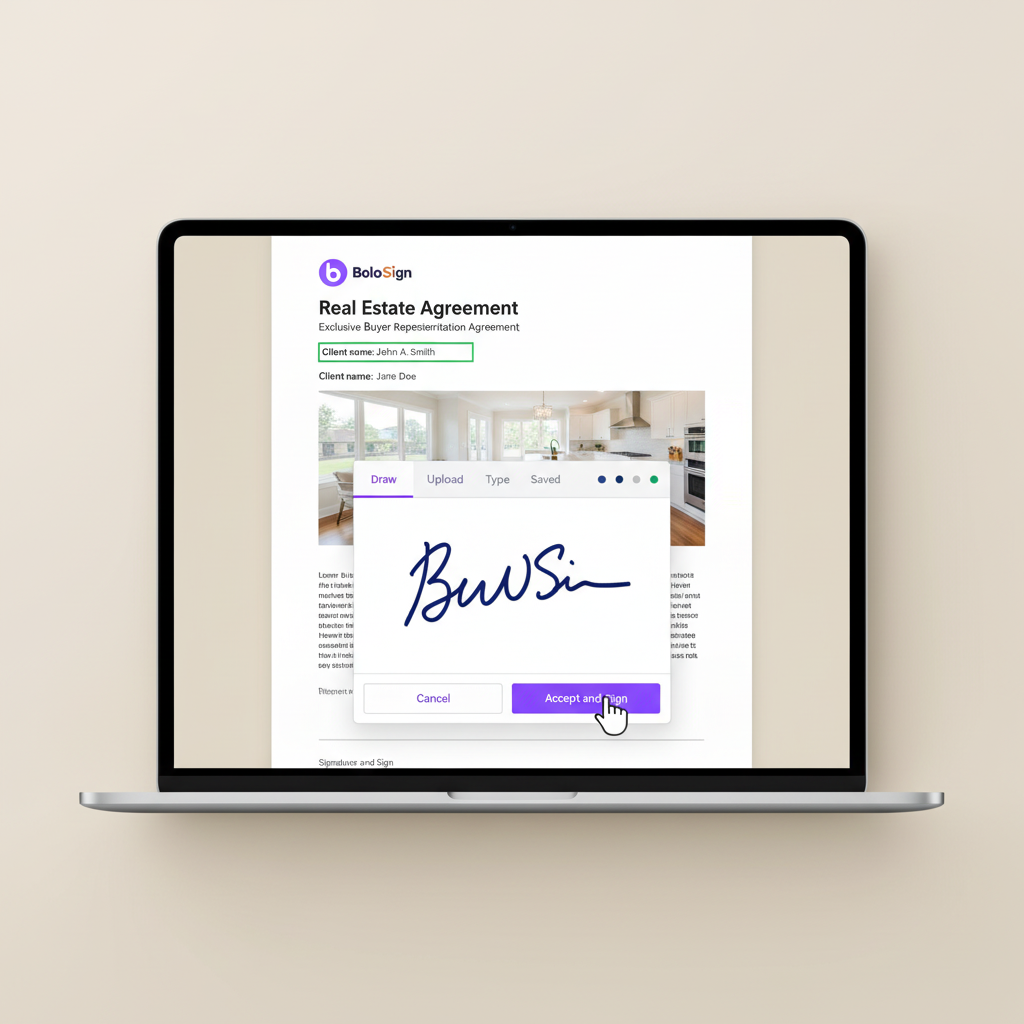
To eSign purchase agreements online: (1) Upload your purchase agreements PDF to BoloSign, (2) drag signature and date fields where each party needs to sign, (3) enter recipient email addresses and click Send. Recipients sign on any device in under 2 minutes — no app download required. Every signature is legally binding under the ESIGN Act with a tamper-proof audit trail. Try BoloSign free for 7 days.
How to eSign Purchase agreements in 3 Steps
Signing purchase agreements electronically with BoloSign takes less than 5 minutes. Here is exactly how to do it:
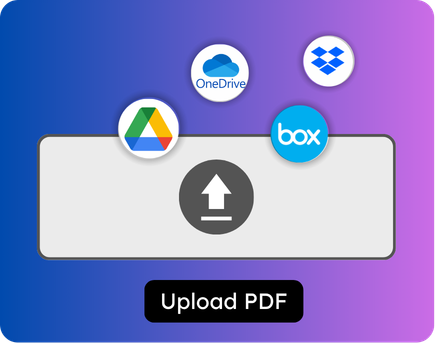
Upload your purchase agreements
30 secondsLog into BoloSign and click 'New Document.' Drag and drop your purchase agreements PDF — or select it from your files. You can also choose from your saved templates if you have already created one for this document type. The document loads instantly in BoloSign's editor.
Tip: Save this as a reusable template so you never upload purchase agreements from scratch again.
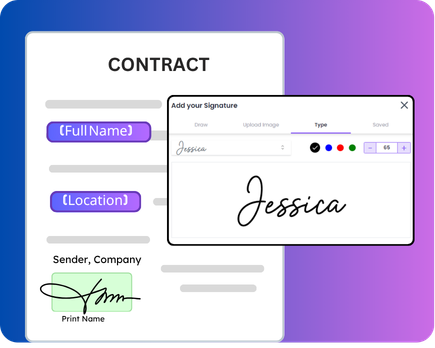
Place signature and date fields
1-2 minutesDrag signature fields, date fields, initial fields, and any custom form fields (text, checkbox, dropdown) onto the document where each party needs to sign. Assign each field to the correct recipient role. For purchase agreements with multiple signers, set the signing order so each person signs in the right sequence.
Tip: Use the 'Signing Order' feature if your document requires signers to go in a specific sequence.
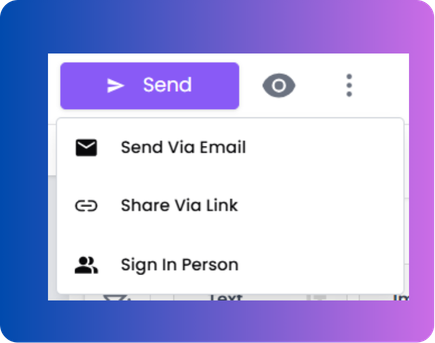
Enter recipients and send
30 secondsType each signer's name and email address (or phone number for SMS delivery). Add an optional personal message. Click 'Send.' Each recipient receives a secure link to review and sign the purchase agreements on any device — phone, tablet, or desktop — in under 2 minutes. No account creation or app download required.
Tip: Use SMS delivery for faster response — 98% open rate vs 20% for email.
After signing
Once all parties sign, BoloSign emails a completed copy to everyone along with a Certificate of Completion showing who signed, when, and from which IP address. The signed purchase agreements is stored securely in your BoloSign account and can also auto-save to Google Drive, Dropbox, or OneDrive.
Why Are Real Estate Deals Still Getting Stuck on Paperwork in 2026?
The average real estate transaction involves 6-10 documents that need signatures from 3-6 different parties. When those signatures depend on printing, scanning, faxing, or driving across town — deals stall by days or weeks. Here is what is actually causing the bottleneck.
Purchase agreements sit unsigned for 48+ hours because buyers are unreachable
deal killerA buyer makes an offer at an open house on Saturday. The agent emails the purchase agreement. The buyer doesn't check email until Monday evening. By Tuesday, a competing offer has already been accepted. This happens constantly because email-based signing has no urgency built in. SMS-based signing with BoloSign gets the agreement to the buyer's phone in seconds — and most people open texts within 3 minutes.
Multi-party contracts get stuck in a signing bottleneck
workflow breakdownA standard purchase agreement needs signatures from the buyer, co-buyer, seller, listing agent, and buying agent — often in a specific order. When one person delays, the entire chain stops. Without an automated signing order, agents spend hours calling, texting, and emailing to push the process forward manually.
State disclosure forms get missed, creating legal liability
compliance riskEvery state requires specific disclosure forms — lead paint, natural hazards, property condition, HOA. When agents assemble documents manually, forms get missed. A single missing disclosure can unwind a deal or create a lawsuit months after closing. This is not a minor issue — it is one of the top reasons for real estate litigation in the US.
Property managers waste 3 weeks on lease renewal season
time drainA property manager with 200+ units faces an annual nightmare: printing lease renewals, personalizing each one with the tenant's unit and rent amount, mailing them, and chasing responses for weeks. The manual process takes 15-20 hours of administrative time and results in slow sign-back rates that increase vacancy risk.
Per-user e-signature fees eat into agent commissions
cost burdenMost e-signature platforms charge $25-50 per user per month. A 10-agent brokerage pays $250-500/month just for the ability to send documents for signing. That cost comes directly out of agents' commissions and the brokerage's bottom line — and it scales up with every new hire.
How Do Real Estate Agents Use E-Signatures to Close Deals Faster?
Real estate agents use BoloSign to send purchase agreements, listing contracts, and disclosures for electronic signing — getting documents signed in minutes instead of days. This eliminates the printing-scanning-faxing cycle and lets agents close more deals per month.
Send purchase agreements for instant signing
Upload your purchase agreement PDF, place signature and date fields for buyer and seller, and send via email or SMS. Buyers sign on their phone in under 2 minutes. No more printing 30-page contracts or driving across town for signatures. BoloSign's reusable templates mean you set up the document once and reuse it for every transaction.
Collect signed buyer agency agreements at open houses
Share a signing link via QR code at your open house. Visitors scan with their phone and sign a buyer agency agreement before they leave the property. This captures committed leads while interest is highest — instead of following up days later when they've already moved on.
Route multi-party contracts in the right signing order
Set up signing order so the buyer signs first, then the seller, then both agents. Each party receives the document only when it's their turn. No more confusion about who needs to sign next or whether the document is fully executed. BoloSign tracks the status of every signer in real time.
Auto-attach state disclosure forms to listing packages
Build template bundles that include all required state disclosures (lead paint, natural hazards, HOA, property condition) attached to your listing agreement. Send the complete package in one click. This prevents the costly mistake of missing a required disclosure form that could unwind a deal.
Manage lease agreements for property management at scale
Use Bulk Send to distribute lease agreements to 50, 100, or 500 tenants simultaneously. Upload a CSV with tenant name, email, unit number, rent amount — and BoloSign generates personalized lease agreements for each tenant and sends them in one batch.
Ready to eSign Purchase agreements online?
Upload, sign, and send in under 5 minutes. No credit card required.
Is BoloSign Legally Binding for Real Estate Documents?
Yes. BoloSign signatures are legally binding under the ESIGN Act and UETA — the same federal and state laws that govern all electronic signatures in the United States. Every signed document includes a tamper-proof audit trail with timestamps, IP addresses, and signer authentication records.
ESIGN Act and UETA compliance for every signature
BoloSign meets all four requirements for legal e-signatures: intent to sign, consent to do business electronically, association of signature with record, and record retention. This means your purchase agreements, leases, and disclosures carry the same legal weight as wet-ink signatures.
Tamper-proof audit trail for court defensibility
Every document signed through BoloSign generates a Certificate of Completion showing who signed, when they signed, their IP address, email address, and the exact document they signed. This audit trail is admissible as evidence if any contract is ever challenged in court.
ISO 27001:2022 certified security infrastructure
BoloSign holds ISO 27001:2022 certification — the international standard for information security management. This means your client data, contracts, and signatures are protected by enterprise-grade security controls that are independently audited.
SOC 2 Type II compliance for data protection
BoloSign's SOC 2 Type II compliance means an independent auditor has verified that BoloSign's systems consistently protect your data across five trust principles: security, availability, processing integrity, confidentiality, and privacy.
State-specific disclosure form compliance
Build template bundles mapped to your state's required disclosure forms. Whether you're in California (14 required disclosures), Texas (Seller's Disclosure Notice), or New York (Property Condition Disclosure Act) — BoloSign ensures you include every required form.
Pro Tips
Expert advice for Real Estate
Create a template bundle for each transaction type (residential purchase, commercial lease, rental) with ALL required documents pre-mapped — so your agents send complete packages in one click instead of assembling 6 separate forms per deal.
Use SMS delivery instead of email for time-sensitive documents like counteroffers and inspection contingency removals — SMS has a 98% open rate vs. 20% for email, which means you'll get signatures back in minutes instead of hours.
Connect BoloSign to Google Sheets to build a free deal pipeline tracker that auto-updates in real time — you'll see every transaction's status without paying for CRM software, and your entire brokerage can access it.
Embed a QR code at every open house that links to your buyer agency agreement — interested visitors scan, sign, and become committed leads before they walk out the door while their interest is at its peak.
Enable automatic reminders at 24 and 48 hours for all unsigned documents — this single setting will recover 30-40% of stalled signatures without any manual follow-up from you or your team.
Frequently Asked Questions
Everything you need to know about e-signing purchase agreements
What Our Customers Say
“I switched from DocuSign after my monthly bill crossed $300 for a 6-person team. BoloSign gives me the same functionality — templates, signing order, audit trails — for $49/month with unlimited everything. Last month I closed 8 transactions and didn't pay a single extra cent. My clients love the SMS signing — I sent a purchase agreement from an open house and the buyer signed it before I finished packing up my signs.”
Rachel M.
Licensed Real Estate Agent, Austin, TX
“We have 22 agents in our brokerage and we were paying DocuSign per-seat which was killing us. BoloSign's flat $49/month for unlimited users was the obvious move. The Google Sheets integration is something I didn't expect to love this much — I built a live deal pipeline tracker that auto-updates when contracts are signed. My agents don't even use our CRM for pipeline visibility anymore because the Sheet is faster and free.”
David K.
Managing Broker, Denver, CO
“I manage 340 units across 4 properties. Lease renewal season used to be a 3-week nightmare of printing, mailing, and chasing. Now I upload a CSV of my tenants into BoloSign's Bulk Send, and 340 personalized renewal agreements go out in one click. Last quarter I had a 91% sign-back rate within 5 days. The audit trail also saved me in a tenant dispute — I pulled up the timestamp and IP address and the case was closed.”
Sarah T.
Property Manager, Orlando, FL
Why Real Estate Teams Switch from DocuSign to BoloSign
A 10-agent real estate brokerage pays $400+/month on DocuSign with per-user and per-envelope fees. BoloSign costs $49/month flat for the same team — unlimited agents, unlimited documents, unlimited templates.
| Feature | BoloSign | Competitor |
|---|---|---|
| Unlimited purchase agreement templates | Included | Limited envelopes |
| Multi-party signing order (buyer → seller → agent) | Included | Included |
| Google Sheets deal pipeline integration | Included (free) | Not available |
| SMS/mobile signing for open house clients | Available (SMS credits) | Extra cost add-on |
| Bulk Send for lease renewals (CSV upload) | Included | $60+/mo add-on |
Conclusion
That is it — three steps to eSign purchase agreements online. Try BoloSign free for 7 days. No credit card required.