

White Label E-Sign Enterprise: The Complete Guide
Discover how white label e-sign enterprise solutions transform document workflows. Learn benefits, compliance, integration, pricing and next steps

Tired of nonsense pricing of DocuSign?
Start taking digital signatures with BoloSign and save money.
74% of organizations already used e-signatures for at least some contracts before the pandemic, and today roughly 70%–80% of U.S. organizations have integrated e-signature tools into operations. A white label e-sign enterprise platform makes that capability appear under your brand, ideally inside the systems your teams already use, rather than forcing customers and employees into a separate vendor portal.
A company might present its signing portal under its own domain while embedding signature requests directly inside Salesforce and Google Workspace. A sales representative sends a contract without leaving the CRM, a new hire completes forms from an onboarding workspace, and the recipient sees the company's emails, colors, and completion certificate throughout the process. That experience feels simple, but the platform choice behind it affects evidence ownership, compliance, integration maintenance, pricing, and migration effort.
The legal foundation is established. Courts accepted telegraph-based signatures as early as the 1860s, while the United States formalized electronic-signature recognition through UETA in 1999 and the ESIGN Act in 2000. Those milestones gave electronic signatures the same legal weight as handwritten signatures and helped enterprises move approval chains from paper to digital workflows across financial services, higher education, government, healthcare, staffing, real estate, and professional services. (DocHub's history of electronic-signature standards)
What White Label E-Sign Enterprise Actually Means
A staffing company has just received a signed employment agreement. The candidate used a branded signing page, the recruiter tracked completion inside the company's dashboard, and the PDF certificate carried the staffing firm's identity. No one had to explain why a third-party logo appeared in the middle of a sensitive onboarding experience.
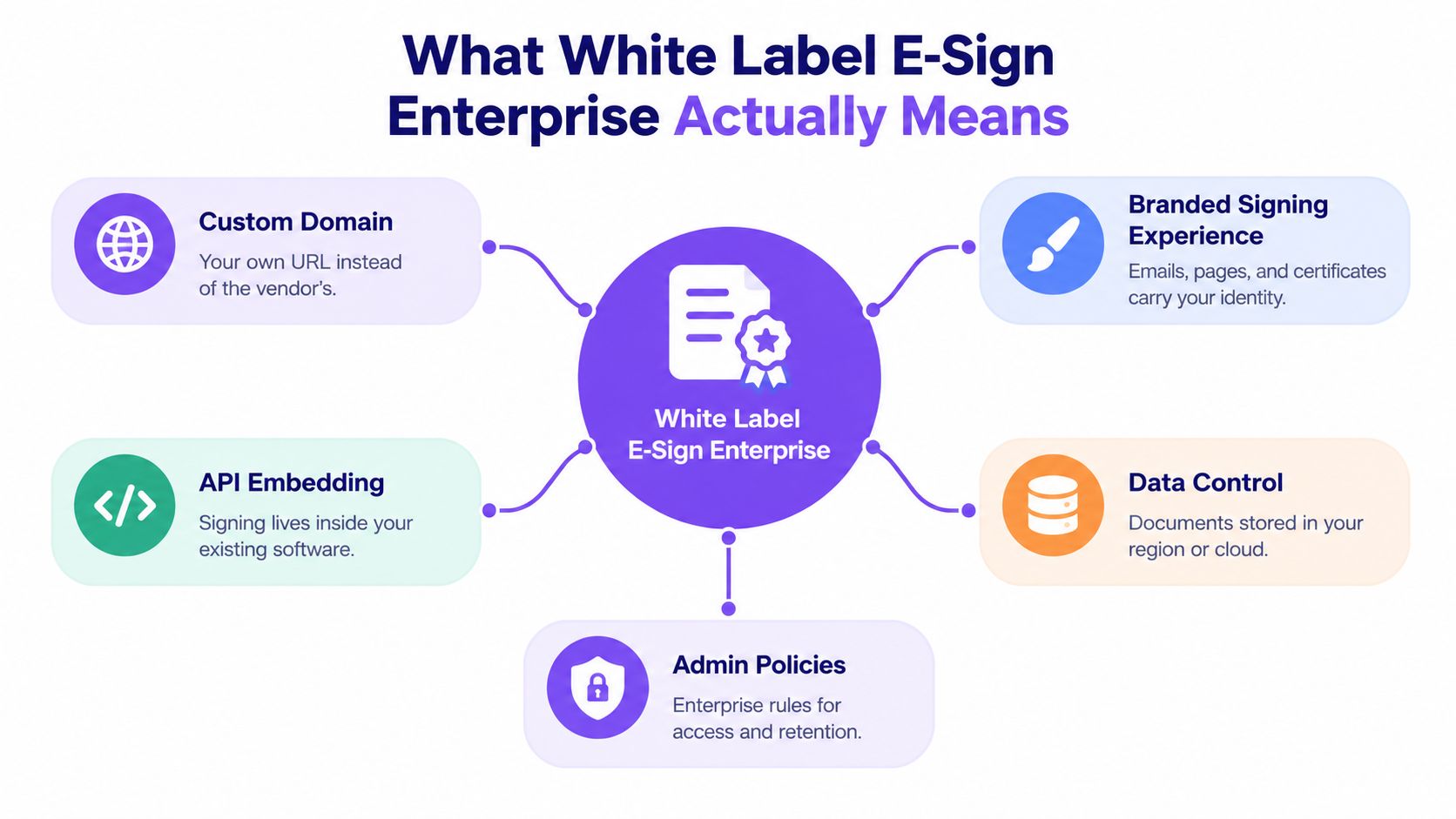
That's the practical meaning of white label e-sign enterprise. It isn't just a logo placed on a login screen. A serious deployment can include:
- Custom domain: Signers visit a URL associated with your organization instead of a vendor address.
- Branded signing experience: Invitation emails, signing pages, notifications, and certificates use your identity.
- API embedding: Signature collection runs inside Salesforce, HubSpot, an HRIS, an ERP, Google Workspace, or an internal portal.
- Data control: Administrators define how documents, logs, and evidence are managed within the available hosting and governance model.
- Admin policies: Teams set access rules, roles, retention practices, approval paths, and audit visibility.
White label is not the same as resale
A reseller arrangement usually lets a company sell or refer another provider's service. The provider remains visible in the workflow, controls much of the user experience, and may own the operational relationship with the signer. White labeling goes further. Your organization presents the signing layer as part of its own product or service, while the underlying provider supplies infrastructure, security controls, document processing, and signature technology.
That creates a governance question: who answers when a signer disputes an action, requests records, or asks how identity was verified? The brand may be yours, but evidence handling still depends on the platform's audit controls and your agreement with the provider.
Practical rule: Treat white labeling as a product and governance decision, not a cosmetic upgrade.
For example, BoloSign can help businesses create, send, and sign PDFs, reusable templates, and forms under a branded workflow. Teams can explore BoloSign's eSignature features to see how signing can fit into everyday document operations rather than remain a standalone destination.
Legal Compliance and Evidence Ownership
A customer disputes a signed agreement, and your support team must explain what happened without sending the signer to a third-party brand. That scenario exposes the central compliance issue in white label e-signing: legal recognition matters, but evidence ownership determines who can retrieve, interpret, and defend the record.
Electronic signatures are legally recognized, yet a white label deployment still needs to show who signed, what they signed, when the action occurred, and whether the document changed afterward. In the United States, teams typically assess ESIGN and UETA. In the European Union, eIDAS has applied since 1 July 2016. The European Commission states that an electronic signature cannot be denied legal effect or admissibility as evidence solely because it is electronic. It also states that a qualified electronic signature has the equivalent legal effect of a handwritten signature across EU Member States. (European Commission eSignature FAQ) For a practical explanation of these frameworks, see BoloSign's guide to eSignature legality.
The rules operate together
Signature validity covers only one part of the compliance picture. An organization processing personal information may also need to address GDPR, while healthcare workflows may involve HIPAA obligations. These rules address different risks, so legally valid signing alone does not make a platform suitable for every regulated process. (Developer guidance on e-signature compliance)
White labeling places more responsibility on the organization whose name appears in the workflow. Confirm these points before deployment:
- Data residency: Where are documents and audit records stored?
- Identity assurance: Does the process use email confirmation, stronger verification, or qualified identity methods where required?
- Evidence access: Can administrators export complete records without opening a support ticket?
- Retention: Can the organization apply retention and deletion policies that match internal and regulatory requirements?
- Responsibility: Does the contract separate the provider's infrastructure duties from your operational responsibilities?
A tamper-evident audit trail should capture the signing lifecycle, including date and time, signer identity verification, IP address, document changes, and completion status. The record supports more than a legal dispute. Compliance managers can investigate a contested approval, operations teams can locate a stalled workflow, and legal teams can connect the signature to the person involved. (Adobe's explanation of e-signature audit trails)
A branded interface should never hide the evidence that compliance teams need to review.
For a healthcare provider, a branded signing page may support patient trust, while administrators still need a dependable consent record. For a multinational professional-services firm, regional policies may determine identity checks and retention rules. The right platform keeps the signer experience simple while giving your organization clear access to records, controls, and assigned responsibilities.
Integration Models and Deployment Options
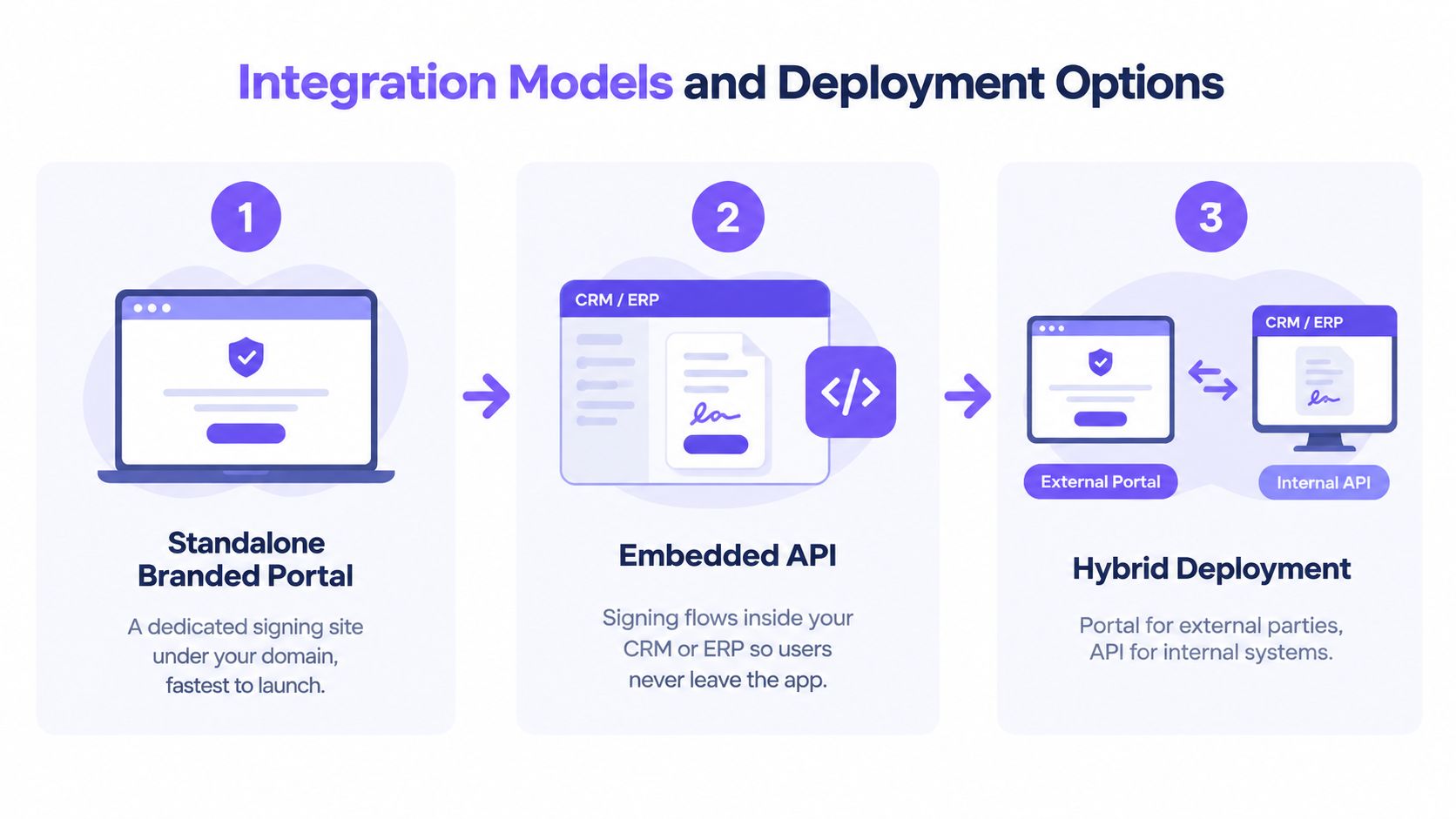
Where signing happens usually matters more than how the page looks. A standalone branded portal may suit occasional external signing, while an embedded API is more useful when employees already work inside a CRM, ERP, HRIS, or customer portal.
Choose the model that matches the workflow
Standalone branded portal is the fastest route to a recognizable experience. A company can place its logo, colors, emails, and domain around a dedicated signing site. This works well for a small professional-services firm sending agreements to clients or a university collecting admission documents from applicants.
Embedded API signing keeps users inside the application they already use. A recruiter can launch a candidate agreement from an applicant-tracking system. A sales representative can send and monitor a contract from Salesforce. The integration should return status changes through webhooks or comparable events so teams don't rely on manual checking.
Hybrid deployment combines both approaches. Internal staff may initiate and monitor documents through an API, while customers, vendors, or applicants receive a branded external signing experience. This model often fits logistics companies, where operations teams work in internal systems but suppliers and drivers use a separate link.
Test the operational details
Before approving an integration, ask the technical team to test the complete signing lifecycle. A successful demo isn't enough if the workflow breaks when a recipient declines, a second signer is added, or a callback arrives late.
Check these areas:
- Authentication: Confirm whether the platform supports the single sign-on approach your organization uses, including SAML or OAuth where applicable.
- Routing: Test sequential and parallel signing, delegated signing, reminders, and multiple recipients.
- Events: Verify that webhook notifications include the status information your application needs.
- Access: Review tenant separation, role-based permissions, and administrator visibility.
- Documents: Import a real template and test field mapping, version changes, and completion downloads.
- Volume behavior: Ask how bulk signing and API usage are governed under your selected plan.
BoloSign's API documentation is relevant for teams that want signing to operate as part of a broader application workflow. The important question isn't whether an API exists. It's whether the API supports the business events, permissions, and recovery paths your employees depend on every day.
Customization, Branding, and Data Control
A polished logo can't compensate for a confusing approval process. Enterprises should rank customization by its effect on trust, usability, and governance, not by how many colors the interface can display.
Start with the signer-facing layer. Emails should identify the organization clearly, signing pages should explain what the recipient needs to do, and completion certificates should use consistent legal and brand information. Localization may also matter for teams serving customers across the United States, Canada, Australia, New Zealand, the UAE, and other markets.
Prioritize the controls behind the interface
The less visible settings often have greater operational value:
- Provisioning: Decide how employees, teams, and external collaborators receive access.
- Approval hierarchy: Match signing authority to departments, contract types, and risk levels.
- Retention policy: Define how long completed documents and audit records remain available.
- Audit visibility: Give compliance and legal teams access to evidence without granting unnecessary editing rights.
- Template governance: Control who can publish, modify, or retire reusable documents.
- Brand consistency: Apply approved email, page, and certificate styles across departments.
A heavily modified interface can create risk if administrators remove important disclosures or make the completion record difficult to interpret. Customization should preserve signer consent, document integrity, and evidence clarity. The underlying security stack should remain strong even when the vendor's name isn't visible to the signer. Enterprise white-label implementations commonly pair TLS 1.2 or 1.3 in transit, AES-256 at rest, and controls associated with SOC 2 Type II or ISO 27001. (White-label platform security guidance)
BoloSign's branding capabilities illustrate the practical end of this framework. A business can shape the visible experience while still treating templates, permissions, records, and completion evidence as controlled business assets.
Pricing Models and Migration Considerations
A low subscription price can become expensive when every user, envelope, API call, storage tier, or compliance feature carries a separate charge. A flat plan can also be misleading if it excludes the integrations or support your workflow needs.
Compare pricing models by asking what triggers the bill.
| Model | What it looks like | Main planning risk |
|---|---|---|
| Seat-based | A charge follows each user or team member | Growth increases licensing overhead |
| Envelope-based | A charge follows each sending package | Multi-document workflows can consume units quickly |
| Usage-based | Billing follows transactions or API activity | Demand can vary from one period to another |
| Fixed unlimited | One subscription covers defined capabilities without per-user or per-envelope charges | Included features and fair-use terms still need review |
BoloSign's publisher describes a one-fixed-price model with unlimited documents, team members, and templates, and positions it as 90% more affordable than traditional tools. That affordability claim comes from the publisher and should be validated against your current contract, feature requirements, and total implementation cost. The value is clearest for organizations that expect broad adoption across departments and don't want every new user to trigger a separate approval.
Migration is a workflow project
Moving platforms involves more than exporting PDFs. The project may include:
- Template inventory: Identify active templates, archived versions, conditional fields, and department owners.
- Signer mapping: Document each recipient order, approval path, reminder rule, and delegation process.
- Evidence continuity: Decide how historical audit records will remain searchable and accessible.
- Integration review: Rebuild webhooks, CRM actions, storage connections, and notifications.
- User testing: Ask recruiters, sales teams, coordinators, and administrators to complete real scenarios.
- Cutover planning: Run old and new workflows carefully enough to avoid sending duplicate requests.
A platform may offer one-click import for DocuSign templates, but import convenience doesn't guarantee that every field, rule, or integration behaves identically. Test a representative set of documents before switching production traffic. Migration friction usually appears in edge cases, such as declined documents, changed signers, expired links, and partially completed forms.
Real-World Use Cases by Industry
A staffing agency can send a candidate agreement as soon as an offer is approved. The recruiter works from the hiring system, the candidate signs from a phone or laptop, and the agency stores the completed PDF with a traceable record. White labeling helps the process feel like part of the staffing firm's service rather than an unrelated software handoff.

Healthcare teams need a different balance. A clinic may use branded forms for consent, intake, or authorization while restricting access to staff who need the records. The platform must support secure document workflows and the organization's obligations around personal and health information. The patient experience should remain clear, while administrators preserve a detailed audit trail.
Real estate agents often send offers, disclosures, and lease documents to several parties. A branded, multi-recipient workflow can reduce confusion about which document is current and who still needs to act. The same principle applies to logistics, where vendor agreements, delivery confirmations, and field-service approvals may begin in an internal system and reach external parties through a mobile-friendly signing flow.
Education providers use digital forms for admissions, consent, enrollment, and certification. They may need a recognizable institutional experience for students and families, along with role-based access for admissions, faculty, and administration. Professional-services firms use similar patterns for engagement letters, statements of work, confidentiality agreements, and approval records.
A platform becomes more useful when it handles the full document journey. BoloSign supports creating, filling, and signing PDFs, reusable templates, form-based data capture, multi-recipient requests, customizable emails, and dashboard status updates. It also supports adding legally binding signature fields directly inside Google Forms, which can help teams collect information and signatures in one familiar interaction.
The following demonstration is useful for teams comparing form capture with conventional document sending:
Across these sectors, the common decision is not just whether to sign PDFs online. It's whether signature collection fits the system of record, preserves compliance evidence, and remains understandable to the person signing.
Evaluation Checklist for Buyers
A procurement team can use this checklist during product demonstrations and technical reviews. Ask for evidence rather than accepting a general statement that the platform is “enterprise ready.”
- Security controls: Request current details on encryption, access management, incident response, and relevant certifications such as SOC 2 or ISO 27001.
- Legal coverage: Confirm how the platform supports ESIGN and UETA in the United States, eIDAS in the European Union, and GDPR or HIPAA obligations where they apply.
- Audit transparency: Review a sample completed audit trail. Check for signer identity, timestamps, IP information, document changes, and completion status.
- API depth: Test embedded signing, callbacks, template handling, multi-recipient routing, and failure recovery.
- Identity assurance: Ask which verification methods are available and which workflows support stronger assurance.
- Administration: Examine roles, SSO, provisioning, retention settings, and regional access controls.
- Migration support: Import existing templates and test unusual field types, conditional logic, and historical records.
- Pricing predictability: Calculate the cost of users, documents, API activity, storage, support, and any required enterprise features.
- Vendor responsiveness: Open a technical question before purchase. The quality and speed of the answer reveal how support may work during implementation.
Procurement test: Don't approve a platform until a real template has completed a full send, sign, decline, reminder, and audit-export cycle in a sandbox or controlled environment.
Also test the experience on the tools your teams already use. If sales lives in Salesforce, HR works from its onboarding system, and operations relies on Google Workspace, a branded portal alone may not be enough. The right solution should remove unnecessary switching without hiding the records administrators need.
Why BoloSign Simplifies White Label Enterprise Signing
Enterprise signing doesn't have to become a maze of per-user licenses, disconnected form tools, and separate PDF utilities. BoloSign combines reusable PDF templates, forms, multi-recipient signature requests, contract management, and dashboard tracking so teams can create, send, and sign documents from a shared workflow.
The platform supports integrations with Zapier, Make, Pabbly, HubSpot, Salesforce, Pipedrive, Google Drive, Google Sheets, Slack, and Microsoft Teams. That gives sales, HR, operations, and service teams options for triggering signature requests and updating downstream systems. AI-powered contract intelligence can also help teams review documents and make decisions more efficiently, while the platform maintains detailed audit records.
Compliance requirements vary by workflow and jurisdiction, but BoloSign identifies support for ESIGN, UETA, eIDAS, GDPR, HIPAA, ISO 27001, and SOC 2. Its enterprise offering also supports white-label branding across signing pages, email notifications, and completion certificates. For a business comparing contract automation tools, the combination of embedded workflows, branded experiences, unlimited documents and team members at one fixed price, and template migration can make budgeting easier than a model built around expanding seats or envelopes.
The practical test is simple. Import representative templates, send them to internal and external recipients, connect the systems your teams use, and inspect the resulting audit trail before rolling the workflow out broadly. Start a 7-day free trial to test how the platform handles your actual forms, PDFs, approvals, and signing journeys.
Closer Innovation Labs Corp. offers BoloSign, a practical eSignature and contract-management platform for teams that need branded, secure, and embedded document workflows without complicated per-user or per-envelope charges. Visit Closer Innovation Labs Corp. to start a 7-day free trial and test your own PDFs, templates, Google Forms, and business integrations.

Paresh Deshmukh
Co-Founder, BoloForms
28 Sep, 2026
Take a Look at Our Featured Articles
These articles will guide you on how to simplify office work, boost your efficiency, and concentrate on expanding your business.



