
What Is UETA? a Plain-English Guide for Businesses
Find out what is UETA and how this state law makes eSignatures and electronic records legally valid, plus how it compares to ESIGN and eIDAS.


Tired of nonsense pricing of DocuSign?
Start taking digital signatures with BoloSign and save money.
UETA is the Uniform Electronic Transactions Act, a model US state law under which an electronic record, signature or contract cannot be denied legal effect solely because it is electronic. By October 1, 2004, 46 states, the District of Columbia and the U.S. Virgin Islands had adopted it.
Ask a room of operations managers whether their eSignatures are legal and nearly every hand goes up. Ask them to prove, eight months later, that one specific candidate signed version three of an offer letter on a Tuesday afternoon, and the room goes quiet. That silence is where most explanations of what is UETA stops, and where actual disputes begin.
Validity and defensibility are different outcomes, and only one of them gets tested when a contract turns sour. A signature image on a PDF shows that pixels were placed. A consent record, an audit trail and an unaltered file show who acted, when, and on which version. Businesses that treat those as the same thing tend to learn the difference at the worst possible moment.
What UETA Is and Why States Adopted It
Before 1999, a business that wanted a client to accept terms on a screen ran into a paperwork problem dressed up as a technology question. Statutes written for paper demanded a writing and a signature, and nobody could say for certain whether a click satisfied either one.
The Uniform Electronic Transactions Act settled the argument. It's a model state law built to establish consistent legal rules for electronic records, electronic signatures and electronic contracts, and its core rule is deliberately simple: a record, signature or contract cannot be denied legal effect solely because it is electronic. The National Conference of Commissioners on Uniform State Laws began developing it in 1997 and approved the model in July 1999. Adoption moved quickly. By December 2000, 23 states had enacted UETA and legislation had been introduced in 6 more, and by October 1, 2004, adoption had expanded to 46 states, the District of Columbia and the U.S. Virgin Islands, as this review of UETA's drafting and adoption history records.
Why a model law instead of fifty rewrites
Think of UETA as a universal travel adapter. You don't rewire the building; you plug the new device into a fitting that matches the socket already in the wall. Contract law in the United States belongs to the states, so rather than a federal rewrite of every contract statute, the commissioners published one text each legislature could enact on its own terms.
That flexibility has a cost. Several states enacted modified versions of the model rather than copying it word for word, which means a literal reading of the statute in one state can differ from the statute next door. Same family of rules, different plumbing.
The consent rule most people miss
UETA reflects a foundational principle that predates the technology: the parties generally must agree to conduct the transaction electronically. A supplier that emails a signature link to a customer who never agreed to electronic dealings doesn't trigger the statute just by wanting it to apply.
Say it this way to a colleague: "Under UETA our contracts can't be rejected just because they're electronic, provided both sides agreed to sign electronically and we can show who signed what."
That second clause carries more weight than the first. The statute recognizes electronic form; it does not bless every click. Electronic records are validated without every document or signature becoming automatically enforceable, and a business that confuses the two ends up holding a file it can't defend.
How UETA, ESIGN and eIDAS Fit Together
| Framework | Where it applies | Scope | Key requirement |
|---|---|---|---|
| UETA | US states that adopt the model, sometimes with changes | Electronic records, signatures, and contracts under state law | Parties agree to transact electronically and the signer intends to sign |
| ESIGN Act | United States federal law for interstate and foreign commerce | Nationwide recognition of electronic records and signatures | Consumer consent and disclosures where required; a qualifying state UETA enactment can govern instead |
| eIDAS Regulation (EU) No 910/2014 | European Union | Electronic signatures and trust services | Simple, advanced, or qualified signature tiers with different evidentiary weight |
Each framework handles a different part of electronic contracting. UETA is state law, ESIGN is federal law, and eIDAS sets rules for the European Union.
UETA is a model statute, so states may adopt it with changes. Its effect also depends on the transaction, including whether the parties intended to sign and whether the electronic record can be retained and accurately reproduced, as Potter Anderson's analysis of electronic contracting explains. The framework recognizes electronic records and signatures; it does not prescribe a particular signing technology.
The reverse preemption trick that keeps state law in charge
Congress enacted the federal Electronic Signatures in Global and National Commerce Act, usually called ESIGN or E-SIGN, to recognize electronic records and signatures in interstate and foreign commerce. ESIGN does not displace state law. It allows a state's electronic-transactions law to govern instead when the state adopts UETA or another technology-neutral framework that meets federal requirements.
That arrangement lets state rules operate within a federal framework. For a business, the practical question is which law governs the transaction, not whether one framework always replaces the other.
eIDAS takes a different approach by distinguishing simple, advanced and qualified electronic signatures, which carry different evidentiary weight. Those categories are not interchangeable with a routine click-to-sign under US law. Legal recognition also does not, by itself, prove who signed or which document version they approved. A defensible record should connect the signer, their intent, the signed version and the transaction's evidence trail.
If your document crosses a border
For a cross-border transaction, start by identifying the law that governs it. Use UETA when a US state's law governs; otherwise, consider the applicable local electronic-transactions rules and any consent or record-retention duties for the document.
Relevant laws include the US ESIGN Act, US UETA, the EU eIDAS regulation, Australia's Electronic Transactions Act 1999, the UK Electronic Communications Act 2000 s.7 and Canada's PIPEDA. BoloSign meets the requirements of the US federal ESIGN Act and state UETA laws for legally enforceable electronic signatures, as well as ESIGN Act, UETA, GDPR and eIDAS requirements. A guide to eSignature legality in the USA can help identify which US framework may apply.
Which Documents UETA Covers and Which It Leaves Out
UETA can cover everyday business records, from employment agreements to vendor contracts, when the parties agree to transact electronically. That agreement is the doorway: a signature field alone does not establish consent. State enactments may also exclude specific records or set additional requirements, so a business must check the governing state's rules and preserve evidence that the parties agreed to use electronic records, as DLA Piper's guide to electronic transactions explains.
Wills, codicils and testamentary trusts are generally excluded from UETA, though some states have separate laws for electronic wills. State-specific exceptions may also affect family-law documents, court materials, eviction or foreclosure notices, insurance notices and other regulated records.
| Document | Sector | UETA position | What to check |
|---|---|---|---|
| Candidate employment agreement | Staffing and recruitment | Generally covered when the candidate consents to e-signing | Record consent before presenting the agreement |
| Patient consent or authorization | Healthcare | Generally covered; health-privacy and state rules may also apply | Check state form requirements and retention rules |
| Residential lease and disclosures | Real estate | Generally covered, but some notices may be treated differently by state | Check whether state law excludes a specific notice |
| Delivery confirmation and vendor agreement | Logistics | Generally covered | Keep a retrievable copy with its audit trail |
| Enrollment and consent form | Education | Generally covered | Check parental or guardian consent rules for minors |
| Engagement letter | Professional services | Generally covered when consent is recorded | Document the client's agreement to transact electronically |
Use the table as a screening tool, not a final legal classification. A staffing agency may be able to send candidate agreements electronically if it records consent first. A clinic collecting patient authorizations must also check applicable form and retention rules. For a residential lease packet, review each notice separately: an exception affecting one page may matter even when the lease itself can be signed electronically.
The requirements UETA leaves standing
Technology neutrality does not cancel rules about notarization, witnesses, consumer disclosures, accessibility, government-prescribed formats or record retention. The details can depend on the document and the state, as Alston's review of electronic signature use notes.
A government agency may accept electronic signatures in principle yet require a particular format or process for records it handles. That distinction matters to organizations serving public bodies, schools or healthcare clients: legal validity is one question; whether the recipient will accept the record in the required form is another.
Before automating a document type, identify its sector and governing state, then check for exclusions and process requirements. A workflow that suits a delivery confirmation may not suit an eviction notice.
What Makes an Electronic Signature Hold Up
What would you need to show if someone disputed an electronic signature? UETA defines an electronic signature as an electronic sound, symbol or process attached to or logically associated with a record and adopted by a person with intent to sign, as California's codified text of the statute sets out. A typed name, a checkbox, a drawn mark or a click-to-sign button can qualify. The form matters less than the signer's intent and the signature's connection to the record.
That definition establishes legal validity, but a business may still need evidence to defend the signature later. Four practical tests help show what happened.
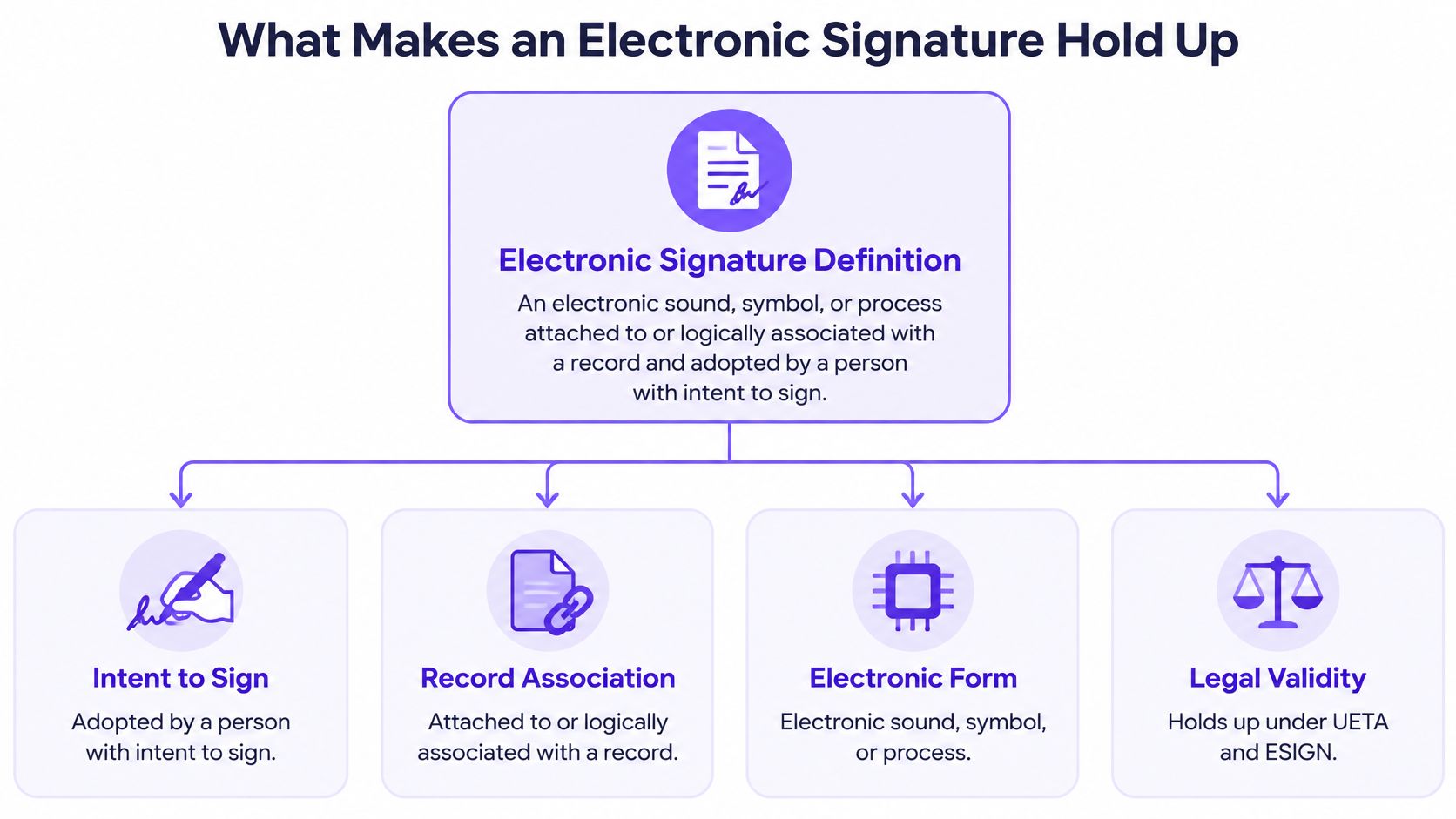
Four tests a signature has to pass
Intent. Opening a file does not show intent to sign. The record should capture a deliberate action, such as drawing a mark, typing a name and selecting a Sign button, or checking a box clearly labeled as agreement to sign. A generic “Next” button may not establish that intent.
Attribution. The evidence should connect the signing action to a particular person. Email verification or a unique access link tied to one recipient can help. The level of identity checking can reflect the transaction's risk: a $40 purchase order and a six-figure services agreement may call for different controls.
Integrity. Keep the signature connected to the final version of the document. If someone changes the file afterward, the change should be detectable. A signature detached from its agreement is like an autograph without the page it belongs to.
Retention. Keep electronic records accessible and accurately reproducible for the period required by law. Store the signed file, audit history and delivery record so they can be retrieved together. An electronic-signature audit trail can help preserve that evidence in one record.
UETA generally does not prescribe a particular certificate, cryptographic method, vendor or authentication technology. That flexibility leaves businesses responsible for choosing controls suited to the transaction and keeping evidence that shows who signed, what they signed and how the record was preserved.
Courts may refuse to enforce an electronic signature if the party relying on it cannot authenticate who signed. The issue is not whether electronic signatures are permitted. It is whether the available evidence links a person's deliberate action to the specific document in dispute.
Adoption makes that distinction more important. In 2025, 78% of law firms surveyed in the United States had adopted electronic-signature tools as part of their remote-working technology stack, according to Text Control's survey summary. As electronic signing becomes routine, disputes can turn on proof of identity, intent and document version.
For a quick visual pass over the same ground:
Consider three common evidence gaps. A candidate disputes an offer, but the file does not show which version was delivered. A customer challenges a delivery confirmation, while the audit history sits in a separate system from the signed PDF. A vendor disputes which draft governs, and the stored version has no record showing whether it changed after signing. In each case, a signature may exist, but the evidence needed to establish what happened is incomplete.
Compliance Steps Before You Send Your First eSignature
Six steps, in order, will get a team from "we think we're compliant" to "we can prove it on a Tuesday afternoon."
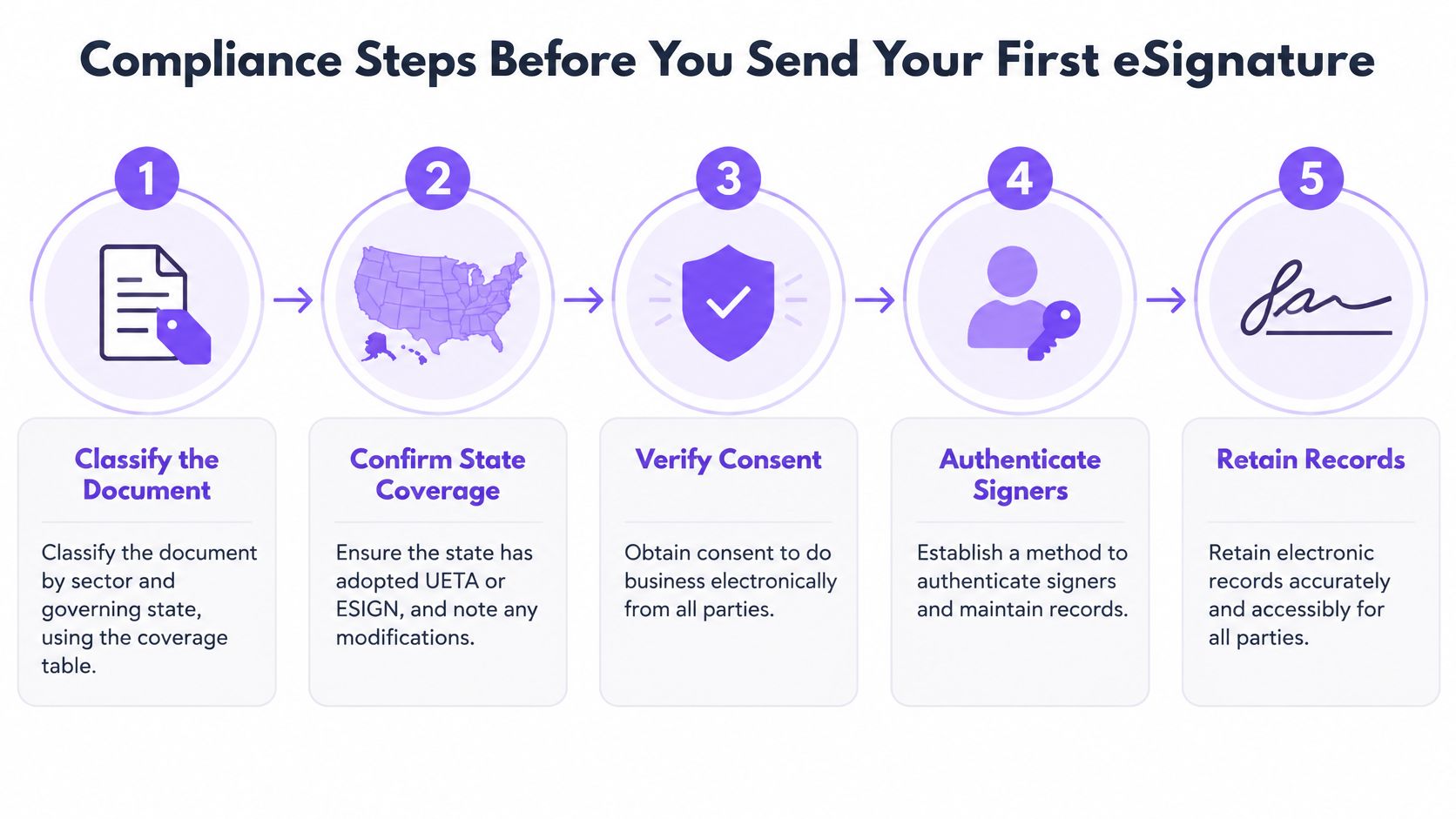
Classify the document first. Sort every form you send by sector and governing state, using the coverage table as a starting grid. Wills, certain statutory notices and modified state enactments sit outside ordinary treatment, and you want to find that out before the workflow goes live rather than after a counterparty objects.
Disclose, then obtain affirmative consent. Present the agreement electronically, explain how records will be accessed and retained, and capture a positive electronic action agreeing to transact that way. Consent obtained after the document appears is consent obtained in the wrong order.
Bind the signature to the exact final file. Show the signer the version they're executing, then lock the signature to that file so any later change is detectable. Version drift is the quiet killer in high-volume onboarding.
Require an explicit signing action and tie it to a person. A typed name plus a Sign button, delivered to a verified address or a single-use link, gives you both intent and attribution without an expensive identity check on every low-risk form.
Store the whole bundle together. Signed PDF, audit trail, timestamps, consent record and delivery history should live in one place and stay retrievable for the retention period. Retention isn't a filing chore, it's the element that turns a signature into evidence. That matters most in health settings, where HHS guidance confirms covered entities may accept electronically executed requests containing an electronic signature, including requests submitted through a secure web portal, while record-access duties still apply.
Apply the sector overlay you already identified. Healthcare authorizations, school forms involving minors and state-specific real-estate notices need an extra legal check, not a different picture at the bottom of the page. Teams without a legal operations person often hand this mapping to virtual legal assistant services that maintain state-by-state coverage charts, which is cheaper than rebuilding a signing flow twice.
When you're ready to configure the sending side, this walkthrough on how to e-sign documents covers templates, recipients and signature fields in sequence.
One readiness check covers all six steps. If a customer, auditor or court challenged the document this afternoon, could you produce the signed version, the identity of the signer and the time of signing within minutes? If any of those takes an email chain to assemble, the workflow isn't finished.
Test Your eSignature Workflow Against UETA Today
Could your team retrieve the signed document and its supporting record if someone questioned it months later? Choose one active workflow and check that the signer agreed to transact electronically, the record shows intent and who signed, and the signed version and related evidence remain accessible.
A signature's legal validity and its defensibility are related, but they are not the same. The signature needs to meet applicable legal requirements; the record must also help show who signed which version and when. Keep the completed document and its audit trail together so you can retrieve them as a single record.
BoloSign, built by Closer Innovation Labs Corp., supports signing workflows with reusable PDF templates and forms, multi-recipient requests, customizable emails, dashboard updates, and a detailed audit trail. It meets the requirements of the US federal ESIGN Act and state UETA laws for legally enforceable electronic signatures, and meets ESIGN Act, UETA, GDPR, and eIDAS requirements. Its fixed-price offering includes unlimited signatures, templates, forms, and team members.
Put a real document through your workflow and check the result: can you identify the signer, locate the signed version, and retrieve the audit trail? BoloSign offers a 7-day free trial. Visit Closer Innovation Labs Corp. to start.

Paresh Deshmukh
Co-Founder, BoloForms
19 Nov, 2026
Take a Look at Our Featured Articles
These articles will guide you on how to simplify office work, boost your efficiency, and concentrate on expanding your business.