

What Is Contract Redlining? a Practical Guide for 2026
What Is Contract Redlining? Learn how tracked changes, comments and clean versions work, and how to run an auditable markup process from draft to signature.

Tired of nonsense pricing of DocuSign?
Start taking digital signatures with BoloSign and save money.
Contract redlining is the process of proposing, reviewing and negotiating marked changes to a draft agreement until both parties agree on the final wording. You've probably lived it already. A vendor sends a contract that looks fine until you reach the clause that caps their responsibility at almost nothing, renews automatically, or makes you pay before work even starts.
You don't want to reject the whole deal. You want to change three or four lines, explain why, and see whether they'll agree. That's redlining. It's not proofreading, and it's not just colorful markup. It's a controlled decision record that shows who proposed each change, why they proposed it, and which wording your signature finally attached to.
What Contract Redlining Means in Plain Terms
Say you hand a manuscript to an editor. She returns it covered in red pen marks. Some words are crossed out, some are added, and notes in the margin explain why. You can keep a suggestion, reject it, or write something better. What is contract redlining if not that same exchange, applied to legal promises instead of sentences?
The name comes from paper. Early reviewers marked drafts in red ink so changes stood out from the original typing. Today you'll usually see the same work in Word Track Changes or inside a contract platform, but the job hasn't changed.
The Four Marks You'll Meet
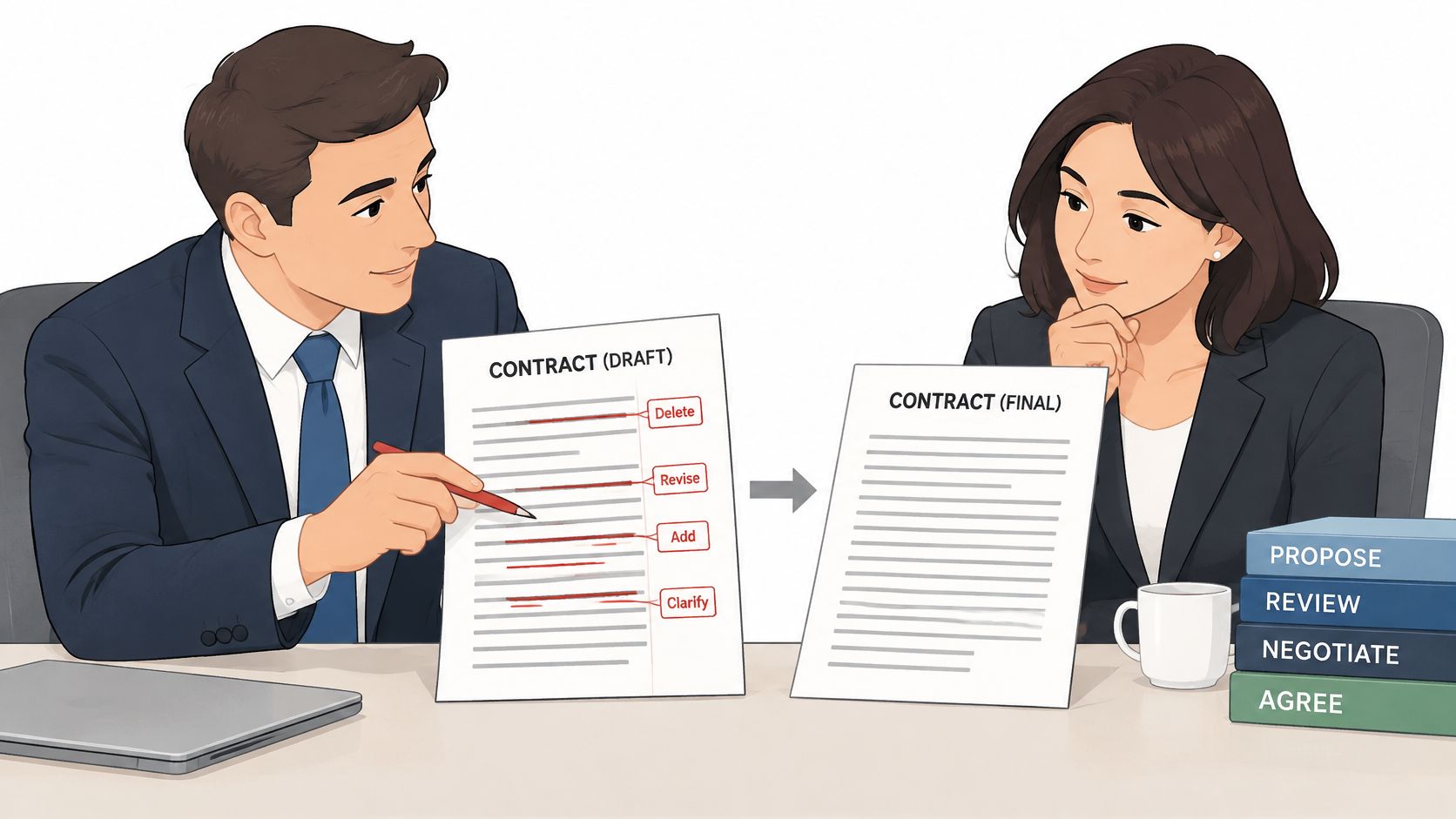
Insertion: new text, usually underlined. Deletion: removed text, usually struck through. Replacement: one phrase swapped for another. Comment: the reason behind a change, such as "liability cap raised to 12 months of fees to match our insurance."
That last one matters more than beginners expect. A deletion tells the other side what you don't want. A comment tells them why, which gives them something they can solve. "We can't accept this" starts an argument. "Our insurer won't cover us below this level" starts a negotiation.
LegalClarity's guide to redlining in contracts describes redlining as the documented process of proposing, reviewing, and negotiating changes, where the receiving party can accept, reject, or counter each change through successive versions. That word "documented" is the whole point.
Sending a fresh, clean draft by email does the opposite. The other side has to compare documents line by line to find what moved, and nobody can prove later who suggested what. A redline keeps the baseline text and the proposed text visible side by side, so every disagreement stays attached to the exact words in dispute.
One caution before you start marking. Changing terms isn't a neutral act legally, and the effect depends on the transaction and jurisdiction. That's another reason the record matters, because you need to know precisely which version both sides finally approved.
Leave this idea fixed in your mind. Redlining is the negotiation record that shows which wording governed the signed agreement, not a cosmetic editing layer you strip away and forget.
Why Teams Redline and Where It Matters Most
| Industry | Typical contract | Clauses redlined most | Why it matters |
|---|---|---|---|
| Staffing and HR agencies | Placement and temp-worker agreements | Rate cards, worker classification, guarantee periods | Pricing and legal status of placed workers |
| Healthcare providers and clinics | Vendor and patient-service agreements | Business associate terms, breach notification, uptime | Protected health information must stay compliant |
| Logistics and transportation | Carrier and freight contracts | Liability per shipment, delay penalties, insurance limits | Losses on a single shipment can exceed margins |
| Real estate agencies | Leases and purchase agreements | Deposits, repair obligations, contingency dates | Missed dates can cancel the deal |
| Education and training | Training and partner agreements | Refund windows, course-material ownership, accreditation claims | Refund and IP disputes are common |
| Professional services | Statements of work and retainers | Scope-change fees, IP ownership, payment terms, liability cap | Unclear scope drives unpaid work |
| Procurement and vendor management | Master service agreements | SLAs, indemnity, data protection | Vendor failure affects the whole operation |
Read the table by asking one question per row. What could this business lose if it signed the draft unchanged?
A staffing agency fights over rate cards and guarantee periods because a bad placement clause decides who eats the cost when a worker leaves early. A healthcare clinic fights over business associate terms because patient data carries regulatory consequences a normal vendor contract doesn't. A logistics company cares about liability per shipment because one lost load can wipe out the profit on dozens of good ones.
The pattern repeats everywhere. Real estate teams guard dates, education providers guard refunds and course ownership, and professional services firms guard scope, because vague scope is how unpaid work enters a project.
The Scale of the Habit
This isn't a niche lawyer ritual. A poll reported by Contract Nerds on commercial redlining practices found that 91% of negotiators used Word's Track Changes, but only 21% had received formal training in the feature. The same poll found 92% of contract professionals preferred exchanging redlines through Word rather than PDF markups, and 93% preferred explanatory comments in the margins.
That gap between use and training explains a lot of messy negotiations. Teams depend on a tool daily, yet nobody has agreed on naming, commenting, or approval rules.
Redline volume also tells you something. A draft that comes back with forty changes usually signals real clause disagreement, more internal reviewers, and a longer path to signature. Tracking rounds, changes by clause, and deviations from your standard language shows you which templates and counterparties create friction again and again.
Use this trigger. If a draft contains more than one negotiable term that affects money, risk, timing, or data, it earns a proper redline.
Clauses Redliners Check First and What to Ask For
| Clause | What to check | Typical fallback |
|---|---|---|
| Limitation of liability | Cap amount and what is excluded | 12 months of fees, with carve-outs for confidentiality and data breaches |
| Indemnification | Scope of claims covered and who controls defence | Mutual indemnity limited to third-party claims |
| Termination for convenience | Notice period and whether fees are refunded | 60 to 90 days notice with pro-rata refund |
| Payment terms | Due date, late fees and invoice disputes | Net 30 with a fixed dispute window |
| Confidentiality | Duration and definition of confidential information | Survives 3 years after termination |
| Data protection | Breach notice timing, data location and processor duties | Prompt breach notice, named subprocessors, and deletion on exit |
| Governing law | Jurisdiction and dispute forum | Neutral jurisdiction or mediation first |
| Service levels | Uptime targets and service credits | Service credits capped at a fixed share of monthly fees |
| Auto-renewal | Renewal term and cancellation window | Renewal requires written notice 30 days before the end date |
A fallback is a pre-approved alternative you can offer when the other side refuses your first position. Deciding fallbacks before you send the redline saves you from improvising concessions on a call. Our guide to limitations of liability walks through the clause that usually carries the largest exposure in this list.
Sort Clauses Into Three Tiers
- Must-fix clauses: limitation of liability, indemnification, and data protection, because these decide who pays when something goes badly wrong.
- Trade-off clauses: payment terms, notice periods, and service credits, which you can exchange to win a must-fix item.
- Low-stakes clauses: notice addresses, formatting, and minor definitions, which you can accept quickly to build goodwill.
Payment timing belongs in the trade-off tier for many organizations, but it still affects operations directly, so it's worth understanding how net 30 affects cash flow before you trade a longer payment window for another concession. A clause you give away cheaply in negotiation can still cost your finance team every month.
Here's fallback logic in action. You ask for a liability cap of 12 months of fees. The vendor refuses. Instead of arguing in circles, you offer 6 months, but with carve-outs so the cap doesn't apply to confidentiality or data breaches. You've moved on the number while protecting the scenario you fear.
Before you touch any clause, check the defined terms it relies on and any section it cross-references. A small edit to one definition can quietly change obligations across the whole agreement.
That two-minute habit prevents a common beginner error. You negotiate a perfect clause, then discover a definition elsewhere narrows it back to nothing.
How the Redlining Workflow Runs From Draft to Clean Copy
The flow below condenses the process into its main stages, from first draft to a clean copy you can sign.
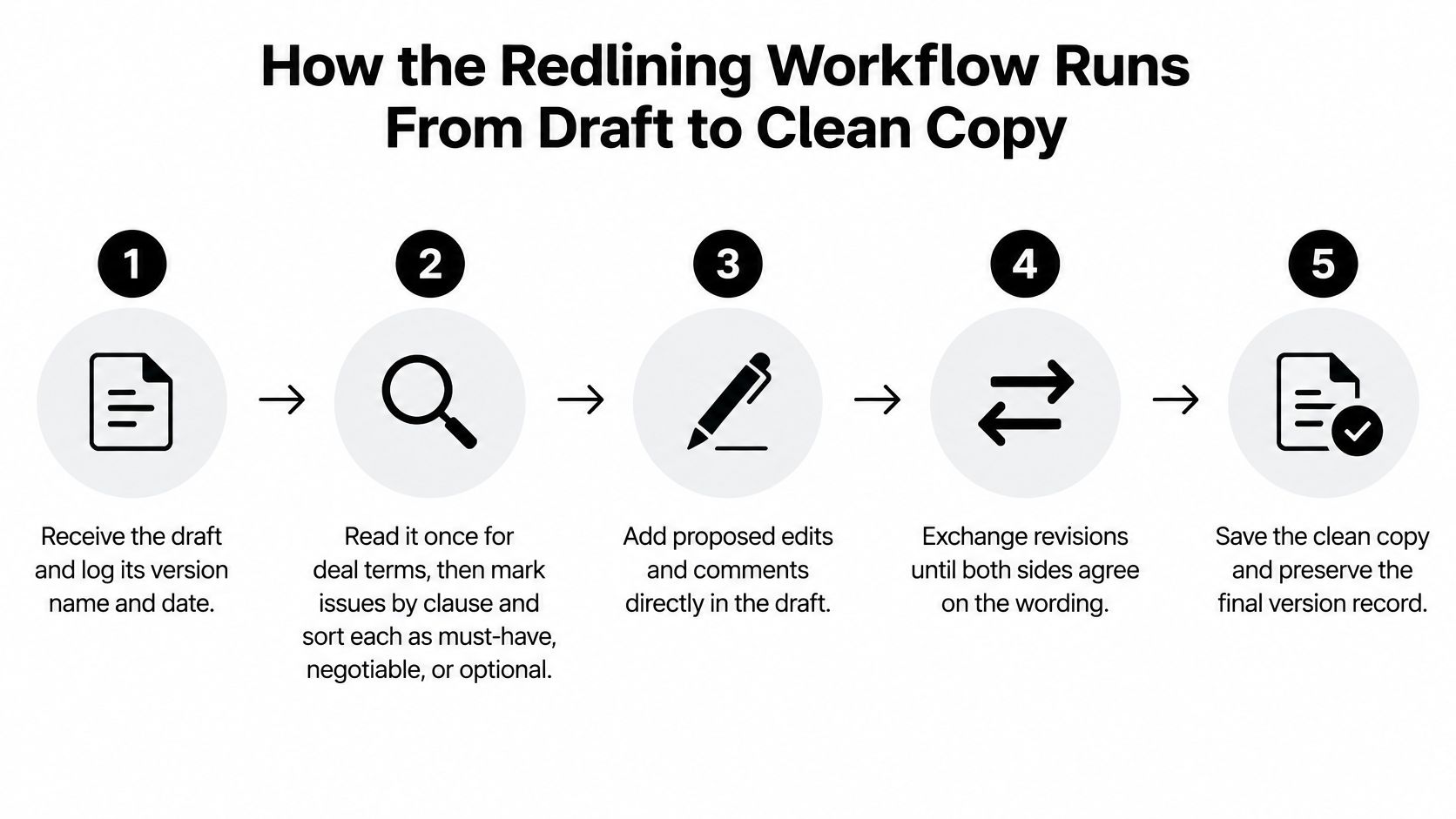
SpotDraft's glossary entry on redlining frames it as a controlled process that preserves a comparison between baseline and proposed text, so each party's position stays reviewable. These steps put that control into practice.
The Eight Steps
- Receive and log the draft. Record its version name, date, and sender before anyone edits. If you can't identify the starting point later, you can't prove what changed.
- Read once for the deal, then mark issues. First check that price, scope, dates, and parties match what was agreed commercially. Then sort each issue as must-have, negotiable, or nice-to-have so your markup carries priorities, not just opinions.
- Edit with tracked changes and explain material changes. An edit changes the operative legal language. A comment records the reason, asks a question, or flags an unresolved point. Keep those jobs separate.
- Send the redline with a short cover note. List your three most important changes in plain language. The other side's business owner will read your note before they read forty tracked changes.
- Log every round of response. The counterparty accepts, rejects, or counters each change. Record the round number and date each time, because version confusion starts here.
- Produce a clean copy. Accept the agreed changes, remove rejected text, and resolve or delete every comment. No markup should survive into the signing version.
- Compare the clean copy against the last agreed redline. This catches accidental deletions, changed definitions, and conflicting edits introduced during cleanup.
- Approve deviations, then send for signature. Get internal approval for any material departure from your standard position, then route the verified final version to signers.
A Worked Example Inside Step 3
Say a vendor draft caps liability at "fees paid in the prior month." You strike that phrase, insert "12 months of fees," and add the comment, "Matches our insurance coverage; one month is too low for a data incident." The vendor now sees the exact replacement, the size of the gap, and the business reason in one glance.
This short video walks through the mechanics of moving a document from markup toward signing.
A Second Example From Staffing
Say an agency draft says placement fees are "due on signing." You replace that with "due within 30 days of the first invoice" and comment, "Matches our client billing cycle; upfront fees strain small clients." The agency counters with "due within 14 days of the first invoice."
That counter is a new round, not a side conversation. You log it, decide whether 14 days works for your billing cycle, then accept it or counter again in the document. Email agreement that never reaches the draft is how signed contracts end up saying something nobody intended.
Volume makes discipline harder. Desk research on contract management workflow automation covers the routing side of this problem for teams handling many agreements at once. Whatever system you use, version naming, author identification, and clause-level approval aren't bureaucracy. They're how you prove which document holds the negotiated terms when five attachments share almost the same filename.
The signed document should match your verified clean copy line for line. If it doesn't, you haven't finished redlining. You've started a dispute early.
Redlining Mistakes to Avoid and Negotiation Tips
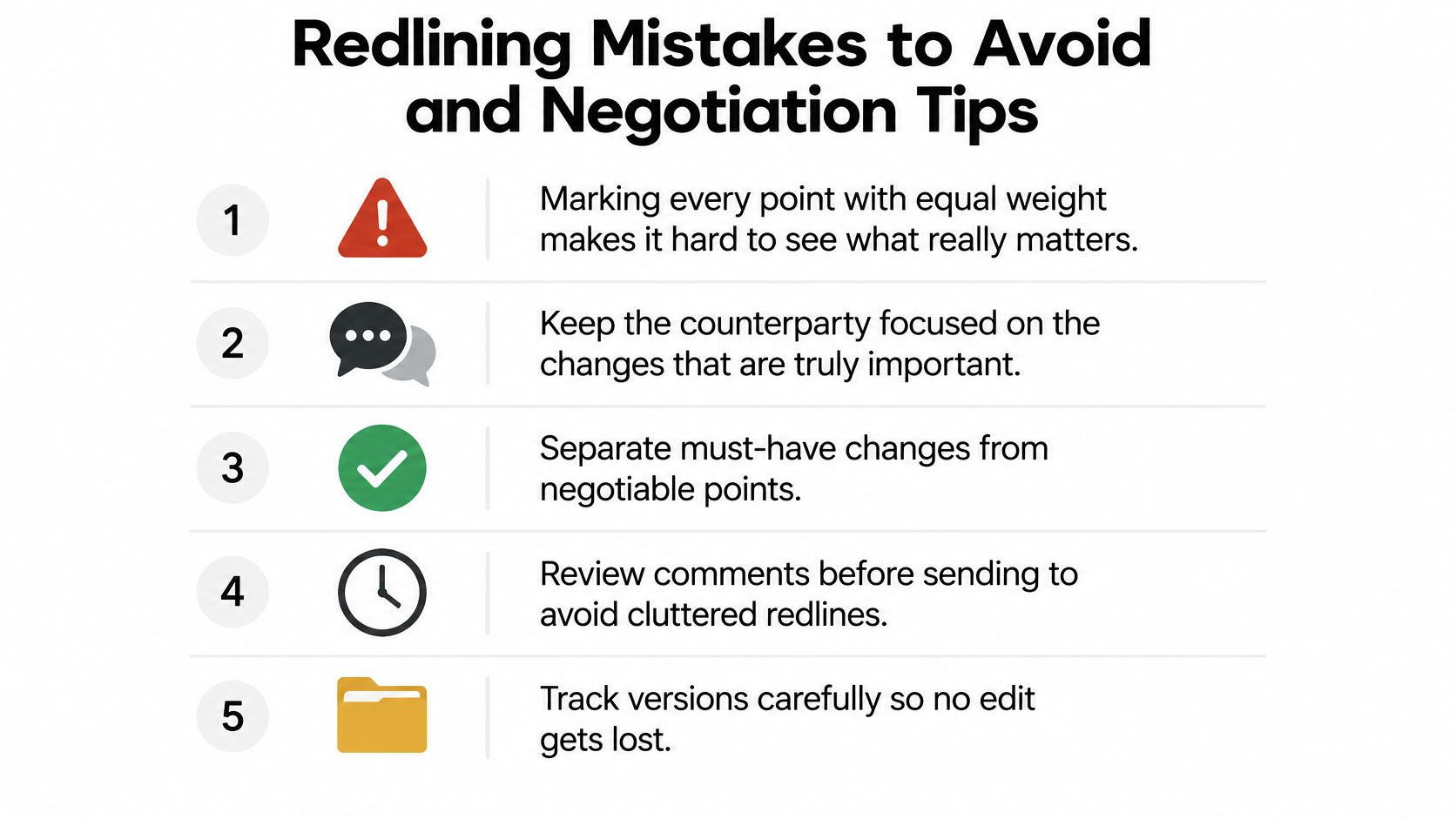
The costliest mistake isn't bad wording. It's marking every point with equal weight. When forty changes all look equally urgent, the other side can't tell what you need. They may concede your minor points, hold firm on your critical ones, and reasonably claim they met you halfway.
Four Errors That Quietly Cause Damage
- Sending a silent rewrite: you forget to switch tracked changes on, so the counterparty receives altered text with no visible history and trust drops immediately.
- Leaving internal comments in: a note meant for your own team, such as your walk-away price, goes out in the margin for the other side to read.
- Accepting without reading definitions: the clause looks fine, but a defined term elsewhere limits who or what it covers.
- Approving without recording the reason: six months later, nobody can explain why your company accepted a nonstandard clause, so the exception gets repeated or challenged.
What AI Can and Cannot Do Here
Many readers ask whether AI contract review can redline for them. It can flag risky clauses and propose wording quickly. Deciding what to concede is a different job, one that involves influence, trust, and how much this deal matters.
Lexpert's report on the DocJuris survey describes a 2025 survey of 360 legal professionals conducted with the Association of Corporate Counsel, where 36% said AI struggled with persuasion and relationship management, 28% cited weak understanding of business and negotiation context, and 22% said AI struggled to identify hidden risks. The same survey found 63% believed AI missed, overlooked, or mislabeled contract problems, with 34% reporting that this happened frequently.
Treat AI as a fast first reader, not the negotiator. Verify its suggestions against your playbook, check defined terms and cross-references, escalate nonstandard liability or data clauses, and get documented human sign-off before anything leaves your building.
Close every negotiation with four habits. Concede low-stakes points early to trade for must-fix items. Write one comment per issue so responses stay clean. Propose replacement language instead of only objecting. Keep approved fallbacks ready before the call, so you never invent a concession under pressure.
Legal, Compliance and Version Control Essentials
A redlined draft is more than edited text. Each round creates a decision record: who proposed the change, why they wanted it, and which wording the signature finally attached to. Lose that record, and a routine edit becomes a dispute about what was agreed.
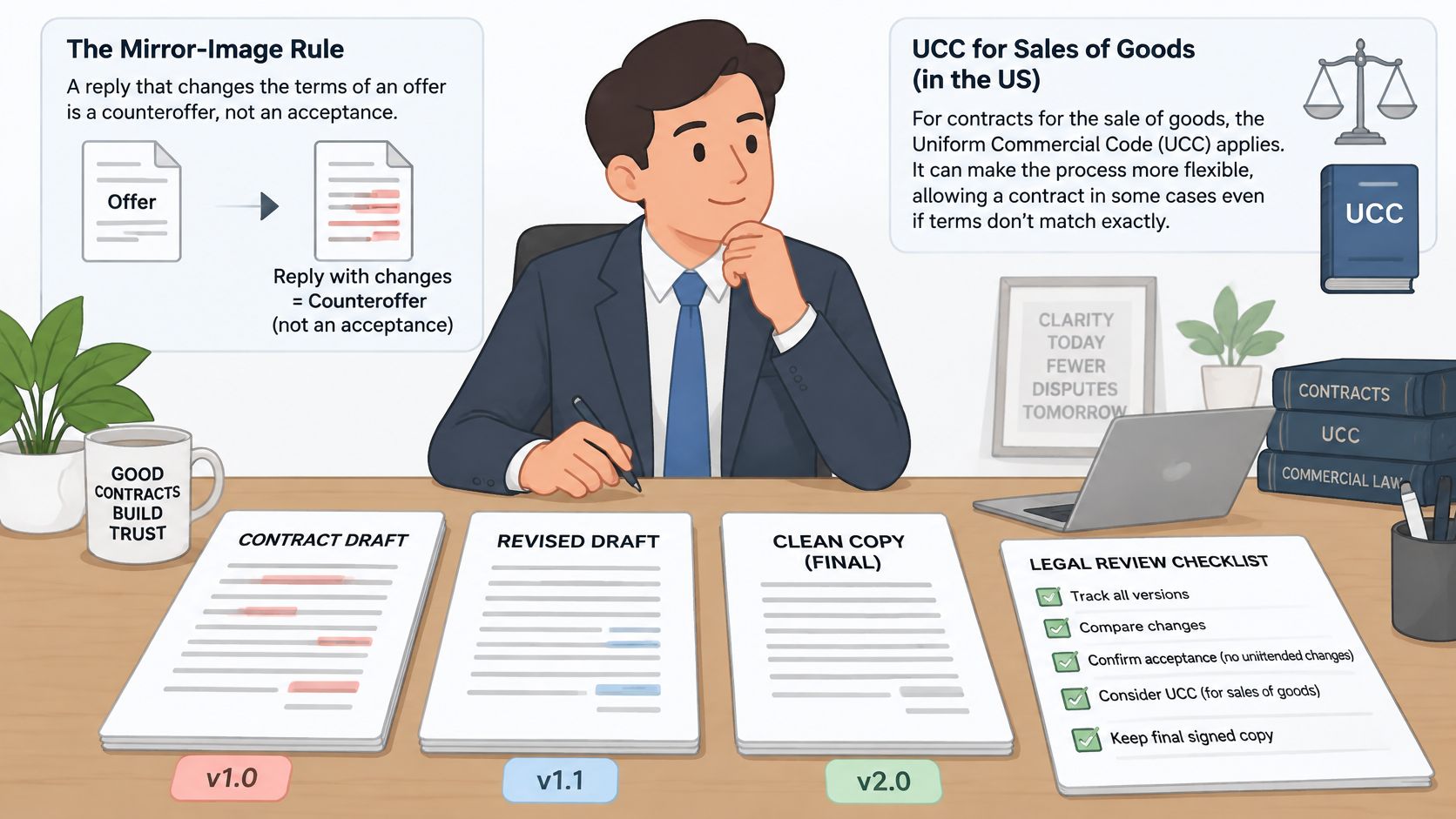
The legal stakes are real. A reply that changes the terms can operate as a counteroffer rather than an acceptance, so the question of which version was signed carries real consequences. A good version history works like a flight recorder: it preserves the sequence of decisions, not just the final state.
Controls That Prove What Was Agreed
- Name files with version and date: "MSA Vendor Redline Round 2" beats "Contract Final v3" every time.
- Record the author of each change: you need to know whose position a comment represents.
- Note the reason behind the edit: a struck liability cap means little later without the rationale attached.
- Store every round: don't overwrite yesterday's version to save space.
- Approve material deviations in writing: a verbal okay on a call won't help during an audit.
- Keep the record out of email attachments: inboxes bury versions and strip context.
Our explainer on what is document version control covers naming and history practices in more depth. The same record-keeping discipline shows up in other document-heavy fields, and it can help to compare construction documentation needs when you're designing an approval trail that has to survive scrutiny.
Matching the Signature to the Risk
The European Commission's eSignature FAQ explains that under Article 25 of the eIDAS Regulation, an electronic signature can't be denied legal effect solely because it's electronic, while only a qualified electronic signature is expressly given the same legal effect as a handwritten signature in every EU Member State. A typed name and a qualified signature aren't interchangeable.
Map the regime to the work. The US ESIGN Act covers most commercial agreements, HIPAA governs healthcare contracts touching protected health information, GDPR applies to personal data of EU residents, and eIDAS shapes cross-border European signing. Canada, Australia, New Zealand, and the UAE each run their own electronic transactions rules, so check local statutes before relying on an eSignature for a regional deal.
Pre-signing check: the final version is locked, the signature level fits the risk, and the audit trail is retained.
Frequently Asked Questions About Contract Redlining
What's the difference between redlining and a markup? A markup is one round of proposed edits. Redlining is the full cycle of proposing, responding, countering, and resolving those edits until both sides agree on final wording.
Is redlining the same as contract review? No. Review checks a draft for risk and missing terms. Redlining comes after, when you propose specific changes, track the other side's responses, and close each point. Skipping review means you may redline confidently around a problem you never spotted.
Can AI redline a contract for me? It can flag risky clauses, compare language against your playbook, and suggest alternative wording. People still need to judge business impact, choose concessions, and approve material deviations, because a plausible edit can still be the wrong deal decision.
Does changing terms create a counteroffer? Under the traditional mirror image rule, a reply that changes the terms generally acts as a counteroffer rather than an acceptance. For sales of goods under the UCC, the result can differ, which is why jurisdiction and transaction type matter.
Which signature level suits a redlined contract? Match it to the risk and the governing regime. US commercial agreements usually sit under ESIGN, while European deals may need an advanced or qualified signature under eIDAS, and healthcare work adds HIPAA duties around the data involved.
Which tools do teams use? Most still exchange redlines in Word with tracked changes and margin comments. A contract platform adds version history, approval routing, and a direct path from the agreed clean copy to digital signing solutions and signature, so teams can sign PDFs online without rebuilding the document.
Start Running Your Redlines in One Trackable Workflow
Make three decisions before your next contract goes out. Decide who drafts, who reviews, and who signs, because BoloSign routes the contract automatically once those roles are set. Decide which deal changes need approval, since custom approval rules route contracts by deal size, role, or type. Decide where your master template lives, because each contract type keeps one designated master template and every new contract pulls the latest version of it.
With those decisions made, the whole negotiation runs in one place, from drafting through renewals. You can see in real time which stage each contract is in, and automated reminders keep approvals moving, so a stalled redline surfaces before it delays a signature. AI-powered workflows can review the draft and suggest edits, while your people keep final approval. That split matters: the AI proposes, a person decides, and the record shows both.
A sound workflow also protects the decision record behind the signature. Each proposed change keeps its author, its reason, and the wording both sides finally agreed to. Legal, Sales, HR, and Procurement teams can each work from segmented folders, workflows, and templates, so a sales concession and an HR policy exception never share the same review path. When the last point closes, the clean copy goes straight to eSignature with the full history still attached.
Run your next negotiation as a trackable record instead of an email thread, with AI-assisted review, clear approvals, and secure eSignature built into the same flow. Visit BoloSign and move one real redline from draft to clean, signed copy this week.

Paresh Deshmukh
Co-Founder, BoloForms
6 Nov, 2026
Take a Look at Our Featured Articles
These articles will guide you on how to simplify office work, boost your efficiency, and concentrate on expanding your business.