

Unlimited E-Sign Enterprise Plan Guide
Explore what an unlimited e-sign enterprise plan includes, who it's for, how to evaluate vendors, and how it compares to per-user pricing models.

Tired of nonsense pricing of DocuSign?
Start taking digital signatures with BoloSign and save money.
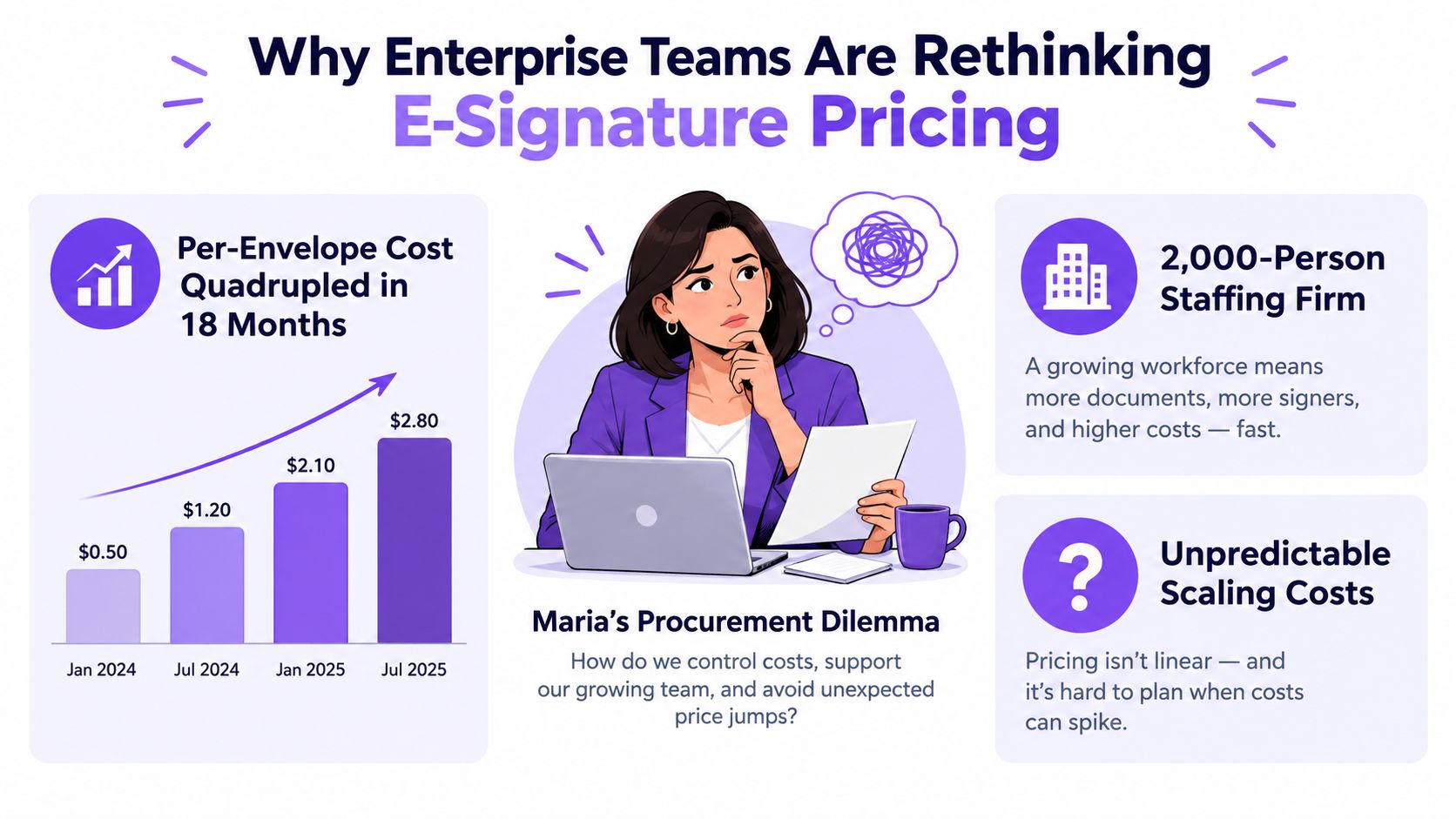
Maria, a procurement director at a 2,000-person staffing firm, is staring at a year-end e-signature invoice that has quadrupled in 18 months. The vendor's per-envelope model looked predictable until recruiters, sales representatives, and HR teams began sending offers, NDAs, client agreements, and onboarding packets every week.
That situation is common in growing organizations. Seasonal hiring, acquisitions, new compliance requirements, and remote contract work can push document volume beyond the budgeted ceiling. An unlimited e-sign enterprise plan can remove that volatility, but the word “unlimited” deserves procurement-level scrutiny.
Why Enterprise Teams Are Rethinking E-Signature Pricing
Per-envelope pricing looks manageable until every department adopts the same platform. Recruiters send candidate forms, sales teams send client contracts, HR sends employment documents, and finance sends vendor approvals. Each workflow is legitimate, yet the invoice turns every additional envelope into a new cost event.
Volume also rises at predictable moments. Hiring surges generate more offer letters and consent forms. Mergers and acquisitions add agreements, data requests, and onboarding paperwork. Remote contractors create recurring documents across locations, while compliance changes can require replacement forms and extra approval steps.
Procurement rule: A pricing model should absorb normal growth, not penalize the departments driving it.
Enterprise demand already shapes the digital-signature market. One forecast expects the Businesses and Enterprises segment to lead globally with 76.80% of the market, while the market grows from USD 6.98 billion in 2025 to USD 121.01 billion by 2033, according to Fortune Business Insights.
Unlimited plans address organizations with high document volume, multiple teams, and repeated approval cycles. They are useful only when “unlimited” removes the billing meters that affect your workflows. Otherwise, the label can hide API charges, storage limits, verification fees, restricted user types, or peak-usage rules.
Ask the vendor specific questions before approving the contract. Does the plan include signatures and envelopes created through integrations? Are templates, internal users, signing groups, audit records, identity verification, storage, and support included? What happens during seasonal spikes, acquisitions, or a company-wide rollout? Does the vendor reserve the right to impose fair-use limits or reclassify high-volume activity?
Request the billing definition in writing, including what counts as a transaction and which features require an add-on. Compare that language with a real month of activity from HR, sales, legal, procurement, and operations. A fixed-price eSignature pricing reference can help frame that comparison, but your own contract terms should decide whether the plan is predictable.
What an Unlimited E-Sign Enterprise Plan Includes
An unlimited plan belongs in the contract, not just the sales headline. Define it as the ability to create, send, route, and complete documents without a transaction ceiling that triggers surprise charges. Then test the definition against integrations, users, storage, verification, and seasonal demand.
The four building blocks
Unlimited signatures and envelopes should cover documents sent through the web application and, where applicable, approved integrations. Ask whether a document sent to several signers counts as one envelope, multiple transactions, or another billable unit. API activity often exposes the gap between a fixed plan and an overage model.
Unlimited templates and fields standardize repeated work. Staffing teams can reuse offer letters, healthcare teams can maintain consent forms, and real estate teams can prepare transaction packets. Authorized users should be able to create and maintain these assets without a separate template quota.
Unlimited internal users and signing groups let teams add a recruiter, coordinator, manager, or reviewer without renegotiating access. Confirm how the vendor defines a user, because SSO or federated identity seats may sit outside the advertised allowance. A dedicated workspace structure for internal teams also keeps departments, roles, and signing groups organized as adoption grows.
Unlimited audit-trail storage covers a different risk from unlimited sending. A defensible record preserves the timestamped sequence of sending, viewing, signing, and completion, along with the authentication method, IP address, device information, and a tamper-evident seal. Confirm how long those records remain available and whether exports or archival services cost extra.
| Capability | Typically Included | Often Metered or Capped |
|---|---|---|
| Signatures and envelopes | Web-app sending and completed signature requests | API-generated transactions or special delivery channels |
| Templates and form fields | Reusable PDFs, forms, fields, and workflows | Advanced authoring, conditional logic, or premium templates |
| Internal users | Team access and signing groups | SSO, SCIM, and federated identity seats |
| Audit trails | Completed-document history and event metadata | Long-term storage, export volume, or archival services |
| Bulk sending | High-volume distribution within the plan | Recipient counts above a threshold |
| Notifications | Email delivery | SMS messages, verification messages, and one-time passcodes |
Read every reference to “fair use.” A vendor may impose a practical ceiling after an acquisition increases contract activity, or require approval when usage grows faster than expected. Ask for the threshold and remedy in writing.
Custom branding, multi-brand authoring, advanced workflow approvals, and centralized administration may be tier-specific. Price them as separate line items. An unlimited signature allowance does not offset missing governance, weak integrations, or unusable contract intelligence.
Core Features That Matter Most in an Enterprise Plan
An unlimited plan only works when four feature pillars support the same operating model. Signature volume is one pillar. Security, integrations, and administrative intelligence determine whether the platform can survive legal review, audits, and departmental growth.
Unlimited usage without operational bottlenecks
The first test is throughput. A large employer needs more than unlimited sending in principle. It needs reusable templates, signer groups, approval routing, bulk distribution, and permissions that let different departments work without creating duplicate processes.
A platform should support sudden activity during quarter-close, enrollment periods, onboarding campaigns, and contract renewals. It should also make it easy to create, send, and sign PDFs, templates, and forms quickly. If users must request access for every new workflow, the plan is technically unlimited but operationally constrained.
Security and compliance that stand up to review
Enterprise buyers should ask about SOC 2 Type II, ISO 27001, HIPAA, FedRAMP, eIDAS Qualified Electronic Signatures, regional data residency, encryption at rest and in transit, and SCIM provisioning. Not every organization needs every control, but regulated teams must match the platform to their obligations.
U.S. adoption rests on the ESIGN Act, enacted on June 30, 2000, and the UETA model law. In the European Union, eIDAS took effect in 2016 and created a harmonized framework for electronic identification and trust services (MarketsandMarkets compliance overview). A compliance program should also address intent to sign, consent to transact electronically, association between the signature and record, and retention requirements (SignWell eSignature compliance guide).
BoloSign identity verification is relevant when teams need stronger signer assurance within a secure document workflow.
Integrations and AI-powered contract intelligence
Disconnected signing creates legal review queues and manual rekeying. Look for connectors to Salesforce, Microsoft 365, Dynamics 365, Workday, SAP Ariba, ServiceNow, document management systems, and proprietary CLM or ERP workflows through APIs and webhooks.
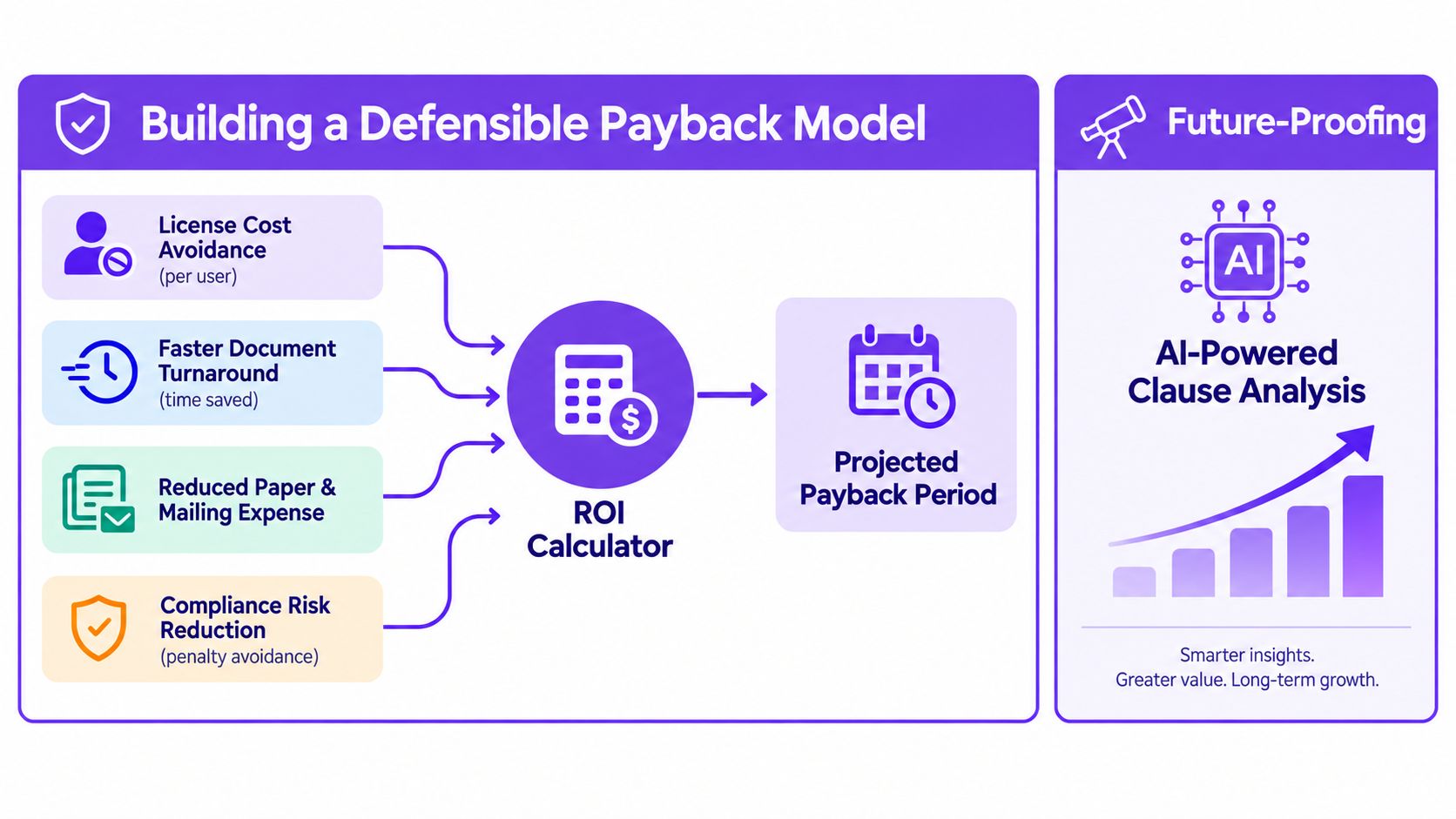
AI-powered contract intelligence adds a different layer. Clause extraction, risk flagging, obligation tracking, and searchable repository analytics can turn signed documents into operational data. That matters when legal teams need to find renewal obligations or identify risky language without opening every PDF manually.
The market is moving toward AI-powered, identity-centric, cloud-enabled digital trust platforms. Another industry forecast puts the market at USD 16.83 billion in 2026 and projects USD 47.19 billion by 2031, so buyers should assess whether a signing-only platform will remain sufficient (eSignly pricing and market context).
Buyer Personas and Real-World Use Cases
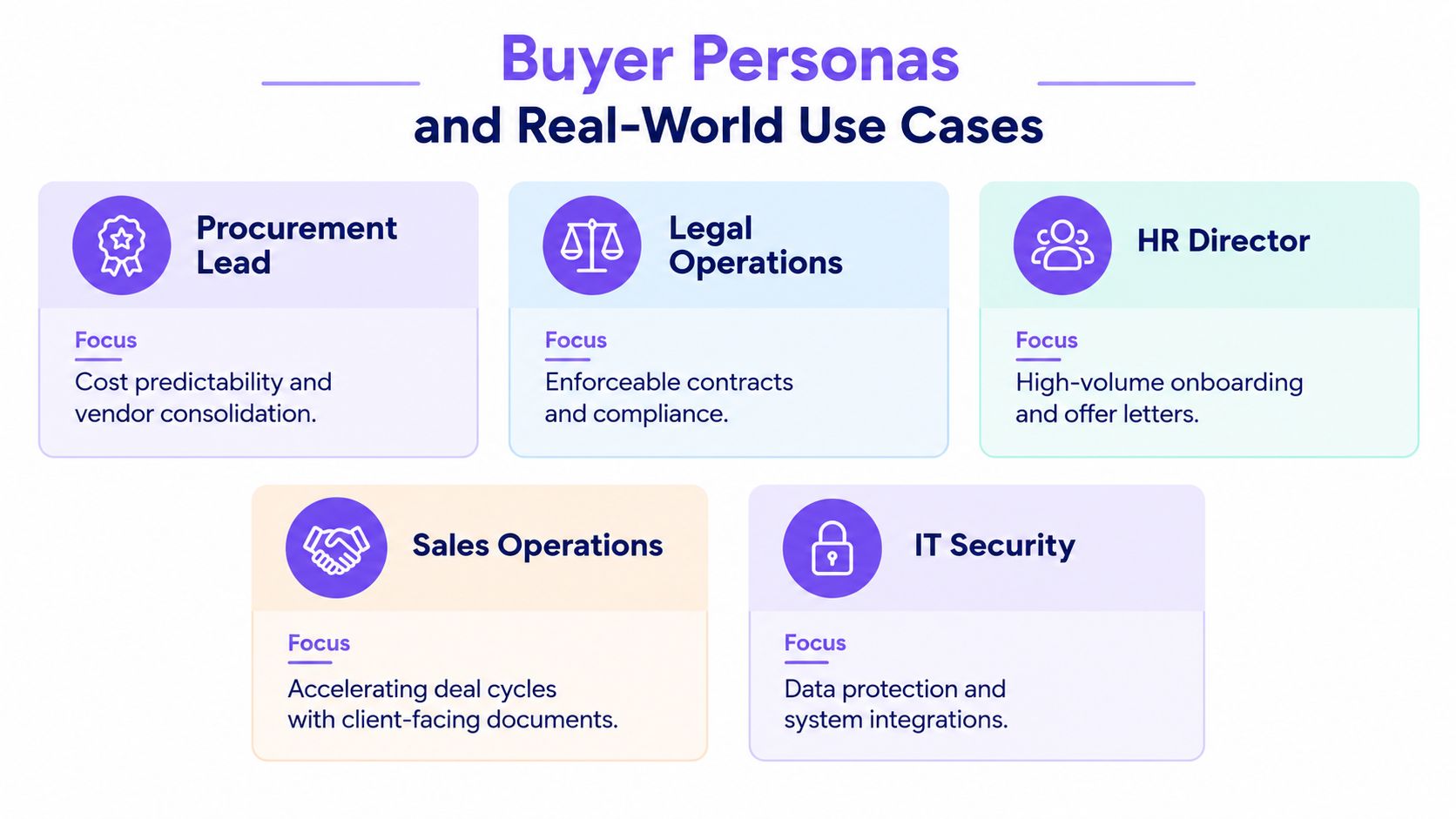
The strongest candidates for unlimited enterprise signing aren't defined only by employee count. They share a workflow pattern: several departments send documents, external parties sign frequently, and compliance teams need a reliable record.
Staffing and recruitment
A staffing operations lead manages candidate consent forms, offer letters, timesheets, client agreements, and onboarding packets. Recruiters need quick access to approved templates, while HR needs consistent fields and a searchable audit trail. HRIS feeds, CRM connections, and role-based access matter more than decorative branding.
Healthcare
A compliance officer in healthcare may oversee patient consents, provider agreements, referral documents, and internal approvals. The platform must support HIPAA-oriented controls, retention, authentication, and detailed audit evidence. A workflow that lets staff sign PDFs online while preserving document history can reduce manual handling, but the buyer still needs a written security and compliance review.
Real estate
A transaction coordinator works with listing agreements, disclosures, purchase documents, inspection forms, and closing paperwork. Agents may need mobile-friendly signing, while operations teams need templates, multi-recipient routing, and integrations with CRM or transaction systems. Unlimited access is valuable when every new deal creates another document packet.
Logistics and field operations
An operations manager in logistics handles delivery confirmations, vendor contracts, driver paperwork, equipment records, and service approvals. The integration surface may include an ERP, dispatch platform, shared drive, or automation tool. The priority is rapid completion from distributed locations, with an audit trail that shows who signed and when.
Education and professional services
Education providers manage admission forms, consent documents, certifications, and enrollment agreements. Professional-services firms handle statements of work, engagement letters, change orders, and confidentiality agreements. Both need controlled templates and simple external signing, but professional services may place more emphasis on CRM and project-system integrations.
The shared profile is clear. Unlimited plans fit organizations with multi-department usage, audit-heavy workflows, fluid user access, and sustained document demand. They also fit teams whose cost problem comes from growth rather than from a single unusual project.
Migration Checklist and Questions to Ask Vendors
Switching vendors becomes manageable when procurement treats it as a controlled workflow migration rather than a license swap.
A phased implementation plan
- Measure current usage. Record envelope activity, active users, signer groups, completed-document storage, verification events, and integration calls. Separate normal demand from seasonal spikes.
- Inventory workflow assets. List active templates, PDF fields, approval paths, notification rules, web forms, and automations. Mark each asset by owner and department.
- Map governance requirements. Document SSO, SCIM, data residency, retention, access roles, audit exports, and regional requirements across the US, Canada, Australia, New Zealand, UAE, and other operating markets.
- Pilot one department. Use a sandbox or controlled production group. Staffing, HR, or sales operations usually provides enough volume to expose routing and integration problems.
- Migrate and validate. Import templates, test signer order, confirm completed-document records, and verify that integrations create the correct document and status updates.
- Roll out training and controls. Establish template ownership, approval rights, naming conventions, retention rules, and an escalation path for failed signing requests.
Ask vendors these questions in writing:
- What counts as an active user?
- Are API calls, webhooks, bulk recipients, SMS messages, or identity checks capped?
- How are audit trails and completed documents stored and exported?
- Does the price change at renewal?
- Is identity verification included or metered?
- Can the organization export every document, field, audit record, and metadata at exit?
- What does “fair use” mean in measurable terms?
- Which features require a higher tier or separate implementation fee?
Be skeptical of answers such as “unlimited standard usage,” “custom limits based on volume,” and “enterprise features available upon request.” Those phrases may conceal caps around automation, verification, storage, or administrator seats.
Unlimited vs Per-User and Per-Envelope Pricing Models
The right model depends on what drives your cost. Per-user plans charge for access, per-envelope plans charge for transactions, and unlimited fixed-fee plans charge for an agreed operating scope.
| Pricing Model | Best Fit | Watch Out For |
|---|---|---|
| Unlimited fixed-fee enterprise | High-volume, multi-department organizations with fluid users | Fair-use clauses, API limits, add-ons, renewal changes |
| Per-user subscription | Small, stable teams with predictable access needs | Cost rises with every new employee, even when usage stays low |
| Per-envelope or per-document billing | Low-volume teams with occasional signing | Growth, peak periods, and repeated routing create budget pressure |
A worked scenario illustrates the trade-off without pretending that a universal price exists. Suppose a company sends 1,000 envelopes per month across 50 internal users. A per-envelope vendor multiplies the monthly transaction count by its negotiated envelope rate. A per-user vendor multiplies 50 seats by the contracted seat price. An unlimited plan replaces both calculations with a fixed fee, subject to the contract's actual exclusions.
The procurement team should model ordinary months, hiring surges, acquisitions, and department expansion. It should also price API activity, verification, storage, and premium support separately if the vendor meters them.
One industry pricing reference notes that enterprise offerings often separate unlimited documents or signatures from higher-volume API, administration, and support tiers, and that some vendors impose hidden thresholds or overage fees (SignWell pricing reference). That is why a simple “unlimited” label isn't enough.
The old rule of thumb is useful but shouldn't replace a real model. If monthly envelopes per user exceeds roughly 20, unlimited pricing usually deserves serious consideration. Validate that threshold against your negotiated rates, not as a guaranteed outcome.
ROI, Future-Proofing, and Choosing the Right Plan
Build the business case from four measurable inputs: license cost avoided, time saved through faster document turnaround, reduced paper and mailing expense, and compliance risk reduction. The resulting payback model should compare the current vendor, the proposed vendor, implementation effort, training, migration, add-ons, and renewal terms.
Don't optimize for signature volume alone. Cloud deployments represented 66.22% of the digital-signature market in 2025 and are projected to grow at a 25.66% CAGR through 2031, according to Verdocs' market discussion (Verdocs digital-signature trends). That direction supports evaluating integrations, identity, automation, and data governance alongside price.
Run a pilot with two vendors, model total cost of ownership across three years, and negotiate flexibility for AI and identity add-ons. Buyers operating in Australia can also review this practical resource on Australian digital signature compliance when checking regional requirements. Choose unlimited when volume is high, user access changes frequently, and governance matters. Choose a simpler model when usage is small and stable.
Closer Innovation Labs Corp. offers BoloSign, a fixed-price platform for creating, sending, and signing PDFs, templates, and forms with unlimited documents, team members, and templates, plus AI-powered automation and secure workflows. Visit Closer Innovation Labs Corp. to start a 7-day free trial and test whether its eSignature, contract automation, integrations, and compliance features fit your procurement requirements.

Paresh Deshmukh
Co-Founder, BoloForms
18 Oct, 2026
Take a Look at Our Featured Articles
These articles will guide you on how to simplify office work, boost your efficiency, and concentrate on expanding your business.



