

Real Time Collaboration: How It Works for Contract Teams
Real Time Collaboration explained: how it works, where it pays off, and how to roll it out for contracts, eSignatures and compliance.

Tired of nonsense pricing of DocuSign?
Start taking digital signatures with BoloSign and save money.
You've got a services agreement open, a sales manager asking whether it's ready, and legal comments sitting in an email attachment. Procurement has already changed the payment terms in another copy. Before anyone can approve the deal, someone has to establish which document everyone should trust.
Real time collaboration replaces that attachment chase with a shared working document. For contract teams, though, speed is only part of the job. You also need control over who may change a clause, who must approve it, and which version ultimately goes out for signature.
What Real Time Collaboration Means for Contract Teams
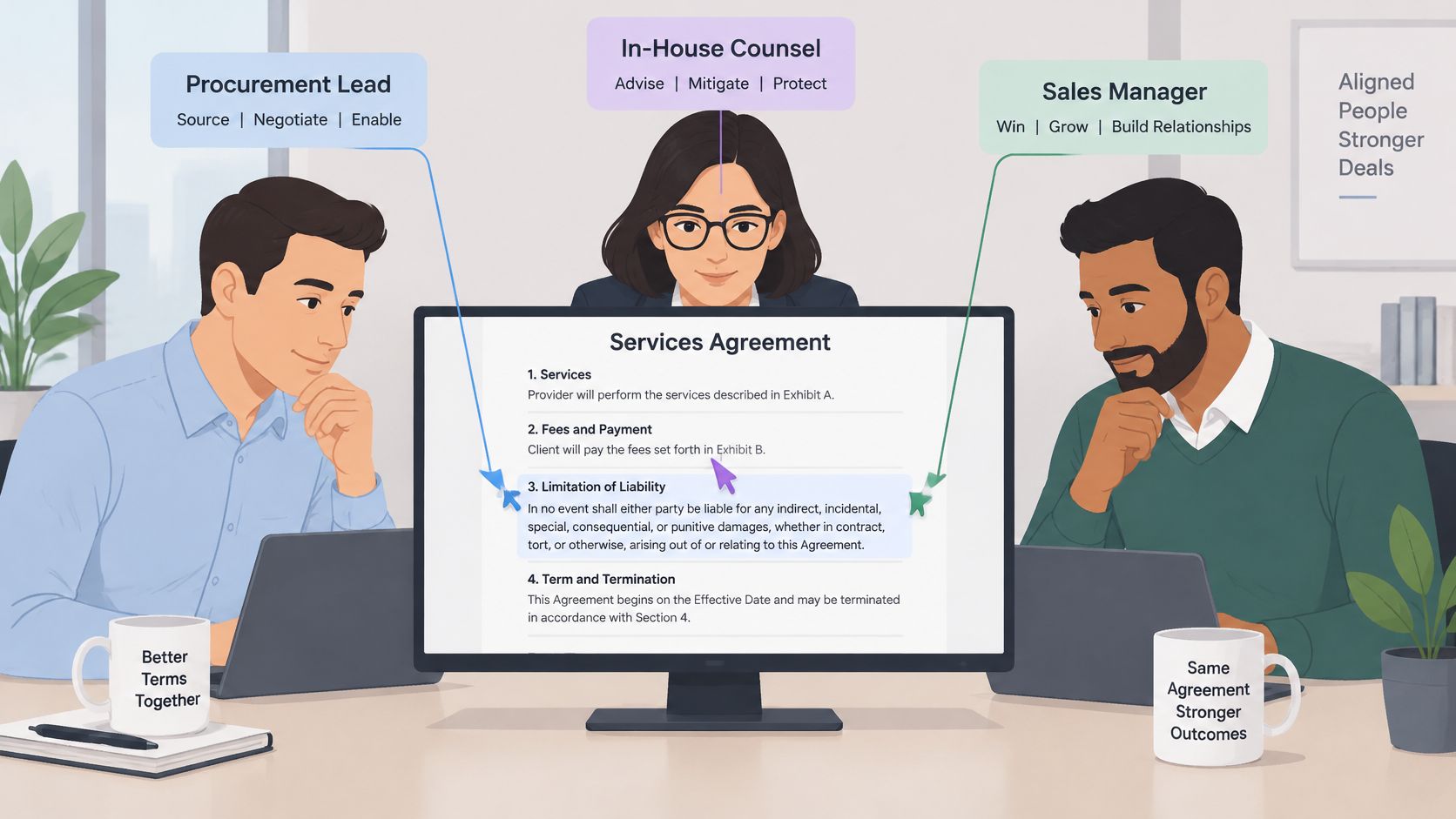
Say a procurement lead, in-house counsel, and a sales manager open the same services agreement. They can see each other's cursors, discuss a liability clause, and record the agreed wording during a hypothetical twenty-minute call instead of spending days exchanging redlines.
Real time collaboration means several people work on one document or record at once, changes appear for everyone within moments, and the team maintains one shared version. Think of a shared whiteboard: everyone contributes to the same surface. Emailing attachments is more like mailing photocopies and asking someone to reconcile the handwritten changes afterward.
Sharing isn't always collaborating
Contract teams use several distinct modes of work:
- Passive sharing: A manager presents an agreement on a screen while everyone else watches.
- Asynchronous review: Counsel leaves comments that procurement answers later, without everyone needing to be online together.
- Synchronous joint editing: Authorized participants revise, comment, and settle questions together in the shared document.
The distinction matters. In a 2022 survey of 200 U.S. federal technology decision-makers and influencers, 61% considered screen sharing useful for broadcasting information but inadequate for active knowledge sharing, while 69% wanted real collaboration, according to Nextgov's coverage of the study.
Those responses describe a participation gap, not just a need for more meetings. Watching someone scroll through a contract doesn't give reviewers a reliable way to propose wording, resolve objections, or demonstrate approval.
Practical test: Can authorized colleagues change the same clause and see the result without downloading and resending a file?
Passing that test establishes shared editing. It doesn't establish permission to approve a commercial concession. Your workflow still needs to distinguish a suggestion from an accepted change, and an accepted change from an agreement ready to sign.
How Real Time Collaboration Works Behind the Scenes
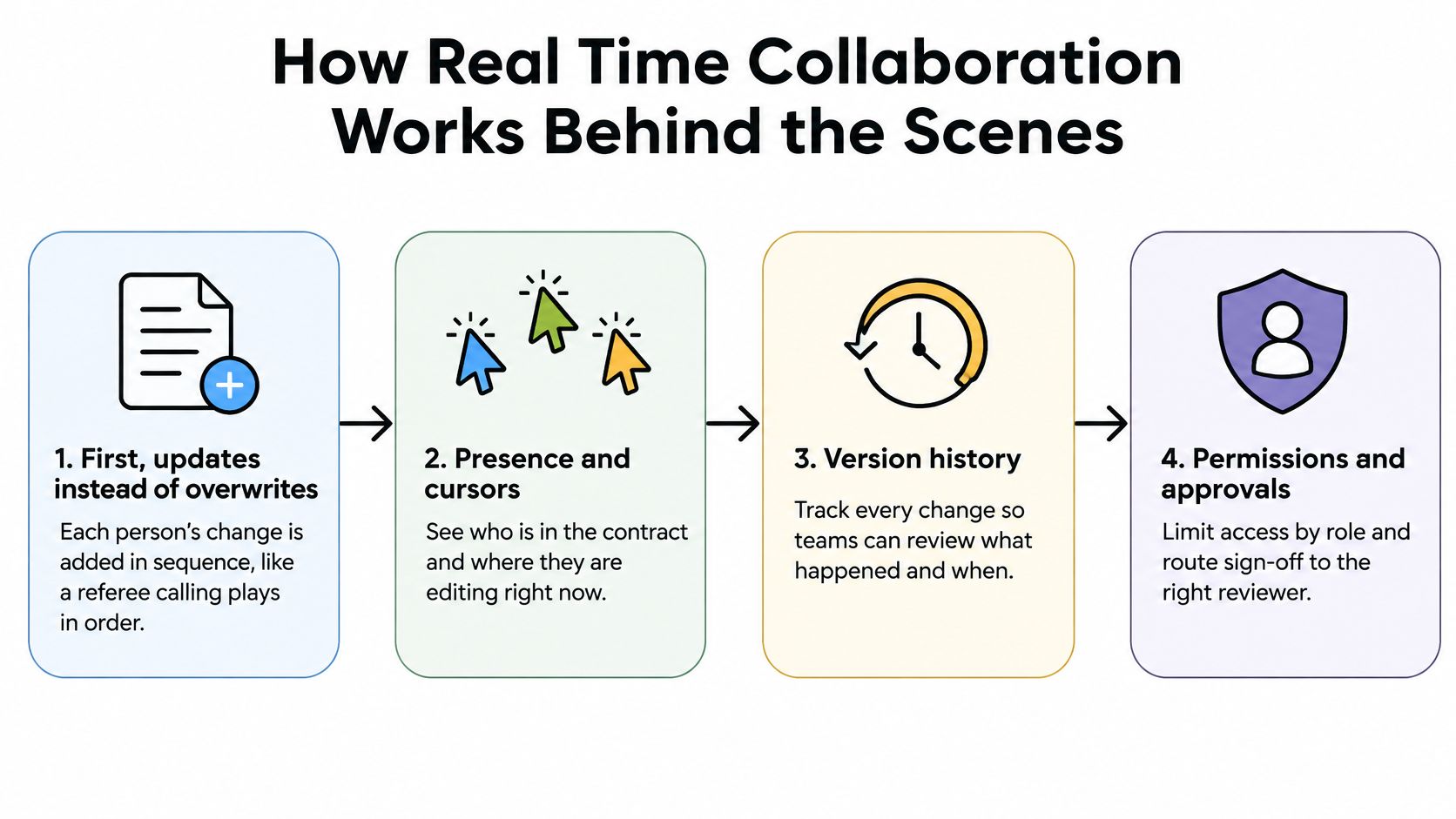
A collaborative editor acts like a referee at a shared ledger, accepting and coordinating edits so participants don't overwrite each other. The experience looks simple because the software handles synchronization behind the document.
The diagram connects that editing machinery with the controls a contract team needs.
The moving parts
- Updates instead of whole files. When procurement changes a payment term, the editor sends a compact description of that change rather than retransmitting the entire agreement.
- Coordinated ordering. A server or coordinated peers reconcile incoming operations. Different edits can survive together, although contradictory wording still needs a human decision.
- Presence indicators. Cursors and participant indicators show that counsel is working on indemnities while sales checks the scope of work.
- Recovery after interruption. Acknowledgments and replayable update logs help a reconnecting laptop recover missed changes rather than showing an outdated agreement.
Google's public concurrent-editing implementation used operational transformation to reconcile simultaneous changes through a central server, a development described in Britannica's history of Google Docs. That's one implementation approach, not a requirement that every collaborative platform use identical technology.
What makes editing feel live
Latency is the delay before another person sees an update. Jitter is variation in that delay, which can make an otherwise responsive session feel uneven. WebRTC research published in the Journal of Network and Systems Management supports evaluating latency and jitter rather than relying only on average response time.
During testing, watch for delayed bursts of edits, stale text after reconnection, and conflicting offline changes. Ask an administrator to inspect slow-response percentiles, packet loss, and retransmissions when problems recur.
Synchronization also differs from document version control. The former keeps participants aligned while they work; the latter preserves identifiable states that reviewers can compare and restore. Contracts need both.
Where Real Time Collaboration Pays Off by Industry
Where live contract collaboration matters by industry
| Industry | Typical shared document | Who edits live | Where delay hurts |
|---|---|---|---|
| Staffing and HR agencies | Worker and client agreements | Recruiter, client HR, compliance | Same-day placements stall |
| Healthcare clinics | Intake forms and patient authorizations | Front desk and providers | Patients wait while forms circulate |
| Real estate | Purchase addenda and listing agreements | Agent, seller, buyer, lender | Closing dates slip |
| Logistics and transportation | Carrier agreements, rate sheets, delivery paperwork | Operations and procurement | Shipments wait on unsigned terms |
| Education and training | Enrollment and training contracts | Admissions and finance | Start dates and funding are delayed |
| Professional services | Statements of work and MSAs | Partner, client, legal | Redline rounds lengthen deal cycles |
In staffing, a recruiter can confirm an assignment while client HR checks the start date and compliance reviews required wording. Keep candidate details restricted to people who need them, rather than inviting everyone into the entire personnel record.
In healthcare, front-desk staff can resolve missing administrative fields while a provider reviews the authorization's purpose. Patients shouldn't enter an unrestricted internal editing space just because they need to complete or sign a form.
Match the workspace to the transaction
A real estate team might resolve an addendum together, with the lender reviewing financing implications rather than editing every term. In logistics, operations can verify delivery requirements while procurement controls changes to rates and carrier obligations.
For education providers, admissions confirms enrollment information while finance checks funding conditions. A professional services partner can settle deliverables with the client while legal reviews changes to the master services agreement.
These aren't interchangeable workflows. Each needs its own access boundaries and final decision-maker.
Shine Above captured 150+ caregiver consents digitally with BoloSign, cutting document turnaround from 5 days to 1 day. Customer Naida describes a related execution benefit: “the fact that clients can sign digitally has cut our project kickoff time in half.”
The useful outcome isn't merely a faster discussion. It's an agreed document that reaches the right signer without another manual handoff.
For example, a clause that previously required repeated email exchanges could be settled in a shared session, released for signature, and stored with the transaction record. Treat that as a workflow to test, not a promised performance result.
Outcomes to Measure and What Delay Costs
Start with the cost of coordination, not the software subscription. A contract can sit untouched while each participant assumes someone else owns the next action. Faster typing won't fix that waiting time.
Reported collaboration and productivity figures
| Metric | Reported figure | Source | What it signals |
|---|---|---|---|
| Leaders losing at least one hour daily resolving collaboration problems | Over one-third in a 2024 survey; estimated cost up to $16,491 annually per manager | Zoom and Morning Consult | Coordination deserves a measurable baseline |
| Meetings replaced by recorded video | 43% of Atlassian employees had at least one replaced in a two-week period in 2024, freeing 5,000 focus hours | Atlassian State of Teams | Some updates don't require live attendance |
| Employees believing email could replace more than one-quarter of their meetings | Nearly 70% of employees surveyed in 2024 | TechSmith research reported by GlobeNewswire | Reserve meetings for actual decisions |
| Employees believing their work environments were equipped for hybrid work | 47% in Cisco's 2024 study | Cisco Hybrid Work Study | Access to tools doesn't establish readiness |
These findings concern broader workplace collaboration, not measured savings for your contract team. Use them to identify questions worth investigating rather than plugging their results into a purchasing business case.
Establish your contract baseline
Track these measures against a consistent start and finish event:
- Draft to first redline: When did substantive review begin?
- Review rounds: How often did the document return for further changes?
- Waiting per approver: How long did each approval request remain unresolved?
- Final draft to signature: How much delay remained after negotiation ended?
- Meetings per contract: Which meetings produced decisions rather than status updates?
For a hypothetical calculation, three email rounds with two days of waiting each create six waiting days. A live session could resolve the same issue in a day if the authorized decision-makers attend and record their decision. That's scenario arithmetic, not an industry benchmark.
Pull these measures from your last ten contracts before selecting a platform. Separate work time from waiting time, and record why a contract paused. A deliberate legal review shouldn't be classified as avoidable delay merely because it wasn't instantaneous.
Compliance Rules That Shape Online Signing
This is a starting map, not legal advice. Read it by jurisdiction, document type, and the information passing through the workflow.
Signing and data rules by framework and region
| Framework | Region | Applies to | What to check |
|---|---|---|---|
| eIDAS | European Union | Electronic signatures and seals | Choose simple, advanced, or qualified level by transaction risk |
| ESIGN Act | United States | Electronic signatures in interstate commerce | Confirm consent and record retention for consumer documents |
| HIPAA | United States, healthcare | Patient authorizations, access requests, intake forms | Add access controls and audit logs; eSignature isn't a mandate |
| GDPR | European Union and EEA | Personal data in drafts and signed records | Confirm lawful basis, data location, and retention |
| PIPEDA | Canada | Personal information in private-sector contracts | Limit collection, state purpose, and record consent |
| Electronic Transactions Act 1999 | Australia | Electronic signatures and records | Confirm method reliability and recordkeeping requirements |
| UAE electronic transactions law | UAE | Electronic contracts and signatures | Confirm current requirements with local counsel |
Under Article 25, an electronic signature cannot be denied legal effect or admissibility solely because it's electronic or isn't qualified; qualified signatures have the same legal effect as handwritten signatures across EU Member States, according to the eIDAS Regulation.
Identify the person and the processing route
Under eIDAS, a signatory is a natural person, while organizations can use electronic seals for organizational authentication, as the European Commission's trust-services guidance explains. Route a supplier agreement to its authorized representative, not merely a company name.
For healthcare access requests, HHS guidance permits electronic copies of signed requests and electronically executed portal requests; it also explains that electronic signatures may be an appropriate security measure rather than a HIPAA requirement. Adding a signature image doesn't replace access controls or record protection.
For legal teams organizing those records, Attorney Assistant's legal document management guide provides useful operational context.
Also examine where AI services process shared documents. Our submitted documents may be processed and analyzed using partner AI services, so assess the relevant processing terms before uploading sensitive material.
For transactions involving Canada, Australia, New Zealand, or the UAE, don't assume an EU or U.S. workflow settles local requirements. Ask: Who must sign, which rules govern the information, and who can view the live drafts?
How to Roll Out Real Time Collaboration for Contract Automation
Start with a bounded workflow rather than moving every agreement into live editing. The rollout should make responsibility easier to understand.
This process diagram shows the main checkpoints.
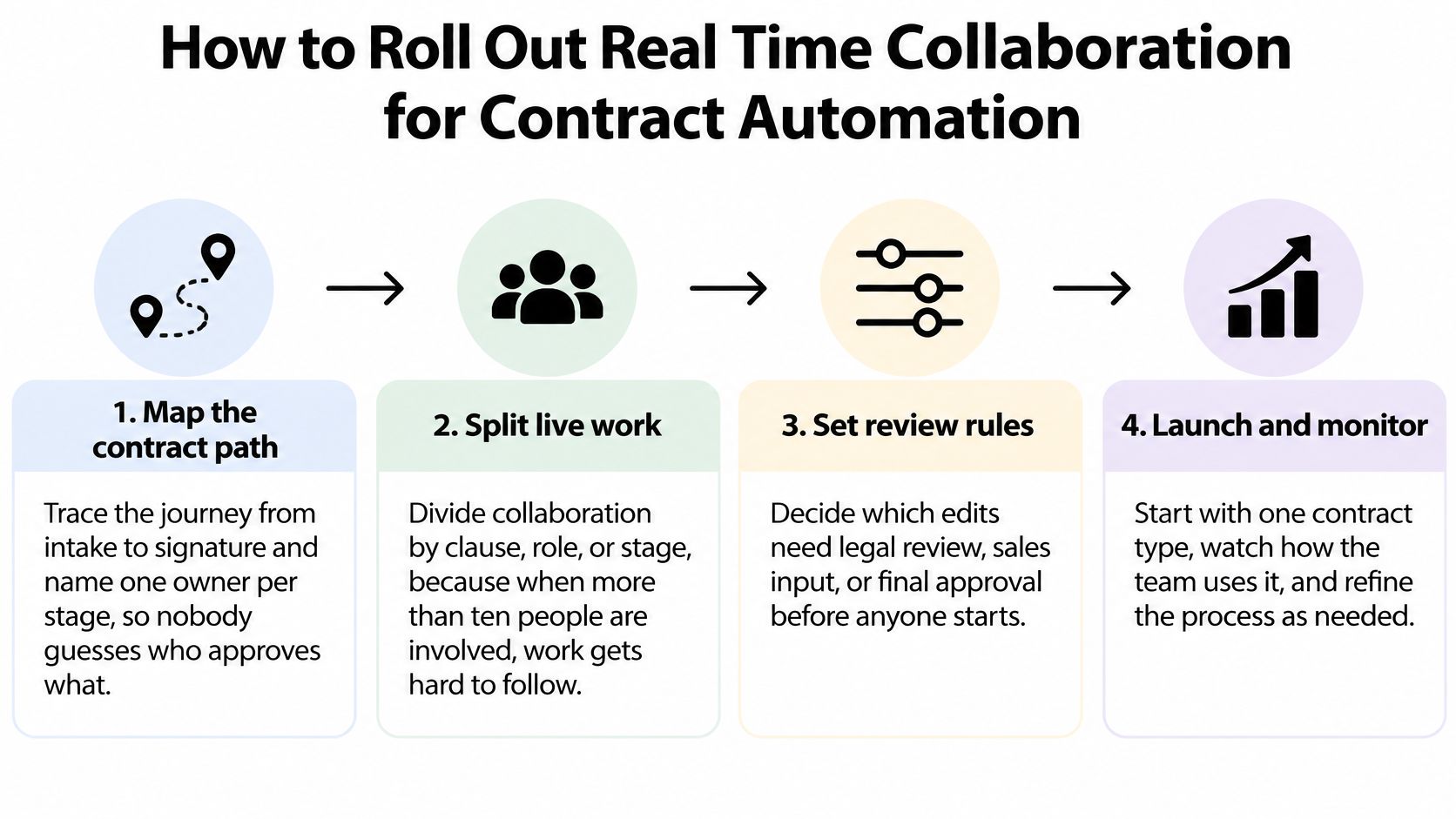
- Map the contract path. Trace intake, drafting, review, approval, and signature, naming an owner at each stage. This prevents an unresolved comment from becoming everyone's responsibility and nobody's task.
- Split live work. Assign clauses, roles, or review stages rather than inviting unrestricted simultaneous editing. A study of browser-based collaborative editors found that simultaneous editing by more than ten users could produce perceived delays of up to 50 seconds, supporting careful management of contention.
- Set workspace permissions. Separate Legal, Sales, HR, and Procurement materials, then distinguish editing, commenting, and approval rights. An external reviewer shouldn't inherit access to unrelated agreements.
- Prepare reusable documents. Import existing contracts and build eSign templates for frequently sent agreements. During our onboarding, customers can import contracts, set up clickwraps and eSign templates, and start tracking status in under a week.
- Assign substantive approvals. Name the reviewer for liability, pricing, and contract-term changes. A useful suggestion mustn't become an external commitment before that person accepts it.
- Configure reminders. Send approval reminders to the responsible person and define an escalation route. Our onboarding contact can help clarify ownership when teams are setting up the process.
- Pilot and include everyone. Try a staffing placement agreement or NDA over a suggested two-to-four-week pilot, comparing results against your baseline. Test keyboard and screen-reader completion, captions, and written-response options, not just whether participants can open the document.
Test participation, not feature labels
A 2025 study of blind and low-vision workers found that more than half reported accessibility barriers affecting job performance, career advancement, or effective collaboration, as described in the ACM proceedings. Let participants complete realistic tasks without coaching.
Use the eSign rollout change-management guide to support the people side of adoption. Healthy results include fewer avoidable review rounds, timely approvals, and complete signing records.
For a visual walkthrough, watch the following video.
Send, Sign and Review Contracts in BoloSign
Begin with a saved template or upload a PDF. Fill in party names, rates, dates, and other transaction details, then check the recipients before sending. BoloSign brings document preparation, review, and eSignature into a connected contract workflow.
Place signature and initial fields where each recipient needs to act. Teams can create, send, and sign PDFs, templates, and forms instantly, without printing and scanning. Instant execution should follow the required review, not bypass it.
Keep preparation connected to execution
A staffing coordinator can prepare a worker agreement when a placement is confirmed. A clinic can send a patient authorization for completion on a phone, while a real estate coordinator can send a multi-recipient addendum to the appropriate parties in a shared signing request.
For teams searching for add signature to Google Form, start by identifying the actual record that requires consent. Confirm whether your workflow signs the form response, a generated document, or a separate agreement, and preserve the relationship between those records.
- Prepare the right record: Check that the populated document reflects the agreed terms.
- Send to the right people: Assign fields to each intended signer rather than leaving recipient ownership ambiguous.
- Retain execution evidence: Preserve the signed document with the timestamp, signer identity information, and audit trail.
Let AI propose, not authorize
AI contract review can flag risky clauses, such as uncapped liability or an unexpected auto-renewal provision, and propose alternative language. The named reviewer still needs to evaluate the wording against the deal, the organization's policy, and applicable law.
That's the practical role of contract intelligence: helping reviewers locate and assess obligations, not declaring every detected issue unacceptable. An unusual liability provision might be a negotiated exception rather than an error.
AI-powered automation can route work and suggest edits while people retain authority over commitments. The final signing record supports compliance processes associated with ESIGN, eIDAS, and healthcare workflows, but it doesn't independently establish that every legal or privacy obligation has been satisfied.
Pitfalls That Stall Shared Work and How to Avoid Them
The first trap is treating an AI-generated answer as a team decision. A tidy summary can make an unresolved disagreement look settled, particularly when the reviewer who objected wasn't present when the summary was generated.
A 2025 longitudinal study of distributed project teams reported that generative AI could increase individual output, while participants remained unconvinced it could mediate teamwork's human and relational dimensions, according to the published study. Faster production and shared understanding aren't interchangeable outcomes.
Keep judgment visible
- AI output treated as approval: Assign a human verifier to every decision summary and require explicit acceptance of high-stakes wording before release.
- Missing provenance: Record who or what proposed a change, what text it replaced, and who accepted it so machine-generated language doesn't appear ownerless.
- Accessibility reduced to a checklist: Have a colleague complete a realistic contract task using their assistive technology, and repair the workflow where they get stuck.
- Instant replies expected: Allow written comments and response windows so deaf, multilingual, and neurodivergent colleagues aren't disadvantaged by rapid turn-taking.
- A company inbox substituted for a signer: Verify the individual's authority and route execution to that person rather than assuming mailbox access establishes authorization.
- Sensitive discussion placed in shared text: Keep settlement strategy and personnel deliberations in appropriately restricted, human-only conversations rather than exposing them to every document participant or AI service.
- Changes made without a reviewable record: Preserve the proposed and accepted wording so reviewers can reconstruct the negotiation rather than relying on memory.
An unresolved objection belongs in the decision record, even when the rest of the team is ready to move.
Use clear comment statuses such as pending, accepted, and rejected, and record the reason for a material rejection. A reviewer joining later should understand the decision without replaying the entire meeting.
For negotiation mechanics, the guide to redlining a contract can help teams distinguish proposed revisions from finalized language. Keep an explicit release step between resolving comments and sending the agreement outside the organization.
Choose Your Platform and Test It on a Live Contract
A sales lead is out of office, legal still owes a clause change, and the counterparty just asked to swap a payment term. Run that agreement through the platform. A demonstration with tidy wording and cooperative recipients will not show what breaks when an approver is unavailable or a late edit arrives.
Real-time collaboration on contracts works like a locked control room. Several people can be in the same file, but only the roles you assigned may change a given clause, and every edit stays on a record a later reviewer can reconstruct. Written comments and a named human sign-off stay in the path on purpose. Speed should not erase who decided what, or when.
BoloSign combines contract lifecycle management, eSignatures, and AI in one platform. Multi-user plans let account holders add team members, set permissions, and manage activities under a single workspace. Live support is available 24/7 through chat, email, or phone, which matters when a revision lands outside a normal business day.
For organizations coordinating multiple locations or operators, Franchise Foundry's guide to AI tools for franchisee support offers useful context for evaluating wider operational dependencies.
Use this checklist during the live-contract test.
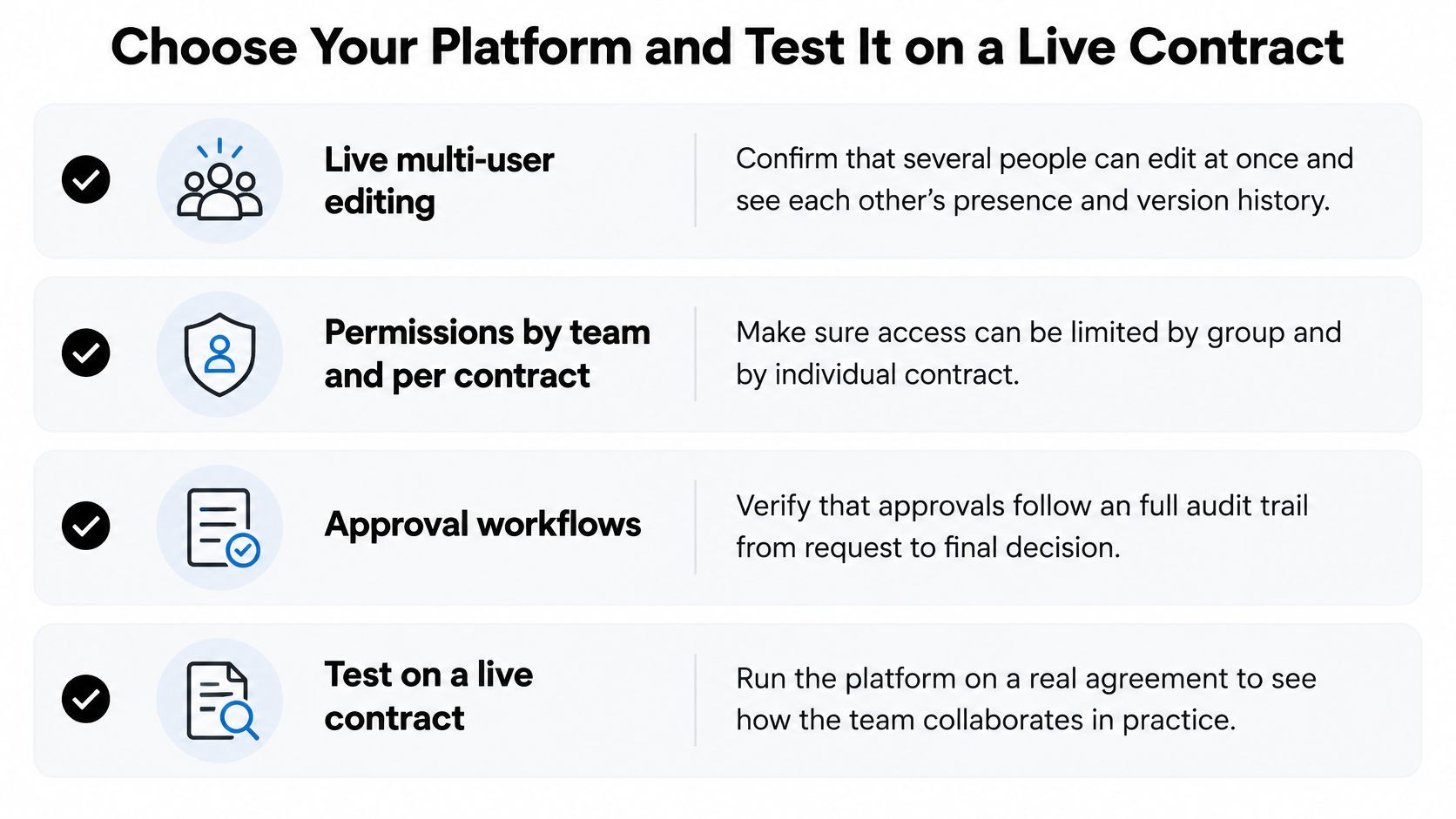
- Shared editing: Verify presence indicators, simultaneous changes, reconnection behavior, and version history.
- Access boundaries: Test permissions by team and individual agreement, including external reviewers.
- Accountable approvals: Confirm that material edits and AI proposals require a named decision-maker.
- Regional requirements: Assess signature and data handling against ESIGN, eIDAS, HIPAA, GDPR, and applicable local law.
- Connected work: Test HubSpot integration or a Document Signing API against your actual handoffs.
- Operational fit: Confirm support availability, evidence export, and how commercial terms change as usage grows.
BoloSign connects AI-powered contract automation with eSignatures so your team can review agreements, control approvals, and sign PDFs online without disconnected handoffs. Visit BoloSign, then run a real contract through review and signing with permissions, an approval trail, and 24/7 support by chat, email, or phone before you commit.

Paresh Deshmukh
Co-Founder, BoloForms
12 Nov, 2026
Take a Look at Our Featured Articles
These articles will guide you on how to simplify office work, boost your efficiency, and concentrate on expanding your business.