

eSignature API Pricing and Limits Compared
Compare eSignature API pricing, limits, embedded signing and compliance so you can choose a provider before you write code.

Tired of nonsense pricing of DocuSign?
Start taking digital signatures with BoloSign and save money.
An eSignature API lets your application create a document, assign recipients and fields, request signatures, and retrieve the completed file with signing evidence. BoloSign's Document Signing API supports that workflow, with embedded signing and a white-label partnership for teams that want the signing experience connected to their own product.
You're probably choosing between a quick integration that sends an agreement today and a production system your security team can approve. The difficult part isn't displaying a signature box. It's understanding what each request costs, what happens when delivery fails, and what evidence remains after someone signs.
What an eSignature API Does for Your App
Say your SaaS product needs an agreement signed before a customer can activate a service. Your application already knows the customer's legal name, account owner, and selected service. An electronic signature API should let you reuse those values instead of asking an operations teammate to copy them into a PDF.
The integration has several moving parts. A template defines the document and its fields; recipient roles determine who completes them; a signing request starts the transaction. Your application then tracks progress and retrieves the final artifact.
The integration surface that matters
Before choosing a provider, map these capabilities to your application:
- Document creation: Upload a PDF or generate a document from a reusable template.
- Recipient routing: Assign roles and choose sequential or parallel signing.
- Field ownership: Connect signature, date, initial, text, checkbox, and dropdown fields to the right recipient.
- Delivery: Determine whether your workflow needs email, SMS, an embedded experience, or a shareable link.
- Completion evidence: Retrieve the signed file and an associated audit record.
For a broader explanation of how applications exchange this information, Wistec's guide lets you explore practical API integration examples. The important architectural choice is which system owns each fact, not which system can send a request.
Signing is more than authentication
Logging into your application establishes access. It doesn't, by itself, establish agreement to a particular document. Your signing transaction must connect the intended person to the exact document they accepted.
Likewise, an electronic signature records intent, while a cryptographic digital signature provides a mechanism for verifying integrity and authenticity. Don't assume every API that places a name on a PDF supplies independently verifiable cryptographic evidence.
The global eSignature market was valued at USD 12.22 billion in 2025, according to Certinal's eSignature statistics, but market size won't tell you which integration fits your SaaS product. Start with the Document Signing API entry point, then evaluate the commercial meter and evidence output before committing your data model.
Practical rule: Prototype the happy path quickly, but choose the provider by its failure handling and exportable evidence.
eSignature API Pricing and Limits Compared
An eSignature API lets an application create and route signing requests, then receive document status and completion data. Pricing depends on the provider's billing model and plan limits, so compare the contract terms against your expected workflow.
| Provider | Pricing model | Starting price | Included envelopes or requests | Embedded signing | Sandbox |
|---|---|---|---|---|---|
| BoloSign | Fixed price covering unlimited signatures, templates, forms, contracts, and team members, with no extra signature or user charges | $49/month | Unlimited signatures; API request and envelope limits require confirmation | Embedding is offered; confirm API plan entitlement | Confirm availability and base URL |
For DocuSign, Dropbox Sign, BoldSign, and SignWell, request current pricing and API terms directly from each vendor. Public seat pricing may not cover API access or embedded signing. A dashboard subscription, API plan, and embedded-signing agreement can have different entitlements.
Compare the billing unit before the monthly price
An envelope may represent a signing transaction rather than one signature. Confirm whether resends, voided requests, extra recipients, authentication services, or production API access incur separate charges.
Ask each shortlisted provider for written answers:
- Billable event: Does billing occur when a request is created, sent, completed, or at another point?
- Included allowance: What happens when the allowance is exhausted?
- Embedded entitlement: Can your customers sign inside your application under the quoted plan?
- Operational limits: Are API requests, storage, file sizes, recipients, or concurrent sessions capped?
- Exit costs: Can you export completed documents, templates, and audit records without a separate project?
For a closer look at the distinction between subscriptions and API usage, use the DocuSign pricing guide. Don't use a public seat price as a substitute for a developer quote.
Rank providers against your workload
Use the same workload for every quote: routine sends, peak batches, reminders, failed deliveries, and evidence downloads. A low headline price can be misleading if required capabilities sit outside the base subscription.
Keep commercial allowances separate from technical throughput. Unlimited signatures do not establish unlimited API requests per second, and sandbox access does not establish production capacity.
For teams serving the US, Canada, Australia, New Zealand, and UAE, confirm billing currency and purchasing arrangements during procurement. Geography alone does not establish a specific legal entitlement or hosting location.
The right eSignature API for a SaaS product is the one whose contract and operating limits fit the workflow. BoloSign pricing starts at $49/month, with unlimited signatures and no per-user fees. Confirm API request limits and plan entitlements before estimating production costs.
Create a Document Send It and Catch the Webhook
A staffing offer letter gives the signing workflow a clear business outcome: the recruiter selects an approved template, the backend supplies candidate details, and the signed agreement is attached to the candidate's record.
Before writing request code, check BoloSign's current developer documentation for SDK names, endpoint paths, webhook authentication, and idempotency support. Confirm the API key provisioning process, authentication scheme, test environment, and sandbox base URL as well.
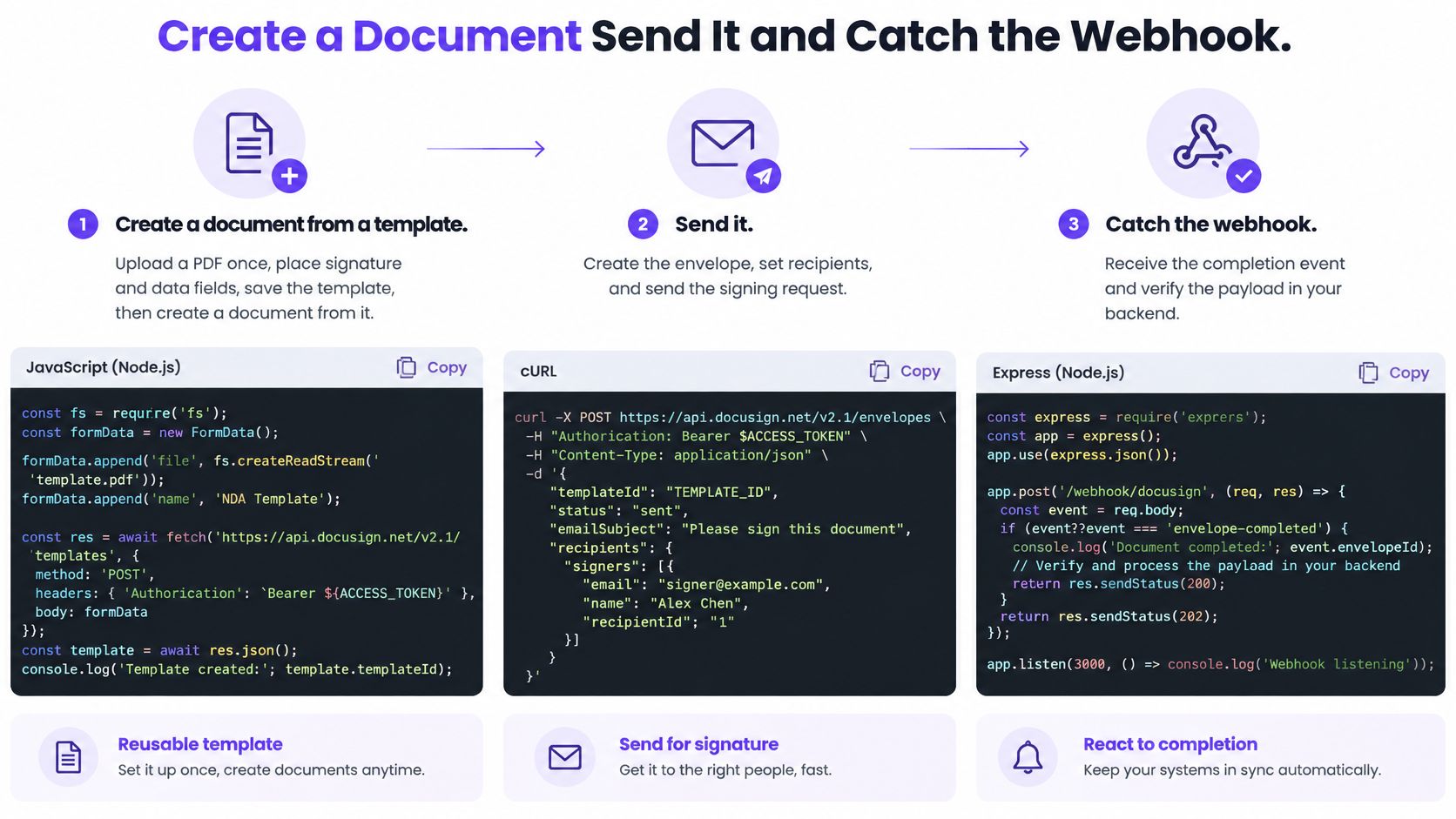
The document and delivery calls
Create a document from a template. Upload the approved offer PDF, place signature and data fields, then save it as a reusable template. Use the documented API operation to provide the candidate's role and approved field values. Check that the response gives you a stable document identifier, and inspect the document version before sending.
Send the signing request. Choose email or SMS using the supported API parameters. For sequential approval, route the document to each signer in turn. For multi-party workflows, recipients can sign the same document at the same time. Confirm that every required field is assigned to the correct recipient role before sending.
Retrieve the completed artifacts. Once all required parties have signed, download the final PDF and Certificate of Completion. Store both against the candidate's application. A successful delivery response confirms only that the request was accepted, not that the agreement was completed.
Carry an internal transaction identifier through each step. If the API supports idempotency keys, reuse the same key when retrying the same business operation. Otherwise, use your application's transaction record to detect retries and prevent duplicate offers.
The webhook handler
Treat webhook deliveries as external input. Verify each event using the provider's documented authentication method, persist accepted events, then acknowledge receipt before running slower archival or HR-system updates. Map your application states to the provider's actual event names rather than assuming a particular payload structure.
A recruiter workflow should distinguish these outcomes:
- Created and viewed: Record progress without activating downstream benefits.
- Signed: Confirm that all required parties have completed the transaction.
- Declined, expired, or voided: Stop the completion path and notify the recruiter.
- Validation failed: Hold the record for investigation rather than marking it complete.
For delivery design, see this guide to webhook security and retry strategies. Deduplicate repeated deliveries, and bind each event to the correct transaction so a replay cannot complete an unrelated or superseded agreement.
NIST's digital-signature publications, including FIPS 186-5, distinguish cryptographic signature generation and verification from ordinary workflow completion. If cryptographic signing is used, validate the finalized PDF and retain the verification result, certificate or key information, and integrity evidence.
Keep a dashboard status available as a human fallback. Recruiters need to investigate a pending transaction without sending the candidate a duplicate offer.
Embedded Signing and White Label Pages
Embedded signing controls where the signer completes the transaction. White labeling controls how that experience looks. They solve different problems, and neither should be treated as proof of stronger identity assurance.
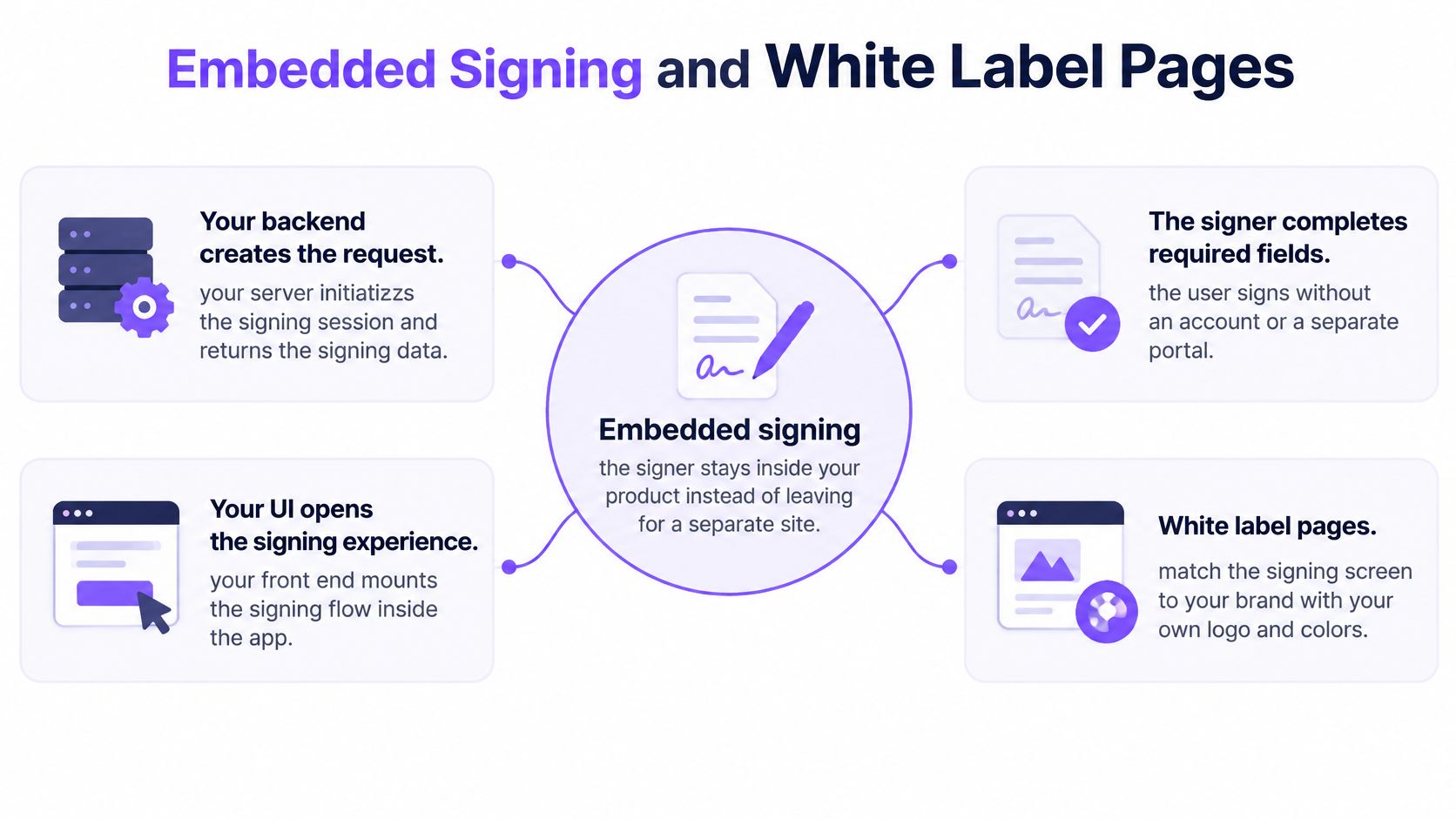
This diagram shows the application boundary you need to design.
Keep the session under backend control
Your backend should create the signing request and establish which authenticated customer may access it. Your interface then opens the signing experience using the supported integration mechanism. Don't expose your API credential in browser code.
Use the embedding guide to establish the supported approach, and review the embedded-signing feature page when defining the user experience. Confirm session lifetime, browser restrictions, cancellation behavior, and what happens when someone resumes an interrupted session.
A real estate platform could embed a listing agreement after the agent confirms the property and owner. The platform should keep the agreement's status separate from the listing's publication status, so opening the signing screen doesn't accidentally publish the property.
A professional-services portal could present an engagement letter alongside the agreed scope. The client should be able to inspect the entire agreement before signing, rather than relying on a summary beside the signature box.
Brand the experience without hiding the transaction
Our white-label partnership addresses branded signing experiences. Confirm which controls apply to signing pages and delivery messages, including logos, colors, wording, and sender presentation. Don't promise identical customization across email and SMS without checking the supported settings.
The signer still needs to understand who is requesting agreement and what they're accepting. The European Commission's explanation of electronic signatures centers the signatory's intent to be bound, not the appearance of the signature image.
That means the interface should:
- Present the full agreement: Keep it readable and navigable on a phone.
- Identify required actions: Make assigned fields and outstanding steps obvious.
- Capture affirmative intent: Separate signing from merely viewing or navigating.
- Protect the accepted version: Don't replace the file after consent.
For a visual introduction to the signing experience, use the walkthrough below.
Website embeds, shareable links, and QR codes also support people outside your logged-in application. Signers can complete our documents on a phone without installing an app, but you should still test accessibility, mobile layout, and interrupted-session recovery.
A white label e-sign experience should reduce confusion, not obscure consent or the parties involved.
Fill PDF Forms and Collect Signatures
PDF form fill and sign via API works best when you separate known data from the signer's declarations. Prefill the information your system owns, then ask the signer only for missing information and affirmative agreement.
Don't make a patient retype demographics already confirmed during registration. Don't let an enrollment form accidentally assign the guardian's signature field to the student.
Model fields by role
Our field model supports signature, date, initial, text, checkbox, and dropdown fields assigned to recipient roles. A template should express ownership explicitly, rather than relying on a developer remembering which coordinates belong to which person.
| Field group | Typical owner | Integration decision |
|---|---|---|
| Existing account information | Sending system | Prefill and control whether editing is permitted |
| Personal declaration | Relevant signer | Require that signer's response |
| Signature and initials | Assigned recipient | Bind completion to the intended role |
| Internal approval | Authorized colleague | Keep separate from the external signer's fields |
Upload the approved agreement once, map its fields, and save the template. For each transaction, supply fresh values while retaining the template version used. That's the practical basis of contract automation, not repeatedly editing and uploading the same PDF by hand.
Reject an integration design that can't answer a simple question: Which role owns this field? Ambiguous ownership becomes especially risky when several people sign the same document.
Choose between a PDF and a signing form
In healthcare, a consent PDF might include patient demographics supplied by the registration system, with the patient completing the consent decision and signature. Keep clinical explanations and required disclosures in the document presented for agreement, not only in a separate application screen.
In education, an enrollment form might collect student details while assigning authorization to a guardian. The workflow should establish the guardian's role instead of assuming that whoever opens the link has authority to sign.
A form-based approach can be more suitable when each submission collects the same structured information. Our form editor supports signature fields without requiring staff to create an individual source document for every respondent.
For teams that already work in forms, our no-code option can add signature to Google Form workflows. Developers building a product integration should still define their own data ownership, validation, and archival requirements rather than treating a form submission as a complete contract record.
A flattened PDF with a typed name isn't the same thing as a retained evidence package.
Store the completed artifact, submitted field values, and audit trail together. If you use AI-powered contract intelligence to assist review, keep its suggestions separate from the approved agreement and require a controlled decision before changing contract language.
Bulk Sending for High Volume Workflows
Bulk sending means creating individual signing requests from a recipient list. Each request needs its own document association, delivery result, signer history, and terminal state. It's not the same as asking a crowd to sign a shared PDF.
Our Enterprise offering includes bulk sending, approval workflow, and SSO. Use the bulk-send guide to scope the process, then confirm current plan entitlements, API endpoint shape, batch-size restrictions, and numeric rate limits before implementation.
Design for partial success
Say a logistics operator renews vendor agreements across its carrier network. Some requests will be delivered, some recipients will need corrected contact details, and some agreements will require manual review. A batch-level success response must not conceal those individual outcomes.
Professional-services engagement renewals create a similar requirement. Your operations team needs to identify which clients completed the new agreement, not merely whether the renewal job ran.
Build the queue around individual business transactions:
- Bound concurrency: Don't launch an unbounded loop of send operations.
- Back off deliberately: Use exponential backoff with jitter after transient failures.
- Honor documented retry signals: Confirm whether the API provides a retry instruction and how to interpret it.
- Quarantine permanent failures: Move invalid requests into a review queue instead of retrying forever.
- Preserve transaction identity: Keep retry behavior consistent with the idempotency design.
A rate-limit response shouldn't trigger every worker to retry immediately. Likewise, slow downstream processing shouldn't make the webhook endpoint time out and invite duplicate deliveries.
Keep evidence and access available
UNCITRAL's electronic-commerce framework is built around non-discrimination, functional equivalence, and technology neutrality. Operationally, that supports evaluating the reliability of the transaction process rather than treating a particular screen or delivery channel as sufficient evidence.
Keep an evidence-retrieval job separate from the sending queue. If retrieval fails, the transaction should remain visibly incomplete for archival purposes even when the signer has finished.
Operational test: Disable a delivery channel during testing and prove that staff can recover the transaction without losing its history.
For signers in the US, Canada, Australia, New Zealand, and UAE, test phone signing, email delivery, and SMS availability against the actual service configuration. Our workflows support email and SMS, but your application still needs a deliberate alternate path when a channel or identity service is unavailable.
When deciding which eSignature API suits high-volume workflows, include the cost of support, failed evidence retrieval, and re-signing. A cheap request isn't a cheap system if staff have to reconstruct the agreement afterward.
Compliance Evidence for Cross Border Teams
A cross-border signing workflow must satisfy three separate tests: whether the signature is valid for the transaction, whether personal data is handled appropriately, and what evidence the vendor provides about its security controls. One type of assurance does not answer the others.
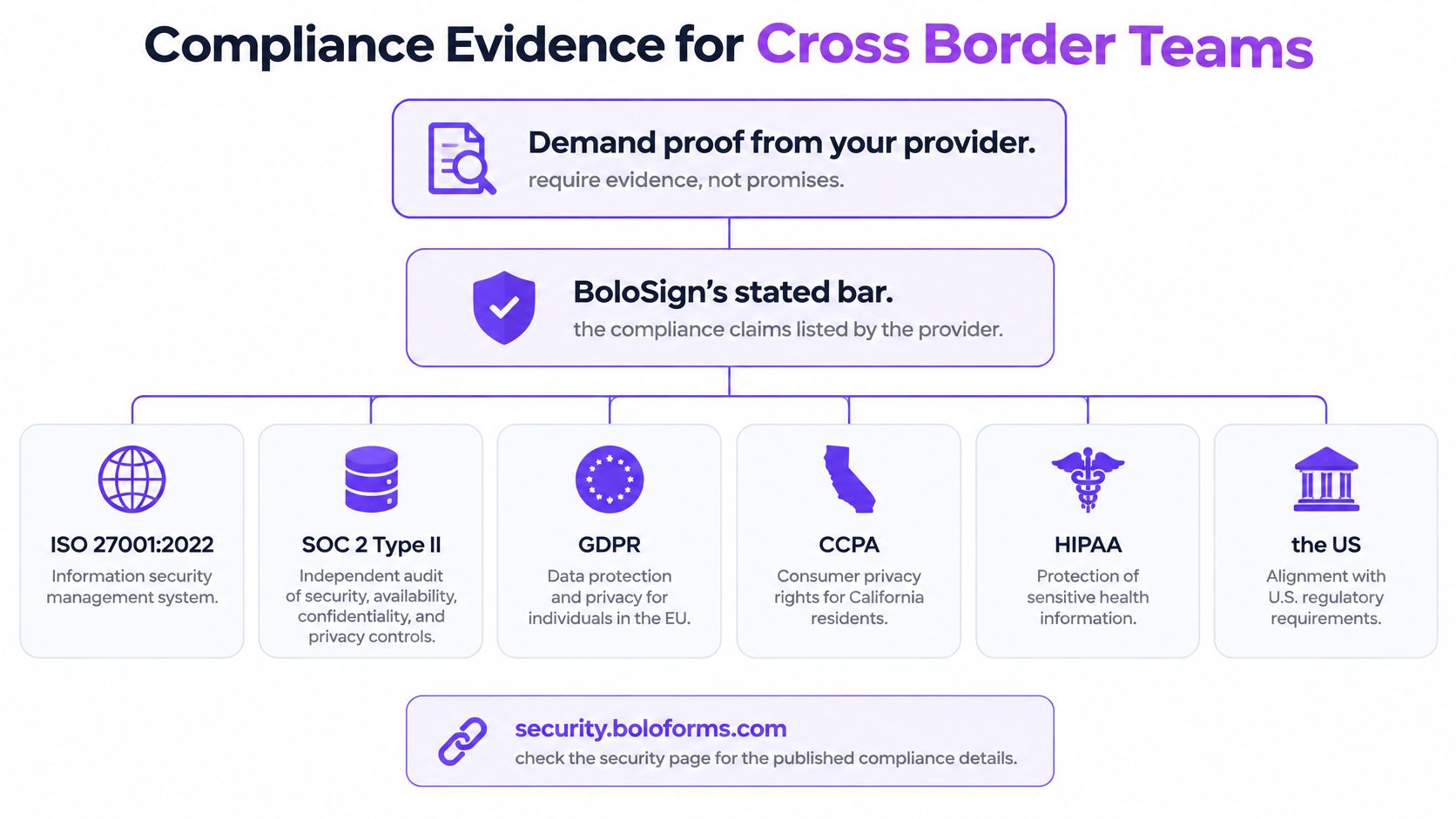
BoloSign meets ESIGN Act, UETA, GDPR, and eIDAS requirements. Its stated security and compliance credentials also include ISO 27001, SOC 2, and HIPAA. Check the applicable service scope and commitments before relying on a credential. Data-residency regions are unconfirmed, so don't assume hosting in the UAE, Australia, Canada, or the EU.
Match the law to retained evidence
The ESIGN and UETA legality guide describes the US principle that an electronic record or signature cannot be denied legal effect solely because it is electronic. Your application still needs to retain evidence of intent, consent to transact electronically, the final document, signer details, and event history.
For the EU, the European Commission's eSignature FAQ distinguishes simple, advanced, and qualified signatures. A qualified electronic signature requires a qualified certificate and a qualified signature-creation device. A typed name in an embedded signing view does not, by itself, make a signature qualified.
Under the eIDAS regulation, a qualified electronic signature has the equivalent legal effect of a handwritten signature. A qualified signature based on a qualified certificate issued in one Member State must be recognized in the others.
| Regime | Where it applies | What the API must retain or prove |
|---|---|---|
| ESIGN | US federal commercial transactions | Intent, electronic-transaction consent, final document, signer details, and audit trail |
| UETA | US states that adopted it | Evidence supporting the electronic record and signature |
| eIDAS | EU Member States | Appropriate signature level and validation context; qualified certificate and device for QES |
| GDPR | EU and EEA personal data, with relevant territorial scope | Lawful processing, controlled retention and deletion; hosting region to confirm |
| HIPAA | Applicable US healthcare workflows | Appropriate access controls and a business associate agreement assessment |
| SOC 2 and ISO 27001 | Vendor security assurance | Relevant control evidence, not a substitute for signature-law analysis |
Preserve evidence beyond completion
BoloSign's audit trail records each signer's email address, signing timestamp, IP address, and exact document version. Each signed document also includes a Certificate of Completion with those details. Retain the completed document and certificate together so the record can be retrieved as a unit.
For cryptographic workflows, retain integrity results and enough context for later validation. ETSI's trust-service guidance explains how trusted lists identify qualified providers and services. Qualification should be established from that evidence, not inferred from branding.
The right eSignature API for a cross-border transaction depends on the signature level and jurisdiction involved. US and EU rules do not establish every requirement in Canada, Australia, New Zealand, or the UAE.
For healthcare workflows, a signed PDF alone does not establish HIPAA compliance. Review access controls, contractual responsibilities, and whether a business associate agreement is appropriate.
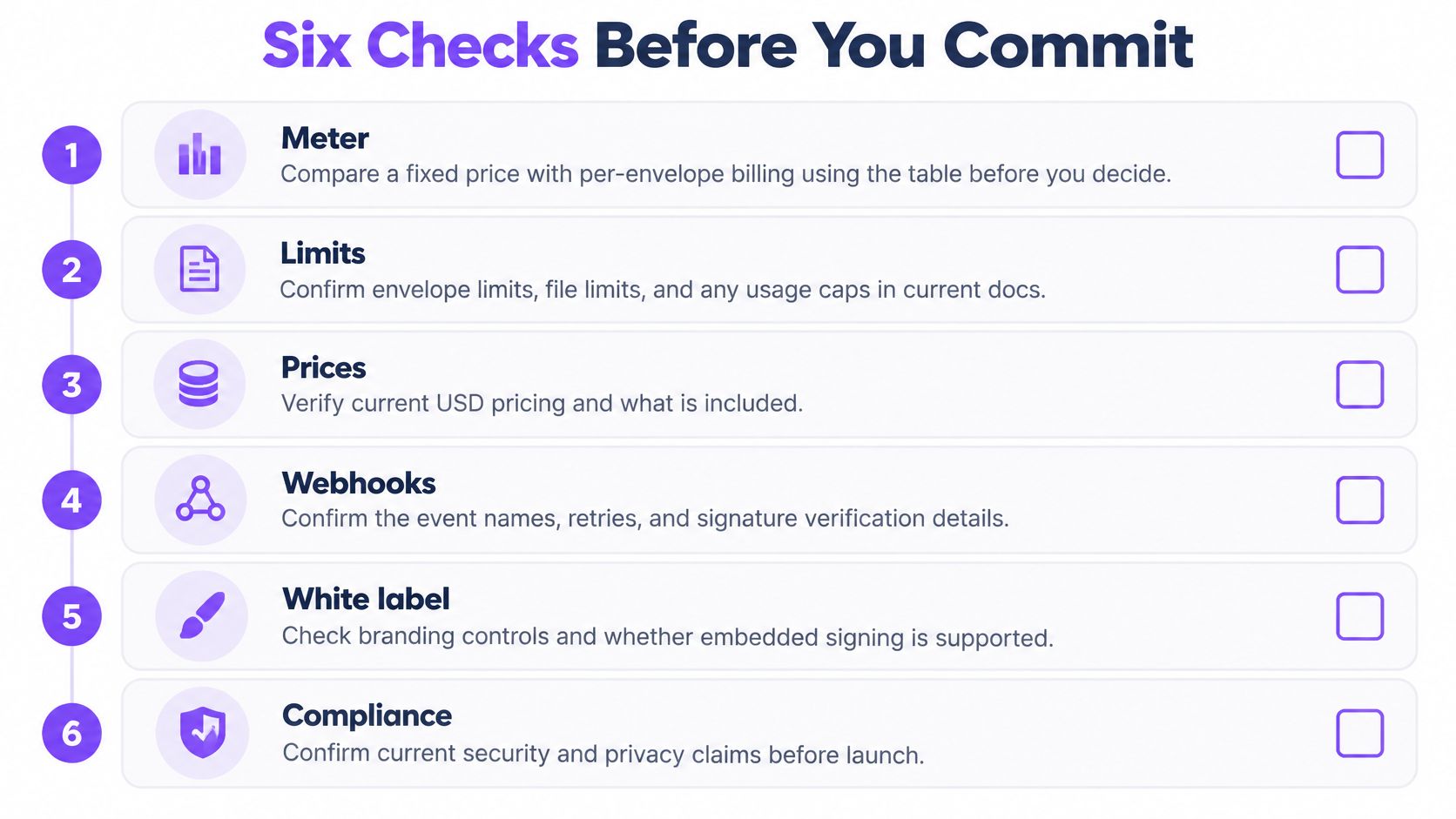
Six Checks Before You Commit
Treat these as release gates, not a feature wish list. Assign an owner to each unanswered question and keep production approval blocked until the answer is documented.
The checklist below is a useful review aid.
Make the decision auditable
Commercial meter. Use the pricing comparison to request a quote against your expected workload. Record the billable event, overage behavior, renewal terms, and any excluded capabilities. Leave unknown competitor cells open until you have current vendor evidence.
Embedding and branding. Turn the embedded-signing requirements into an acceptance test. Confirm that the quoted agreement permits your customer-facing use case and identify which branding controls are available.
Field model. Test an agreement with multiple roles and mixed field types. Deliberately omit a required value and assign a field incorrectly so you can see how validation fails before a real customer encounters it.
Webhook and test environment. Demonstrate authenticated event handling, duplicate delivery, delayed delivery, and recovery. Confirm the SDK list rather than choosing a package merely because its name resembles the provider.
Volume path. Obtain documented request, file, recipient, and batch limits. Run a controlled load test within the provider's permitted conditions, then verify that your queue pauses and resumes cleanly.
Evidence and compliance. Have security and legal reviewers inspect an actual completed evidence package. Obtain a written residency answer and match the proposed configuration to the countries and regulated information you serve.
Choose by unresolved risk
A provider that answers every commercial question but can't explain evidence export still leaves you with an architectural dependency. A provider with strong security documentation but unsuitable delivery behavior may create a support problem instead.
Keep the decision record short: the selected provider, the accepted constraints, the unresolved items, and the person authorized to accept each risk. That record is more useful than a feature-score spreadsheet nobody updates.
For searches such as global compliance eSignature APIs GDPR SOC2, treat the keywords as a starting filter. The release decision should rely on scoped documentation and a tested workflow, not matching words on a landing page.
Developer Questions and Your Next Step
Do signers need an app or account?
Signers can open a link on a phone or desktop and complete a document without installing an app. Keep your application's authentication requirements separate, especially when documents contain confidential information.
Is a successful HTTP response proof of a valid signature?
No. The endpoint contract defines what the response confirms, such as request creation or acceptance. A completed transaction depends on the required signing actions and the evidence retained for that document.
Is a typed name a qualified EU signature?
Not automatically. A qualified signature requires the certificate and device specified by the EU framework. Match the signature method to the assurance level your transaction requires.
Can I confirm sandbox access, SDK names, and data residency myself?
Check current documentation and ask the provider's technical and security teams. Record the versions and any written clarifications. If an answer is unavailable, keep it unresolved rather than assuming.
Can I move DocuSign templates?
BoloSign supports one-click DocuSign template import. Treat the imported file as a starting point: check routing, field ownership, notifications, and application references before using it for production agreements.
Make the first test prove something
Choose a representative agreement with realistic routing, but use non-sensitive test data. Complete it on a phone, interrupt a session, retry a request, then inspect the resulting document and evidence.
The milestone is a recoverable workflow with a usable agreement record, not just a successful signing screen.
Closer Innovation Labs Corp. builds BoloSign, which offers a Document Signing API, embedded signing, and a Whitelabel Partnership. One fixed price covers unlimited signatures, templates, forms, and team members. Visit Closer Innovation Labs Corp. to book a technical demo and confirm API-key access and your document-to-evidence workflow.

Paresh Deshmukh
Co-Founder, BoloForms
2 Nov, 2026
Take a Look at Our Featured Articles
These articles will guide you on how to simplify office work, boost your efficiency, and concentrate on expanding your business.