
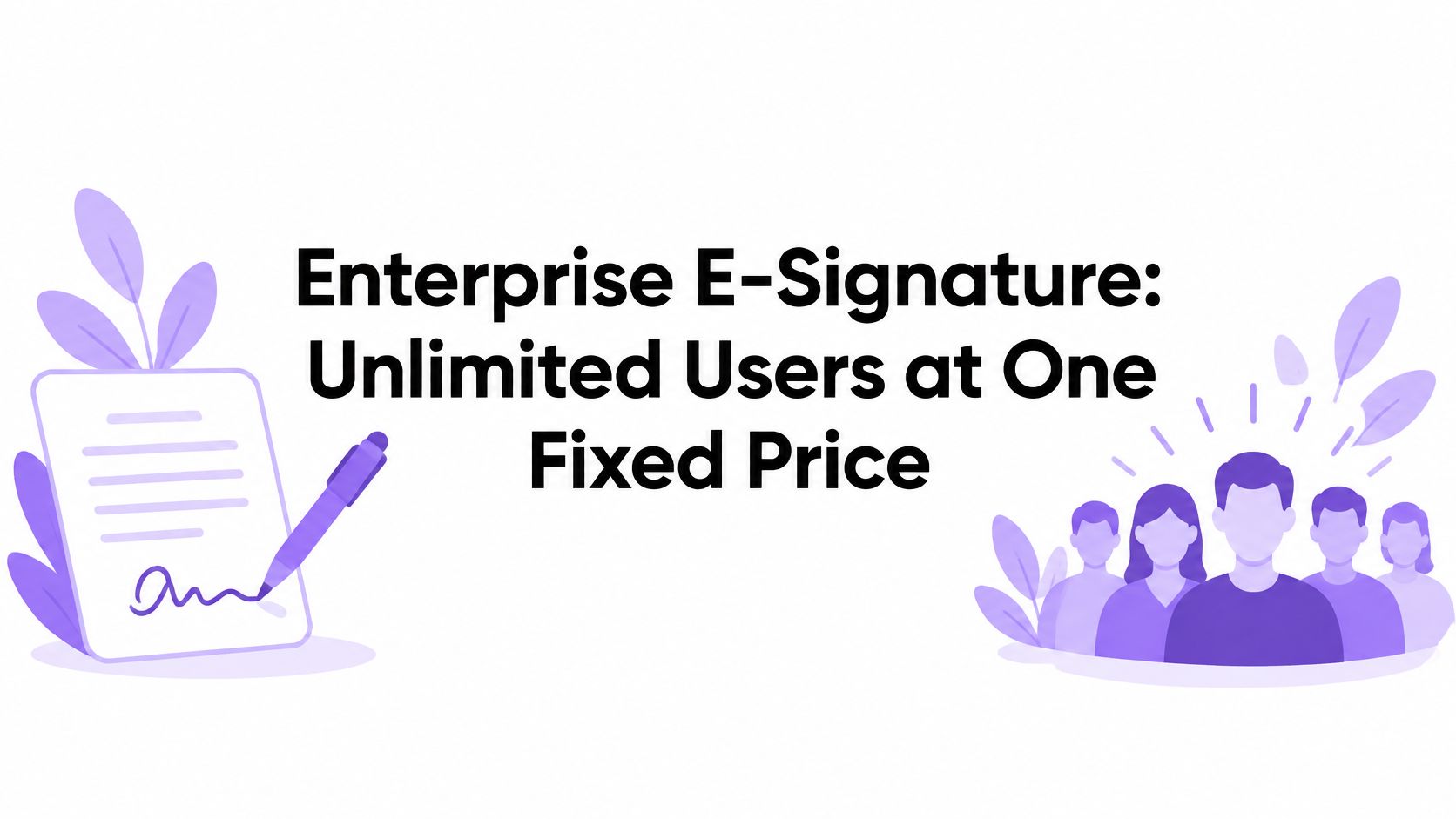
Enterprise E-Signature: Unlimited Users at One Fixed Price
Compare enterprise e-signature cost at 50, 250 and 1,000 users, and check admin controls, SSO, compliance and rollout steps before you buy.

Tired of nonsense pricing of DocuSign?
Start taking digital signatures with BoloSign and save money.
The popular advice is to buy the enterprise e-signature tool with the longest feature list and negotiate the per-seat price down. Don't. At scale, the seat price is the problem, not the discount. Every new hire, contractor, and occasional sender adds another monthly charge, and your team starts rationing licenses instead of fixing slow paperwork.
What Large Teams Need From Enterprise E-Signature
A large team needs enterprise e-signature priced by organization, not by seat, with admin control over who can send and sign, evidence that survives an audit, and rollout that doesn't become a months-long IT project. That's the short answer, and it's the standard you should hold every vendor to.
BoloSign covers that core with one fixed price for unlimited signatures, templates, forms, and team members, with no per-user or per-envelope charges. You can create, send, and sign PDFs online, reuse templates across departments, and keep a full audit trail without counting envelopes before you send a routine approval.
The Four Buying Questions That Matter
- Cost at scale: What do you pay at 50, 250, and 1,000 users, not at your pilot size?
- Admin and SSO: Can you separate senders, signers, administrators, and auditors, and can staff sign in through your identity provider?
- Regional compliance: Do ESIGN, UETA, eIDAS, GDPR, and HIPAA controls match where your signers live?
- Rollout speed: Can HR, sales, operations, and clinical teams go live in weeks with shared templates?
The trap is simple arithmetic. A per-seat price rises in a straight line with headcount, while a fixed price stays flat, so the gap widens exactly when your team grows.
Practical rule: Gather your current seat count, documents signed per month, and sending departments before you compare quotes. Without those three numbers, you're buying a demo, not a platform.
Enterprise E-Signature Cost at 50, 250 and 1,000 Users
Run this table with your own quotes before you talk about features.
| Team size | Per-seat tool, annual cost | BoloSign, fixed annual price | Annual difference |
|---|---|---|---|
| 50 users | 50 × your per-seat monthly price × 12 | One fixed price | Per-seat annual total minus fixed price |
| 250 users | 250 × your per-seat monthly price × 12 | Same one fixed price | Per-seat annual total minus fixed price |
| 1,000 users | 1,000 × your per-seat monthly price × 12 | Same one fixed price | Per-seat annual total minus fixed price |
The formula doesn't hide anything. Annual per-seat cost equals users times list price per seat per month times 12. Fill it only from a published rate or a written quote, and fill the BoloSign column from your enterprise quote. Don't accept a verbal enterprise number.
A Worked Example You Can Copy
A staffing agency with 250 recruiters sending candidate agreements and client contracts multiplies 250 by the quoted per-seat monthly rate, then by 12. Compare that result with BoloSign's fixed price, which covers unlimited signatures, templates, forms, contracts, and team members with no added charge for extra signatures or users. At 50 users the gap may look manageable. At 250 and 1,000, every added seat adds another monthly charge while the fixed price doesn't move.
Judge savings against your own seat count and at least two written quotes from other vendors, because the difference depends on your situation. Then add the costs vendors bury elsewhere: admin hours spent managing seats, higher tiers for SSO or advanced audit features, and extra charges for envelopes or integrations.
A fixed price settles the signature volume question. It does not confirm SSO provisioning, regional compliance, language support, or bulk sending limits, so put those in the enterprise terms. If your signing volume regularly exceeds typical usage, ask for the high-volume plan and its enhanced capabilities in writing. If you expect to pass 100 users within two years, model the 1,000-user row first. That's the contract you'll live with.
Admin Control, SSO and Branding for Large Teams
One fixed price means little if a thousand users can each edit a contract template. Admin control is what turns unlimited seats into a usable rollout, and every control below belongs in the signed contract, not the sales deck.
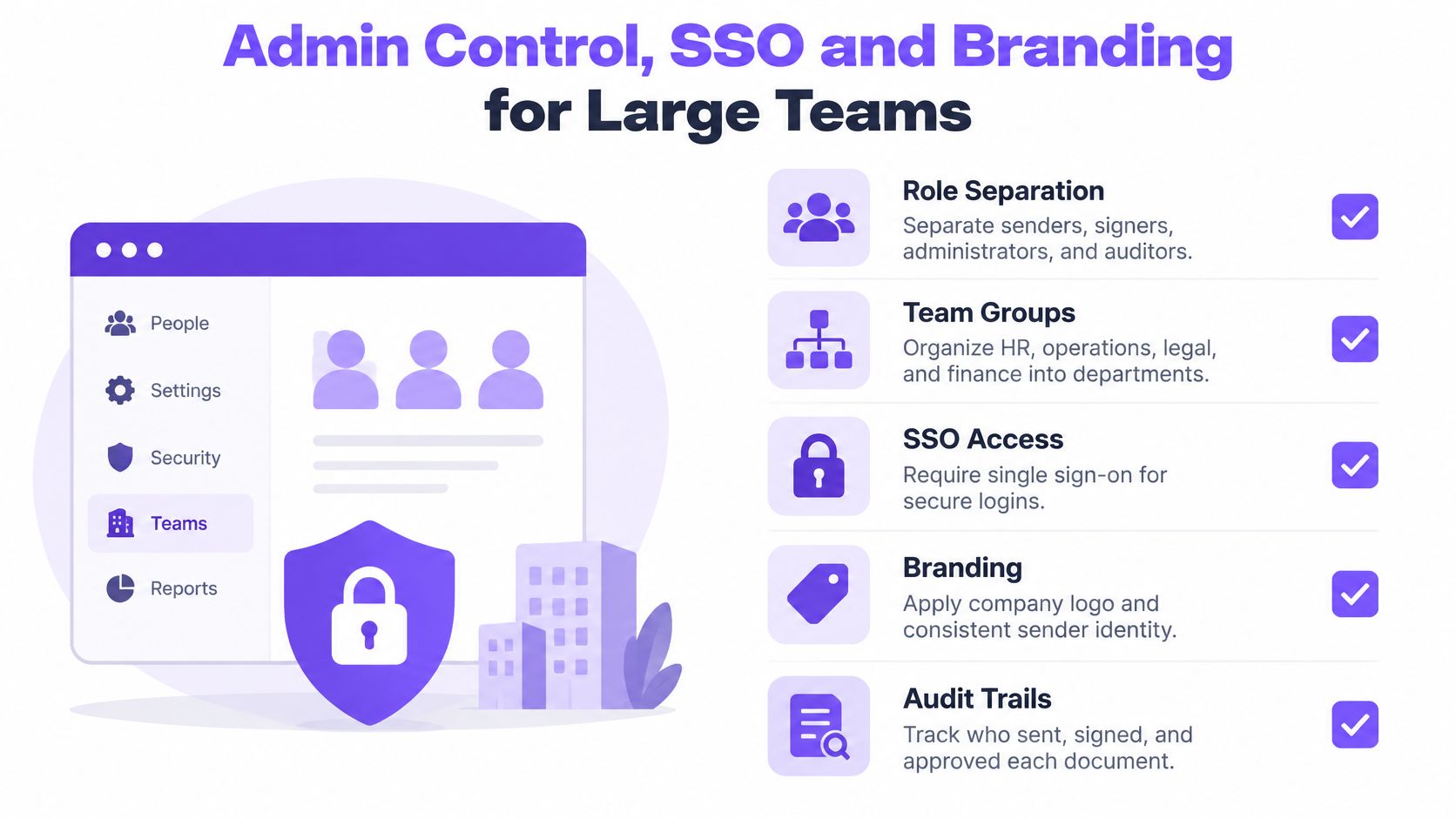
- Approval workflow: Route documents through internal approval before they reach an external signer. The Enterprise plan includes single sign-on (SSO), an approval workflow, and bulk sending of individual requests to a large list of signers.
- Shared templates: Let one administrator maintain the approved version that departments reuse, instead of letting every office edit its own copy. Templates are reusable, so legal controls the wording once.
- Usage visibility: Use a real-time dashboard to see who sent what, what's pending, and which location needs follow-up.
- Bulk sending: Send the same request to hundreds of signers at once instead of building each envelope by hand. Onboarding waves and policy acknowledgments stop consuming admin hours.
SSO and Provisioning
With SSO, staff sign in through your company identity provider, so access ends when an employee leaves and IT disables that account. Review the SSO feature details, then confirm which identity providers are supported and whether automatic provisioning and removal are included in your plan. Don't assume provisioning works the way your IT team expects. Put the supported providers, the setup owner, and the deprovisioning behavior in the order form.
Branding and White Label
Customizable signature request emails matter because signers trust requests that clearly come from you. A healthcare staffing firm, for example, can send candidate agreements and clinic consent forms under its own name and logo, which reduces ignored emails and support calls. BoloSign signing forms can also be embedded on your own website, so prospects submit and sign documents without leaving the page. Firms that want signing inside their own product should review the white-label partnership option and confirm what can be customized, what's powered by the API, and what's excluded.
Copy these into your RFP: Which roles exist by default, and can document access be restricted by department? Can template editing be locked to administrators? Which SSO providers are supported? Is provisioning automatic, and what happens to access when an account is disabled? What branding appears on request emails, signing screens, and completion notices?
Compliance and Audit Trail Requirements by Region
In the US, the Adobe summary of United States e-signature regulations states that the Uniform Electronic Transactions Act (UETA) was published in 1999 and Congress enacted the Electronic Signatures in Global and National Commerce Act (ESIGN) in 2000; ESIGN provides that a contract, record, or signature cannot be denied legal effect solely because it is electronic, and UETA has been adopted by 49 states, the District of Columbia, Puerto Rico, and the U.S. Virgin Islands, while New York uses its own statute. That legal base is only the entry ticket. At 50 users one office may touch two jurisdictions; at 250 and 1,000 users the same workflow can cross states, EU signers, and regulated records, so counsel needs a region map before procurement signs.
| Framework | What it covers | Where it matters most |
|---|---|---|
| ISO 27001 | Information security management system | Global enterprise procurement |
| SOC 2 | Security, availability, and confidentiality controls | US and global enterprise procurement |
| GDPR | Processing of personal data of people in the EU | EU operations and EU customers |
| ESIGN | US federal validity of electronic signatures and records | US contracts and records |
| UETA | State-level electronic transaction rules | US state contracts and records |
| eIDAS | Signature levels and legal effect in the EU | EU and cross-border agreements |
| HIPAA | Safeguards for protected health information | US healthcare, clinics, and staffing for clinics |
BoloSign names ISO 27001, SOC 2, GDPR, eIDAS, ESIGN, UETA, and HIPAA in its compliance materials, and its eSignatures are described as covered by over 60 international laws on validity and legal effect. Treat that as scope to verify, not permission to assume every country is solved. For Canada, Australia, New Zealand, and the UAE, ask counsel which statute governs each document type, then require the vendor to map controls to that statute. Apply the same discipline to maintaining compliance as cloud environments change, because evidence must remain valid after systems and vendors change.
A fixed signature price can cover high volume; it does not prove regional fit. Confirm which requirements are included and which depend on plan, signer location, language support, SSO provisioning, or a regulated workflow.
What Your Audit Trail Must Preserve
Keep the original file, signer identity or authentication event, signing timestamp, recipient sequence, IP address, signer email, and exact document version for every signed record. Review the audit trail feature against that list, and validate records at ingestion and again before payment, HR filing, or litigation export.
Match assurance to risk. An HR policy acknowledgment does not need the same identity checks as healthcare consent or a high-value procurement contract, and forcing the strongest check everywhere will hurt completion rates.
Ask in writing: Can we export signed PDFs and audit records without vendor help? Which signature levels are supported for EU work? How long are logs retained, and who can access them?
Distributed Teams, Languages and Signer Identity
Start with a map, not a template. List every department, location, and time zone that sends documents, and every country where signers live. A tool that works for headquarters HR can still fail a logistics depot, a school admissions office, or a clinic network.
- Assign templates by department: Give HR, operations, sales, clinical administration, and admissions their own approved templates for offer letters, delivery confirmations, enrollment forms, and consent documents.
- Centralize visibility: Use shared templates and one admin dashboard across sites so managers can check pending and completed work for every location.
- Confirm languages before you promise them: Check the localization details for signing pages and notification emails, then get the supported list in writing for your countries.
- Name the individual signer: Don't treat a shared company account as a personal signature, especially for EU-facing work.
For distributed teams, e-sign for distributed enterprise teams works when the workflow is consistent but the signer is specific. A staffing employee, clinician, teacher, property agent, driver, or customer signs as an individual, while the employer, clinic, school, broker, or logistics company may need separate organizational authentication for certain records.
Capture individual identity and consent clearly, preserve the final document and audit trail, and test signing on the phones your field staff use. Developers who need signing inside internal systems should review the Document Signing API page for embedding and integration options.
Don't launch in a new country until a local signer has completed a real document in the local language on a mobile connection. A translated landing page proves nothing.
A 30-Day Rollout Across Departments and Locations
Roll out in four weeks with one owner and a narrow scope. Don't start by migrating every legacy template, because you'll spend the month cleaning documents nobody sends anymore.
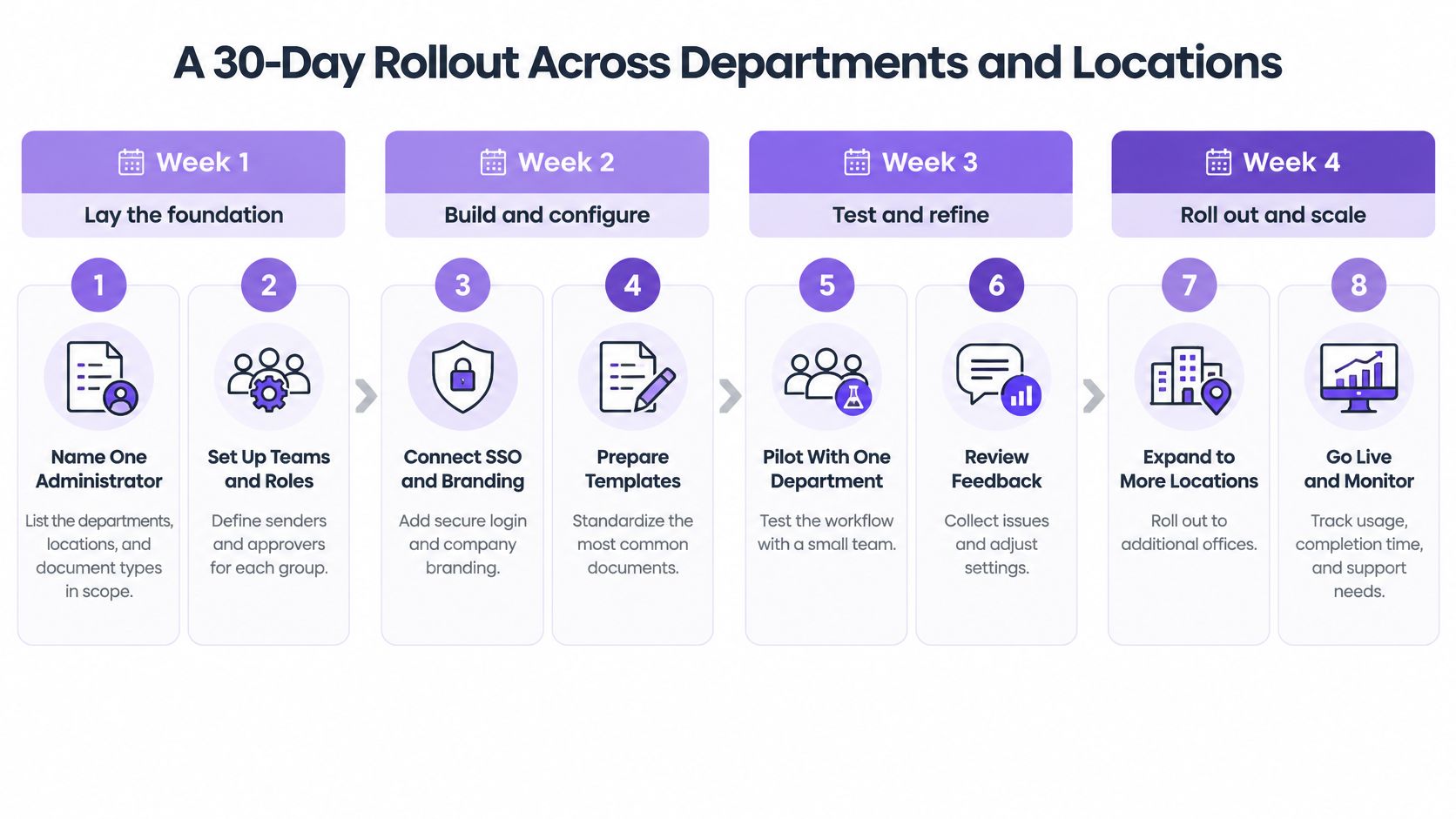
Week 1 Set Ownership and Access
- Name one administrator: List departments, locations, and document types in scope, and decide who can approve template changes.
- Set up teams and roles: Give senders and signers only the access they need, and separate auditors from document authors.
- Confirm SSO and provisioning: Test sign-in, removal, and reactivation, or record in writing that a capability isn't available in your plan.
Week 2 Build the Templates People Actually Send
- Build shared templates: Start with HR offer letters, clinic consent forms, real estate listing agreements, logistics delivery confirmations, and school enrollment forms.
- Confirm language coverage: Test each signing page and notification email with the locations that'll receive it.
The European Commission Q&A on trust services under eIDAS notes that since 1 July 2016, an electronic signature is created by a natural person primarily to express consent, while electronic seals serve organizational purposes. Build that distinction into your templates now. The individual consents as signer, and your organization applies its own authentication or sealing only where a record requires it.
Week 3 Pilot and Week 4 Expand
- Run a pilot: Use two departments and two locations, include phone signing, and fix confusing fields before you expand.
- Test bulk sending: Use bulk send for large lists, such as a staffing firm sending onboarding packets to a new cohort.
- Review usage and evidence: Check the dashboard and sample several audit trails before you add more departments.
Describe onboarding help only as the vendor confirms it in writing. If support isn't included, plan for a self-run rollout and assign internal owners for training and template cleanup.
When a Full Contract Lifecycle Platform Is Needed
Buying a contract lifecycle platform to send simple approvals wastes budget. E-signature already covers the send, sign, and file loop, and a fixed price covers unlimited signatures, documents, and team members, so headcount growth alone never justifies the upgrade. Decide based on what happens after signing.

The upgrade pays off when three signals show up together: contracts go through several negotiation rounds before signature, more than one legal entity owns the agreements, and renewals or obligations are already being missed. One signal is noise. All three mean your bottleneck sits in contract management, not signature collection.
Long-term validity is the other reason to look past basic signing. The European Commission standards and specifications page identifies PAdES for PDF, XAdES for XML, and CAdES for CMS-based documents as baseline profiles under eIDAS, with levels from B-level basic properties to LTA-level archival timestamps. Use stronger preservation for employment records, healthcare consent, procurement, and financial contracts you'll keep for years, because certificate expiration or lost validation data can make a valid agreement hard to verify later.
Watch this overview, then compare it with your own post-signature workload.
BoloSign describes contract management and AI-powered contract intelligence aimed at faster reviews. Before you rely on any vendor's lifecycle claims, get written answers on redlines, obligation tracking, renewal alerts, and repository search. Then run the simplest test available: list your last ten contracts and mark every step that happened after signing. If most rows stop at filing, keep your e-signature plan and spend the difference elsewhere.
Enterprise E-Signature Questions Answered
Are enterprise e-signatures legally binding in the US and EU? For most agreements, yes, when you capture consent, identity, and a complete record. US work relies on ESIGN and UETA, while EU work uses eIDAS signature levels, and a qualified signature requires specific technical elements for handwritten equivalence.
Does the fixed price cover every user and document? It covers unlimited signatures, templates, forms, and team members, with no per-user fees. Check your written terms for high-volume use beyond typical patterns, because that's where surprises hide.
Do external clients need an account to sign? Signers receive an email link and can sign without printing or scanning. Confirm whether any account step applies in your workflow, then test it with an external address before launch.
What happens if we switch vendors? Signed PDFs and audit records should be exportable with validation data kept alongside each record. The NIST Digital Signature Standard specifies algorithms that authenticate the signatory and detect unauthorized modification of signed data, so preserve the original document bytes, signature value, timestamp, recipient sequence, and immutable audit record. Validate at ingestion and again before payment, HR filing, or litigation export.
How long should signed records be kept? Retention depends on document type and local law, so set periods with legal counsel by category. Don't let a vendor default become your retention policy by accident.
Start a Free Trial and Test Your Team Rollout
Start the free trial with one real department and a live agreement, not a sandbox sample. It includes unlimited document signing, reusable templates, signing order, audit trails, mobile signing, Google Sheets integration, and team collaboration. No credit card is required, and you can send the first document in under 2 minutes.
Give the team three jobs in that window: upload a business contract PDF and send it in a few clicks, route one document to several signers at once, and have an external recipient open the email or SMS link on a phone and sign without an app download, printing, or scanning. Then inspect the audit trail for signer email address, timestamp, IP address, and document version, and check dashboard usage before finance assumes the fixed price covers the rollout.
Before launch, get written answers on SSO, user provisioning, language coverage, regional compliance needs, and whether expected volume fits standard terms or a high-volume plan. One fixed price covers unlimited signatures, templates, forms, contracts, and team members, but controls and limits still belong in the quote.
Closer Innovation Labs Corp. builds BoloSign for teams that need unlimited signatures, templates, forms, and team members at one fixed price, with audit trails, reusable PDF templates, integrations, and secure digital signing that scale from small businesses to enterprise needs. Test the rollout with a real department, compare the evidence against your compliance checklist, and visit Closer Innovation Labs Corp. to start your trial or book a demo.

Paresh Deshmukh
Co-Founder, BoloForms
6 Nov, 2026
Take a Look at Our Featured Articles
These articles will guide you on how to simplify office work, boost your efficiency, and concentrate on expanding your business.