

Enterprise E-Sign Without Per Envelope Pricing Guide
Learn how enterprise e-sign without per envelope pricing works, when flat-rate saves money, and how to evaluate, migrate, and negotiate the best deal.

Tired of nonsense pricing of DocuSign?
Start taking digital signatures with BoloSign and save money.
A staffing agency sends offer letters, a healthcare provider routes consent forms, and a logistics team collects delivery confirmations before the month is over. The documents are routine, but the invoice is not. Every new department adds senders, every busy workflow consumes envelopes, and abandoned requests can still count against the allowance.
That's why enterprise e-sign without per envelope pricing has become a procurement priority. The issue isn't only whether a signature costs a few dollars. It's whether finance can forecast the software bill while HR, sales, operations, and compliance teams use the same system freely.
The budgeting shift: Move from paying for every document event to standardizing the workflow that creates, routes, signs, and stores those documents.
A flat-rate model can make that shift practical, but unlimited volume alone won't fix fragmented templates, manual approvals, or disconnected systems. This guide explains how envelope pricing works, when unlimited usage can improve the economics, which capabilities matter beyond price, and how to migrate without interrupting daily work. It also shows where BoloSign fits for teams that need to create, send, and sign PDFs, templates, and forms through a simple, secure workflow.
Introduction Why Per Envelope Pricing Breaks at Scale
A staffing firm can send similar candidate packets daily, while property teams route leases, schools collect consent forms, and procurement groups approve vendor contracts. The workflows repeat, but per-envelope charges treat each send as a new cost event.
That charge may apply when a request is sent, even if the recipient never signs. A hiring campaign, seasonal property push, or increase in vendor onboarding can therefore raise the invoice before the related work is completed. Finance sees document activity, not just completed agreements.
The enterprise e-signature market has expanded as organizations replace paper processes. One market summary reported $1.2 billion in enterprise e-signature spend in 2022, up 50% from 2020, with a projection of $3.5 billion by 2025. It also reported enterprise adoption growing by 400% since 2019, with 71% of organizations using e-signatures for at least some contracts in 2022 and 74% in 2024. These figures come from enterprise e-signature industry statistics.
Electronic signing also has an established legal foundation in major markets. The U.S. ESIGN Act became law in 2000, and the EU's eIDAS framework took effect in 2016. For procurement teams, the question is how to purchase e-signature software without turning routine document volume into an unpredictable operating expense.
Fixed pricing can suit organizations with frequent, repeatable workflows. It works like a transit pass: the predictable fee matters only when teams use consistent routes rather than sending every request through a different process. BoloSign offers unlimited documents, team members, and templates at one fixed price, positioning it as a cost-effective option for high-volume workflows.
The pricing decision is therefore also a workflow standardization decision. Unlimited envelopes pay off when teams have agreed templates, approval routes, sender permissions, and destinations for completed records. If those elements remain fragmented, a flat rate may remove the envelope meter while leaving the underlying operational waste in place.
How Enterprise E-Sign Pricing Models Work
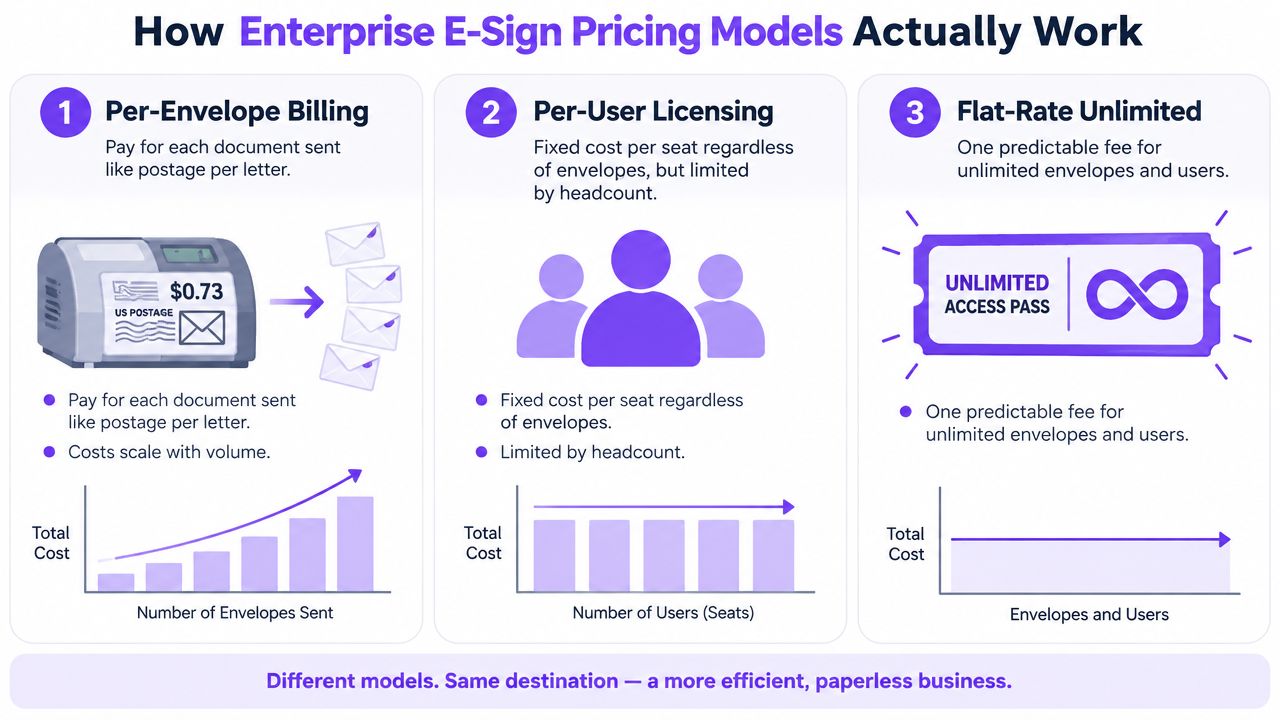
A procurement team can choose a plan that looks predictable and still face rising costs if every department sends documents differently. Per-envelope billing charges for each transaction package, much like a postage meter charges for each item sent. A flat-rate plan replaces that meter with a fixed fee, but its value depends on whether the organization follows a consistent route for preparing, approving, sending, and storing documents.
An envelope is generally the transaction package sent for signature. It may contain one document or several, depending on the provider's rules. Procurement teams need to confirm when an envelope becomes billable, which actions reduce the allowance, and how the provider handles overages.
One major provider states that standard paid plans include 100 envelopes per user per year. An envelope becomes billable when it is sent, even if the recipients never complete it. Additional usage is charged on a pay-as-you-go basis through the provider's eSignature plans and pricing. A monthly plan may instead include about 10 envelopes per user per month, while other standard business plans may use an annual allowance of about 100 envelopes per user. General commentary on volume-based e-signature pricing is available in enterprise envelope volume pricing commentary.
Three common models
| Pricing Model | How It Bills | Best For | Risk at Scale |
|---|---|---|---|
| Per-envelope | Charges for each package sent, with overage fees after the allowance | Teams with light, stable volume | Variable costs and abandoned-envelope charges |
| Per-user | Charges for seats, usually with usage or feature rules | Teams with predictable headcount | Cost rises as users are added |
| Flat-rate unlimited | One fixed fee for unlimited documents, templates, and team members | High-volume, standardized workflows | Savings weaken if processes remain fragmented |
A per-user license makes transaction costs easier to forecast, yet headcount can become the main cost driver. Sales may need CRM automation for a small group, HR may need bulk onboarding, and operations may need forms. If each employee requires a full paid seat, the organization can pay for broad access even when only a smaller group sends documents regularly.
Flat-rate pricing changes the procurement question from expected envelope consumption to operating consistency. Can every approved workflow use shared templates, defined approval routes, controlled sender permissions, and the same record destination without a new charge for each document or user? That question matters for organizations routing agreements across departments and borders, including teams in the United States, Canada, Australia, New Zealand, the UAE, and other markets.
Legal requirements still need separate review. RNC Group's resource on commercial contract e-signature in Israel provides context for teams assessing commercial e-signature in that jurisdiction. The pricing model should fit the legal and operational setting rather than determine it alone.
Flat rate fits frequent document activity, distributed users, and a shared operating standard. It does not repair inconsistent processes by itself. Teams should first agree on templates, routing rules, forms, integrations, and audit-record practices. Unlimited envelopes then support the standard workflow, rather than masking the cost of fragmented work.
When Flat Rate Saves Money and How to Calculate ROI
A staffing team sends candidate agreements in bursts, a clinic sends intake forms, and a logistics group requests vendor approvals. If each package creates a separate charge, the invoice rises with every workflow variation. The right comparison starts with actual operating patterns, not the vendor's headline price.
Collect monthly envelope volume, active senders, included allowances, overage rates, and requests that are sent but never completed. The final input is easy to overlook. If billing begins at send, an abandoned request still uses budget, whether a candidate withdraws, a patient stops an intake process, a property transaction falls through, or a vendor never returns an approval packet.
Use this framework:
- Monthly envelope volume: Count every package sent, including incomplete requests.
- Current cost per envelope: Record the included allowance and pay-as-you-go rate.
- User cost: Add seat charges when growth requires more senders.
- Operational cost: Estimate time spent chasing signatures, rebuilding documents, and checking status.
- Flat-rate cost: Compare the full subscription with the combined current expense.
A simple break-even calculation is:
Current monthly document cost = billable envelopes multiplied by the effective envelope rate, plus applicable user and feature charges.
Estimated monthly savings = current monthly document cost minus the fixed-rate subscription.
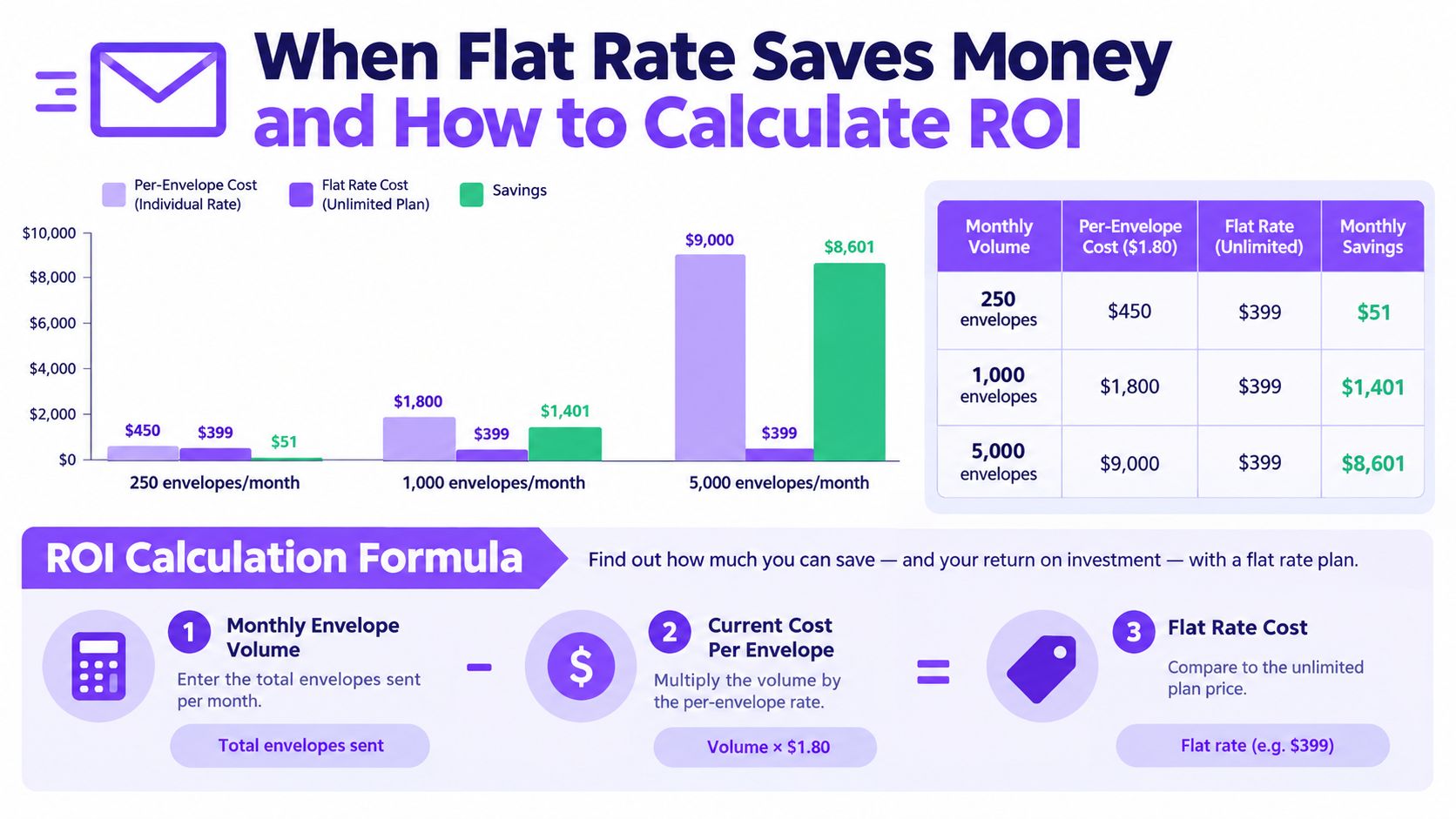
The supplied comparison uses illustrative planning points: 250 envelopes per month at $1.80 per envelope equals $450 per month, compared with a $399 flat-rate plan, a stated saving of $51. At 1,000 envelopes per month, the per-envelope cost is $1,800, compared with $399, a stated saving of $1,401. At 5,000 envelopes per month, the per-envelope cost is $9,000, compared with $399, a stated saving of $8,601. Treat these figures as scenario inputs, not universal market prices.
Volume changes the negotiation
A flat-rate offer should be compared with the vendor's real renewal rate, expected usage tier, and overage terms, not only with a public list price. Volume discounts can materially reduce per-envelope costs, so procurement should request the actual commercial terms for the expected usage level.
Model each workflow separately. A staffing agency can distinguish candidate onboarding from client agreements. A healthcare organization can include consent and intake traffic. A real estate brokerage can count repeated disclosures, while logistics teams include vendor approvals and delivery records. Education providers should count admissions, consent, and certification documents. Professional services firms can include engagement letters, statements of work, and change orders.
The cost model also exposes process variation. If departments use different templates, approval routes, sender permissions, or storage destinations, unlimited envelopes may fund inconsistency rather than improve operations. Standardize those elements first. Then a flat rate supports a repeatable workflow, much like a shared production line makes each unit easier to process.
Use the BoloSign calculator collection to organize the broader comparison, then validate assumptions with finance and department owners.
The strongest ROI case usually appears when high volume combines with repeated document patterns. If teams create one-off PDFs, route them manually, and store them in separate places, removing envelope charges may reduce the invoice without fixing the underlying work.
What to Evaluate Beyond Price in an Enterprise Platform
A flat fee is only valuable if the platform can become the organization's shared signing system. Procurement should evaluate the complete path from document creation to retention, not just the moment when a signer adds a signature.
Start with legal validity and evidence. Under ESIGN and UETA, a signer must show intent to sign, consent to electronic business, have the signature associated with the record, and be able to retain and reproduce the signed record. Those requirements are summarized in e-signature compliance guidance for developers.
For EU workflows, ask how the platform handles the eIDAS signature tiers. The cited compliance material states that qualified electronic signatures provide the highest legal recognition and are comparable to notarized signatures, a distinction that matters in cross-border and regulated agreements. Review the eIDAS, ESIGN, and UETA compliance comparison with legal counsel when the agreement requires a particular signature level.
The operational checklist
- Audit evidence: Require a tamper-evident audit trail that records signer identity and intent, timestamps, IP address, document hash or version, and the complete signing-event log. These fields support compliance evidence and help teams demonstrate document integrity, as described in SOC 2 contract evidence and e-signature audit preparation.
- Workflow structure: Look for reusable templates, form-based capture, multi-recipient routing, conditional approvals, reminders, and embedded signing. Unlimited sending has limited value if users still rebuild the same agreement manually.
- Integration coverage: Test connections with HubSpot, Salesforce, Google Drive, Slack, Pipedrive, Zapier, Make, Pabbly, and Microsoft Teams where those tools already hold customer, employee, or operational data.
- Identity and access: Check SSO, role permissions, signer verification, administrative controls, and separation between departments. BoloSign's identity verification feature is relevant when workflows need stronger signer checks.
- Privacy and security: GDPR implementation depends on secure personal-data processing, consent management, and data minimization. Secret management, webhook signature verification, and audit logging also matter in integrations, according to GDPR and HIPAA considerations for e-signature systems.
- Service commitments: Ask for support coverage, response expectations, retention rules, export options, and an SLA that matches the importance of the workflow.
Healthcare teams should confirm HIPAA support and any required Business Associate Agreement before sending protected information. Education providers should review consent, retention, and access controls. Finance, legal, and professional services teams should verify whether the audit record can be reproduced for internal reviews or disputes.
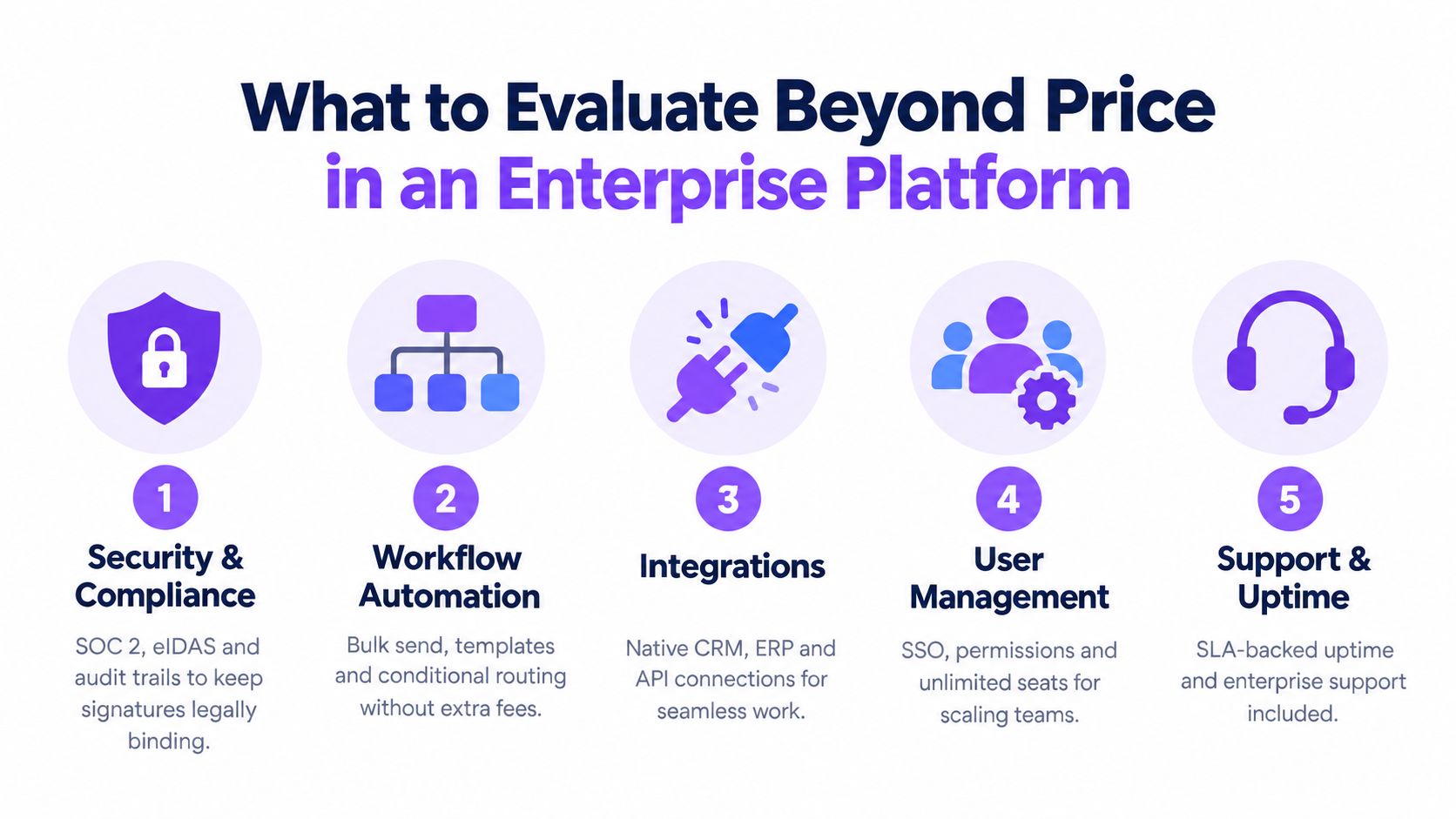
The central procurement insight is that unlimited signatures are a workflow standardization decision. If HR, sales, operations, and compliance all use approved templates, common routing rules, and connected storage, the fixed fee supports scale. If each team maintains its own process, the organization may only replace transaction waste with governance waste.
Migrating to Unlimited E-Sign Without Disrupting Workflows
A flat-rate plan does not fix a disorganized signing process. Migration works best as a controlled operations project: preserve reliable documents and automations, then standardize the steps that cause teams to bypass approved workflows.
Start with an audit
List active templates, owners, senders, recipients, approval paths, integrations, retention rules, and common failure points. Separate high-volume workflows from exceptional agreements. A staffing onboarding packet makes a practical pilot because its fields, recipients, and routing are repeatable. Healthcare onboarding can also work, provided the team confirms privacy and compliance requirements before using live records.
Review duplicate templates next. Two departments may rely on nearly identical PDFs with different names, outdated clauses, or inconsistent signer fields. Consolidation reduces training and creates one approved source of truth, which makes an unlimited plan more valuable because teams follow the same process.
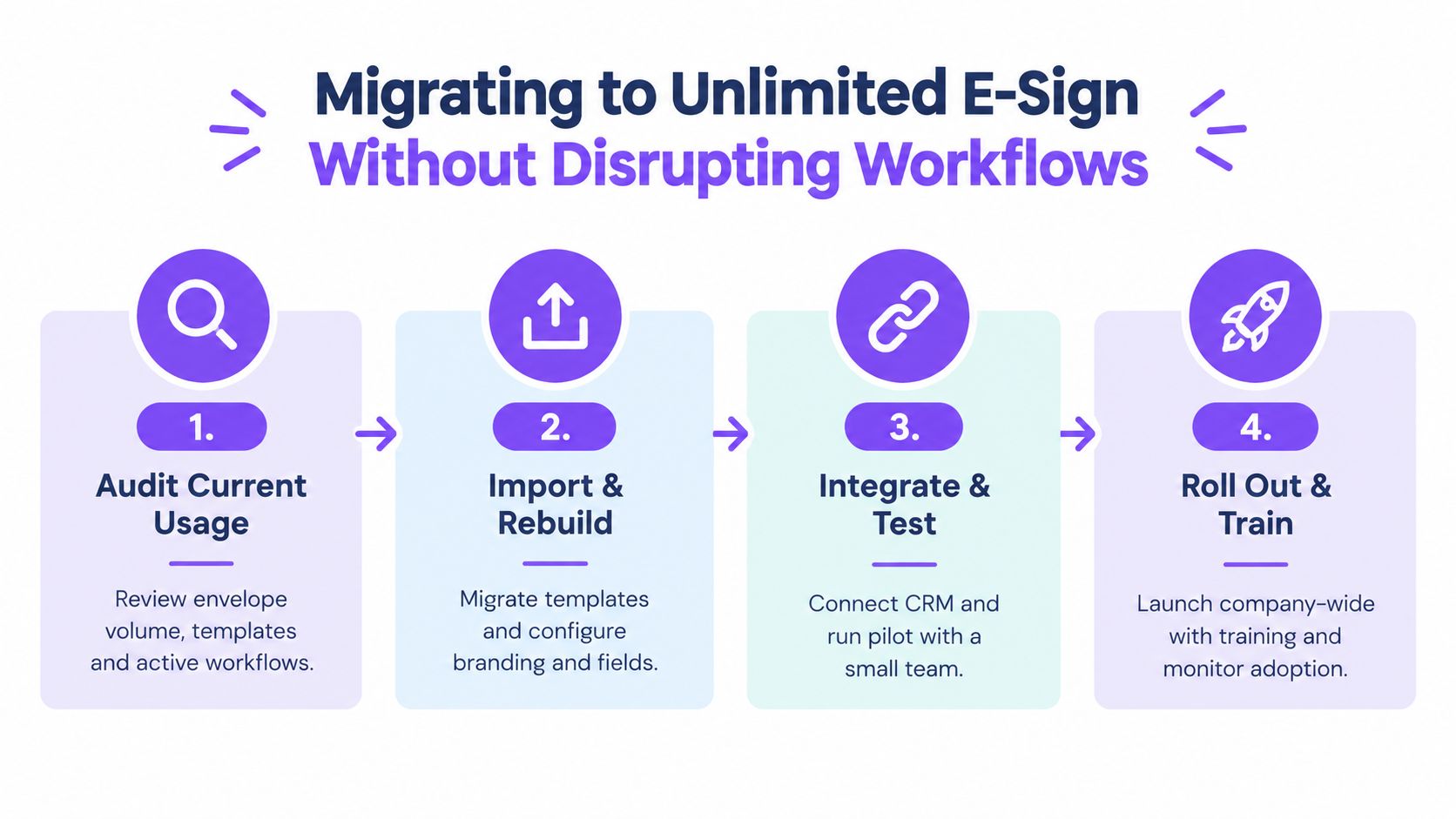
Import, integrate, and pilot
Import templates, configure branding, define required fields, and assign permissions before inviting every department. BoloSign supports one-click DocuSign template migration through its DocuSign migration feature. Rebuild only the parts that need improvement, and keep familiar naming conventions so users can find approved documents quickly.
Connect the systems that trigger or receive signing events. Zapier, Make, CRMs, Google Drive, Google Sheets, Slack, and Microsoft Teams can link document activity with existing team tools. Test completed, declined, expired, and corrected requests, not only successful submissions.
Run the pilot with one high-volume team. In staffing, check whether recruiters can create and send candidate documents without manual rework. In healthcare, test intake routing, identity checks, audit records, and access boundaries with suitable test data. In logistics, verify mobile signing and automatic filing for completed delivery documents.
Train around the new standard
Give users a short rulebook:
- Choose the approved template: Do not upload a new copy when an approved version exists.
- Use the correct route: Send HR, sales, operations, and compliance documents through their assigned workflow.
- Check status centrally: Use the dashboard instead of separate spreadsheets.
- Escalate exceptions: Ask an administrator to change a template or routing rule rather than creating a workaround.
BoloSign lets teams create, fill, and sign PDFs, and add signature fields inside Google Forms. Its AI-powered contract intelligence can support review and decision workflows, while audit trails and compliance controls support secure document handling. The goal is continuity, fewer manual handoffs, and a shared process that can absorb more users without recalculating envelope costs.
Negotiation and Contract Tips for Procurement Teams
Procurement teams should negotiate the meaning of “unlimited,” not only the subscription price. Record unlimited documents, signatures, templates, forms, and team members in the order form. List exclusions just as clearly, including department limits, recipient caps, API activity, storage, and automation.
Ask the vendor to separate the signing fee from costs that can appear later:
- Onboarding: Is implementation included? Does moving existing templates cost extra?
- Support: What response times cover administrators and urgent workflow failures?
- Retention: Are storage duration, exports, or archived records billed separately?
- Integrations: Do CRM, API, embedded signing, Zapier, or Make connections require another tier?
- Renewals: How can prices change, and can the agreed rate continue at renewal?
- Compliance: Which controls, reports, BAAs, and verification features belong to the contracted plan?
Use historical envelope activity as evidence during negotiations. A volume discount can reduce the unit price, yet a fixed rate may offer a clearer budget when several departments are expected to increase usage. Compare both options against actual workflow demand, including recurring templates, approval routes, integrations, and likely user growth.
Flat-rate pricing only delivers its full value when the operating model is stable. If every department creates its own template, sends documents through different routes, or relies on manual exports, unlimited envelopes can fund inconsistency rather than efficiency. Set the standard first, then price the platform against that standard.
BoloSign positions its fixed-price model as a cost-effective option for high-volume workflows, with unlimited usage rather than per-envelope charges. Ask the vendor to define that promise in practical terms, including what the team can use now, which exclusions apply, and what changes at renewal.
Procurement rule: If “unlimited” is not written into the contract with its exclusions clearly stated, treat it as a marketing description, not a commercial term.
Choosing Flat Rate E-Sign for Predictable Growth
Enterprise e-sign without per envelope pricing fits organizations that have meaningful document volume, multiple departments, and repeatable workflows. It's especially useful when HR, sales, healthcare, real estate, logistics, education, or professional services teams need to send documents without asking finance to approve every increase in usage.
The decision comes down to three checks:
- Volume: Are envelopes frequent enough that usage-based billing creates budget uncertainty?
- Standardization: Can the organization consolidate templates, routing, forms, and integrations?
- Compliance: Can the platform provide the legal evidence, privacy controls, identity verification, and retention practices each workflow requires?
BoloSign offers unlimited signatures, templates, forms, and team members at one fixed price, with support for PDF workflows, Google Forms, AI-powered automation, and secure integrations. Its stated compliance coverage includes ESIGN, UETA, eIDAS, GDPR, HIPAA, ISO 27001, and SOC 2. The practical value comes from combining predictable pricing with a process employees can follow consistently.
Start by auditing your current envelope usage and selecting one high-volume department. Then compare the complete cost of your existing system, including overages, abandoned requests, user growth, support, and integration needs, against a fixed-rate implementation.
Closer Innovation Labs Corp. offers BoloSign, a simple eSignature and contract workflow platform with unlimited documents, templates, forms, and team members at one fixed price. Visit Closer Innovation Labs Corp. to start a 7-day free trial, test your real PDF and form workflows, and see whether flat-rate signing gives your growing teams the predictable operations they need.

Paresh Deshmukh
Co-Founder, BoloForms
22 Sep, 2026
Take a Look at Our Featured Articles
These articles will guide you on how to simplify office work, boost your efficiency, and concentrate on expanding your business.



