

Electronic Signature Workday Integration How to Deploy
Learn electronic signature Workday integration step by step — architecture, SSO, APIs, workflows, compliance, testing and rollout with BoloSign.

Tired of nonsense pricing of DocuSign?
Start taking digital signatures with BoloSign and save money.
If you're managing Workday and signatures still happen through email, shared drives, and last-minute PDF chasing, you already know the failure pattern. A recruiter sends an offer letter outside the workflow. A manager downloads the wrong version. The candidate signs on mobile, but the final copy never makes it back to the worker record. Then HR gets pulled into an audit question that should have been answered by the system itself.
That's why electronic signature Workday integration matters. The value isn't just faster signing. It's controlled routing, cleaner identity mapping, and a document trail that returns to the system where HR works.
Why Workday Needs Integrated Electronic Signatures
A candidate accepts an offer on their phone at 9:12 p.m. The signature completes in the vendor portal, but the signed copy never posts back to the Workday worker record. Two weeks later, HR operations is checking inboxes, Legal wants proof of signer authentication, and the recruiter is asking which version went out. That is the failure integrated signing is supposed to prevent.

Workday is built to treat signature as part of the business process, not as a side task. Workday's own guidance on e-signature integrations places setup inside the platform's admin model and ties it to governed process design, which is the right starting point for HR, finance, and procurement teams that need traceability instead of email proof (Workday eSignature integration guidance).
The practical requirement is simple. One Workday event should trigger one signing package, with the right signer roles, the right identity checks, and a signed artifact that returns to the worker record with its audit trail intact.
That sounds obvious, but many deployments stop at “document sent for signature” and ignore the hard parts. An offer event may need a candidate signature, an internal approver acknowledgement, and a recruiter copy. A compensation change may need a different role grid, a different retention rule, and no external signer at all. Cross-border hiring adds another layer because some documents only need standard e-signature, while others may require higher-assurance identity or jurisdiction-specific qualified signing and eID handling. If that logic sits outside Workday, HR loses control of the business process at the exact point auditors care about most.
The business case usually appears first in high-volume flows such as offers, onboarding forms, policy acknowledgments, and worker change documents. One Workday-focused integration overview explains the operational gain clearly: teams cut handoffs by removing email routing, manual downloads, and separate filing steps from HR signing workflows (Workday HR e-signature integration example)).
A useful rule from real implementations is this: if the document originates from a Workday business-process step, the signed document, completion status, signer metadata, and certificate evidence should post back automatically to the same worker or transaction record.
Integrated signing also exposes governance gaps fast. Teams often start by trying to speed up signatures, then discover the larger issue is inconsistent templates, unclear ownership of document versions, and weak retention controls across worker records. That is why signature work often overlaps with broader HR document management practices in growing teams.
For HR operations leaders replacing paper-heavy processes, paperless transition guidance from LeaveWizard is a useful operational companion because it addresses change management, not just software selection.
BoloSign belongs in this discussion as a signing and document workflow option for teams that need controlled PDF, template, and form execution without forcing every use case into a larger enterprise stack. The important question is not brand preference. It is whether the tool can map a Workday event to a governed signing trigger, support the required signer roles and jurisdiction rules, and preserve audit evidence on the return trip back into Workday.
Choosing Your Integration Architecture
A common failure pattern looks like this. HR wants an offer letter signed at the Offer business-process step. Legal needs a qualified signature for one country, a standard e-signature for another, and the signed PDF plus certificate evidence filed back to the worker record. Procurement picks a connector based on speed, then the team learns too late that the signing method, signer-role model, or return payload does not match the Workday event they started from.
Architecture choice decides whether that flow stays governable after go-live.
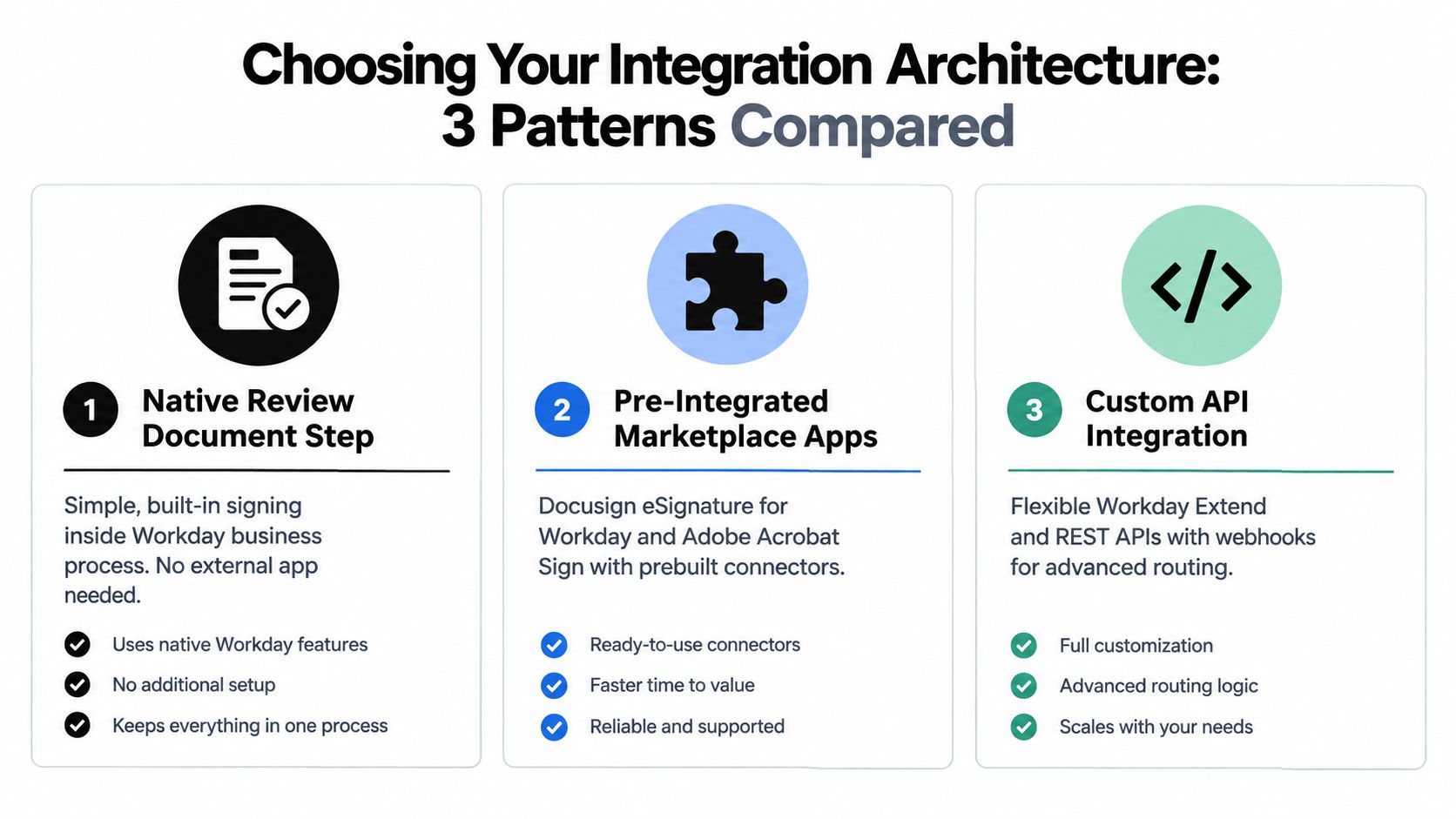
The three patterns that actually matter
The first pattern is the native Review Document step in Workday Business Process Framework. The second is a pre-integrated marketplace app such as DocuSign eSignature for Workday or Adobe Sign. The third is a custom API or embeddable integration for teams that need tighter control over document generation, signer assignment, identity checks, or external signing experiences.
Adobe's Workday quick-start guide confirms a point implementation teams care about. Adobe Sign can be used through the Review Document step across a large set of Workday business processes, including Offer, Distribute Documents and Tasks, and Propose Compensation (Adobe Sign Workday quick-start guide). Broad coverage helps, but coverage is not the same as fit. The question is whether the connector can trigger from the exact business-process event you need, apply the right signer grid by role, and write the completed package back to the originating Workday record with audit evidence intact.
Workday eSignature Architecture Options Compared
| Architecture Pattern | Best For | Trade Offs |
|---|---|---|
| Native Review Document Step | Internal acknowledgments, policy receipt, and low-variance approval flows handled fully inside Workday | Limited control over external signer experience, less flexibility for jurisdiction-specific signing requirements, and fewer options for custom evidence handling |
| Pre-Integrated Marketplace Apps | Faster deployment for common HR, finance, and procurement flows with supported connector behavior | Separate vendor licensing, connector-specific setup constraints, and less control over role-based routing beyond the app's supported model |
| Custom API Integration | One Workday event mapped to one signing trigger, jurisdiction-aware QES or eID flows, custom portals, advanced template logic, and precise round-trip filing | More implementation effort, more regression testing, and clearer ownership needed across HRIS, security, and integration teams |
How to choose without creating support debt
Use the native pattern when the requirement is simple and internal. A handbook acknowledgment or a one-role employee consent usually fits.
Use a marketplace app when the process starts in Workday and stays close to the provider's supported routing model. That is often the right answer for offer letters, onboarding packets, compensation letters, and other HR documents where speed matters more than edge-case customization.
Use the API route when one event in Workday has to produce different signature experiences by worker country, signer role, or document type. This is the architecture I reach for when an Offer step in Workday must trigger one signer sequence for a U.S. candidate, a different QES path for an EU worker, and still return the signed PDF, completion status, timestamp trail, certificate file, and signer identity data to the same worker transaction without manual cleanup. Competitors often gloss over that round-trip detail. It becomes painful during audit season.
A practical rule helps. Start with the business-process event, not the vendor demo. Define the trigger point, the signer roles, the required signature level by jurisdiction, and the exact artifacts that must return to Workday. Then choose the lightest architecture that can do all four reliably.
For teams comparing the same design question across other back-office platforms, this overview of ERP-connected e-signature integration patterns is a useful reference.
Prerequisites Permissions and Identity Setup
A signing flow can look perfect in a workshop and still fail the first time an offer moves to Ready for Signature. The usual cause is not the template. It is a missing role in the signature grid, an identity mismatch between Workday and the signing platform, or a sandbox setup that was treated like production with test data swapped in at the last minute.
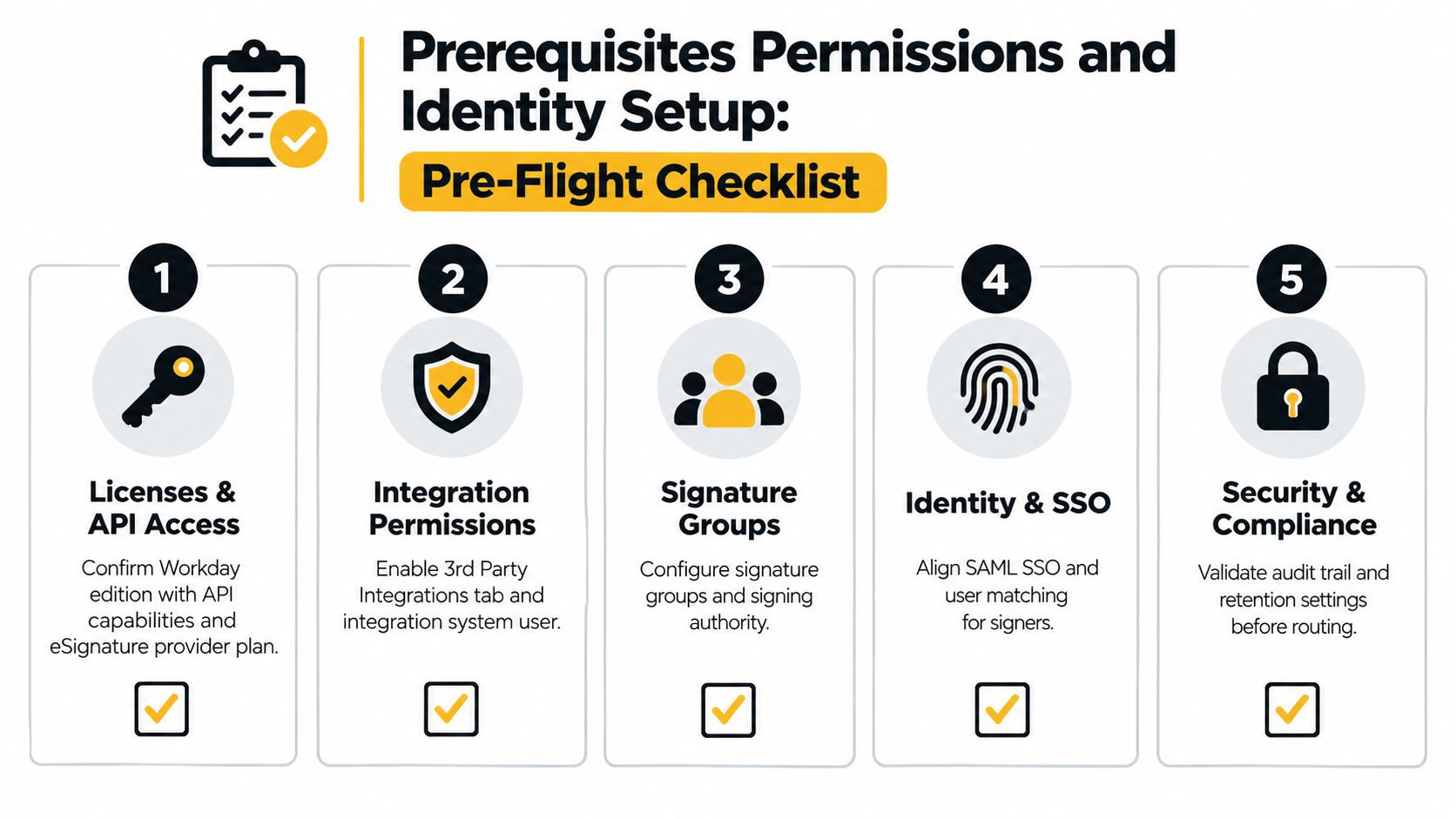
The pre-flight items that matter
Start with one concrete event. For example, an Offer business-process step triggers a candidate signature, then an internal approver countersignature. That sounds simple until you add country rules, delegated approvers, and the requirement to write the signed PDF, completion timestamp, signer identity data, and certificate file back to the worker record. Permissions and identity design decide whether that round trip works cleanly.
At minimum, validate five areas before anyone builds routing logic:
- Provider licensing and API scope: Confirm the plan includes the API operations you need, not just basic send-for-sign features. If your design requires webhook callbacks, recipient authentication options, or certificate retrieval for QES cases, verify those now.
- Workday security access: Give the HRIS or integration owner access to the integration setup area, the target business process, document generation tasks, and the security domains tied to worker documents and completed BP artifacts.
- Signature-role setup: Define real signer roles in the signature grid before testing. Placeholder roles create false positives in design reviews and failed routing in execution.
- Identity mapping: Decide which identifier is authoritative for each signer type. Worker, candidate, manager, and external signer records do not always resolve the same way, especially after name changes or pre-hire conversions.
- Environment separation: Keep sandbox and production isolated, including credentials, callback URLs, certificates, and test identities.
The role model matters more than teams expect. If one Workday event can trigger different signing paths by role or jurisdiction, map that explicitly. A U.S. employee acknowledgment may only need a standard employee signature. An EU employment agreement may require a higher-assurance signer check, or a QES path, plus a separate employer signatory role. Set those roles before document design, because role order, authentication method, and audit artifacts usually travel together.
What to validate before anyone configures workflows
I usually review identity in three passes.
First, confirm who Workday thinks the signer is at the exact business-process step that will trigger signature. Candidate records, pre-hires, contingent workers, and employees can expose different email and legal-name fields. If the signing platform receives a preferred name while the signed certificate reflects a legal name, audit review gets messy fast.
Second, confirm how the signing platform authenticates that signer. SSO helps for internal approvers. It does not solve identity proofing for external candidates or jurisdiction-specific QES requirements. Teams that need stronger lifecycle control across multiple signing tools should review enterprise-grade e-sign tools with SSO and SCIM before they lock the provisioning model.
Third, confirm what must return to Workday and where it will live. For regulated flows, “completed” status is not enough. The worker record often needs the signed PDF, envelope or agreement ID, signer timestamps, IP or authentication logs where applicable, and any completion certificate your compliance team expects to see later.
Document integrity and signer data
Choose early between Workday-generated documents and uploaded PDFs. Workday-generated documents usually produce fewer reconciliation problems because the source data, the document version, and the worker transaction stay tied together. Uploaded PDFs are sometimes necessary, but they raise the risk of version drift and weaker traceability if the file changes outside the business process.
If Adobe Sign is part of the design, Adobe's Workday quick start guide is useful for the setup sequence and integration prerequisites (Adobe Sign for Workday quick start guide). The operational point is straightforward. Require clear recipient identity data before send, and preserve document integrity before the file leaves Workday. Small configuration choices here prevent larger audit problems later.
This section is where governance shows up in technical form. Get the permissions, role grid, and identity rules right first. Then the workflow logic has a fair chance of doing what the business process owner thought they approved.
Mapping Workday Workflows to Signing Flows With APIs and Webhooks
A recruiter advances an Offer business process at 4:45 p.m. The candidate should get one document, in one signing order, with the right legal standard for their country, and the completed file has to come back to the right record without HR chasing status by email. If that mapping is vague, the first decline, delegate, or cross-border signer exposes it fast.
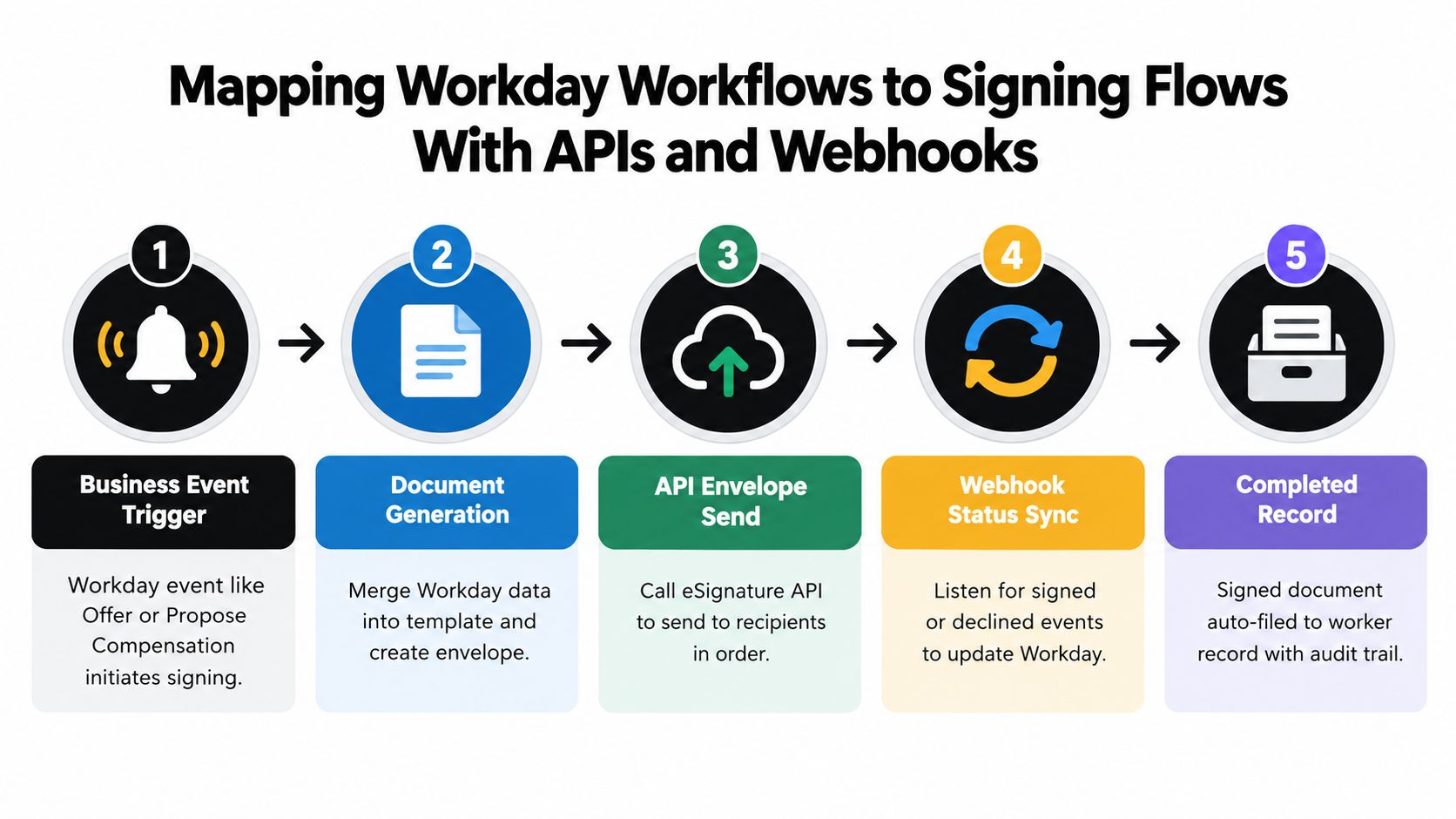
The pattern I trust is narrow on purpose. One Workday business-process event should map to one signing trigger. Offer generates offer signature flow. Policy acknowledgment generates acknowledgment flow. Contract amendment generates amendment flow. Teams create support headaches when they push unrelated events through one generic envelope and then try to recover meaning with conditional logic.
Start with the Workday event and role grid
Workday's e-signature model centers on the Review Document step in the business process. The practical design question is not just which file goes out. It is which event fired, which signer roles belong to that event, what order they sign in, and what needs to come back when the transaction completes. Workday marketplace guidance for e-signature integrations aligns with that approach, including role-based signature grids and return of the completed document to the originating record (Docusign eSignature for Workday marketplace listing).
That sounds obvious until you map real processes.
An offer flow usually has a candidate signer and sometimes an internal counter-signer. A promotion letter may require worker signature only. A policy acknowledgment may need no counter-signature at all, but it still needs clean filing against the worker and a status that the business process can act on. If those flows share one template and one recipient model, exceptions multiply.
Role grids deserve more attention than they usually get. They are where business intent becomes executable routing. Define roles by process, not by document name, and be explicit about fallback behavior if a manager delegate, recruiter change, or regional HR partner steps in mid-process.
A concrete mapping example
For an offer process, the clean mapping looks like this:
- Workday event: Offer business process reaches Review Document
- Document source: Workday-generated offer letter from the approved template
- Signing trigger: Integration launches one signature request for that offer event
- Role grid: Candidate signs first, internal approver signs second, or the reverse if your policy requires countersign before release
- Jurisdiction rule: Apply the signature type required for the worker's country or contract type, including QES or eID-backed identity proofing where needed
- Webhook return: Status updates return to the same transaction, and the signed PDF plus provider audit evidence attach to the worker or candidate record
That last point gets glossed over in a lot of implementation writeups. “Completed” is a status. It is not the record. The record is the finished file, the signer identities, timestamps, envelope or agreement ID, and any certificate or evidence your legal team expects later.
What APIs and webhooks actually need to handle
Even with a marketplace connector, it helps to design the integration like an API workflow because that is how production issues show up. You need clear payload rules on the way out and deterministic handling on the way back.
A workable model usually includes:
- Event context: worker or candidate ID, business-process name, transaction ID, template version
- Recipient data: signer role, email, name, order, locale, authentication requirement
- Signature policy: standard electronic signature, advanced signature, or QES path based on jurisdiction and document type
- Document package: generated PDF, supporting attachments if allowed, and immutable metadata linking the file to the Workday transaction
- Callback states: sent, opened, signed, declined, voided, expired, failed
- Round-trip payload: completed PDF, certificate, audit log, provider transaction ID, signer timestamps, and final status mapped back to Workday
The hard part is exception handling.
A signer declines. An internal signer changes after the envelope is sent. A French employment document needs a stronger identity step than a U.S. handbook acknowledgment. A manager wants to resend without restarting the business process. Those are the cases that separate a demo flow from an operable one.
Treat jurisdiction and signature level as routing logic
Cross-border employers cannot treat every Workday document as a basic click-to-sign event. Some documents only need a standard signature. Others need stronger identity verification or a qualified certificate path. Put that decision in the routing layer early, using worker location, employing entity, document type, or business-process subtype. Do not leave it to manual choice by HR once the document is already out for signature.
That also affects the role grid. If a jurisdiction requires a certain signer sequence or stronger proofing for one role, build that into the event mapping rather than creating a separate off-system workaround. Workday should remain the process anchor, even when the signing provider handles identity proofing outside Workday.
Keep the return path strict
The completed agreement has to return to the same worker context and transaction that produced it. I prefer immutable IDs passed from Workday into the signature request and returned in every callback. That cuts down on reconciliation work when there are duplicate names, multiple pending events for the same worker, or reissued documents.
BoloSign fits into this layer as a signing service with API and embedded workflow options. That is useful when the Workday event is only one step in a broader process, such as pre-sign intake, post-sign retrieval, or contract review outside the core HR transaction. The product choice matters less than the discipline of the mapping. One event, one trigger, one role grid, one return path.
Test the ugly cases before go-live. Decline to sign. Expired request. Reassigned internal signer. Country-specific signature method. Webhook retry after a timeout. If those paths work cleanly, the happy path usually takes care of itself.
Security Compliance and Audit Trail Controls
An HR partner launches an offer letter from Workday at 4:45 p.m. The candidate signs from Germany, the hiring manager countersigns from New York, and legal asks a week later for the exact signer evidence, certificate type, and final file attached to the worker record. That is the moment weak controls show up.
For Workday signing, security and audit design starts with one question: what evidence has to survive review after the business process is complete? If the answer is only “a document was submitted,” a light approach may work. If the answer includes signer identity, signing order, consent record, IP or device evidence where available, certificate details, and proof that the completed document returned to the correct worker event, configure for that from the start.
Where audit trails usually break
The gap I see most often is the split between Workday process history and provider-side evidence. Teams assume the PDF in the worker record is enough. It usually is not.
A defensible record has three parts tied together by immutable transaction data:
- Workday business-process context: which event generated the document, for which worker, under which staffing or document workflow
- Provider-side signature evidence: who signed, when, in what order, with what authentication or identity proofing method, and whether the method met local legal requirements
- Round-trip attachment and status update: the signed file, completion status, and audit metadata returned to the same worker record and transaction that created the request
If any one of those parts sits outside the chain, audit review turns into manual reconstruction.
Match the signature method to the document and country
Generic “e-signature enabled” language causes trouble. A policy acknowledgment in one country may only need standard electronic signature with clear identity mapping. A cross-border employment agreement may require stronger identity proofing, advanced signatures, or qualified signing based on local counsel's position and the jurisdiction where the agreement must hold up.
For European flows especially, check whether the process needs simple electronic signature, AES, or QES under eIDAS, and whether the provider supports local identity methods that employees will complete. Workday ecosystem offerings now reflect that reality, including marketplace solutions built around qualified signatures and country-specific electronic ID options rather than one global default method (DocuBridge QES and Workday marketplace context).
The practical design decision is straightforward. Map one Workday event to one signing trigger, then assign the signature method by jurisdiction and document class before the request leaves Workday. Do not let HR choose ad hoc after the envelope is already in flight.
Role-based controls matter as much as encryption
Security review often over-focuses on storage and under-focuses on signer roles. The harder failures come from the wrong person signing in the right system.
Set controls at the role level:
- Candidate, worker, manager, HR partner, and company signer should each have explicit signing rights by document type
- Signer order should be fixed where legal sequence matters
- Authentication method should vary by role if one signer needs stronger proofing than another
- Delegation and reassignment rules should be logged, limited, and reviewable
- Completed document access should follow least-privilege rules in Workday and in the signature platform
That role grid is what keeps a regulated process from turning into a shared mailbox exercise.
Preserve the combined record
The signed PDF is only one artifact. Keep the audit trail, certificate of completion, callback payload references, and provider transaction ID associated with the worker record or the related Workday transaction. If Workday stores the document while the provider stores the evidence log, retention rules need to account for both systems together.
I also recommend preserving the provider event IDs that correspond to sent, viewed, signed, declined, expired, voided, and completed statuses. When a worker has multiple open transactions, those IDs save hours of reconciliation work.
For teams that need help coordinating document review and legal checklists around those controls, a virtual legal assistant can support the operational side without turning HRIS into the owner of every legal review step.
Control checklist I use before approval
- Audit completeness: Can the team show Workday event context, signer evidence, and the returned final document as one record set?
- Jurisdiction fit: Is the selected signature type acceptable for the document and country involved?
- Identity proofing: Does each signer role use the right authentication or eID method?
- Exception logging: Are declines, expirations, voids, and reassignment events retained with timestamps?
- Retention alignment: Do Workday and the provider keep records for the same required period?
- Access control: Can only the right HR, legal, and business roles view signed files and evidence?
That is the standard I use whether the provider is BoloSign or another signing platform. The product matters less than the control design and whether the audit trail survives the trip back into Workday intact.
Testing Rollout Monitoring and Choosing BoloSign
The first pilot usually fails in a predictable place. A candidate signs the offer letter, the provider marks it complete, and the PDF never lands on the worker record tied to the correct Workday event. HR then has a signed document, a completed business process, and no clean audit chain between them.
That is why rollout needs to start with one Workday event and one signing trigger, not a broad “HR documents” launch. A good first use case is a high-volume process with stable templates and clear ownership, such as offer letters or annual policy acknowledgments. I avoid starting with cross-border termination documents or anything that may require a higher-assurance signature type until the return path, status mapping, and exception handling are proven.
What to test before go-live
Use a stepwise test plan in sandbox and then in a limited production pilot. The sequence matters. Confirm which Workday business-process step creates the signing request, confirm which role grid receives the document, confirm whether any signer in that grid needs a jurisdiction-specific signature level such as QES or eID, and then confirm exactly where the final document and evidence package write back in Workday.
In the pilot, I look for four failure modes first:
- Event-to-trigger accuracy: One Workday event should create one signing request, with no duplicate envelopes and no missed triggers after rescinds, corrections, or re-submissions.
- Role-based routing: The signer list should reflect the actual business process roles, such as candidate, manager, HR partner, or legal approver, in the right order and with the right authentication method.
- Round-trip record integrity: The signed PDF, certificate of completion, provider event IDs, and completion timestamps should attach to the right worker or transaction record every time.
- Exception ownership: Declines, expirations, reassignment requests, and webhook failures need named owners and a documented reprocessing path.
Mobile testing belongs in the pilot too. Recruiters, clinicians, hourly workers, and contractors often complete documents on phones. If identity checks, consent capture, or final-submit steps break on mobile, completion rates drop fast.
What to monitor after launch
Monitor the workflow, not just the final status. Track where requests stall, which signer role causes the delay, how often HR manually intervenes, and whether the same template produces repeat corrections. In Workday integrations, repeated failures usually come from role mapping, conditional document logic, or bad worker data, not from the act of signing itself.
Watch jurisdictional exceptions separately. If a worker in one country requires QES or a local eID method, that path should not be mixed into the same queue as standard ESIGN flows without a visible flag. Otherwise, teams lose time sorting valid exceptions from broken routing.
Cost should be evaluated at the process level. HR teams processing 500 or more offer letters per quarter often outgrow per-envelope pricing within one hiring cycle, especially once procurement, legal, and operations ask to use the same signing stack. A fixed-price model can be easier to govern because budget owners are not pushed to create side tools just to avoid transaction fees.
BoloSign is worth reviewing in that context. The product includes a Document Signing API and supports broader document workflow use beyond Workday, which matters if the same governance model also needs to cover procurement or contract operations. The practical test is simple: can it trigger from the right Workday event, apply the right signer grid, support higher-assurance signing where required, and return the final document plus evidence to the worker record without breaking the audit chain?
If you're building electronic signature Workday integration and want a simpler way to create, send, and sign PDFs, templates, and forms instantly, BoloSign is worth a look. It combines eSignature, AI-powered contract intelligence, and compliance-focused workflow control in a model that fits both HRIS projects and broader contract operations. Start the 7-day free trial and test it against one real Workday-driven workflow before you commit to a larger rollout.

Paresh Deshmukh
Co-Founder, BoloForms
25 Sep, 2026
Take a Look at Our Featured Articles
These articles will guide you on how to simplify office work, boost your efficiency, and concentrate on expanding your business.



