

E-Sign Software Oracle Integration Guide for Teams
Learn e-sign software Oracle integration step by step — connect BoloSign to Oracle ERP, CX and DB with APIs, OIC, templates and secure workflows.

Tired of nonsense pricing of DocuSign?
Start taking digital signatures with BoloSign and save money.
Your Oracle contract is approved internally. Procurement is waiting. Legal has the latest PDF in email. The sales rep has a different copy in CRM. Someone downloads it, uploads it to a signing tool, and then manually updates Oracle after the signature comes back. That's the workflow many teams are still living with.
The problem isn't just speed. It's loss of control. Once signing happens outside Oracle, audit trails split, status updates lag, and post-sign actions depend on whoever remembers to push the next button.
Why E-Sign Software Oracle Integration Matters Now
Oracle has supported native electronic signature capabilities across enterprise applications for years, including Oracle E-Business Suite and Oracle Fusion Cloud. Oracle documents e-records and e-signatures in E-Business Suite as a framework that takes transaction snapshots and obtains electronic signatures before committing a transaction, and Oracle Cloud Contracts supports electronic signature setup through DocuSign or OneSpan with status-based contract progression such as Pending acceptance when signing is enabled at the contract-type level (Oracle e-signature documentation).
That's the important starting point. E-sign software Oracle integration isn't about adding signatures to Oracle from scratch. It's about deciding how signing should operate across the Oracle estate you have. Contracts, procurement approvals, HR journeys, project documents, and customer-facing forms often sit in different Oracle modules with different workflow rules.
Where teams feel the friction
A staffing firm sees it in offer letters and placement agreements. Recruiters need to sign PDFs online, but they also need candidate status, countersignature state, and retention records to land back in the right Oracle object.
A healthcare provider feels it in consent packets and vendor agreements. The document has to be sent fast, signed securely, and retained in a way that supports access control and audit history.
A logistics team feels it in delivery confirmations and carrier agreements. The delay rarely comes from document generation. It comes from broken handoffs between Oracle, email, and the signing platform.
Practical rule: If your team still exports PDFs from Oracle and re-uploads signed copies by hand, you don't have a signature process. You have a document relay.
What a connected flow changes
A proper integration lets teams create, send, and sign PDFs, templates, and forms instantly from the business system that already owns the process. Oracle handles the transaction context. The e-sign platform handles signer experience, audit history, and execution. Then the final status and signed record route back automatically.
That's where AI-powered contract automation starts to matter. A contract-review workflow can ingest an agreement, compare it to a playbook, and return a structured report with flagged clauses, redline suggestions, and a recommended action through a pipeline built from intake, parsing, clause extraction, risk analysis, and reporting (AI contract review workflow model). In practice, that means signature isn't the finish line. It becomes one controlled step inside intake, review, approval, execution, and post-sign follow-up.
Pricing changes the conversation too. Teams usually don't struggle to justify eSignature software. They struggle to justify per-envelope economics when document volume spreads across HR, procurement, real estate, education, and professional services. Fixed-price models with unlimited documents, templates, and team members are easier to operationalize than systems that force every business unit to count sends.
Choosing Your Integration Architecture for Oracle
Architecture choice decides whether the project feels clean six months from now or turns into a maintenance burden. I've seen teams spend too much time debating providers and not enough time deciding where orchestration belongs.
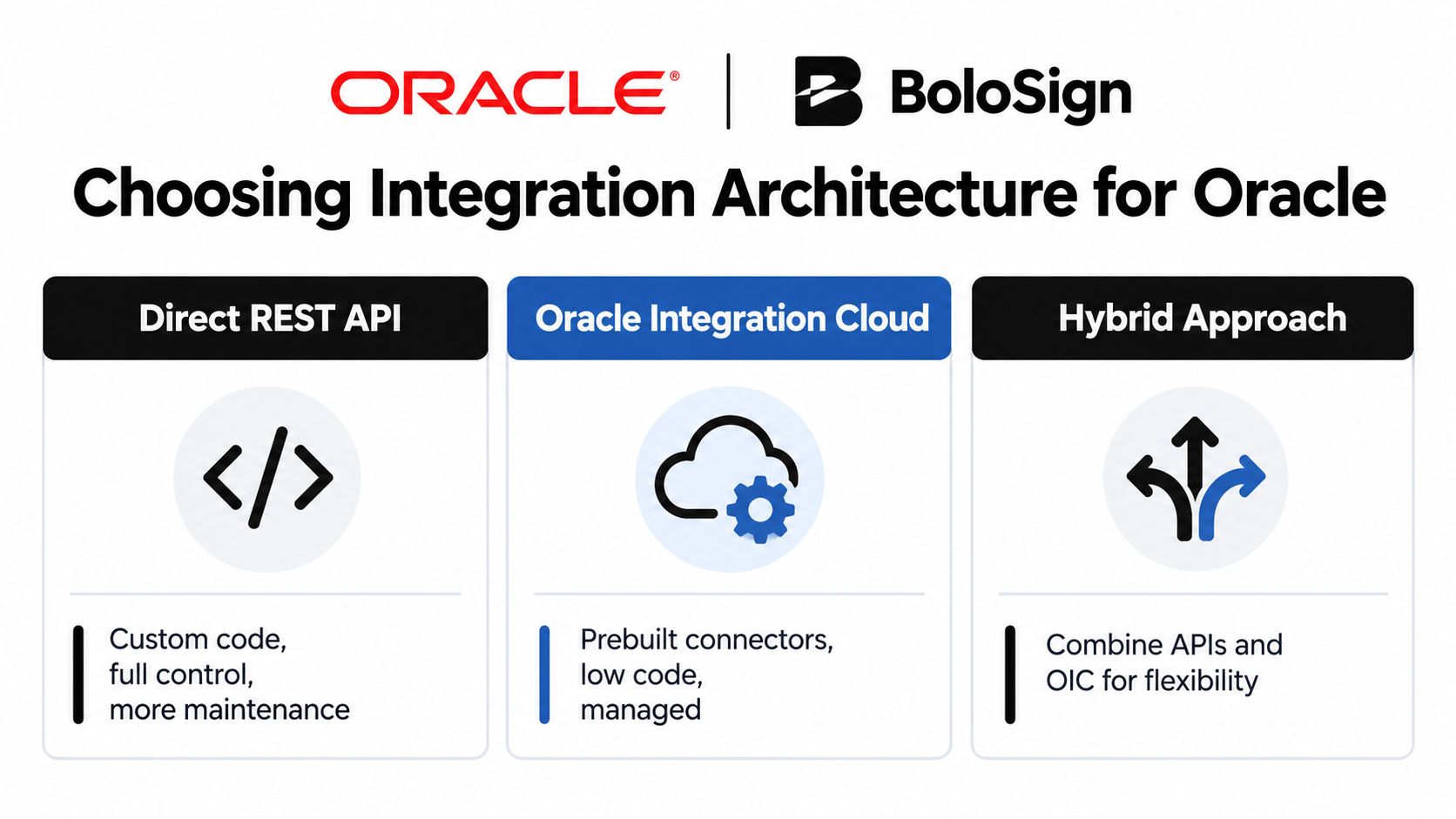
For most Oracle environments, three paths are real: direct REST API, Oracle Integration Cloud, and embedded signing inside a user-facing workflow. The right answer depends less on product marketing and more on the Oracle module, the approval path, and who owns support after go-live.
Three paths that actually show up in projects
Direct API fits when your Oracle process is already custom or when a downstream service can own document generation, envelope creation, callbacks, and record updates. A logistics operation often likes this pattern because delivery confirmations or proof-of-service acknowledgments are event-driven and don't need much UI inside Oracle.
Oracle Integration Cloud middleware fits when governance matters more than raw coding freedom. A healthcare organization may want Oracle Integration Cloud to mediate payloads, route approvals, and standardize credentials handling across modules. That's often easier to defend in audits.
Embedded signing fits when user experience is the constraint. A staffing firm using Oracle CX may want candidates, clients, or account teams to stay inside a portal or guided workflow instead of bouncing to a separate signing page.
Oracle realities that shape the decision
Oracle's own documentation shows why one pattern doesn't fit every module. Oracle public support materials show that e-signature support spans multiple releases in E-Business Suite and cloud workflows, and Oracle Cloud Contracts requires configuration in Setup and Maintenance, provider validation, and enablement at both contract type and individual contract level (Oracle support guidance across releases).
That tells you something architectural. The integration point is not just “send a document for signature.” It's usually attached to a workflow state, document type, or approval path controlled by the Oracle module.
| Oracle E-Sign Integration Architecture Comparison | Best For | Effort and Control |
|---|---|---|
| Direct REST API | Custom Oracle extensions, logistics events, tightly controlled payloads | Highest control, more code, more maintenance |
| Oracle Integration Cloud | Regulated workflows, cross-module orchestration, central governance | Balanced control, managed routing, lower custom-code burden |
| Embedded signing | Portal-led user journeys, staffing, sales, onboarding | Better UX, moderate effort, depends on front-end orchestration |
What works and what usually doesn't
A direct API pattern works when one team owns the full lifecycle and can support webhook retries, template versioning, and Oracle update logic. It struggles when multiple Oracle modules need a shared compliance model.
Middleware works when you need reusable mapping, visibility, and a consistent handoff between Oracle and the signing platform. It can become bloated if every exception gets pushed into a giant integration layer.
Embedded signing improves completion rates in front-office flows, but it won't fix weak back-office state management. If Oracle status updates are still manual, the UX polish doesn't solve the underlying problem.
For teams evaluating governance and maintainability, this guide on EAI best practices for 2026 is useful because it frames integration as operating model design, not just connector selection. The same principle applies here.
If you're comparing Oracle-connected signature patterns beyond a single module, this walkthrough on ERP e-sign integration approaches is a helpful reference for thinking through system boundaries.
The cheapest architecture on day one is often the most expensive one to support after the first exception path shows up.
Connecting Authentication Templates and Field Mapping
Most projects stall. Not on APIs. On setup discipline.
Oracle's documented setup for contract e-signatures requires a one-time administrator consent flow. The admin registers a third-party provider, selects DocuSign or OneSpan inside Oracle Enterprise Contracts, enters provider-specific IDs and endpoints, and uses Validate to complete authorization. Oracle also notes that users must already exist on the provider side with permission to send contracts for signing (Oracle contract e-sign setup flow).
Treat authentication as a two-system handshake
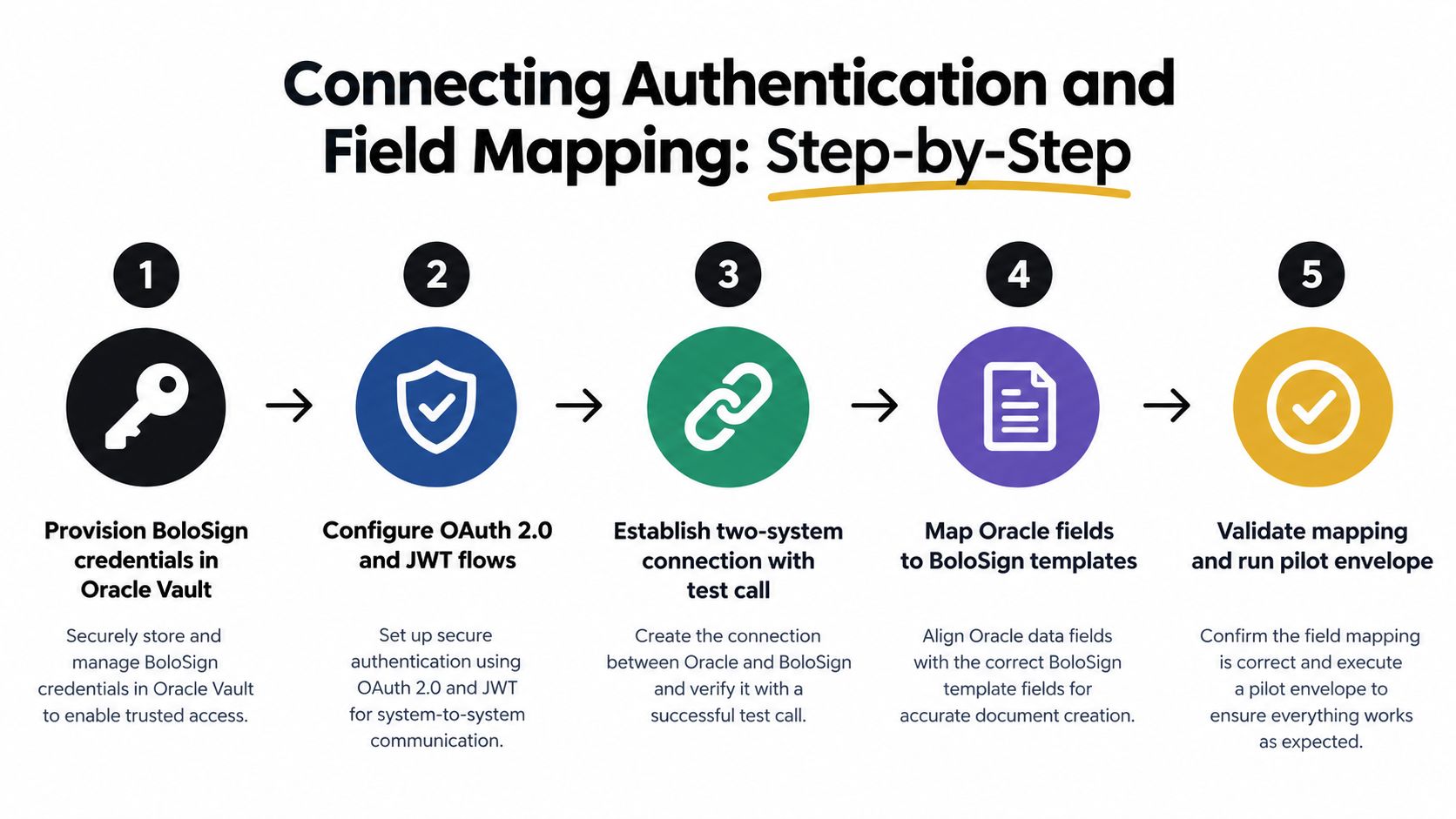
Too many teams treat setup like a single API toggle. It isn't. It's a handshake between Oracle and the e-sign provider.
Use this sequence:
- Provision credentials first. Create the provider-side application, define authorized users, and confirm who can send for signing.
- Register the integration in Oracle. Add provider IDs, endpoints, and consent details in the Oracle configuration path tied to the module you're using.
- Run validation intentionally. Don't stop at “connection successful.” Confirm the Oracle user, provider user, and permission scope line up.
- Enable the business object. In contracts, that may mean turning on the capability at the contract type and then again on the contract record.
- Test with a real template. Authentication isn't proven until a document is generated, sent, viewed, signed, and written back.
The most common failure isn't bad code. It's incomplete provider-side setup or a sender account that lacks permission.
Build templates around Oracle data, not around PDFs
After auth works, the next build decision is template design. Teams either create a maintainable system or a brittle library of one-off PDFs.
Good template design starts with roles and field ownership. A real estate lease might have tenant, landlord, guarantor, and internal approver roles. A healthcare consent might include patient, guardian, and clinic witness roles. An education enrollment form may need student, parent, and registrar roles with conditional sections.
Create templates so Oracle fields map into these roles cleanly:
- Signer identity fields: Name, email, title, organization
- Document metadata: Agreement type, region, effective date, record ID
- Conditional business logic: Include guarantor only when required, show extra clauses for certain jurisdictions, route to witness only for specific document categories
- Return payload fields: Envelope ID, signed timestamp, status, final document link, audit record reference
A signing tool such as BoloSign can support this pattern by letting teams create, send, and sign PDFs, templates, and forms instantly while integrating through API-driven workflows. That matters when you need reusable document packages across staffing, healthcare, real estate, logistics, education, and professional services instead of separate manual setups for each team.
Field mapping patterns that hold up in production
Use Oracle as the source of truth for transaction data. Use the e-sign platform as the source of truth for signer action and execution evidence.
That means:
- Map one Oracle record to one signing transaction key. Don't rely on filenames as identifiers.
- Store structured status fields back in Oracle. Not just the completed PDF.
- Version your templates. When legal changes a clause block, preserve the prior version for documents already in flight.
- Keep roles stable. Change conditions behind the role, not the role names themselves.
For organizations managing identity centrally, this guide on enterprise e-sign tools with SSO and SCIM is useful because user lifecycle problems often show up before document problems do.
Implementation note: If your template requires users to drag fields around after Oracle sends the document, your integration isn't finished. You've only automated the first half.
Preserve signing metadata for downstream systems
Oracle Fusion Applications documentation includes a REST API method specifically for electronic signatures that can automatically input the signer, signer role, and signed date. That's valuable because downstream systems receive structured signing metadata instead of only a finished PDF (Oracle Fusion e-sign REST method).
That structure matters in contract automation. Procurement may need the signed date for obligation tracking. HR may need signer role to confirm countersign authority. Professional services teams may need final execution metadata before work order release.
If you also need to add signature to Google Form-driven intake, the same template logic still applies. Capture the intake data first, normalize it, and then generate the signing transaction from a controlled template rather than treating the form output as the document itself.
Automating Status Sync With Webhooks and Events
A sent envelope that never updates Oracle is only half an integration.
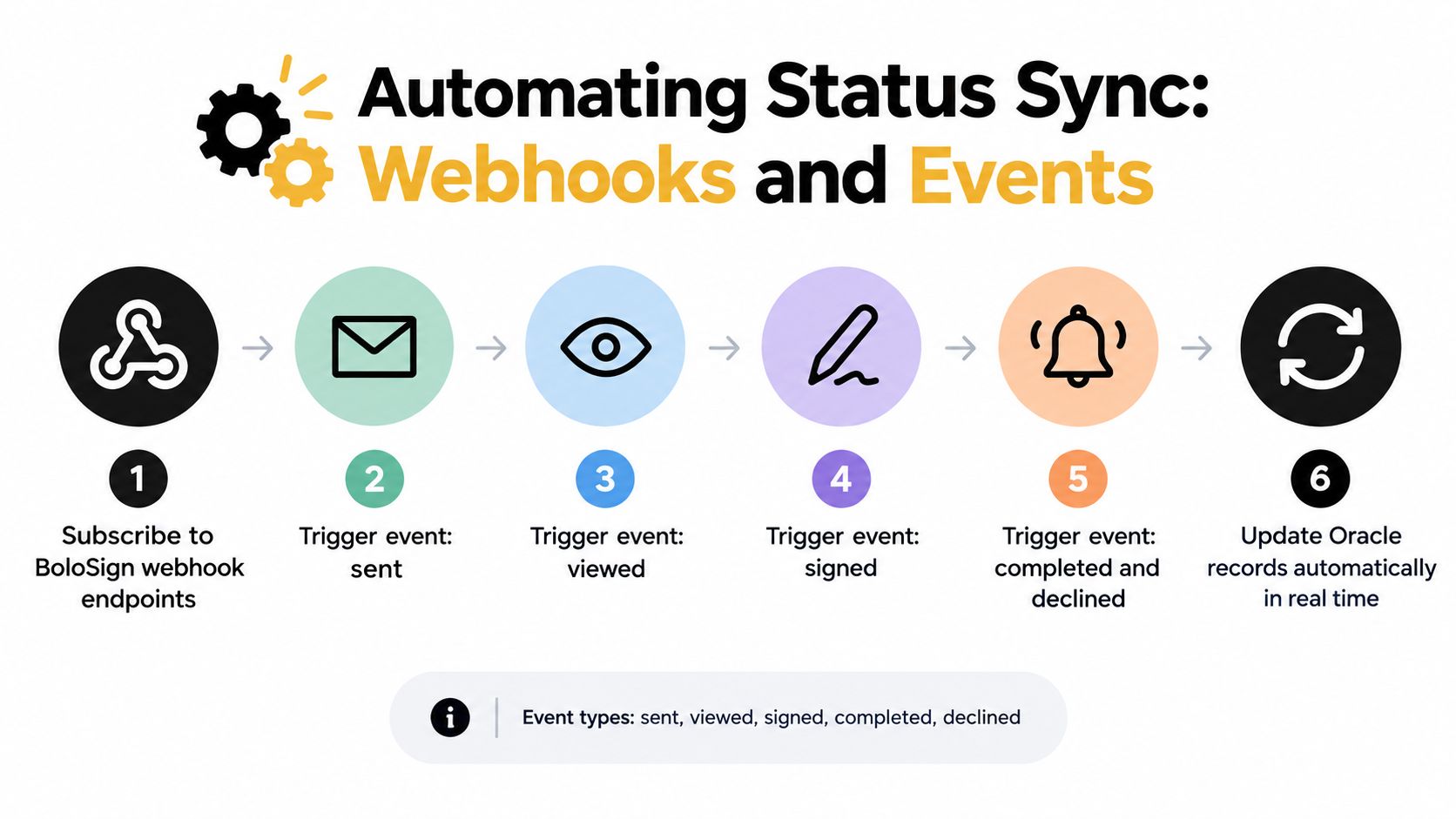
Oracle's contract-signing flow already uses status progression. In practice, your integration should mirror that discipline and treat event handling as part of the business process, not as an afterthought. The cleanest implementations subscribe to webhook events, update Oracle records on each meaningful state change, and store both the final PDF and the structured audit data.
Events that matter operationally
The event list doesn't have to be large. It has to be reliable.
Use handlers for:
- Sent: Mark the Oracle record as dispatched and store the signing transaction ID.
- Viewed: Useful for sales, staffing, and education follow-up queues.
- Signed: Capture signer-level action when you need multi-party visibility.
- Completed: Release the final contract, trigger procurement next steps, or archive to content storage.
- Declined: Route back to owner, legal, or account management with context.
Don't over-automate low-value events. If no one acts on “reminder sent,” don't write code for it.
Sync patterns that prevent duplicates
Most production issues happen after a webhook retries. Your handler should be idempotent. If Oracle already processed a completion event for a given signing transaction and event timestamp, the second copy should be ignored safely.
I usually recommend three controls:
- Store an external event key in Oracle or the middleware layer.
- Process status transitions in order so a stale event can't overwrite a completed state.
- Separate document storage from state transitions so one failure doesn't corrupt both.
Where the signed record should land
That depends on module ownership. Contracts teams usually want the signed PDF and audit trail tied back to the contract object. Procurement may also want approval history preserved before supplier activation. In database-centric custom apps, a document reference plus status metadata is often enough.
Oracle's product documentation also shows that e-signature handling is fragmented by cloud area and transaction type. Contracts, HR Journeys, and SCM follow distinct configuration paths, and SCM notes that some transactions use inline approvals before save while others trigger BPM task flow and an e-record page after the signature requirement is detected (Oracle module-specific e-sign behavior). That fragmentation is exactly why your event model should stay consistent even if your Oracle entry points don't.
Keep one canonical signature status vocabulary across Oracle modules, even if each module reaches the signer through a different path.
Tie events to contract intelligence
Status sync shouldn't stop at “completed.” Post-sign automation is where AI contract review and contract intelligence start paying off. Once execution lands, the system can push the agreement into a clause extraction or obligation workflow, flag non-standard language against a playbook, and route operational tasks without requiring someone to reread the whole document.
That's what makes digital signing solutions useful beyond execution. They become a reliable trigger for the next controlled workflow.
Testing Deployment and Fixing Common Failures
Most Oracle signature projects don't fail because the vendor can't sign a PDF. They fail because the workflow is only partially configured.
Oracle's native flows in Journeys and SCM are configured as feature-flagged workflows rather than generic attachments. Admins must enable the feature, define which transactions require signatures, map the business events that trigger signing, and in HR Journeys preconfigure document-type metadata and record settings such as making attributes relevant, setting Restrict Update to Yes, and creating a BI Publisher template for the document to be signed (Oracle SCM and Journeys setup guidance).
A test sequence that catches real problems
Run testing in this order:
- Configuration validation first: Confirm feature enablement, provider registration, and business object activation.
- Permission mapping second: Verify the provider-side sender exists and can send for signing.
- Template binding third: Make sure the Oracle record produces the intended document and role mapping.
- End-to-end execution last: Only after the first three pass should you test view, sign, complete, and callback behavior.
Teams often reverse that order. They send a pilot document before confirming the workflow path is complete. Then they spend days troubleshooting the wrong layer.
Common failures and what they usually mean
Validation succeeds but sending fails. That usually means the connection is technically authorized, but the provider-side user isn't configured correctly or lacks send permission.
The signature step never appears. In Oracle, that often points to missing feature flags, missing transaction mapping, or a document type that wasn't fully configured.
The document generates but won't route. Check template binding, signer role mapping, and the workflow rule that should launch the signing action.
The PDF signs but Oracle doesn't update. That's typically an event-handling issue, not a document issue. Check webhook authentication, record correlation keys, and retry behavior.
A green connection test only proves that two systems can see each other. It doesn't prove that the workflow can run.
A go-live checklist worth using
Before production, confirm these items:
- Business event alignment: The transaction that should trigger signing does so in the target module.
- Metadata completeness: Document types, templates, and required attributes are present.
- Approval path readiness: Upstream approvals don't conflict with the signature step.
- Signer authority: Internal countersigners are valid and available.
- Retention path: Final documents and audit history land in the correct Oracle or connected repository.
If you're working with Primavera Unifier, Oracle documents e-signature integration under Admin mode in Integrations, where teams select Acrobat Sign or DocuSign, enter connection details such as API URL, client ID, and client secret, and connect the service. Oracle also notes support for multi-party signature workflows with signatures embedded into generated PDF forms (Oracle Primavera Unifier e-sign setup). That's a useful reminder that each Oracle product family brings its own admin path and testing assumptions.
Security Compliance and Scaling Your Oracle Signing Workflow
Compliance gets simpler when teams stop treating signing as a disconnected task. A valid electronic signature under ESIGN and UETA requires four conditions: intent to sign, consent to do business electronically, association of the signature with the record, and record retention so the signed document can be reproduced. The same compliance guidance says HIPAA-oriented deployments should include a Business Associate Agreement, encryption in transit and at rest, access controls, and audit logs (e-sign compliance guidance for developers).
What scaling actually requires
Global rollouts across the US, Canada, Australia, New Zealand, and the UAE usually break on governance, not on signature capture. The practical questions are consistent:
- Which Oracle module owns the authoritative record?
- Which documents require stronger identity or approval controls?
- How will GDPR, HIPAA, eIDAS, and internal retention rules be enforced across teams?
- Who can create templates, and who can only send from approved ones?
A useful governance pattern is one common policy model with module-specific execution paths. That keeps controls aligned even when contracts, HR flows, and SCM transactions don't share the same Oracle configuration screens.
Cost discipline matters too
For many teams, scaling stalls when each department has to budget envelope volume separately. A fixed-price model with unlimited documents, templates, and team members removes that friction. It's also why affordability matters in Oracle environments that span multiple business units. BoloSign positions this model as up to 90% more affordable than DocuSign or PandaDoc.
For teams planning cross-border rollouts, this guide on GDPR and SOC 2 considerations for global e-sign rollouts is a practical companion to Oracle workflow design because legal compliance and systems design usually collide at the same handoff points.
The teams that scale cleanly are the ones that standardize identity, templates, event handling, retention, and policy before they multiply use cases.
If you want one platform that connects contract automation, AI contract review, secure eSignature, and Oracle-friendly workflow design, BoloSign is built for that operating model. You can create, send, and sign PDFs, templates, and forms quickly, keep compliance requirements in view, and start with a 7-day free trial to see how the flow works in your own environment.

Paresh Deshmukh
Co-Founder, BoloForms
22 Sep, 2026
Take a Look at Our Featured Articles
These articles will guide you on how to simplify office work, boost your efficiency, and concentrate on expanding your business.



