

e-Sign Platform HubSpot Integration: BoloSign Setup Guide
e-Sign Platform HubSpot Integration. Learn how to integrate an e-sign platform with HubSpot using BoloSign. Step-by-step guide

Tired of nonsense pricing of DocuSign?
Start taking digital signatures with BoloSign and save money.
A deal reaches “ready to close” in HubSpot, but the contract still lives in someone's inbox. A salesperson downloads a PDF, copies contact details into a signing tool, waits for completion, then returns to HubSpot to update the deal. One incorrect email address or missing field can leave sales, legal, and operations working from different versions of the same agreement.
An e-sign platform HubSpot integration solves that problem only when it does more than add a button. The important work is connecting HubSpot properties to contract fields, sending documents from the right CRM record, and writing signing activity back where the team already manages the customer relationship. BoloSign supports this model for eSignature, contract automation, AI contract review, and digital signing solutions across sales and operations workflows.
Why Native e-Sign Integration Matters in HubSpot

A staffing agency may have a signed placement agreement somewhere in email, while the recruiter sees only an open HubSpot deal. A healthcare provider may have a patient services form completed in a separate application, with no reliable status on the associated company or contact record. A real estate team may know that a lease was sent, but not whether the tenant opened it, signed it, or needs a reminder.
HubSpot's native capability established the basic CRM-native pattern for quote acceptance. On October 24, 2019, HubSpot introduced e-signature support in its quoting workflow, allowing buyers to sign quotes directly, complete identity verification, use Draw, Type, or Upload signature methods, and allow countersigners to act from the quotes index page. The feature is documented in HubSpot's guide to using e-signatures with quotes.
That approach works well for a quote. It becomes less suitable when the process includes employment forms, vendor agreements, healthcare documents, property paperwork, or multi-document packets. HubSpot's native e-signature capability is limited to quotes and requires a Revenue Hub seat, with the setup path under Settings, Objects, Quotes, and E-signature. A dedicated integration can extend the workflow to broader templates and records.
Practical rule: Keep the document, signer, status, and completed file attached to the same CRM record. If a user has to search another system to answer “what happened to this agreement?”, the integration is incomplete.
The difference between an electronic signature and a digital signature can also affect how teams describe their process and evaluate controls. This explanation of e signature vs digital signature is useful when legal, security, and operations teams need a shared vocabulary.
A well-designed workflow lets a user create a PDF, template, or form from a Contact, Company, or Deal record, prefill it, send it for signing, and track the result without losing context. That is the foundation of contract management workflow automation, and it matters more than installing an app.
Installing BoloSign in Your HubSpot Account
Installation is straightforward, but access and permissions should be checked before connecting anything. The person installing the integration should have the required HubSpot marketplace permissions, and the BoloSign account should be ready with the correct workspace, templates, users, and signing roles.
Connect the marketplace app
Use this sequence:
- Open HubSpot Marketplace: Sign in to HubSpot and open the Marketplace from the main navigation.
- Find the integration: Search for BoloSign and review the available permissions, supported objects, and account requirements.
- Start installation: Select Install or Connect, then follow the authentication prompts.
- Authorize access: Confirm the HubSpot account and BoloSign workspace that should communicate. Review the requested permissions rather than approving an unknown connection blindly.
- Confirm users and roles: Decide who can create documents, send envelopes, view completed files, and manage templates.
- Open a test record: Use a non-production Deal or Contact record to confirm that the integration card, document action, and status fields appear as expected.
The authorization step is a security boundary. A sales user may need to send an agreement, while only an administrator or contract manager should change templates, recipient rules, or retention settings. Keep those permissions separate where the business process allows it.
BoloSign can also support embedded signing through an API-based approach when an organization wants signing inside a custom portal or application rather than only inside a HubSpot record. Teams evaluating that model can review this guide to e-signature API with embedded signing.
After the connection is active, don't immediately automate every pipeline. First verify one complete path: select a template, create a document, send it to a controlled recipient, sign it, and confirm that the completed PDF and status return to the intended HubSpot record. This small test reveals permission gaps before they affect live customers.
Mapping HubSpot Properties to Contract Fields
A CRM integration fails quietly when the mapping is wrong. The document may send successfully, yet the signer receives an agreement with an old address, a blank legal name, or a total that doesn't match the deal.
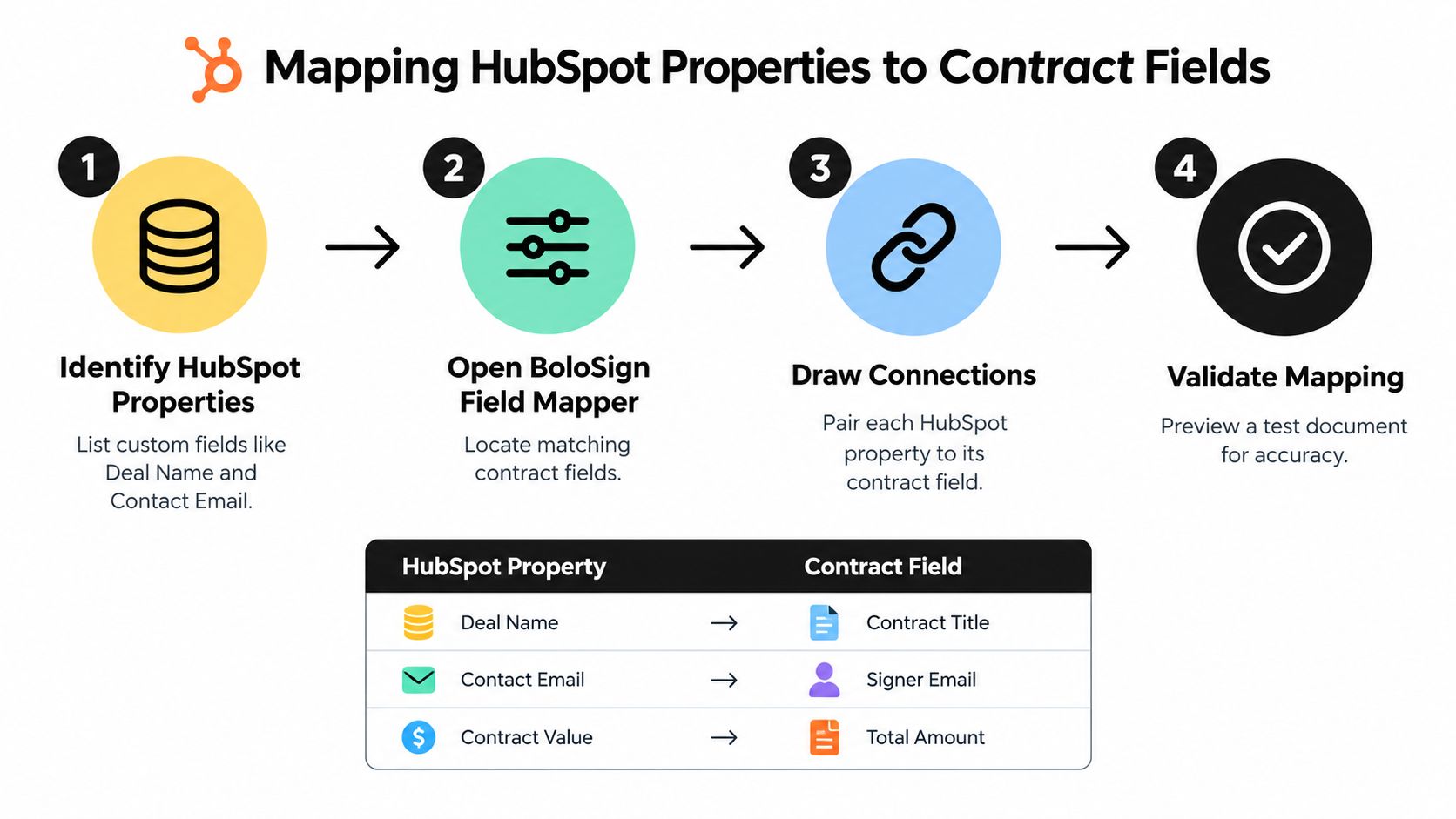
Start with the signing object. Decide whether the agreement belongs primarily to a Deal, Contact, Company, Ticket, or another supported record. Then identify the source property for every value that should enter the document. Don't map fields based only on similar labels. “Company name,” “billing entity,” and “legal entity” may look interchangeable but represent different business facts.
Build a field map before creating automation
A simple mapping worksheet should include:
| HubSpot property | Contract field | Validation question |
|---|---|---|
| Deal Name | Contract Title | Does the title identify the correct engagement? |
| Contact Email | Signer Email | Is this the person authorized to sign? |
| Contract Value | Total Amount | Does the value use the required currency and format? |
| Company Legal Name | Customer Name | Has the legal entity been verified? |
| Close Date | Effective Date | Should this be the signing date instead? |
Use required fields for information that must exist before sending. For optional fields, decide whether the contract should show a blank value, a default phrase, or block delivery until the owner fills it in. This is especially important for healthcare, staffing, and education forms where a missing identifier can create avoidable follow-up work.
Test values at the edges, not only with a perfect record. Try a company with multiple contacts, a deal with no close date, a long legal name, a special character, and a contact whose email differs from the company's primary email. Confirm that dates, currencies, addresses, and line items render correctly in the PDF.
Data discipline: A visible signing status doesn't prove that the signed PDF, signer metadata, and audit information were written back correctly.
Marketplace integration patterns commonly support object-level sync and template fields, but incomplete field or recipient mapping can leave status visible while the completed file is missing from the CRM record. Teams building more advanced connections may find this guide to CRM API for agencies helpful when planning custom data flows.
Use a preview document before enabling an active workflow. Confirm the recipient, signer order, calculated values, document name, and record association. Once those details are correct, lock the template structure and document any property ownership rules so future administrators know which HubSpot field is authoritative.
Embedding Signatures in Workflows and Records
The integration becomes operationally valuable when signing is treated as a CRM event, not a separate task. A Deal reaches the contract stage, the workflow selects the right template, HubSpot data fills the document, and the signer receives a controlled request. Completion then updates the Deal and gives the next team permission to act.
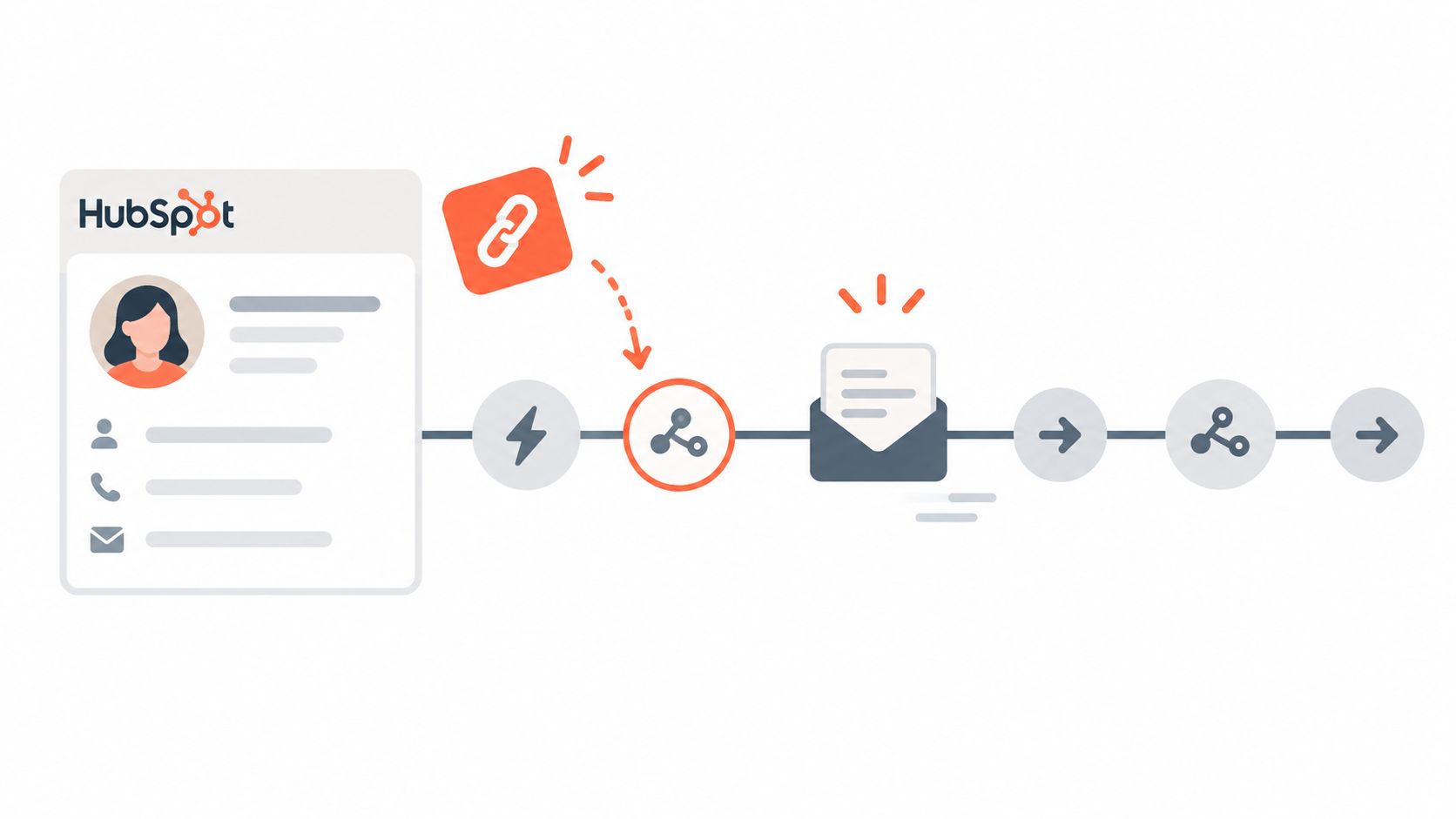
Where teams use the workflow
A staffing agency can trigger an assignment agreement when a candidate reaches an approved placement stage. The workflow should select the correct worker and client records, send the agreement to the authorized signer, and notify operations only after completion. A recruiter shouldn't have to copy a candidate's details into a second system or manually tell payroll that the document is ready.
A healthcare provider can send an intake or services form from the relevant contact or company record. The workflow needs stronger controls around recipient identity, access, audit history, and data minimization. It should also distinguish between “sent,” “viewed,” “signed,” and “completed,” because each status can require a different operational response.
A logistics company can send a carrier agreement or vendor packet when a supplier passes review. If the document remains pending, HubSpot can create a follow-up task for procurement. Once signed, the completed file and status can be associated with the Company and Deal, giving dispatch, finance, and account teams a shared record.
Real estate, education, and professional services teams can use the same pattern for leases, enrollment forms, statements of work, and engagement letters. The template changes, but the design principle remains consistent: the CRM owns the relationship and the signing platform owns the execution event.
Design status-driven actions
Avoid building one oversized workflow that tries to handle every exception. Separate the actions:
- On send: Record the document identifier and signing request status.
- While pending: Create a follow-up task or notify the owner according to the team's service process.
- On decline or expiry: Route the record to a human for review instead of automatically resending.
- On completion: Store the signed PDF, signer details, and completion timestamp on the intended record.
- On failure: Notify an administrator with enough information to identify the template, recipient, and record.
Marketplace examples show that integrations can create documents from CRM data, track progress, and update HubSpot after completion. Some also write generated documents or e-sign envelopes to the engagement timeline and sync captured data to company, deal, contact, ticket, and scoped object properties. That visibility prevents sales from asking operations for a status that already exists elsewhere.
Contract automation should also include the work before signature. BoloSign's AI-powered contract intelligence can support drafting and AI contract review, while the HubSpot connection handles document delivery and status visibility. Keep approval logic separate from signing logic so a document cannot be sent before the required commercial or legal review is complete.
Security and Compliance Considerations
A fast signing workflow is useful only if the organization can explain what data moves between HubSpot and the e-sign platform, who can access it, and how the completed record is retained. Security review should happen before production rollout, especially for healthcare, staffing, education, procurement, and cross-border operations.
Under U.S. electronic-signature requirements, a valid process generally needs intent to sign, consent to conduct business electronically, an association between the signature and the record, and the ability to retain and reproduce the signed document. HIPAA-oriented controls commonly include a BAA, encryption in transit and at rest, access controls, and audit logs. These requirements are described in electronic signature compliance guidance for developers.
Evaluate controls by workflow
For a healthcare use case, ask whether the integration exposes more personal information than the signing task requires. For a staffing workflow, review whether candidate information is copied into document metadata, email notifications, or logs. For a global education or procurement process, confirm where records are stored and how authorized users export them.
Relevant frameworks may include the U.S. ESIGN Act, UETA, HIPAA, the EU eIDAS Regulation, the Canadian UECA, the UK eIDAS/ECA, the Australian ETA, the New Zealand ETA, and the South African ECTA. A provider's stated support for a framework doesn't replace a legal review. Your team still needs policies for retention, access, deletion, export, signer identity, and incident response. This overview of binding electronic signatures for businesses offers additional context for organizations evaluating enforceability and signing controls.
HubSpot has disclosed that a 2021 Dropbox Sign incident exposed contact names and email addresses for some users of its e-signature tool, after which HubSpot said it rotated API keys and OAuth tokens to re-secure the integration. The lesson isn't that integrations should be avoided. It is that buyers should ask exactly what data is shared, how credentials are protected, how vendors respond to incidents, and whether the connector continues to operate reliably during failures.
Review BoloSign's security and privacy documentation alongside your internal requirements, including its stated support for ESIGN, eIDAS, HIPAA, GDPR, SOC 2 Type I and II, ISO 27001:2022, and CCPA. The GDPR and SOC 2 considerations for global e-sign rollouts can help structure that review.
Cost Comparison and Affordability Benefits
Pricing is often where a seemingly simple e-signature project becomes difficult to scale. A team may start with occasional contracts, then add sales users, operations users, templates, approval steps, and higher document volume. Per-seat or usage-based pricing can make each expansion require another calculation.
BoloSign offers unlimited documents, templates, and team members at one fixed price, making it up to 90% more affordable than DocuSign or PandaDoc. That model is particularly relevant for staffing agencies with many recruiters, education providers with several departments, and logistics companies where procurement and operations both need access.
| Evaluation point | BoloSign model | Traditional variable model |
|---|---|---|
| Documents | Unlimited | May depend on plan or usage |
| Templates | Unlimited | May be restricted by tier |
| Team members | Unlimited | May increase the subscription cost |
| Budget planning | One fixed price | Requires monitoring seats or usage |
| Scaling | Add workflows without changing the basic usage model | Reassess as adoption grows |
The right comparison isn't only the subscription total. Include the labor cost of rekeying CRM data, chasing unsigned documents, correcting recipient errors, and locating completed PDFs. An affordable platform still needs reliable mapping, status synchronization, access controls, and usable audit records. Otherwise, the apparent saving moves into manual administration.
Testing and Troubleshooting Your Integration
A production launch should follow a controlled test plan. Start with a test Deal, a test Contact, and a duplicate of the intended template. Use a recipient who understands that the document is for validation, not a live agreement.
Run the complete signing path
Check each point in order:
- Record association: Confirm that the document starts from the intended Deal, Contact, Company, or other supported object.
- Property values: Compare every populated field with the source record, including names, addresses, dates, totals, and signer email.
- Recipient rules: Verify signer identity, recipient order, countersigner requirements, and notification addresses.
- PDF rendering: Open the generated PDF on desktop and mobile. Check page breaks, signature fields, tables, and special characters.
- Signing event: Complete the signing process and confirm that the status changes from sent or pending to completed.
- CRM write-back: Look for the completed PDF, envelope or document identifier, signer metadata, and timeline activity on the correct record.
- Workflow response: Confirm that the next task, stage update, notification, or approval action occurs only after the intended event.
- Exception path: Decline, expire, or cancel a test request and verify that HubSpot routes it to a human rather than treating it as completed.
Diagnose the common failures
If the document contains blank fields, inspect the property mapping and the record used for the test. A common mistake is mapping a Contact property while launching from a Deal that has no associated Contact, or selecting a display field when the template needs a legal entity field.
If the recipient is wrong, review both recipient mapping and association logic. Don't assume the first associated contact is authorized to sign. Add an explicit signer property or approval step for agreements that carry legal or financial consequences.
If the status appears in HubSpot but the PDF doesn't, check whether the integration is configured to write the file to the engagement timeline, a file location, or a specific object property. Marketplace patterns show that status synchronization and signed-file synchronization are separate mechanics, so test both independently.
If a workflow doesn't send, review enrollment criteria, record permissions, template availability, required values, and duplicate enrollment settings. If updates arrive late, check the event history and avoid triggering downstream actions from a field that may not be refreshed immediately. Use the document identifier as the traceable reference between the two systems.
Release standard: Don't launch because the send button works. Launch when a completed agreement, its signer evidence, and its next operational action all appear where the team expects them.
Keep a short runbook with the template owner, mapped properties, supported objects, workflow triggers, failure notifications, and escalation contact. Re-run the test whenever you change a field name, template, recipient rule, or HubSpot pipeline stage.
BoloSign gives HubSpot teams a practical way to create, send, and track PDFs, templates, and forms with unlimited documents, templates, and team members at one fixed price. Start a 7-day free trial by visiting BoloSign and test the complete flow from CRM property mapping to signed-document write-back.

Paresh Deshmukh
Co-Founder, BoloForms
15 Oct, 2026
Take a Look at Our Featured Articles
These articles will guide you on how to simplify office work, boost your efficiency, and concentrate on expanding your business.



