

E-Sign Platform for Large Organizations: A Buyer Guide
Choosing an e-sign platform for large organizations? Compare enterprise security, scalability, integrations, and pricing in this practical buyer guide.

Tired of nonsense pricing of DocuSign?
Start taking digital signatures with BoloSign and save money.
A renewal meeting starts with a familiar question: why is the organization paying for hundreds of e-signature seats that few employees use? The signing experience itself usually works. The problems sit around it, in duplicated templates, disconnected CRM and HR workflows, difficult audits, and pricing that expands every time the business adds a department.
That's why choosing an e-sign platform for large organizations requires more than comparing signature fields and mobile apps. Procurement teams need to examine governance, integrations, migration risk, compliance evidence, and the full cost of operating the system. BoloSign approaches that problem with unlimited documents, team members, and templates at one fixed price, alongside AI-powered automation and secure document workflows.
Why Large Organizations Are Rethinking E-Sign
A procurement manager at a large manufacturer is staring at another DocuSign renewal quote. Finance wants to know why legal needs more named seats than the number of people who actively send documents. IT is warning that the Salesforce integration requires maintenance, HR is using a separate onboarding workflow, and regional teams have created overlapping versions of the same agreement.
That scenario is common in structure, even when the vendor and contract differ. The organization isn't dissatisfied with asking someone to sign a PDF. It's paying for the operational machinery around that signature, including user administration, template ownership, integration maintenance, audit preparation, identity controls, and support for regional processes.
Procurement rule: Evaluate the signing system as shared infrastructure, not as a collection of individual user licenses.
The market context supports that shift. One market report estimates that large enterprises represented 62.10% of global e-signature platform market size in 2025, while cloud deployment held 76.05% share in the same year. The same report projects growth from USD 8.99 billion in 2026 to USD 30.46 billion by 2031, at a 27.65% CAGR. Those figures point to a market increasingly shaped by organizations that need high-volume, cloud-based workflow tools, not isolated signature widgets. See the e-signature market statistics and projections for the cited market context.
The hidden bill usually appears in four places:
- Seat creep: Departments request access “just in case,” then procurement pays for inactive or occasional senders.
- Integration gaps: Data moves from the CRM to the signing tool, but signed documents and status updates still require manual handling.
- Template sprawl: Regional copies drift apart, fields become inconsistent, and nobody can identify the approved version.
- Administrative drag: IT manages access, legal prepares audit evidence, and operations chases incomplete signing requests.
Large organizations are also under pressure to replace paper processes. Neutral industry reporting indicates that 20% to 40% of organizations still rely primarily on paper-based signatures, while integration complexity is a reported barrier for 22% of enterprises. The electronic contract signing trends report frames the implementation challenge clearly. The right question isn't only whether employees can sign online. It's whether the platform can become a controlled operating layer across legacy systems, regions, and departments.
Review BoloSign customer examples while building that evaluation. The useful comparison is total cost of ownership, not the per-envelope price shown on the first sales slide.
What an Enterprise E-Sign Platform Actually Is
An enterprise e-sign platform is a stack of connected capabilities. Think of it as a building with three major levels. The foundation controls who can enter and what they're allowed to do. The middle preserves trustworthy evidence of every transaction. The upper level routes documents through business processes and connects the signing activity to the systems that already hold customer, employee, supplier, and contract data.
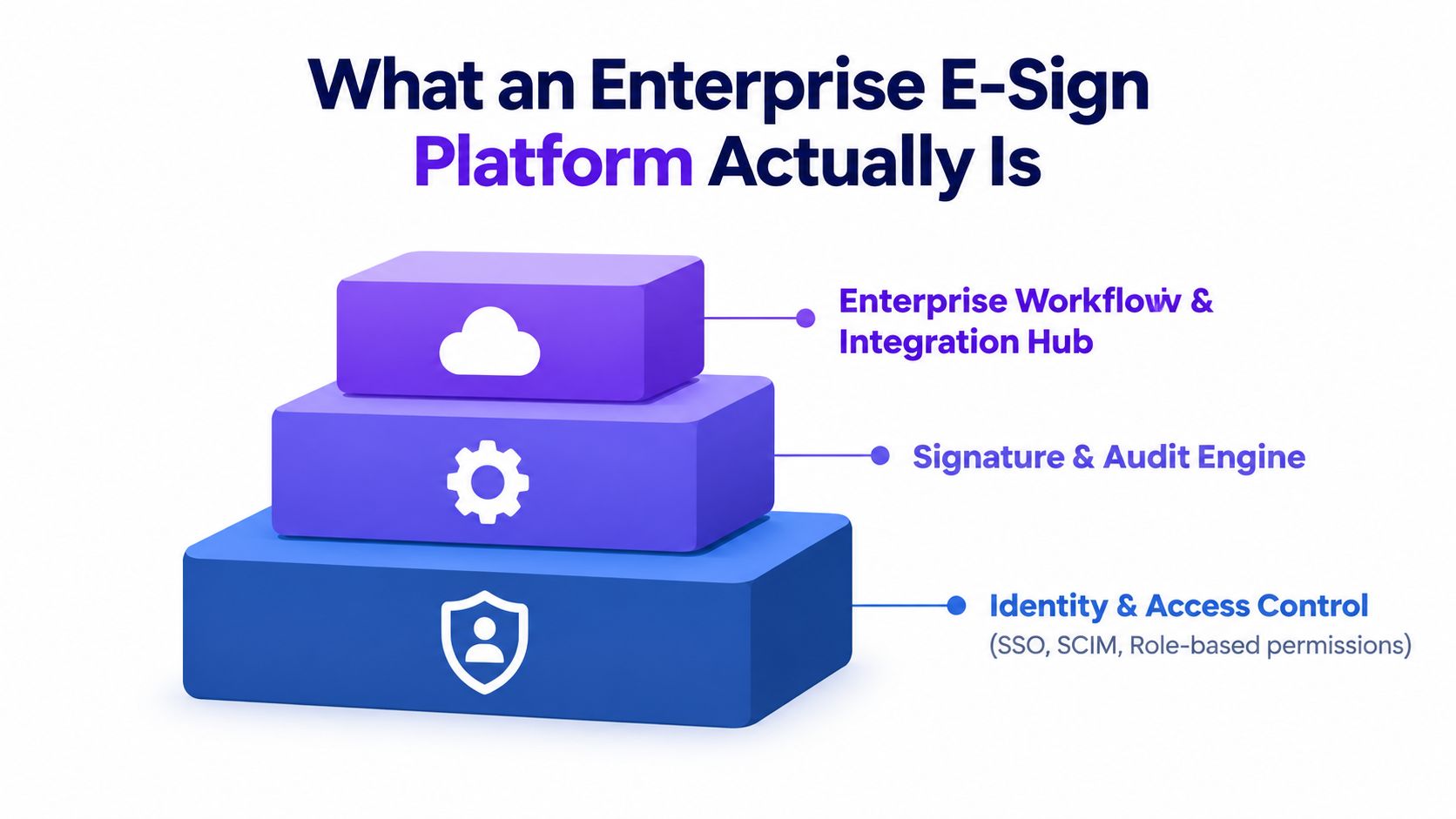
The foundation is identity and access control
A serious deployment needs centralized identity controls, including single sign-on, SCIM provisioning, role-based permissions, and delegated administration. IT should be able to control access through the organization's identity provider, while legal or operations leaders manage approved templates and workflows without receiving unrestricted administrator privileges.
Many small-business plans stop short at this stage. Enterprise buyers should ask whether policies apply across the tenant, whether departments can have controlled administrative boundaries, and whether user access can be reviewed and revoked centrally.
The middle is the signature and audit engine
The platform must do more than place a typed name on a document. It should create a legally defensible record of the signing process, including signer identity information, authentication method, authoritative timestamps, IP and user-agent evidence, document hash, and the completed document or certificate needed for independent review.
An audit trail should remain useful outside the signing interface. Tamper-evident, exportable records let an auditor or legal team examine the transaction lifecycle without depending on a vendor's dashboard. This is why audit design directly affects litigation and regulatory defensibility. The enterprise audit trail best-practices guidance describes the evidence enterprises should require.
The upper layer orchestrates work
Workflow orchestration routes documents through approvals, signing orders, reminders, conditional branches, and departmental handoffs. The integration layer then connects those actions to systems such as Salesforce, Workday, SAP, HR platforms, document repositories, and collaboration tools.
BoloSign supports creating, sending, and signing PDFs, templates, and forms, including workflows that let teams send documents for electronic signature and track progress from a centralized workspace. Its broader workflow model also supports form-based data capture, multi-recipient signature requests, custom emails, dashboard updates, and audit trails.
The difference between a basic signing tool and an enterprise platform is governance. A basic tool helps one person send a document. An enterprise platform lets thousands of employees execute agreements consistently while IT, legal, procurement, and compliance retain control over access, evidence, templates, and integrations.
Enterprise Requirements You Cannot Compromise On
A vendor demo is designed to show the smooth path. Procurement needs to test the uncomfortable path, including failed authentication, a changed template, a regional data requirement, a broken webhook, and an audit request years after completion.
Use six categories to score every platform. Require written answers, product documentation, and a hands-on test rather than accepting “we support that” as evidence.
| Requirement Category | Key Question to Ask | Answer That Signals Real Capability |
|---|---|---|
| Security and compliance | Which certifications, legal frameworks, authentication controls, and data residency options apply to our deployment? | The vendor provides current evidence, explains scope and exceptions, and maps controls to your environment. |
| Scalability | How do bulk sending, API limits, concurrency, and uptime commitments work under our workload? | The vendor documents service limits, monitoring, escalation, and meaningful remedies for service failures. |
| Administration and governance | Can regional or departmental administrators manage approved functions without gaining unrestricted access? | Delegated administration, role-based permissions, policy templates, and centralized reporting are available. |
| Integrations | Do you provide connectors for our CRM, HRIS, CLM, and document systems, plus a documented REST API? | The vendor explains data direction, authentication, error handling, versioning, and ownership of each connector. |
| Automation | Can we test conditional routing, approvals, reminders, and webhooks against a real contract? | The workflow runs in a controlled environment and exposes clear events, conditions, logs, and failure handling. |
| Migration | How will you transfer templates, completed documents, audit records, and active transactions? | The vendor supports structured import, history preservation, validation, parallel operation, and rollback planning. |
Security and compliance must be specific
Ask for the actual compliance package, not a badge on a landing page. Include SOC 2 Type II, ISO 27001, FedRAMP level, ESIGN, UETA, eIDAS, HIPAA, and GDPR in the review where they fit your regulatory and geographic requirements. BoloSign presents these frameworks as part of its security and legal compliance approach, but your team should still confirm the exact scope, contractual commitments, data handling, and configuration responsibilities.
For cross-border processes, eIDAS deserves careful attention. Regulation (EU) No 910/2014 was adopted on 23 July 2014, entered into force on 17 September 2014, and became fully applicable on 1 July 2016. The European Commission says the regulation established a legal framework for cross-border use of e-signatures with the same legal status as paper processes. Review the official eIDAS Regulation text, then ask the vendor how its signature types and evidence support your specific use cases.
Scalability is more than a large transaction allowance
Test bulk send with a real CSV, real merge fields, and realistic approval logic. Ask what happens when an API request fails, whether retries are safe, and how administrators identify incomplete or duplicated requests.
Integrations reveal the real platform
A polished Salesforce button doesn't prove a complete integration. Confirm whether records update in both directions, whether completed PDFs and audit certificates return automatically, and whether the connector supports your regional objects and approval rules.
BoloSign connects with tools including Zapier, Make, Pabbly, HubSpot, Salesforce, Pipedrive, Google Drive, Google Sheets, Slack, and Microsoft Teams. Buyers should also review its SSO and identity access features against their own identity provider and provisioning requirements.
Migration and automation need live validation
Ask the vendor to rebuild one brittle template, import one approved template, and run a workflow with conditional fields and multiple signers. If the sales team refuses to test your process before contract signature, treat that refusal as a procurement signal.
How Pricing Models Diverge at Enterprise Scale
The per-seat model looks simple until every department needs access. Then the organization pays for occasional senders, administrative users, regional teams, SSO add-ons, API usage, premium template libraries, and transaction overages. A low list price can become an expensive operating model once the signing platform sits inside HR, sales, procurement, legal, and customer service.
The pricing brief often used in enterprise discussions includes a 500-person organization sending about 2,000 envelopes monthly and a hypothetical $40 per user per month seat price. That scenario would produce $240,000 annually before other charges, while envelope tiers and overage fees may add 20% to 30%. Because those figures are hypothetical modeling assumptions rather than verified market facts, use them only as a negotiation exercise. Replace them with your organization's actual contract terms.
| Pricing Model | Year 1 Cost | Year 3 Cost | Hidden Fees to Watch | Best Fit For |
|---|---|---|---|---|
| Per-user licensing | Calculate active and provisioned seats separately | Model hiring, restructuring, and regional growth | SSO, premium support, API access, inactive seats | Organizations with few senders and stable access needs |
| Per-envelope licensing | Multiply included volume by actual sends and forecast overages | Include seasonal peaks, renewals, and overage rules | Overage charges, bundled limits, unused-volume restrictions | Predictable, lower-volume workflows |
| Flat-fee enterprise licensing | Use the negotiated annual license and implementation scope | Add renewal terms and expansion rights | Regional pricing, implementation, storage, premium connectors | Large organizations needing broad participation |
| Unlimited-seat, fixed-price model | Use one agreed price for documents, templates, and team members | Confirm that expansion doesn't trigger seat or envelope charges | Support tiers, special integrations, migration services | Distributed teams with growing workflow adoption |
BoloSign's model provides unlimited documents, unlimited team members, and unlimited templates at one fixed price, and the company positions it as 90% more affordable than traditional tools. Treat that affordability claim as a vendor positioning statement and validate it against your incumbent contract, implementation costs, support requirements, and integration scope.
The right request to every vendor is a three-year total-cost-of-ownership projection. Include seat growth, transaction volume, API calls, SSO, migration, support, data retention, regional deployment, and template administration. Ask the salesperson to sign the assumptions, then have finance challenge them.
Real-World Use Cases Across Regulated and High-Volume Industries
The strongest enterprise e-sign deployments don't begin with “we need signatures.” They begin with a repeatable business event, a known source of data, a defined approval path, and a record that must return to the system of record.
Staffing
A staffing agency with 50 recruiters processing 800 offer letters weekly needs more than a PDF upload screen. Recruiters should select an approved template, pull candidate and role information from the HRIS, send documents in bulk, and monitor completion without manually copying details into every letter.
The platform must support merge fields, bulk CSV sending, reusable templates, reminders, and HRIS synchronization. A candidate should be able to sign from a phone without creating unnecessary account friction, while the recruiter sees the completed document and audit evidence attached to the right candidate record.
Healthcare
A multi-hospital network can route patient consent forms through department-specific workflows. Patient identity verification, signer authentication, access restrictions, and HIPAA-aligned audit trails matter more than decorative branding.
The workflow should distinguish between a patient signature, a guardian signature, a clinician acknowledgment, and an internal approval. It should also preserve the final PDF and transaction evidence in the approved patient or document management system, with permissions that prevent casual access to sensitive information.
Commercial real estate
A property management firm handling 3,000 lease renewals across portfolios needs template governance. Regional variants may contain different clauses, signers, or approval routes, but each variant should have an owner, approval status, and controlled publication process.
The platform should pull tenant and property data from the relevant system, route documents to property managers and legal reviewers, and return signed leases to the correct repository. Template version control prevents local teams from editing a master agreement and creating another unmanaged copy.
Logistics
A logistics provider can use digital signing solutions for bills of lading, delivery confirmations, vendor agreements, and customs documentation. Drivers need a mobile signing experience, while operations needs reliable status visibility and a complete record tied to the shipment.
Offline capability must be tested rather than assumed. Ask how the application stores an action without connectivity, how it synchronizes later, and how the resulting evidence identifies the signer, device, and event.
Higher education
Universities and training providers can route enrollment contracts, consent forms, scholarship documents, and certification records to students, parents, sponsors, and administrators. A parent signature may require a different route from a student acknowledgment, and the institution should control which forms each office can publish.
The workflow should respect FERPA-sensitive information, minimize duplicate data entry, and store completed records according to the institution's retention policy. Form-based collection can also help teams add a signature to a Google Form-style experience, rather than forcing staff to rebuild every intake process manually.
Legal and professional services
Law firms, consultancies, accounting practices, and advisory teams often need partner approval before sending engagement letters. Client-branded portals, multi-signer workflows, reusable templates, and a clear audit trail support a consistent client experience without giving every partner permission to modify core language.
BoloSign supports creating and signing PDFs, reusable templates, forms, multi-recipient requests, and integrations with common business systems. Its AI-powered contract intelligence can help teams organize review and decision workflows, but procurement should test the AI against representative agreements and keep human approval in the process.
Migrating From Your Current E-Sign Tool Without Downtime
Migration fails when the project team treats it as a file transfer. Templates contain business rules, integrations trigger downstream actions, and completed agreements carry evidence that legal and compliance teams may need later. Move in phases, with a rollback path.
Phase one is discovery
Export every active template, completed PDF, audit trail, and pending transaction your contract permits. Document each workflow, including signer order, approval conditions, reminders, integrations, custom fields, and regional variations.
Create an inventory of every system touching the signing layer. Include Salesforce, Workday, SAP, HRIS tools, CLM platforms, custom middleware, cloud storage, and reporting pipelines.
Phase two is configuration and validation
Set up a sandbox or controlled environment. Import or rebuild templates, map fields, configure roles, connect identity services, and test integrations with representative records.
Run a parallel signing test on 10 real envelopes. Check every field, approval branch, notification, completed PDF, audit record, and downstream update. BoloSign supports one-click import of DocuSign templates, but imported templates still require business-owner validation.
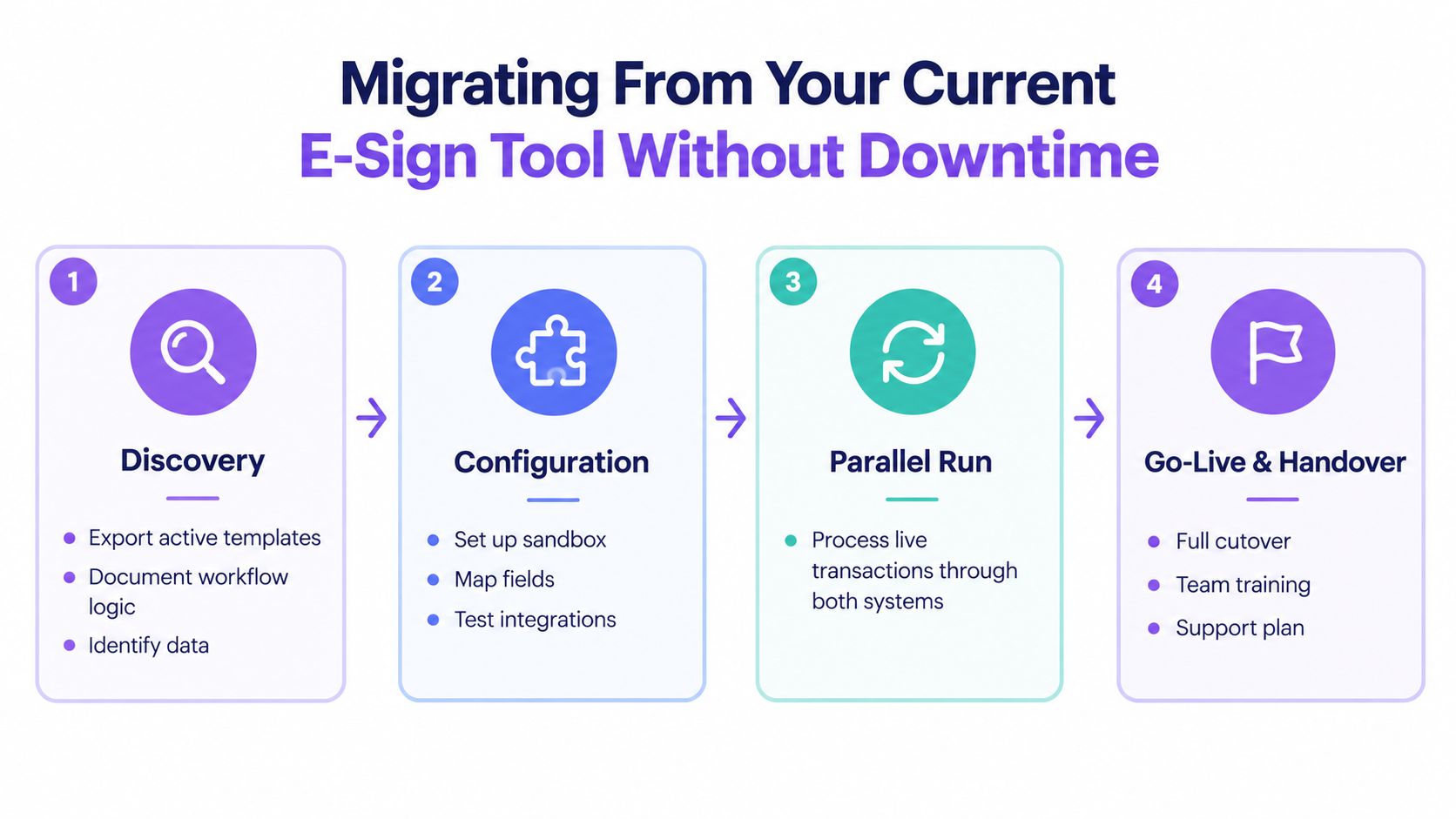
Phase three is a controlled pilot
Choose one high-volume, lower-risk department, such as HR onboarding or marketing contracts. Run the old and new systems side by side for two weeks, then compare completion time, error rates, integration failures, and administrator tickets.
Train administrators before end users. They need to know how to manage templates, resolve failed requests, export audit evidence, and escalate access or identity problems.
Phase four is a phased rollout
Roll out by department or region instead of forcing an organization-wide switch. Preserve envelope history, export completed PDFs with their audit trails, communicate the cutover date, and keep the rollback process documented until each group passes its checkpoint.
Use this migration checklist:
- Data export: Confirm templates, completed documents, audit trails, pending transactions, and metadata.
- Template validation: Approve field mapping, conditional logic, branding, signer order, and regional variants.
- SSO cutover: Test provisioning, deprovisioning, role mapping, and administrator access.
- Integration testing: Verify record updates, document storage, webhooks, retries, and error reporting.
- Training: Prepare administrators, department owners, support staff, and end users.
- Rollback planning: Define the trigger, owner, communication process, and access to the incumbent system.
A short video can help project teams visualize the migration sequence before they build their own runbook.
Your Next Step, Run a 30-Day Pilot Before You Commit
Don't sign a multi-year enterprise agreement based on a guided demo. Run a structured 30-day pilot inside the workflows that create the most operational cost. The pilot should prove whether the platform can authenticate employees, send documents in bulk, handle real templates, connect to business systems, and produce evidence that legal and compliance teams can use.
Week one focuses on environment setup
Configure the tenant, roles, templates, retention rules, identity connection, and test integrations. Include IT, legal, operations, procurement, and one department that sends documents frequently.
The first week should produce a working environment, not a list of promised features. If SSO, user provisioning, or the API can't operate in your controlled test, don't assume implementation will fix everything later.
Week two tests real templates
Migrate three high-volume templates from the incumbent platform. Select different workflow patterns, such as a single signer, sequential approvals, and multiple recipients.
Create and send representative documents using real field structures, not simplified demo data. Test PDF preparation, form capture, reminders, branded emails, completed-document storage, audit export, and exception handling.
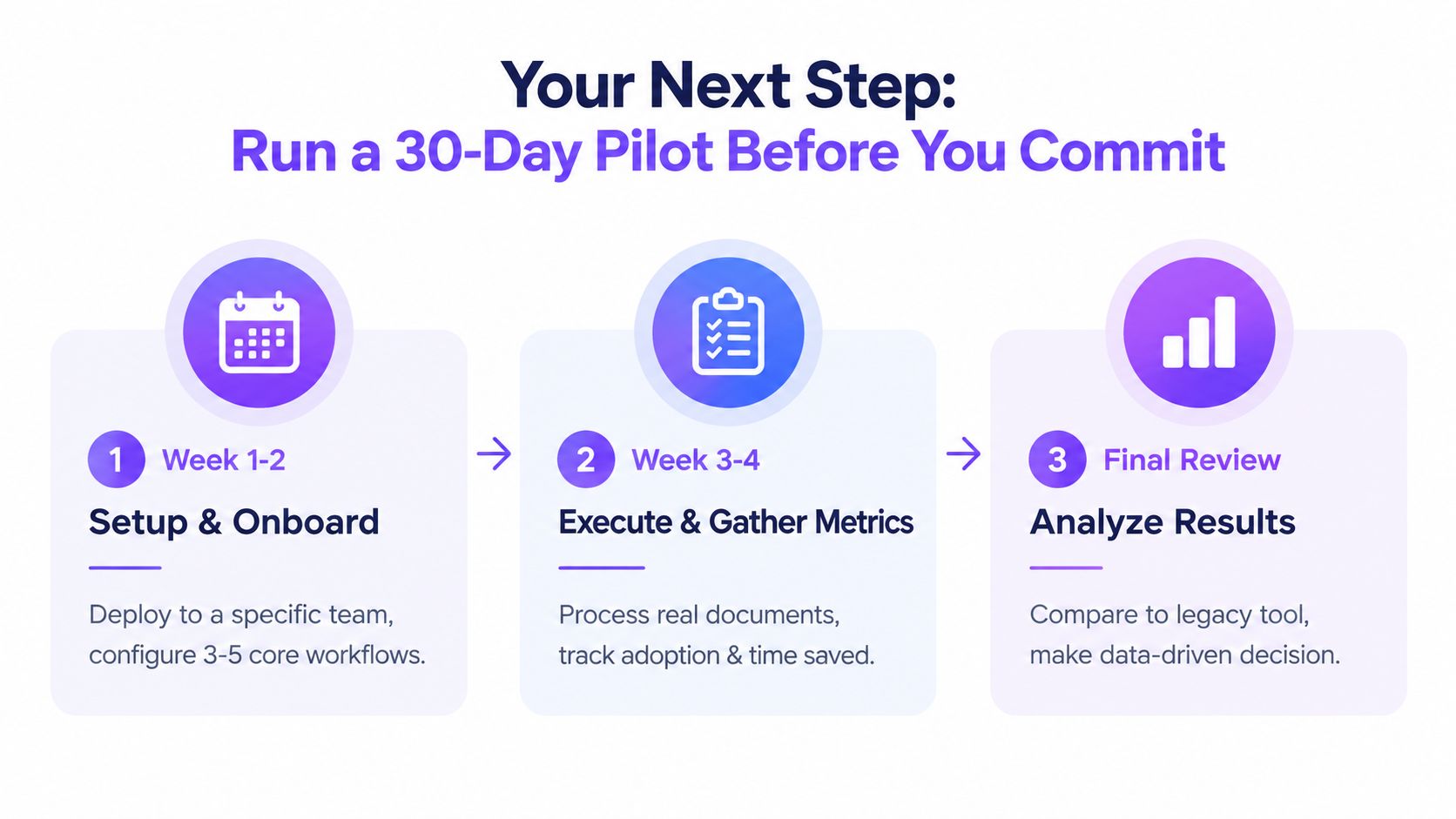
Week three measures department adoption
Roll the pilot into a controlled department and process live documents. Capture time-to-send, completion rate, IT ticket volume, and cost per signature. Track whether administrators can resolve routine issues without vendor intervention, and whether recipients complete the process without confusion.
Cost per signature should include more than the subscription. Add administrator time, integration maintenance, support, migration effort, and the cost of unused seats or transaction capacity.
Week four supports the decision
Have stakeholders score the platform against a pre-built rubric. Include security evidence, workflow fit, template governance, integration reliability, user experience, audit quality, support responsiveness, and the three-year TCO model.
BoloSign gives organizations a practical route to test sign PDFs online, create reusable forms, automate contracts, add signature fields to Google Forms, and connect workflows through integrations and APIs. Its fixed-price structure is designed to avoid per-user and per-envelope expansion, while its compliance and security materials should still be reviewed against your organization's specific obligations.
The fastest next move is to start a 7-day free trial and test SSO, bulk send, templates, PDF signing, form workflows, and API behavior with your own process. Closer Innovation Labs Corp. offers BoloSign as an affordable eSignature and contract management platform with unlimited documents, templates, forms, and team members at one fixed price, plus AI-powered automation and secure integrations for growing organizations. Visit Closer Innovation Labs Corp. to start the trial and replace vendor promises with evidence from your own workflows.

Paresh Deshmukh
Co-Founder, BoloForms
17 Sep, 2026
Take a Look at Our Featured Articles
These articles will guide you on how to simplify office work, boost your efficiency, and concentrate on expanding your business.



