

E-Sign Platform Enterprise Trial: A Complete Playbook
Discover how to run an e-sign platform enterprise trial. This complete playbook covers setup, evaluation, and best practices for your business.

Tired of nonsense pricing of DocuSign?
Start taking digital signatures with BoloSign and save money.
You're reviewing an e-sign platform enterprise trial because the current process is slowing down hiring, approvals, sales, or compliance work. The team uploads a few PDFs, sends them to friendly testers, collects signatures, and reports that everything looks fine. Weeks later, the actual test begins inside Salesforce, an HRIS, Google Workspace, or Microsoft Teams, and the workflow breaks at the handoff.
A useful trial must test more than whether people can sign PDFs online. It must show whether the platform can create, send, route, secure, audit, and automate the documents your business uses. BoloSign supports reusable PDFs, templates, forms, multi-recipient signing, integrations, AI-powered contract intelligence, and compliance controls in one workflow, with a pricing model built around unlimited documents, team members, and templates at one fixed price.
Why Most Enterprise e-Sign Trials Fail Before They Start
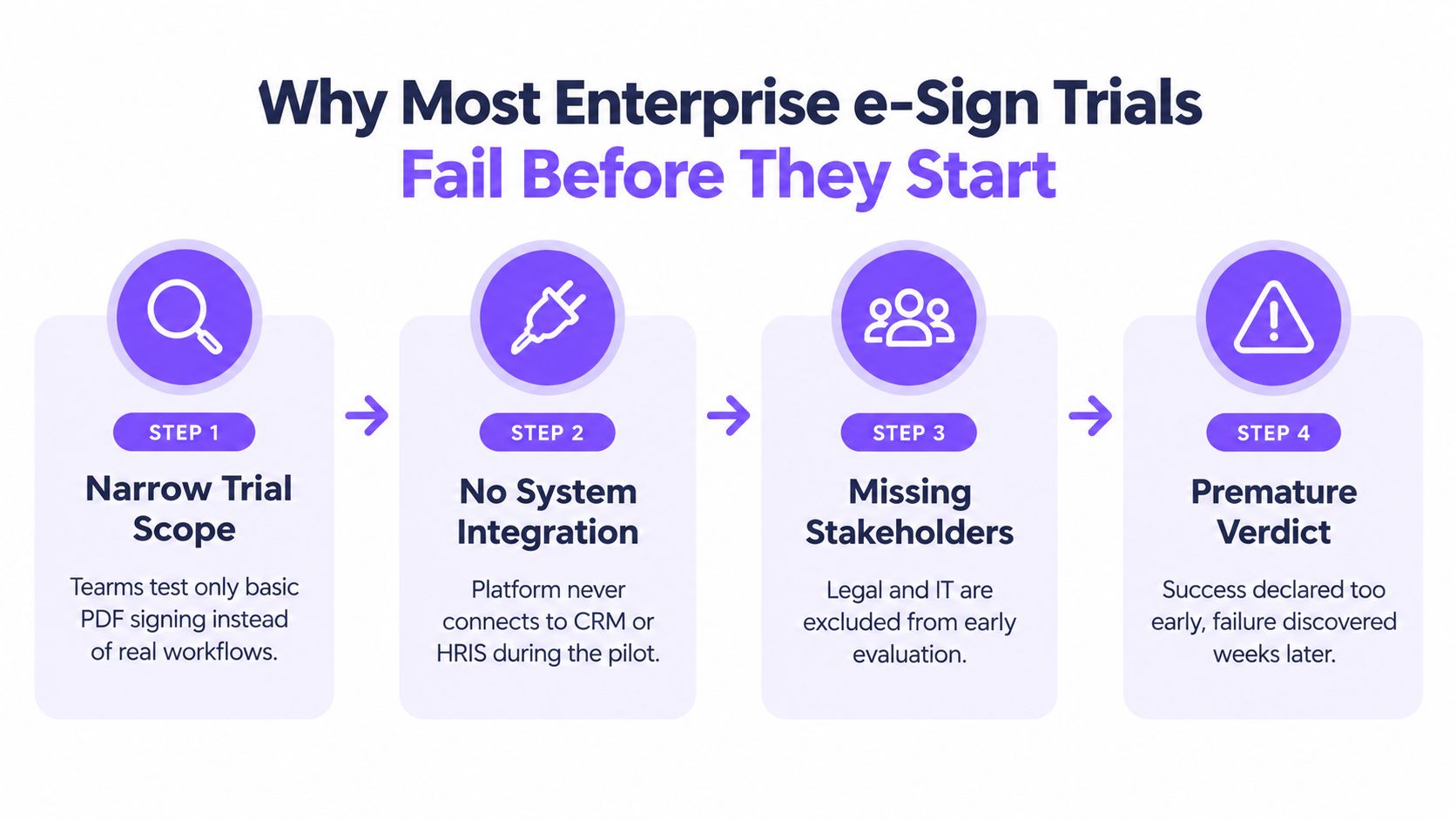
An enterprise trial can look successful while testing the least demanding part of the job. A sales manager signs a sample agreement, HR completes a sample onboarding form, and legal confirms that the final PDF remains intact. The actual test begins when a CRM must select the correct template, an HRIS must supply accurate data, and the completed document must return to the right record.
The hidden trap is standalone signing. A platform may handle a PDF well while creating work inside Salesforce, an HRIS, Google Workspace, or Microsoft Teams. Employees may need to leave the source application, re-enter data in another dashboard, track email notifications, and upload signed files manually. A useful pilot exposes those handoffs before procurement creates a long-term dependency.
Start with a narrow business problem
IDC advises buyers to identify specific use cases and build a pilot before wider deployment. Begin with one or two departments, use real document types, and define success criteria around adoption, completion time, and integration stability. IDC's eSignature software assessment supports this controlled-pilot method.
Choose a workflow with enough volume and complexity to reveal weaknesses. Candidate offer letters, patient consent documents, lease packages, delivery confirmations, enrollment forms, and statements of work can all expose different routing, data, and approval requirements.
Practical rule: If the trial doesn't use a real workflow, real users, and real system handoffs, it's a product tour, not an enterprise evaluation.
Write the acceptance criteria before inviting users. Test whether employees can find the correct template, whether signers complete documents without support, whether the signed file returns to the source system, and whether administrators can investigate every event. Avoid artificial targets. Agree on what acceptable performance means, then record exceptions and manual workarounds.
Keep common failure points visible
Signing may look intuitive, so teams often underinvest in training. That choice leaves recipient roles misconfigured, required fields incomplete, and reminders directed to the wrong person. Test mobile signing as well. Candidates, customers, contractors, and field workers may use phones rather than office computers.
Use this guide to choosing an approval management system while mapping approvals, roles, and escalation paths. Include legal and IT at the start. Legal can assess defensibility, while IT verifies identity controls, permissions, integration behavior, and support requirements before business users form a final view.
Setting Up Your Pilot Account and Configuring Security
A pilot account should resemble production closely enough to reveal operational problems, while remaining controlled enough that a mistake won't affect live records. Create a dedicated workspace, nominate an administrator, and list every person who will design, approve, send, sign, or audit documents. Don't give every participant full access just because it makes setup faster.
BoloSign lets teams create and send PDFs, reuse templates, capture data through forms, and route documents to multiple recipients. A staffing agency might import its candidate agreement and client authorization forms. A healthcare provider could configure consent documents with appropriate signer roles. A logistics operator might prepare delivery confirmation templates that drivers and customers complete from mobile devices.
Build roles around responsibility
Start with separate roles for workspace administration, template management, sending, signing, and audit review. A legal reviewer may need to inspect audit trails without editing templates. An HR coordinator may send onboarding documents but shouldn't change the approved offer-letter layout. A department manager may approve a request without accessing unrelated employee records.
Use least-privilege permissions as a test condition, not just a security preference. Ask each participant to complete their normal task, then verify that they can't view or modify information outside their role. Test what happens when someone changes departments, leaves the pilot, or needs temporary access.
Single sign-on can simplify account control and reduce separate credentials for employees. Review the BoloSign SSO feature with IT, then test login, role assignment, access removal, and session behavior using the identity process your organization already relies on.
Configure the signing experience
Enable multi-factor authentication where available and decide which signer verification methods fit each document. A low-risk internal acknowledgment may need a lighter process than a sensitive healthcare authorization or a high-value commercial agreement. Record the decision and have legal confirm that it matches the organization's risk posture.
Customize sender names, email language, reminders, and completion notifications. A branded message helps recipients recognize legitimate requests, but clarity matters more than decoration. State who is requesting the signature, what action is required, how to contact the organization, and what happens after completion.
Import the templates that users already depend on. BoloSign supports reusable document workflows and one-click import of DocuSign templates, which gives migration teams a practical way to test whether existing field assignments, roles, and routing rules transfer cleanly. Don't import only a polished example. Include a document with conditional fields, multiple signers, attachments, and approval steps if those appear in daily work.
Finish with a controlled failure test. Send an incomplete document, reject a request, change a recipient, revoke access, and retrieve the completed record. A secure trial doesn't only demonstrate the happy path. It shows how the system behaves when people make ordinary mistakes.
Validating Compliance and Legal Defensibility
An enterprise trial can pass every standalone signing test and still fail legal review once signatures run inside a CRM or HRIS. A recruiter may send an offer from an HR system, or a sales representative may trigger an agreement from a CRM, while the platform must preserve consent, identity, routing, and the completed record across both systems. Test that evidence chain during the pilot, not after vendor selection.
In the United States, the legal foundation for enterprise electronic signatures began with UETA, approved in 1999, and ESIGN, passed in 2000. UETA prevents electronic records and signatures from being denied legal effect solely because they are electronic. ESIGN establishes nationwide validity while requiring consumer disclosure and consent. The overview of U.S. electronic-signature law notes that 49 states and Washington, D.C. have adopted versions of UETA, with New York remaining the holdout after Illinois and Washington adopted their own approaches.
Legal recognition depends on the transaction's execution. The signer must show intent, consent to electronic business, and attribution to the signature. The platform must preserve an intact, reviewable record over time. This compliance overview describes these conditions under ESIGN and UETA.
Use the trial to test evidence
Send a production-like document through its full lifecycle, including the CRM or HRIS trigger. Review the invitation, consent language, authentication event, timestamps, signer actions, document hash or other integrity evidence where provided, and final download. Ask an independent reviewer to determine who signed, what they signed, when the action occurred, and whether the record changed afterward.
A useful audit trail lets an auditor reconstruct the transaction without relying on a sender's memory or scattered email threads. Check retention controls, export formats, access permissions, and whether administrators can retrieve records after a user changes role. Confirm that the source application retains the correct status and document reference rather than creating a second, disconnected record.
| Standard | Scope | Key Requirements |
|---|---|---|
| ESIGN | United States | Intent, electronic consent, attributable signing, and reliable record preservation |
| UETA | United States state law | Electronic signatures and records must not lose legal effect merely because they are electronic |
| eIDAS | European Union | Appropriate electronic identification, signing, trust, and evidentiary controls for the relevant signature type |
| GDPR | Personal data processing | Secure processing, data minimization, retention limits, and safeguards for cross-border transfers |
| HIPAA | Protected health information | Confidentiality, integrity, and availability controls for healthcare-related workflows |
Check the document, not just the platform
A platform may offer compliance controls while a specific transaction remains unsuitable for electronic signing. Government filings, notarization-style workflows, regulated disclosures, and documents with jurisdiction-specific requirements may need special handling. Recent legal updates have expanded acceptance for certain corporate and tax documents in places including Oregon, Kansas, and Georgia, but acceptance remains uneven by document class and filing destination. DLA Piper's 2025 eSignature updates shows why the pilot should use actual document types instead of assuming blanket legality.
For healthcare, verify that protected health information stays confidential during creation, transmission, signing, storage, and retrieval. For global operations, review GDPR data minimization, retention, access, and transfer processes. BoloSign presents support for ESIGN, UETA, eIDAS, GDPR, HIPAA, ISO 27001, and SOC 2, as outlined in this eSignature legality overview, but the buyer still needs to confirm contractual terms, data-processing arrangements, regional requirements, and internal policies.
Do not treat a Google Forms workaround as a complete signature workflow. Google Forms does not provide a native signature field, and simple workarounds generally lack identity verification, audit trails, and document integrity controls. This explanation of signatures in Google Forms clarifies the difference between collecting typed information and collecting a defensible eSignature.
Testing Integrations and Automation Workflows
The pilot should start inside the systems employees already use. A recruiter who exports candidate data from an ATS, rebuilds an agreement in a separate tool, then uploads the signed file has gained another system to maintain, not a faster process. The same risk appears in sales, procurement, and finance when signing is tested as an isolated task.
Run each workflow from its trigger to its final record. In HubSpot or Salesforce, create a test deal or contact, generate the correct agreement, send it to the assigned signer, and confirm that status changes return to the original record. In an HRIS, create a controlled onboarding event, populate the offer template, route it to the candidate and hiring manager, and verify that the completed document is stored where HR expects it.
Build the pilot around specific use cases, real document types, and criteria such as adoption, completion time, and integration stability. This keeps stakeholders from expanding the trial before the underlying workflow has been proven.
Test embedded signing, not just connectors
A connector that creates a record has value. Embedded signing can remove more work because users and signers complete the action inside the application where the process began. Test these points:
- Data mapping: Do CRM or HRIS fields populate the correct document fields without manual correction?
- Routing: Does the workflow identify the right signer, approver, and fallback contact?
- Status updates: Do sent, viewed, declined, completed, and expired events return to the source system?
- Error handling: What happens when a required field is empty, a signer changes, or an integration is unavailable?
- Recordkeeping: Can users find the final document and audit evidence from the business record?
BoloSign connects with tools including Zapier, Make, Pabbly, HubSpot, Salesforce, Pipedrive, Google Drive, Google Sheets, Slack, and Microsoft Teams. Check each connection against a real process. An integration directory cannot show whether field mapping, permissions, retries, and ownership work for your team.
Use sector scenarios that expose friction
A staffing team should test a candidate packet with a candidate signature, recruiter review, client approval, and automated storage. The meaningful test is whether the recruiter can initiate the packet from the candidate record and see its status without chasing email.
A healthcare team should test a consent form with sensitive data, limited access, an appropriate signer verification method, and controlled retention. A logistics team should test delivery confirmation from a mobile device, including a failed connection, a customer refusal, and a later audit request.
Education teams can evaluate admissions, consent, and certification forms. Real estate teams can test lease packages and multi-party approvals. Professional-services firms can test statements of work, change orders, and renewals. These scenarios show whether templates, approvals, notifications, and storage operate as one process.
AI-powered automation needs the same examination. Ask what BoloSign's contract intelligence can extract or flag, which users can access that information, how corrections are made, and whether AI-assisted review fits legal approval rules. Automation should reduce repetitive work while keeping exceptions and accountable decisions visible.
A useful boundary: Automate data movement and reminders first. Keep legal exceptions, unusual clauses, and high-risk approvals visible to a human reviewer.
Measuring Success and Calculating ROI
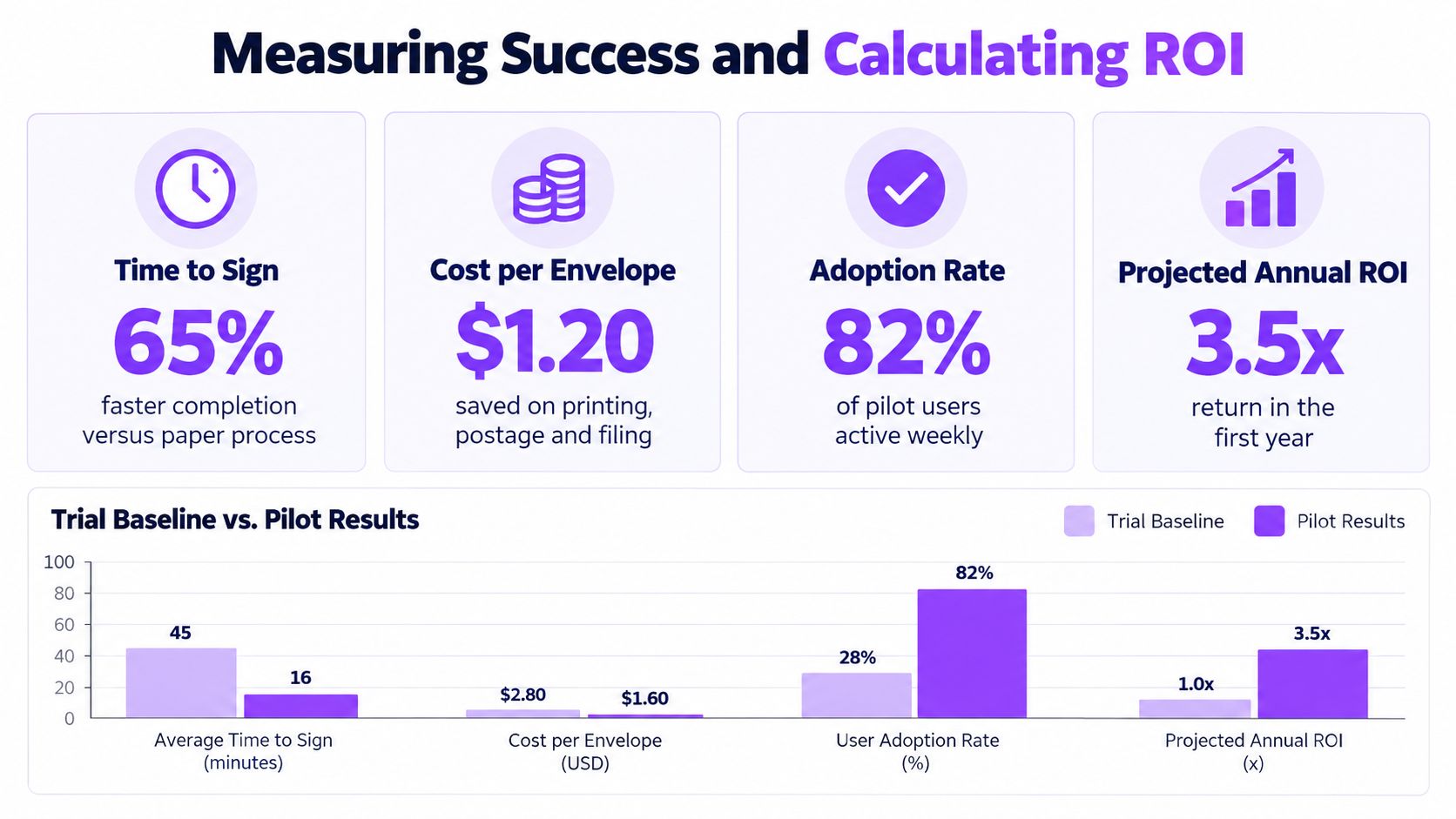
A trial earns approval when it produces evidence that decision-makers can trust. Capture the current process before changing it, then compare the same workflow during the pilot. If paper documents currently move through email, printing, scanning, and filing, document each handoff, waiting period, correction, and storage task without inventing a financial value.
Measure the process from the user's perspective. Track time to signature, total cycle time, completion by signer role, reminder volume, rejected or abandoned requests, template reuse, integration events, and support requests. Adoption isn't merely the number of invited users. It includes whether people choose the approved workflow for real work and whether they can complete it without workarounds.
Build a defensible comparison
Use a simple baseline and pilot sheet. For each document type, record the number of steps, elapsed time, people involved, manual data entries, exception handling, and final storage location. Then record the same fields after implementation. Separate observed results from expected benefits so stakeholders don't mistake an assumption for an outcome.
Calculate ROI using your organization's real inputs:
Estimated benefit = avoided labor + avoided printing and handling + reduced rework + value of faster completion
Estimated ROI = (estimated benefit minus total platform and implementation cost) divided by total platform and implementation cost
The formula is straightforward. The hard part is assigning honest values. Use finance-approved labor rates, actual vendor pricing, and a conservative estimate for implementation effort. If the trial doesn't provide enough volume to support a reliable annual projection, label the result directional rather than presenting false precision.
Ask users what the dashboard misses
Numbers won't show why a hiring manager keeps downloading documents and emailing them manually. Interview senders, signers, administrators, legal reviewers, and IT owners separately. Ask where they hesitated, which notification confused them, whether mobile signing felt reliable, and what they'd change before rollout.
Review the results against the criteria agreed at kickoff:
- Completion: People finish the intended workflow without avoidable assistance.
- Adoption: The target departments use the approved process consistently.
- Integration: Data, status, and documents move reliably between systems.
- Defensibility: Audit evidence, permissions, retention, and authentication meet review requirements.
- Economics: The proposed pricing and operational savings make sense using verified internal inputs.
BoloSign's fixed-price approach includes unlimited documents, team members, and templates, and is positioned as 90% more affordable than traditional tools. Treat that claim as a purchasing consideration, then validate total cost against your own document volume, integrations, administration, and support needs.
Making the Final Decision and Scaling Deployment
A successful trial should leave you with more than positive feedback. It should produce a documented workflow, measured baseline and pilot results, compliance findings, integration logs, training notes, and a list of unresolved exceptions.

Approve expansion only when the platform passes the business, technical, and legal tests together. Scale by department, standardize templates, train senders before launch, and appoint owners for permissions, integrations, retention, and support. BoloSign's model provides unlimited documents, team members, and templates at one fixed price, which can simplify budgeting when usage grows across staffing, healthcare, real estate, logistics, education, and professional services.
A final demonstration should show the complete embedded workflow, including an exception and an audit review, not another isolated PDF signature.
Closer Innovation Labs Corp. offers BoloSign, a secure eSignature and contract workflow platform with reusable templates, forms, integrations, AI-powered contract intelligence, and compliance controls for growing teams. Visit Closer Innovation Labs Corp. to start a 7-day free trial, test an embedded workflow with real documents, and confirm whether the platform fits your enterprise process before signing a contract.

Paresh Deshmukh
Co-Founder, BoloForms
10 Oct, 2026
Take a Look at Our Featured Articles
These articles will guide you on how to simplify office work, boost your efficiency, and concentrate on expanding your business.



