

E-Sign for Distributed Enterprise Teams Made Simple
Learn how e-sign for distributed enterprise teams streamlines approvals, ensures compliance and scales securely with BoloSign. Start your 7-day trial.

Tired of nonsense pricing of DocuSign?
Start taking digital signatures with BoloSign and save money.
Your HR lead is waiting on a signed offer letter in Toronto. Legal is chasing a vendor agreement in Dubai. Operations needs a policy acknowledgment signed before a shift starts in Sydney. The documents are ready, but the process isn't. Files live in email threads, approvals sit in chat, and no one is fully sure which version is the final one.
That's the problem with e-sign for distributed enterprise teams. It isn't just about replacing ink with a click. It's about coordinating people, documents, approval rules, and evidence across time zones without creating a new mess in a different tool.
Electronic signatures became part of mainstream business infrastructure through a clear legal path. The U.S. passed the Electronic Signatures in Global and National Commerce Act on June 30, 2000, after UETA was released in 1999, and the EU later adopted eIDAS on July 23, 2014, helping establish cross-border legal recognition for electronic signatures and making remote approvals practical for everyday business workflows, as outlined in this history of electronic signatures.
That legal foundation matters because distributed work is now normal. One 2025 industry summary says 60% to 80% of organizations have adopted some level of eSignature technology, while 20% to 40% still use paper for at least some workflows, according to these 2025 eSignature adoption statistics. So the question for many teams isn't whether digital signing solutions are legitimate. It's whether the workflow around them is controlled, connected, and easy to scale.
BoloSign fits this reality well because teams can create, send, and sign PDFs, templates, and forms quickly, while keeping document workflows simple enough for operations teams and strong enough for compliance reviews. It also helps that the platform uses one fixed price with unlimited documents, team members, and templates, making it 90% more affordable than traditional tools for organizations that don't want costs to rise every time another department joins.
Introduction to E-Sign for Distributed Teams
A distributed team rarely has a signature problem in isolation. It usually has a handoff problem.
A staffing company offers a candidate a role, then waits for the signed offer letter before sending onboarding forms. A healthcare group needs consent documents returned before care begins. A real estate team wants a counterparty to sign PDFs online without printing, scanning, or emailing attachments back and forth. In each case, the signature is only one moment in a longer chain.
Where remote signing gets stuck
Most bottlenecks show up in familiar places:
- Version confusion. Someone signs an outdated PDF because a revised file was sent in a separate email.
- Missing context. A manager approves in Slack, but the signed document never gets attached to the system of record.
- Slow follow-up. People lose track of who still needs to sign, especially when signers are in different regions.
- Weak evidence. If a dispute comes up later, teams can't easily prove what was signed, when, and under which authentication step.
Practical rule: If your team has to ask “Who has the latest copy?” your e-sign workflow still depends on manual coordination.
This is why many operations leaders now treat eSignature as infrastructure, not a convenience feature. They need a system that handles forms, templates, approvals, reminders, and records in one repeatable flow.
BoloSign supports that kind of setup. Teams can send contracts, onboarding packets, consent forms, and internal approvals without forcing users to learn a heavy legal tool. If you're comparing options, it helps to start with a simple overview of how to eSign documents online.
Why this matters across industries
The same workflow logic shows up in very different sectors:
- Staffing needs fast offer letters, policy acknowledgments, and candidate onboarding.
- Healthcare needs compliant consent and intake workflows with a clear audit record.
- Logistics needs vendor agreements, route documentation, and field confirmations.
- Education needs enrollment packets and parent consent forms.
- Professional services needs engagement letters, statements of work, and change approvals.
The winning setup isn't the one with the flashiest signing screen. It's the one that keeps work moving.
How E-Signatures Work for Distributed Enterprise Teams
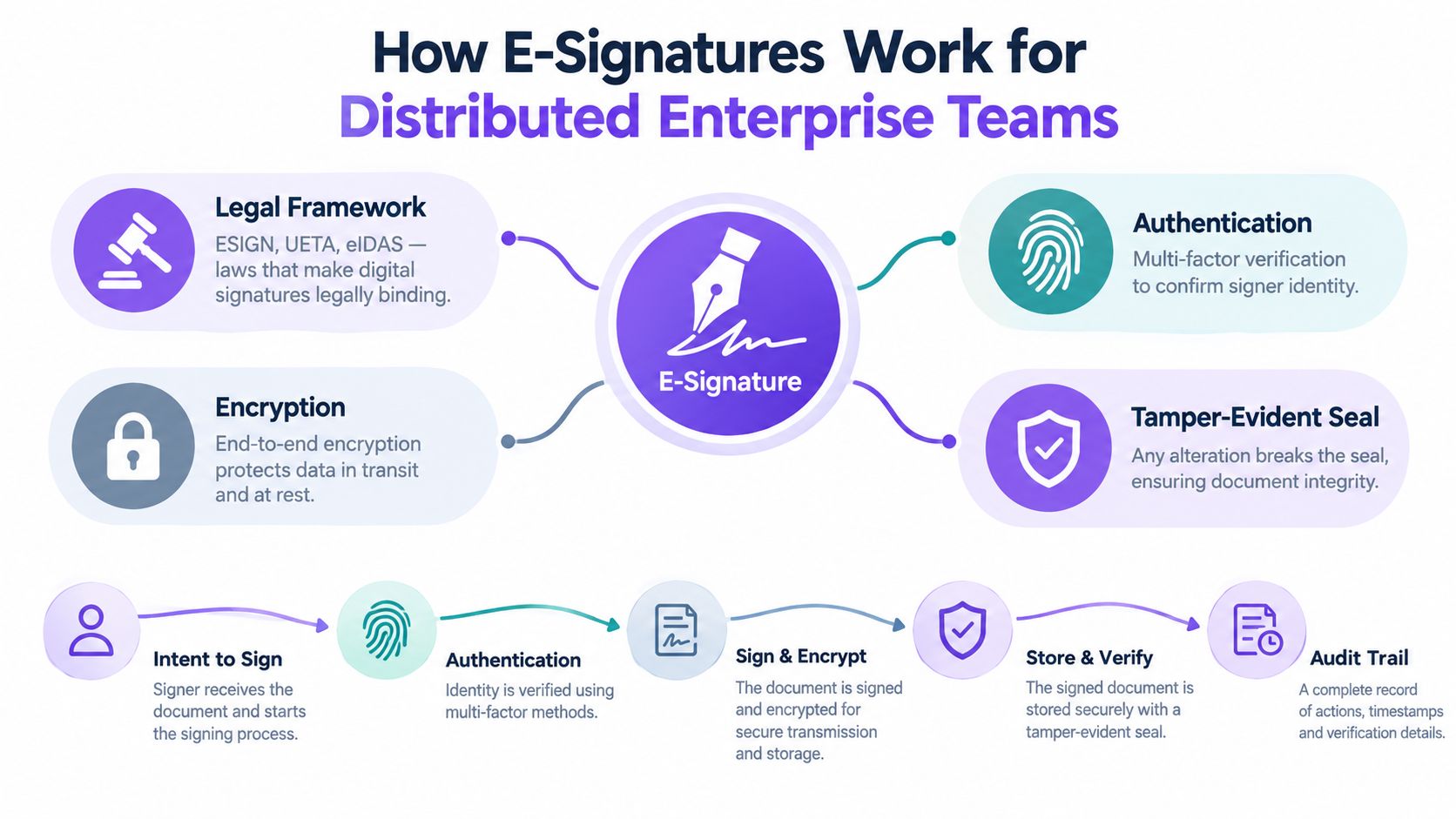
An e-signature is easiest to understand if you think of it as three things tied together. A person. A document. A record of what happened.
If one of those pieces is weak, the signature event becomes harder to defend.
The three parts that make a signing event hold up
Under the U.S. ESIGN Act and state-level UETA, an electronic signature is generally enforceable when the signer shows clear intent to sign, consents to transact electronically, and the system can attribute the signature to that person while preserving the record intact over time, with common evidence fields including document hashes, signer IP and user agent, authentication method, disclosure version, and authoritative timestamps, as explained in this guide to e-signature compliance under ESIGN, UETA, and eIDAS.
That sounds technical, but the logic is simple:
- Intent means the signer knowingly took an action to sign.
- Attribution means the system can connect that action to the signer.
- Integrity means the document hasn't been changed after signing.
A typed name or drawn signature image alone doesn't prove all three. The surrounding evidence does.
Why the proof package matters more than the signature image
Many teams get confused at this point. They focus on how the signature looks instead of how the event is recorded.
For distributed teams, the stronger model is a workflow that captures server-side UTC timestamps, signer identity details, device context, authentication method, and document integrity checks. An e-signature API is commonly described as a programmatic interface that creates signing packets, authenticates signers, captures signatures, and returns sealed documents with audit evidence, and a strong audit trail should record UTC timestamps per event, signer IP, user agent, signer identity, authentication method, document hashes, and a sequential event history, as outlined in this e-signature API and audit evidence guide.
In practice, the signature mark is the least interesting part. The event history is what answers hard questions later.
A staffing team can use that evidence to support a signed offer letter. A healthcare group can use it to document patient consent workflows. A professional services firm can use it to confirm who approved a statement of work and when.
Basic click-to-sign versus stronger workflows
Not every workflow needs the same level of proof. Internal approvals may need straightforward intent and tracking. Cross-border or regulated workflows may need stronger identity-linked or certificate-backed approaches.
A neutral digital identity perspective also notes that legally defensible signing can involve certificate-chain validation, revocation checks, algorithm policy checks, and signing-time verification, which matters when records may be reviewed across jurisdictions, as discussed on the Identigate digital identity blog.
That's why e-sign for distributed enterprise teams is really about matching the evidence model to the business risk.
Compliance Security and Audit Trails You Can Trust
If you're evaluating a platform, don't stop at “Is it legal?” Ask a better question. “What evidence will we have if someone challenges the signature six months from now?”
That question changes how you look at compliance, security, and audit trails.
What a trustworthy audit trail should contain
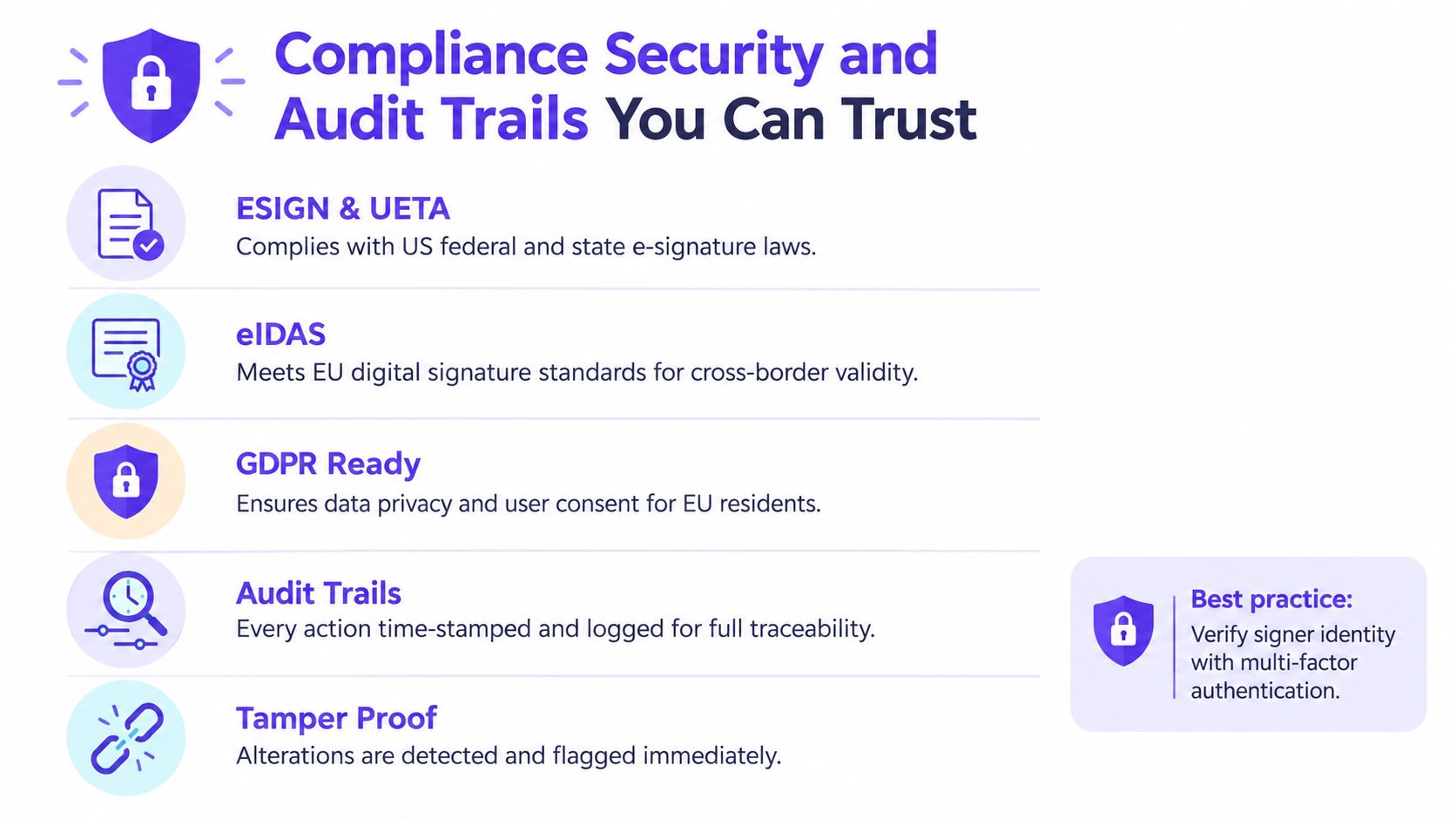
An eSignature audit trail is a tamper-proof digital record of every action taken during the electronic signing process, capturing who signed, when, and how the document was handled, and it's widely used to support compliance with eIDAS, the ESIGN Act, GDPR, and HIPAA, according to this overview of eSignature audit trails.
For distributed enterprise use, a stronger benchmark is more specific. A defensible workflow should bind the signer, document, and event log into one evidence package by capturing server-side UTC timestamps, source IP, user-agent or device context, authentication method, and pre-sign and post-sign document hashes, then storing the log in append-only or otherwise immutable form so later alteration is detectable. A SHA-256 hash mismatch proves a post-signature change, while append-only logging preserves event sequence for audit reconstruction, as detailed in this audit trail design guide for e-signatures.
That gives compliance, legal, and security teams something concrete to verify.
How regulations map to workflow controls
The acronyms only matter if they change system behavior.
- ESIGN and UETA require clear signer intent, electronic consent, attribution, and preserved records.
- eIDAS matters when teams need cross-border recognition in the EU.
- GDPR affects what personal data you collect, how long you keep it, and who can access it.
- HIPAA raises the bar for protected health information and access controls.
For GDPR-focused workflows, a compliant audit trail needs enough personal data to prove authenticity, such as signer identity, timestamp, IP geolocation, and certificate chain, while still minimizing retained personal data through encrypted storage, restricted access, and retention aligned to the signed document, as explained in this GDPR electronic signature compliance article.
A simple review checklist for security teams
When security or procurement asks hard questions, use a checklist like this:
- Check time authority. Make sure the system records server-side UTC timestamps, not only a signer's local device time.
- Check document integrity. Confirm the workflow seals the final document and can detect post-signing changes.
- Check access controls. Review identity verification, encrypted transport, session timeout settings, and admin restrictions.
- Check storage behavior. Logs should be append-only or otherwise tamper-evident.
- Check retention alignment. Signed records and their evidence should be retained according to document type and policy.
A useful place to compare these capabilities is BoloSign's audit trail features for eSignature workflows.
Teams don't get into trouble because a signature was digital. They get into trouble because the evidence around it was incomplete.
Common Workflows and Integrations That Save Time
Most teams don't need another signing dashboard. They need fewer manual handoffs.
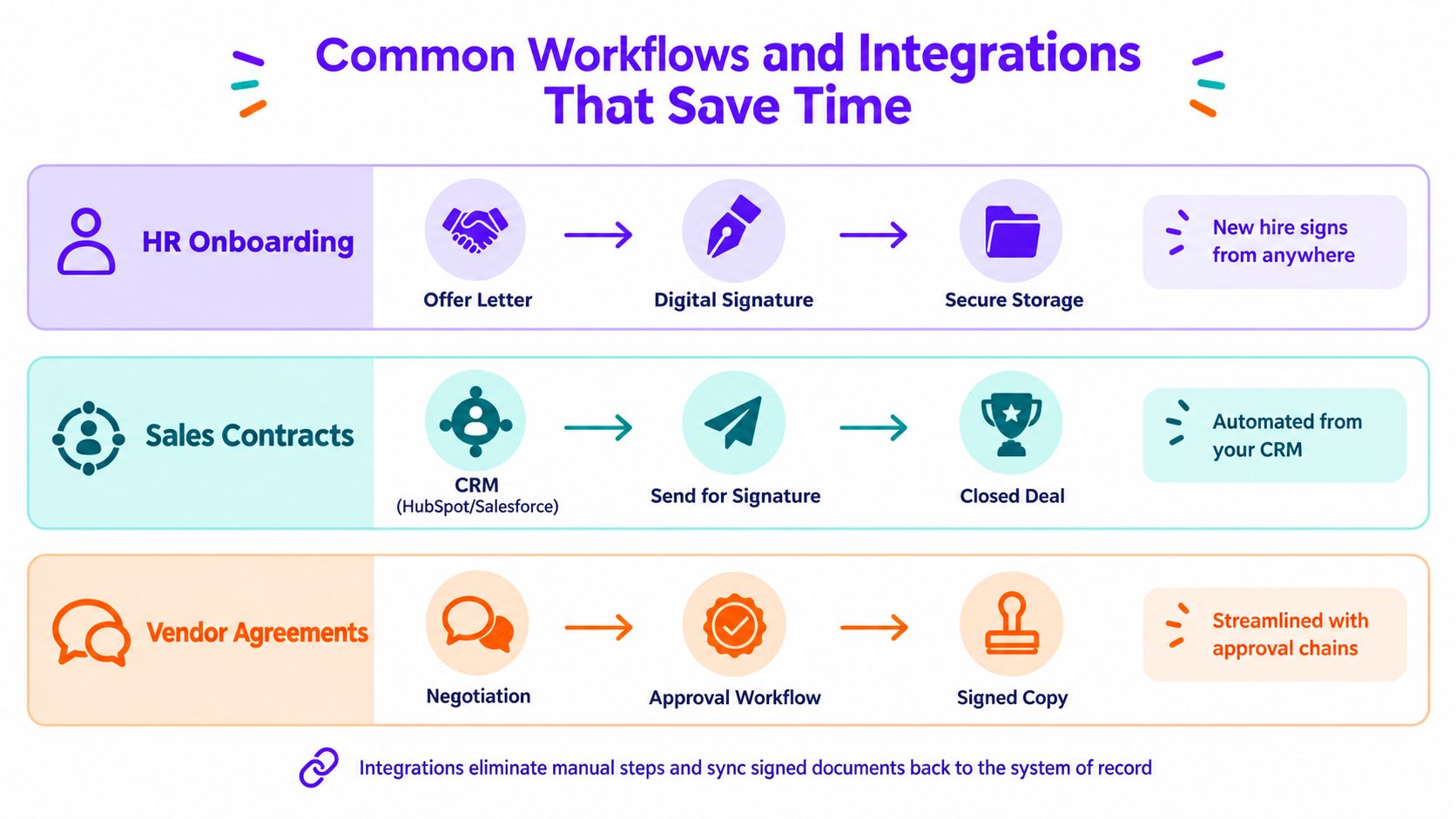
The difference is huge. In a manual setup, someone creates a PDF, emails it, waits for replies, downloads the signed copy, renames it, uploads it to a shared drive, then updates the CRM or HRIS by hand. In an integrated setup, the document is generated inside the business system, sent for signature automatically, and the signed record flows back to the right place without rekeying.
Manual email flow versus connected workflow
Here's how the two models compare in plain terms.
| Workflow style | What people do | What usually goes wrong |
|---|---|---|
| Email-based signing | Create files manually, attach PDFs, chase replies, save copies, update systems later | Version mix-ups, delayed follow-up, duplicate data entry |
| Integrated eSignature workflow | Generate, send, sign, and archive from CRM, ERP, or HRIS | Fewer handoffs, clearer ownership, better record consistency |
For distributed teams, the highest-value technical advantage is embedding signing into existing business systems through APIs and workflow automation so documents can be generated, sent, signed, and archived without leaving ERP, CRM, or HRIS tools. This reduces context switching and manual rekeying, and it also enables event-driven orchestration where completed signatures and extracted field data can be pushed into downstream systems, as described in this ERP eSignature integration guide.
High-demand workflows that benefit first
A few workflows almost always move to the front of the line:
- Staffing and HR onboarding. Offer letters, tax forms, policy acknowledgments, and contractor agreements.
- Sales contracts. Quotes, order forms, statements of work, and renewals routed from HubSpot or Salesforce.
- Healthcare intake and consent. Patient-facing forms that need clean routing and defensible records.
- Real estate approvals. Listing agreements, disclosure forms, and agent coordination across multiple parties.
- Logistics and vendor management. Carrier contracts, supplier agreements, and delivery confirmation paperwork.
- Education administration. Enrollment paperwork, guardian consent, and internal approvals.
A form-based workflow can be especially useful when the signature is only one part of data collection. That's where teams often want to sign PDFs online, automate contract automation steps, or even add signature to Google Form style experiences without asking signers to learn a separate tool.
BoloSign supports this practical side of digital signing solutions well. Teams can create, send, and sign PDFs, reusable templates, and forms quickly, including legally binding signature fields inside Google Forms, while syncing work with tools such as Zapier, Make, HubSpot, Salesforce, Google Drive, Google Sheets, Slack, and Microsoft Teams.
A quick walkthrough helps make the integration idea concrete.
What good integrations actually change
The biggest gains aren't flashy. They're operational.
- Status visibility improves because teams can see pending, viewed, completed, and expired documents in one place.
- Rekeying drops because signer data and completed fields can flow back into the system of record.
- Handoffs tighten because Slack or Microsoft Teams notifications can alert the next approver immediately.
- Archiving becomes cleaner because signed copies and evidence land in the right folder or record automatically.
If you're mapping these handoffs, start with BoloSign's integration options for connected document workflows.
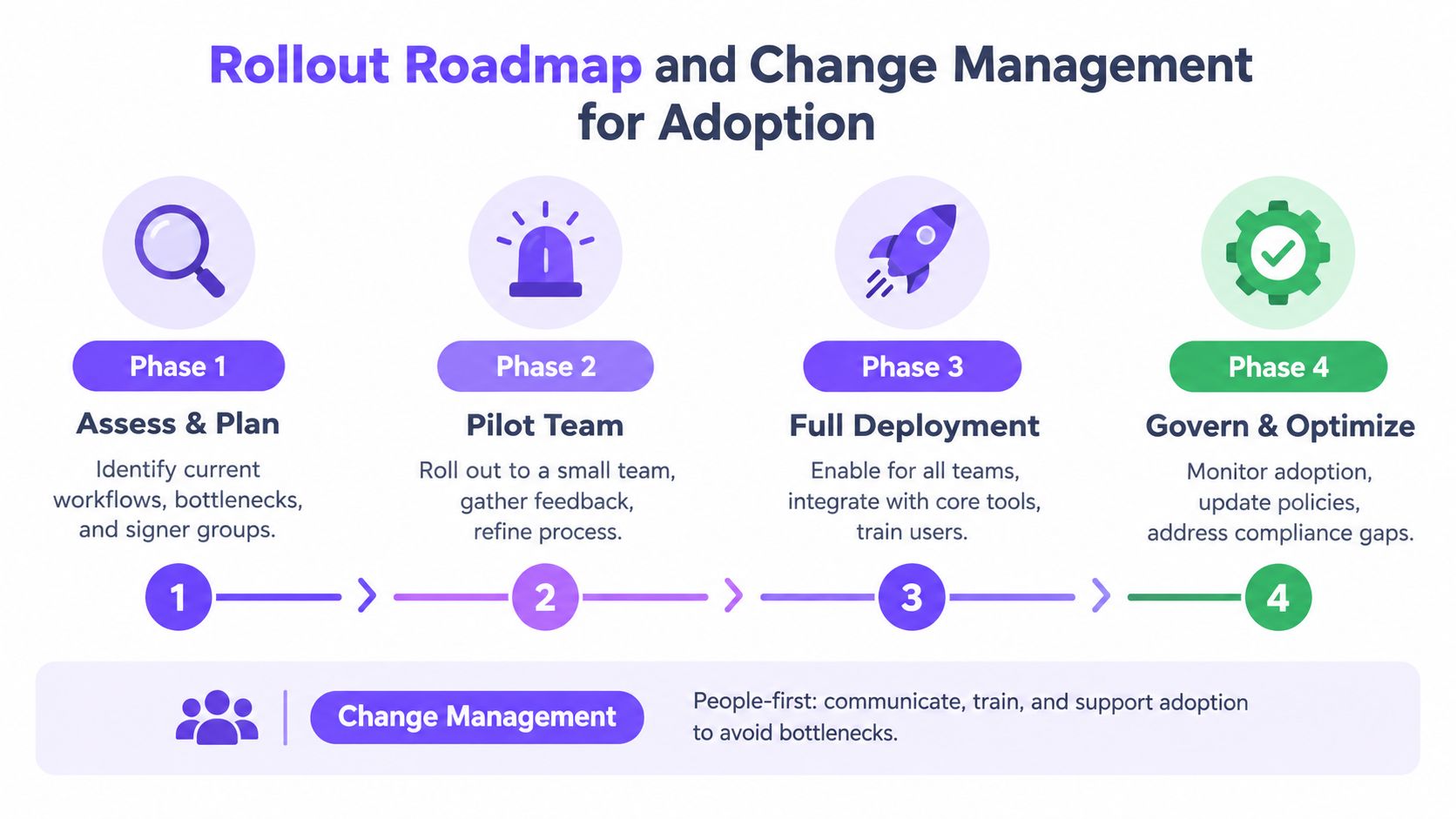
Rollout Roadmap and Change Management for Adoption
A lot of e-sign rollouts fail for a simple reason. The tool works, but the workflow around it doesn't.
Teams sign faster, then discover their templates aren't standardized, approval paths are inconsistent, and too many people have permission to send the wrong document. The bottleneck moves from paper to dashboards.
Start with one workflow, not the whole company
One industry roundup notes that e-sign adoption is already widespread and that the bigger challenge is governance at scale, not basic willingness to use digital signing. It also points out that teams value centralized access, status visibility, and repeatable remote signing flows, while lower-friction signing can expose process debt if templates, permissions, and approval paths aren't standardized, as discussed in this e-signature industry roundup focused on scaling and governance.
That's why a phased rollout works better than a company-wide switch on day one.
A good first pilot is usually one of these:
- HR onboarding because the signer journey is repeatable.
- Sales contracts because the revenue path is visible.
- Vendor agreements because approvals often reveal process gaps quickly.
Build governance before scale
The core rollout decisions are less about design and more about rules.
Standardize templates
Decide which forms and contracts become controlled templates. Lock down legal language where needed, and separate flexible fields from fixed clauses.
Define permission groups
Map who can create, send, edit, approve, countersign, and archive. A distributed team needs role clarity more than broad access.
Set approval paths
Create repeatable routing for legal, finance, department heads, or compliance reviewers. Don't leave escalations to ad hoc chat messages.
The fastest signature workflow still feels slow if nobody knows who owns the next step.
Train local champions
Choose operators in each department who can answer process questions, not just software questions. That matters in staffing, healthcare, logistics, and education, where teams often use different document sets but share the same governance model.
Remove pricing friction during adoption
Pricing structure affects rollout more than many buyers expect.
If each added user, sent document, or template carries extra cost, departments hesitate to onboard more people. That creates shadow workflows. Teams keep using email, shared drives, and side processes to avoid charges.
A fixed-price model changes that behavior. BoloSign offers unlimited documents, team members, and templates at one fixed price, and it's positioned as 90% more affordable than traditional tools. For distributed organizations, that removes a common barrier to scaling access across HR, sales, legal, operations, and external collaborators.
Measuring Success and Optimizing Your E-Signature Workflows
Once the rollout is live, leadership will ask a fair question. Is this improving operations?
You don't need a complicated scorecard. You need a few metrics that show speed, completion, quality, and control.
What to measure first
Start with the moments where delays or errors show up most often:
- Turnaround time from send to completion
- Completion rate by workflow or document type
- Error and rework rate when forms come back incomplete or routed incorrectly
- Compliance readiness based on whether signed records include the expected audit evidence
- Integration savings based on manual steps removed from CRM, HRIS, or shared-drive processes
Key Metrics to Track E-Signature Success
| Business Goal | KPI to Measure | How to Track in BoloSign |
|---|---|---|
| Speed up approvals | Turnaround time | Review send, open, and completion timestamps in the dashboard and audit trail |
| Increase completion | Completion rate | Compare sent versus completed requests by template or team |
| Reduce admin work | Rework rate | Track documents resent due to missing fields, wrong recipients, or outdated templates |
| Improve compliance | Audit completeness | Verify each signed record includes timestamps, signer details, and document history |
| Strengthen orchestration | Handoff visibility | Monitor where requests stall in multi-recipient or approval-based workflows |
How to use the data
Don't just collect the numbers. Use them to tune the workflow.
If one template has repeated delays, the issue may be field overload or poor signer instructions. If one department has more rework, permission settings or routing rules may need cleanup. If completed documents aren't reaching the system of record, the integration needs attention.
AI-powered automation can help here by speeding reviews, extracting contract details, and flagging unusual routing or approval patterns sooner. That's especially useful in professional services, logistics, and healthcare, where turnaround speed matters but the record also needs to stay clean.
A healthy e-sign process leaves clues. Your dashboard shows where people hesitate, where templates confuse signers, and where approvals pile up.
The best teams treat optimization as ongoing operations work, not a one-time implementation task.
Practical Recommendations and Next Steps with BoloSign
For distributed teams, the smartest way to think about eSignature is this. Treat signing as one step in a controlled workflow, not as a standalone feature.
If you're choosing or refining a platform, keep your checklist practical:
- Choose reusable building blocks so teams can create and reuse PDF templates, forms, and standard approval flows.
- Favor connected systems so sales, HR, legal, and operations don't re-enter data after a document is signed.
- Match proof to risk so routine internal acknowledgments stay simple while regulated or cross-border workflows carry stronger evidence.
- Keep governance visible so template ownership, permissions, and approval logic don't drift over time.
- Avoid pricing models that punish adoption because distributed work usually means many occasional signers, reviewers, and coordinators.
For sector-specific next steps, that can look different:
- Staffing should start with offer letters and candidate onboarding packets.
- Healthcare should prioritize consent, intake, and HIPAA-aware document routing.
- Real estate should standardize multi-party deal documents and disclosures.
- Logistics should focus on vendor agreements and field confirmations.
- Education should centralize admissions, consent, and acknowledgment forms.
- Professional services should streamline engagement letters, statements of work, and change approvals.
BoloSign is a practical fit when you need to create, send, and sign PDFs, templates, and forms quickly while keeping compliance in view across ESIGN, eIDAS, HIPAA, and GDPR. It also helps that teams get unlimited signatures, templates, and team members at one fixed price, with reusable templates, multi-recipient requests, customizable emails, real-time dashboard updates, and AI-powered automation that supports faster document handling.
If you want to test the workflow with your own team, the easiest next step is to start a 7-day free trial and run one real process through it from request to signed archive.
Closer Innovation Labs Corp. offers BoloSign, an affordable eSignature and contract workflow platform built for teams that need secure remote approvals without per-user or per-document friction. If you're working through e-sign for distributed enterprise teams and want a simpler way to manage templates, audit trails, integrations, and compliant digital signing solutions, visit Closer Innovation Labs Corp. and try the platform in a real workflow.

Paresh Deshmukh
Co-Founder, BoloForms
23 Sep, 2026
Take a Look at Our Featured Articles
These articles will guide you on how to simplify office work, boost your efficiency, and concentrate on expanding your business.



