

E-Sign API Enterprise REST Guide for Scalable Workflows
Master e-sign API enterprise REST integration from auth to webhooks, compliance and scaling with practical patterns for enterprise workflows.


Tired of nonsense pricing of DocuSign?
Start taking digital signatures with BoloSign and save money.
Your HR system has created the offer letter, tax forms, and policy acknowledgments. The CRM has the customer agreement ready. Procurement has approved a vendor packet. Yet the final step still sends someone to a separate signing dashboard, where context is lost, status updates arrive late, and a duplicate webhook can leave the business system showing the wrong state.
That's the core enterprise problem with an e-sign API enterprise REST implementation. REST endpoints are relatively straightforward. Keeping authentication, document placement, callbacks, audit evidence, regional compliance, and recovery paths reliable is much harder.
Introduction to Enterprise E-Signature with REST APIs
An e-signature API gives software a programmatic way to create signing packets, authenticate signers, capture signatures, and return sealed documents with audit evidence. In practice, that means a staffing platform can assemble an employment packet from employee data, a healthcare application can route consent forms from its existing workflow, and a property system can send a lease without asking an agent to download and re-upload a PDF. BoloSign's enterprise e-signature guidance is especially relevant when identity and access controls need to sit alongside signing.
REST fits this model because it works with the systems enterprises already operate. Industry summaries report that REST is used by about 93% of organizations or API developer teams, roughly 83% of public APIs use REST, and about 92% of Fortune 1000 companies have REST APIs in production. Those figures come from REST integration industry data, and they explain why signing platforms expose document, template, recipient, workflow, and status operations through REST rather than requiring a separate integration style for every business application.
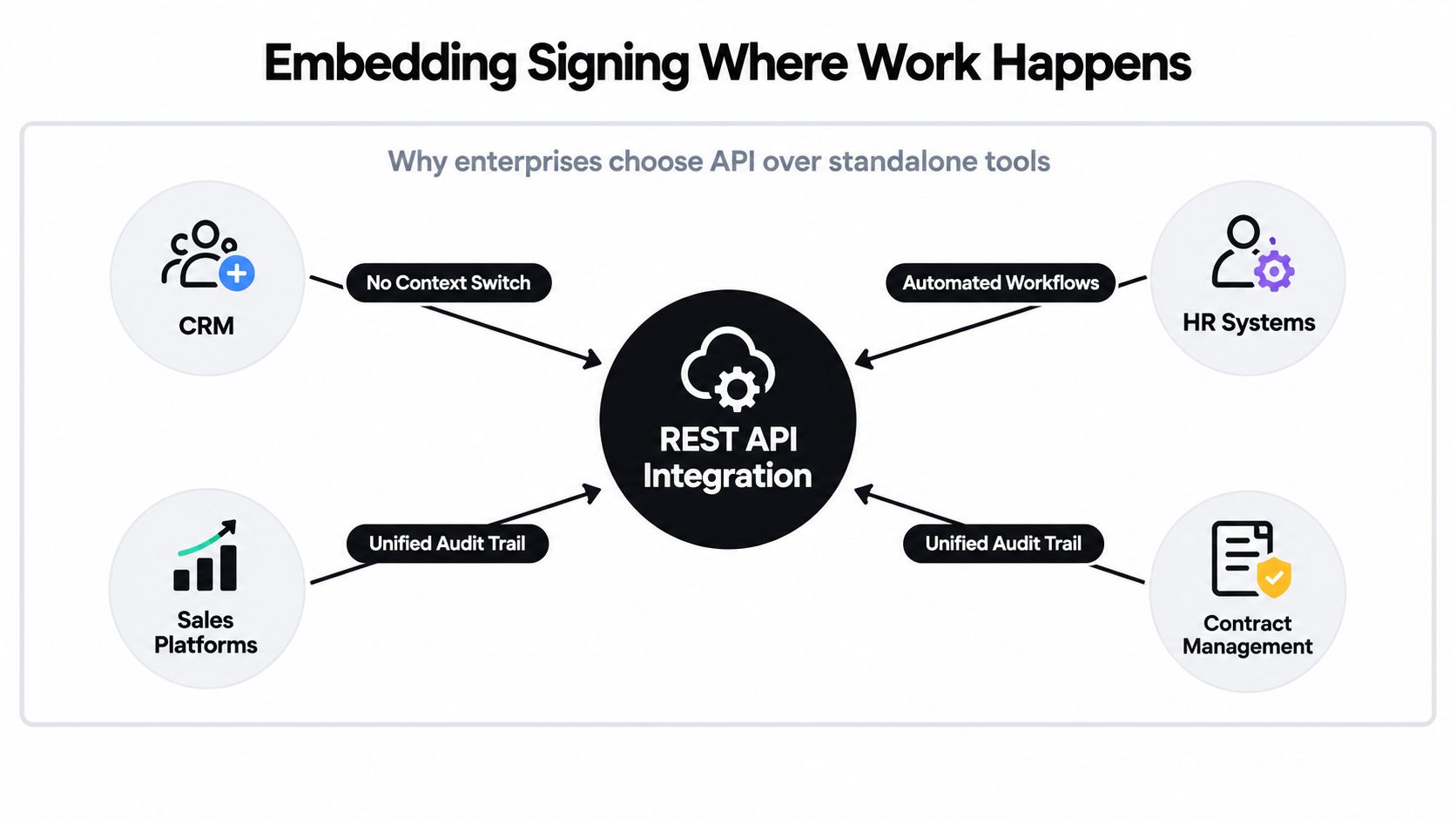
The useful distinction is between a standalone eSignature tool and an embedded digital signing solution. A standalone tool asks users to leave the CRM, HR platform, or procurement application. An embedded workflow keeps the document request, signer data, approval state, and completed agreement connected to the source record.
BoloSign supports workflows that create, send, and sign PDFs, templates, and forms through an integration rather than a manual dashboard process. Teams can also connect signing to CRM environments such as HubSpot, use embeddable components, and support WordPress-based experiences. That creates a practical foundation for contract automation, while AI-powered automation and contract intelligence can help with drafting, review, negotiation, and execution around the signature event.
The legal environment has also moved toward cross-border consistency. The EU adopted its first eSignature Directive in 1999, it became effective in January 2000, and the eIDAS Regulation was adopted on 23 July 2014 and became applicable on 1 July 2016. eIDAS repealed the earlier directive and created a single EU-wide trust-services framework, as documented by the European Commission's eSignature legislation overview. That framework matters when one enterprise signing workflow serves customers, employees, suppliers, or patients in multiple countries.
The rest of the design challenge is operational. A production system needs to survive expired credentials, changing templates, delayed delivery, duplicate events, and audits that happen long after the API call succeeded.
Choosing the Right Signing Flow for Your Workflow
The right flow depends on how much control your application needs, how signers authenticate, and whether the process handles one agreement or a large batch. Teams often choose embedded signing because it looks polished, then discover that a redirect would have been easier to maintain. Others use a redirect for a workflow that really needs an in-app experience.
Four patterns cover most enterprise deployments.
| Flow Type | Best For | UX Control | Scale Consideration |
|---|---|---|---|
| Embedded signing | CRM, HR, healthcare, and customer portals | Highest control over the signing experience | Requires stronger session, browser, and security engineering |
| Redirect signing | Fast hosted handoffs and lower-maintenance launches | Moderate control, with the provider hosting the signing screen | Useful when the business can tolerate a context switch |
| Clickwrap | High-volume acceptance of standard terms and policies | Simple, low-friction consent experience | Requires careful versioning, presentation, consent, and evidence retention |
| Bulk send | HR onboarding, procurement batches, and recurring agreements | Consistent rather than deeply customized | Needs batching, rate-limit handling, recipient mapping, and repair paths |
Embedded signing belongs inside the application. A staffing recruiter can initiate an offer packet from a candidate record, while a healthcare coordinator can keep a patient consent process inside an authenticated portal. This pattern offers the strongest continuity, but your team owns more of the surrounding behavior, including session creation, access control, browser handling, and error presentation. BoloSign's explanation of an e-signature API with embedded signing provides useful context for this architecture.
Redirect signing is often the sensible first release. Your application creates the request, receives a hosted signing URL, and sends the signer there. Real estate agencies can use this for leases, logistics companies can use it for delivery exceptions, and professional-services firms can use it for engagement letters. The trade-off is a visible transition away from the originating application, which can create support questions if the signer doesn't recognize the destination.
Clickwrap works when the signer accepts standard terms instead of signing a document with negotiated fields. Education providers can capture acceptance of course policies, and software or logistics platforms can record agreement to operating terms. It's not a substitute for a carefully designed signature ceremony when the agreement requires identity assurance or a sealed document.
Bulk send fits repeated packets. HR may send several documents to each new starter, while procurement may route standard supplier forms to many vendors. Throughput matters, but so does traceability. Each recipient, document version, and resulting evidence record must remain distinct.
Practical rule: Choose the least complex flow that preserves the identity, evidence, user experience, and throughput your process actually requires.
Authentication Scopes and Core Endpoints in Practice
A secure integration starts with access design, not the first document request. Use scoped API keys, short-lived access tokens, safe refresh handling, and role-based permissions. A service that only creates and sends packets shouldn't also have unrestricted access to every document, template, user, and audit record.
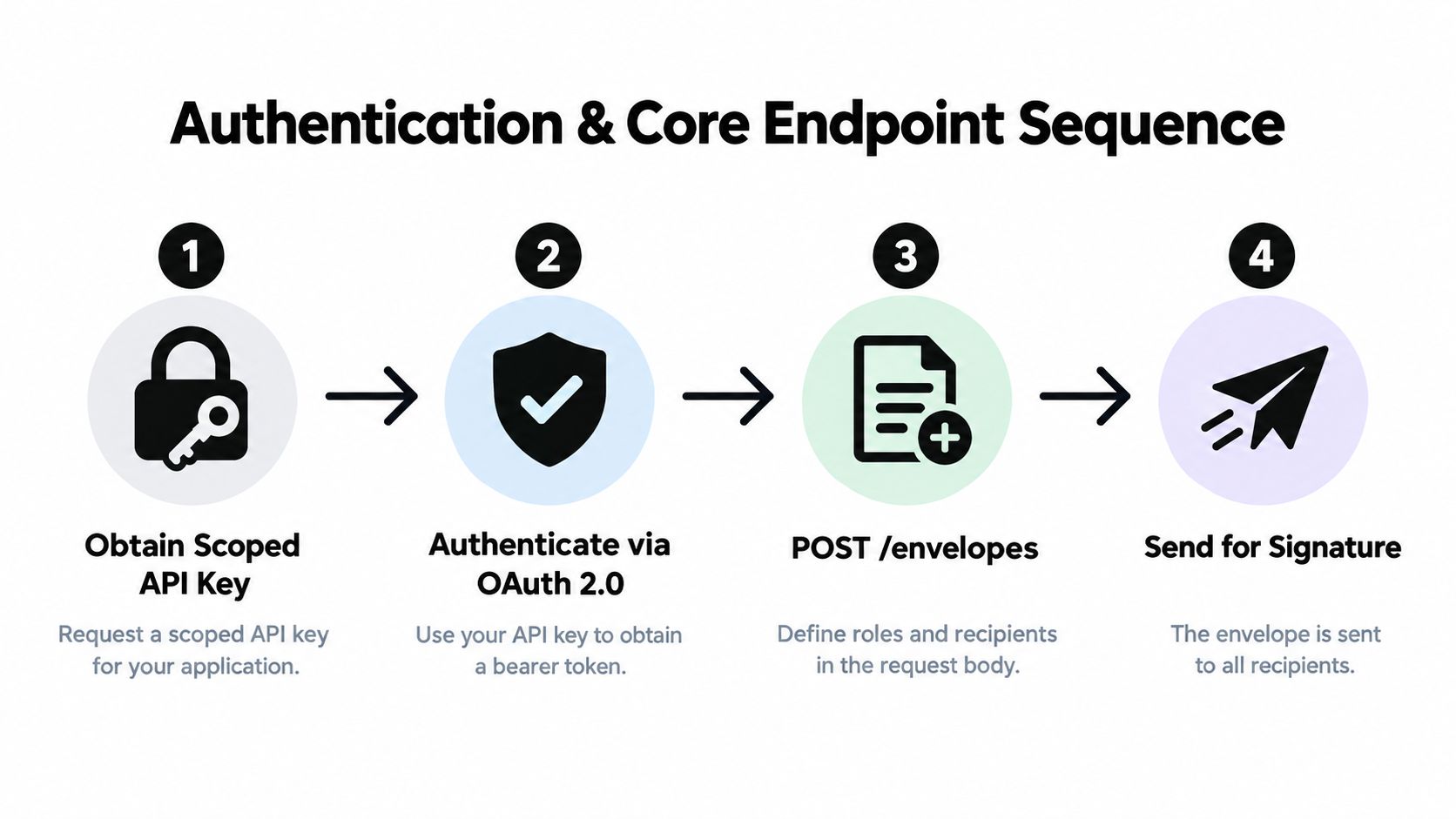
A typical enterprise sequence looks like this:
- Obtain a scoped credential. Keep secrets on the server, not in browser code or mobile bundles. Give each environment and service a purpose-specific identity.
- Authenticate the request. Use OAuth 2.0 where supported, place the bearer token in the authorization header, and handle expiry before a business action fails.
- Create the packet. Define the documents, template version, recipients, signer roles, fields, routing order, and callback destination.
- Send for signature. Store the provider's packet identifier beside the CRM, HR, procurement, or case-management record.
The names vary by provider, but the resources are consistent:
- Documents or envelopes: The agreement package and its lifecycle state.
- Templates: Reusable structures with explicit versions.
- Recipients: Signers, approvers, witnesses, and observers, each with a defined role.
- Fields: Signature blocks, dates, checkboxes, initials, and text inputs.
- Status resources: Pending, viewed, signed, declined, expired, canceled, or failed states.
- Audit resources: Completion evidence, timestamps, signer actions, and the sealed output.
A conceptual request might contain a template identifier, document data, recipient roles, and field values. The important production decision isn't the exact JSON shape. It's whether your application stores the template version and business correlation ID at creation time, so a later status event can be tied to the exact packet that was sent.
PDF placement deserves special attention. Coordinates that look stable in a desktop editor can shift after a template is revised, a page is replaced, or a font is substituted. Use stable field identifiers where possible, test every supported document variant, and reject a template change until its fields and signing positions pass validation.
The same discipline applies to CRM integrations. A HubSpot deal, WordPress form, or HR record should trigger a server-side signing request, not expose signing credentials to the client. Your application can then return session data to the browser for an embedded experience while retaining control of authorization and audit correlation.
Webhook Handling Retries and Idempotency at Scale
A signing request rarely finishes inside one request and response. The signer may open the document later, complete only some fields, decline it, receive a reminder, or sign after an access token has expired. Your application needs an asynchronous state machine, with polling and webhooks working together rather than treating either one as infallible.
Webhook reliability and event granularity directly affect completion rates in high-volume workflows. HR onboarding, logistics exceptions, and procurement approvals all depend on timely state changes. If the callback says only “updated,” your consumer may need another API call to determine whether the document was viewed, signed, declined, or replaced. If the callback arrives twice and your handler isn't idempotent, the same event can trigger duplicate emails, repeated downstream updates, or conflicting workflow transitions.
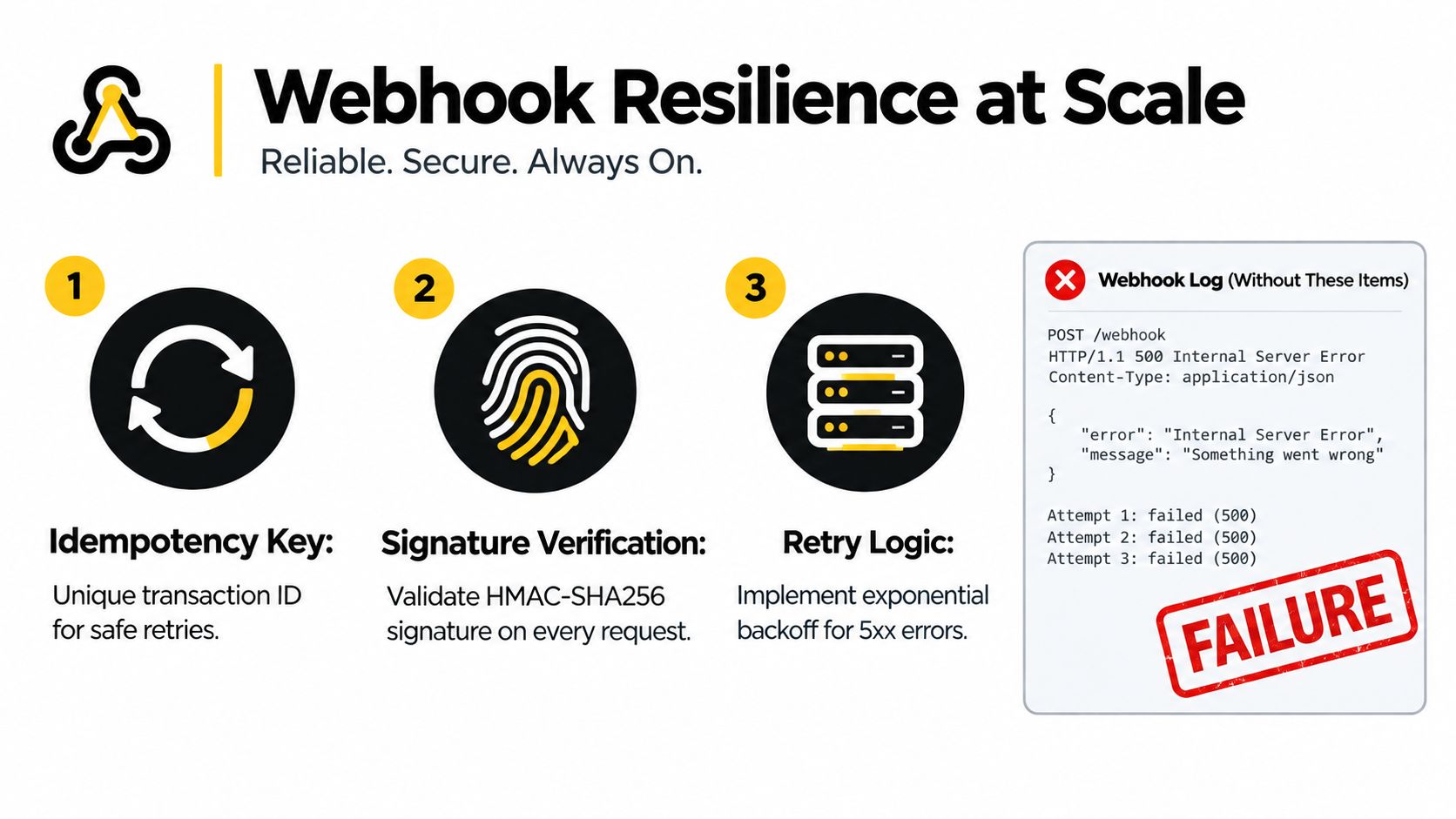
An idempotency key is a unique transaction identifier that lets a system safely repeat an operation without applying the same effect more than once. The Idempotency Key definition from PlatformDTC is a useful reference for teams formalizing this behavior.
Build the callback consumer as a small, observable service:
- Verify authenticity: Validate the webhook signature before parsing or acting on the event. The infographic's HMAC-SHA256 pattern is a practical model where the provider supports it.
- Deduplicate first: Store the event ID, transaction ID, or equivalent unique key before starting downstream work. A repeated delivery should return safely.
- Acknowledge quickly: Persist the event and return success, then process business actions asynchronously. Slow handlers invite retries.
- Retry selectively: Retry transient 5xx failures with exponential backoff. Don't retry malformed payloads or rejected signatures.
- Reconcile periodically: Poll open packets so a missed callback can't leave your HR or procurement system permanently stale.
The most common failures are predictable. Access tokens expire during a multi-step flow, refresh logic can issue competing tokens, clock skew can make a valid token appear expired, and sandbox credentials can accidentally reach production code. Duplicate callbacks and retry storms then amplify the original error.
Native SDKs can reduce integration time by up to 40% versus raw REST-only implementations, according to eSignature API developer guidance from ZiaSign. SDKs don't remove the need for idempotency or monitoring, but they can reduce repetitive request handling and make provider-specific behavior easier to test. For bulk operations, reliable API patterns for bulk sending and signing are more valuable than a simple loop that sends requests until the rate limit responds.
Track packet creation, delivery, view, signature, decline, expiration, callback latency, retry count, reconciliation changes, and repair outcomes. A dashboard that reports only HTTP success can hide a signing process that's failing after the initial request.
Security Compliance and Performance for Regulated Workloads
Compliance should shape the workflow before data leaves the source system. The API call is only one point in the lifecycle. You also need to decide what evidence you retain, where records are stored, how signers are identified, which staff can retrieve documents, and how you protect data when systems exchange events.
For U.S. workflows, ESIGN and UETA requirements center on intent to sign, disclosure and consent, linkage of the signature to the record, and reproducible retention of the signed document. For higher-assurance eIDAS flows, technical evidence can include signer identification, audit timestamps, document integrity hashing, and non-repudiation evidence. These controls should map to fields, events, storage policies, and review procedures, not sit in a compliance spreadsheet. The e-signature API compliance checklist provides a practical reference for these checkpoints.
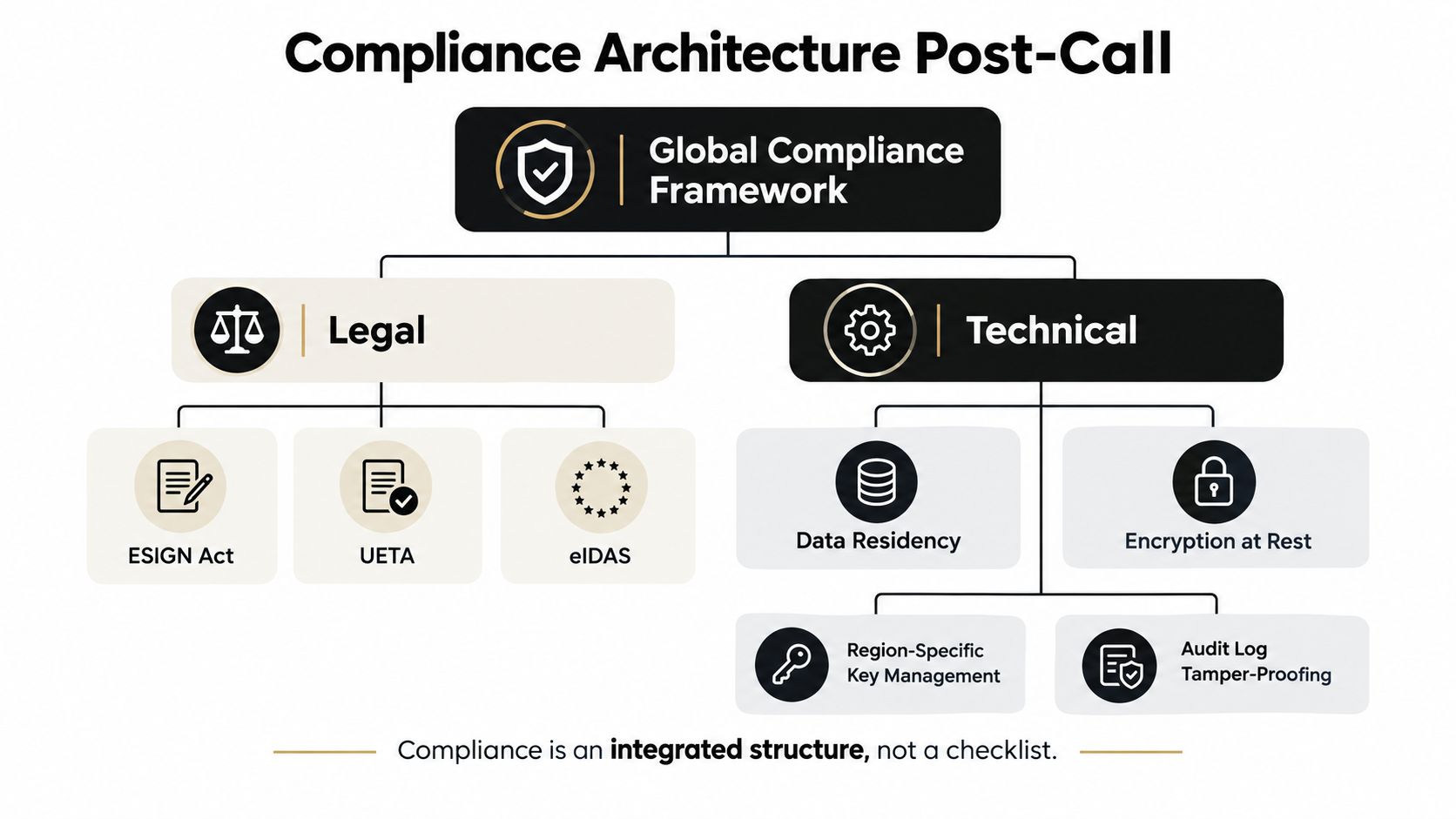
For regulated U.S. workloads involving PHI, enforce TLS 1.2 or higher in transit, AES-256 at rest, scoped API keys, role-based access, and complete audit logging for PHI access when HIPAA applies. These are engineering controls, not marketing labels. A security review should confirm how the signing provider verifies webhook requests, protects stored evidence, handles access revocation, and supports incident investigation.
Global deployments add residency and transfer questions. A U.S. staffing agency may serve workers in Canada, an Australian education provider may enroll students across borders, and a UAE real estate group may need to coordinate documents with international buyers. GDPR data-transfer safeguards, regional storage expectations, identity assurance, and retention rules can affect architecture before the first template is published. BoloSign's enterprise-grade security positioning includes SOC 2 Type I and Type II, ISO 27001:2022, GDPR, eIDAS, ESIGN Act, HIPAA, and CCPA support, but your team should still verify the controls and contractual terms that apply to its own processing model.
Performance controls that protect evidence
Rate limits and retries require the same care as security. Queue bulk sends, apply backoff, separate interactive traffic from batch traffic, and retain the original request and response correlation data. Don't treat a rate-limit response as a reason to create a new packet. Resume the existing transaction when the provider supports safe retries.
AI-powered contract review adds another layer around signing. An AI assistant can help draft agreements, flag risky clauses, suggest alternative language, and support negotiation before execution. That makes AI contract review useful as part of contract automation, but it doesn't replace signer consent, attribution, integrity evidence, or retention.
Testing Migration and Scaling Your Integration with Confidence
A reliable launch starts with a failure-oriented test plan. Don't stop after confirming that a happy-path PDF reaches one signer. Test the cases that create inconsistent business records: an expired token during send, a signer who declines, a webhook delivered twice, a callback that arrives out of order, a changed template, a malformed field value, and a document that can't be delivered.
Use a sandbox or test environment to validate:
- Template stability: Compare field identifiers and signature placement after every approved template revision.
- Recipient behavior: Exercise sequential and parallel roles, missing contact details, expired invitations, and declined requests.
- Callback recovery: Replay events, delay delivery, return server errors, and confirm that retries don't create duplicate actions.
- Evidence retrieval: Confirm that the signed document, audit trail, business record, and retention policy remain connected.
- Operational visibility: Alert on growing pending queues, repeated delivery failures, reconciliation changes, and unusual retry volume.
Migration from a legacy provider is safer when you separate historical records from new execution. Preserve completed documents and audit evidence in the existing archive, map active workflows to explicit template versions, and run a controlled parallel period before switching every business unit. A provider-neutral internal status model can also prevent your CRM or HR system from becoming dependent on one vendor's event names.
Cost matters once volume grows. Independent ROI reporting cites $21.50 saved per e-signed transaction compared with paper-based equivalents in one Forrester TEI summary, while another source cites savings of up to $28 per signed document. The Adobe Sign TEI report supports the broader point: digital execution can reduce paper-related handling costs for staffing, real estate, logistics, education, and professional-services agreements.
BoloSign offers unlimited documents, templates, and team members at one fixed price, with a positioning of up to 90% greater affordability than DocuSign or PandaDoc. That model is particularly useful when HR onboarding or procurement volume is difficult to forecast, because usage growth doesn't require adding a seat for every participant or rationing document creation.
For teams evaluating an e-sign API enterprise REST rollout across the US, Canada, Australia, New Zealand, or the UAE, the practical test is simple. Can the platform create and send documents from the systems you already use, preserve evidence, recover from failure, support compliant regional workflows, and remain affordable as adoption expands?
BoloSign combines REST-based document signing, embedded workflows, unlimited documents, templates, and team members at one fixed price with AI-powered contract automation and review support. Visit BoloSign to start a 7-day free trial and test a complete signing flow from document creation through webhook handling, audit evidence, and signed-file retrieval.

Paresh Deshmukh
Co-Founder, BoloForms
23 Sep, 2026
Take a Look at Our Featured Articles
These articles will guide you on how to simplify office work, boost your efficiency, and concentrate on expanding your business.



