

Document Signing API: Endpoints, Webhooks and Compliance
Learn how a document signing API works: authentication, endpoints, webhooks, SDKs and eIDAS/ESIGN compliance, with BoloSign integration examples.

Tired of nonsense pricing of DocuSign?
Start taking digital signatures with BoloSign and save money.
Your CRM says the agreement was sent. The signer says they finished it. Your onboarding team still can't find the executed PDF, and the developer dashboard shows a successful API response that proves neither side is wrong.
That's the gap a document signing API integration needs to close. Sending a request is straightforward. Delivering a signed, independently validated PDF with retrievable audit evidence takes deliberate choices about authentication, routing, events, storage, and jurisdiction.
Build around the artifact your business will need during an audit or dispute, not just the response your application receives during a demo.
Document Signing API Capabilities at a Glance
A document signing API is a set of endpoints that takes a PDF or template, places signature and input fields, sends it to signers in a defined order, records their actions, and returns the completed, signed PDF. Your application controls the business context; the signing service handles execution.
The legal baseline is practical: under ESIGN, an electronic signature can be an electronic sound, symbol, or process associated with a record and adopted with intent to sign, as explained in HUD's electronic-signature guidance. That's why a signing workflow can capture an authenticated action rather than reproduce a handwritten signature.
Core capabilities and typical uses
| Capability | What It Covers | Typical Use |
|---|---|---|
| Send for signature | Create a signing request from a PDF or template with a signer list | Contract intake from a CRM deal |
| Embedded signing | Signing screen shown inside your own web or mobile app | Patient consent inside a clinic portal |
| Templates | Reusable documents with predefined signature and input fields | Staffing placement agreements sent in bulk |
| Multi-party routing | Sequential or parallel signer order with roles | Landlord, tenant and guarantor on a lease |
| Webhooks | Push events when a document is viewed, signed, declined or completed | Updating a deal stage in HubSpot |
| Audit trail | Timestamped log of views, signatures and signer details | Evidence in a payment or service dispute |
| Signed PDF retrieval | Download of the final sealed PDF | Storing the contract in a document management system |
The same capabilities serve different operational needs. A staffing agency sends placement contracts from its applicant tracker; a clinic collects patient authorizations; a property manager routes leases from a CRM. A logistics firm captures delivery acknowledgements, a school collects enrolment forms, and a professional services team closes statements of work.
Across the US, Canada, Australia, New Zealand, and UAE, the integration pattern can look similar even when document eligibility, identity requirements, and retention policies differ. Don't confuse a reusable technical workflow with a universal legal rule.
Start with the dependency pair: Test send-for-signature and the completed webhook before investing in sophisticated templates or embedded screens.
AI-powered automation and contract intelligence belong upstream of that pair. Review the draft, resolve exceptions, and approve routing before the first signature request leaves your system. Otherwise, automation sends incorrect agreements faster.
How Authentication, API Keys and Sandboxes Work
Authentication answers which application may perform an action. It doesn't establish whether the recipient has signed, whether the signature meets a legal standard, or whether the document is ready to archive.
Keep those concerns separate in your implementation and your database.
Choose the access pattern deliberately
- Server-side secret API key: A back-end service sends a secret in the documented request header. Its main risk is exposure through source control, logs, or client-side code.
- OAuth access token: An application acts on behalf of a user with delegated permissions. Its main risks are excessive scope, mishandled refresh tokens, and access that survives longer than intended.
- Scoped integration key: A credential limits an integration to specific operations or resources. Its risk is incomplete isolation if the scope still grants broad document access.
Secret keys must never ship to a browser or mobile app. For embedded signing, your server authorizes the session and obtains a short-lived signing URL. The browser receives that session URL, not the credential used to create it.
Treat signing URLs as sensitive too. Don't put them in analytics events, public support tickets, or broadly accessible application logs.
Separate environments before sending
Use the provider's documented sandbox address with test credentials. Store production credentials in a secrets manager, and add an application startup check that the selected environment matches the credential configuration.
Make environment selection explicit rather than inferring it from an arbitrary key prefix. A deployment should fail safely if production mode points at a sandbox host or a required secret is missing.
Use a separate key for each integration so you can revoke access without interrupting unrelated workflows. Rotate on a fixed schedule and immediately after staff changes affecting credential access; also revoke sessions and secret-manager permissions rather than assuming key rotation alone removes access.
For requests, use JSON for structured metadata and multipart uploads when transferring a file alongside metadata. Encode text consistently, require modern TLS, and record the provider's request identifier whenever it's available.
Log enough to diagnose, not enough to leak
A useful log entry contains the operation, environment, internal transaction reference, request ID, response category, and document ID. It shouldn't contain API secrets, full patient forms, or reusable signing URLs.
Distinguish transport failures from application failures. A timeout after document creation is ambiguous, so retrying blindly can create another agreement. Preserve the original business-operation identifier and use the API's documented idempotency mechanism.
The pilot should exercise the entire credential path, including embedded-session creation and final-document retrieval. A successful authentication check alone doesn't prove the integration has permission to finish the workflow.
Signature Levels and Compliance Requirements by Market
Every electronic signature isn't equivalent. An email-confirmed click, a cryptographically protected signature, and a qualified signature can involve different identity checks, evidence, and trust services.
The European Commission's eIDAS overview describes a framework covering electronic signatures, seals, timestamps, and qualified trust services across EU Member States. Your schema should distinguish signature journeys rather than reduce them to a generic signed=true value.
Use this comparison to separate the journeys before choosing the authentication screen.
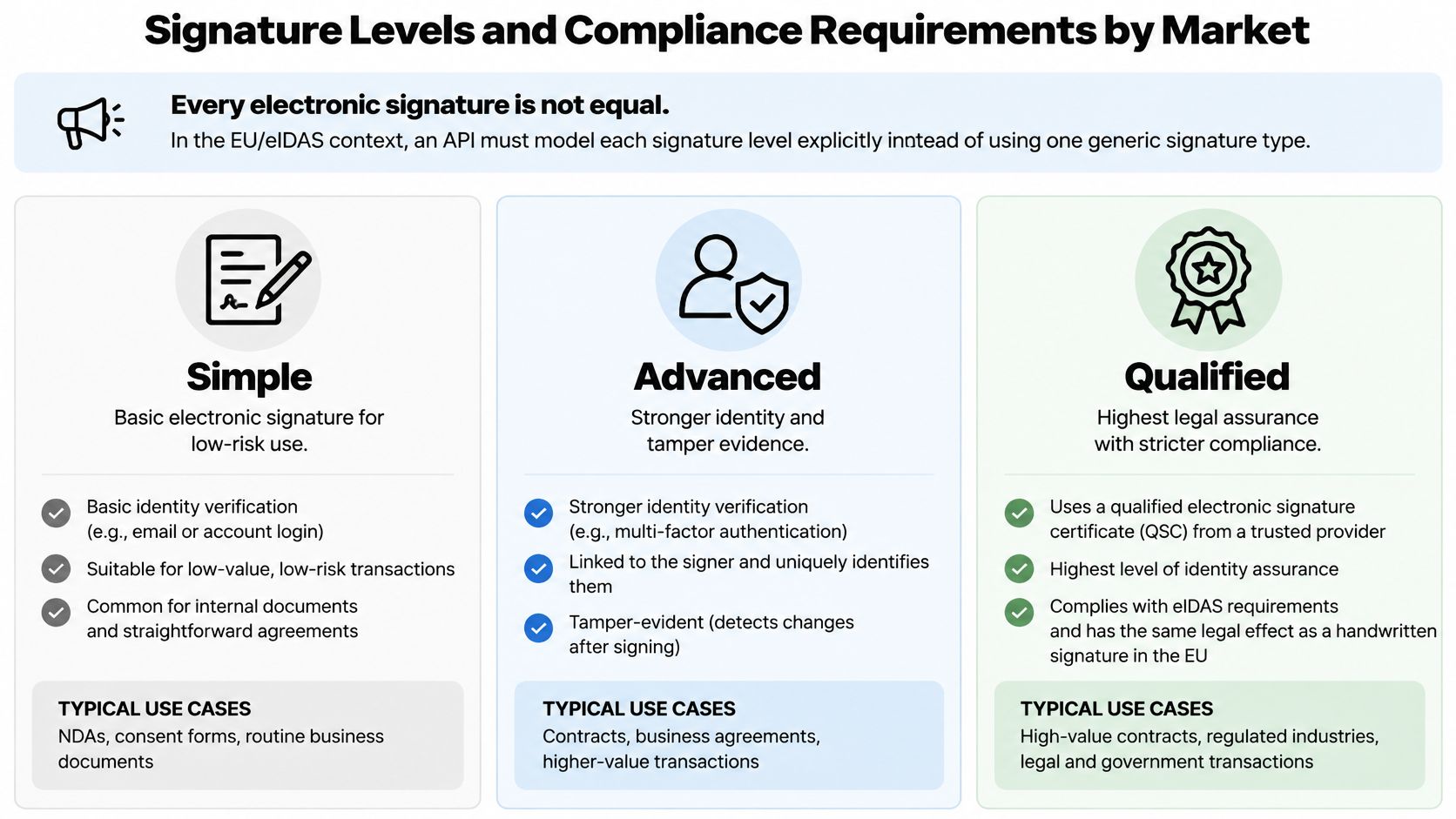
Signature levels and the evidence each requires
| Signature Level | Identity Check | Evidence to Retain | Typical Use |
|---|---|---|---|
| Simple | Email or account login | Audit trail and consent record | Internal approvals and NDAs |
| Advanced | One-time passcode or ID check within a qualifying signing implementation | Certificate, timestamp and audit trail | Vendor contracts and HR forms |
| Qualified (eIDAS QES) | Identity proofing by a qualified trust service provider | Qualified certificate and validation report | Regulated filings and EU cross-border contracts where required |
These are workflow examples, not automatic classifications. A passcode alone doesn't make a signature advanced, and strong identity proofing alone doesn't make it qualified.
Retain signer identity evidence, consent and intent, authentication method, signing time, document digest, certificate chain, revocation data, and timestamp evidence where applicable. Record the trust-service provider and validation context alongside the jurisdiction and policy selected for the transaction.
Match the record to the market
In the US, ESIGN and UETA provide the legal foundation for electronic transactions, as described in the Association of Corporate Counsel's electronic-signature legal overview. Recordkeeping still matters: the SEC's explanation of ESIGN retention emphasizes accurate, accessible records that authorized people can reproduce.
For healthcare, HHS electronic-signature guidance explains that HIPAA doesn't itself require electronic signatures, permits their use when reasonable and appropriate, and addresses providing individuals with copies of electronically signed authorizations. Don't interpret HIPAA support as permission to ignore access controls or document-specific law.
For GDPR-sensitive workflows, minimize collected identity information, define retention limits, and document storage locations and subprocessors. For Canada, Australia, New Zealand, and UAE deployments, have counsel confirm local document exclusions and execution requirements rather than importing EU or US assumptions.
This video provides additional signing context.
BoloSign's eSignatures are designed to comply with ESIGN, UETA, and eIDAS, and documents are protected with end-to-end encryption from sender to signer. That doesn't replace transaction-specific legal review.
For regulated operations, use GoReplay's record retention and backup guidance as an operational checklist, not a substitute for jurisdiction-specific advice. Our financial-services eSignature compliance guide also helps frame evidence questions.
Before approval, document supported signature levels, evidence locations, retention periods, and whether validation reports can leave the provider's dashboard.
How to Send a Document for Signature Through the API
Build the integration so the executed artifact survives independently of the application that requested it. An API response is a transaction receipt; it isn't the executed agreement.
The ETSI PAdES baseline signature specification describes PDF signature structures that support validation and preservation. For a cross-border workflow, expose signature-profile and evidence controls where available, then validate the output rather than assuming a completion status proves everything.
The process below separates document preparation from execution and archival.
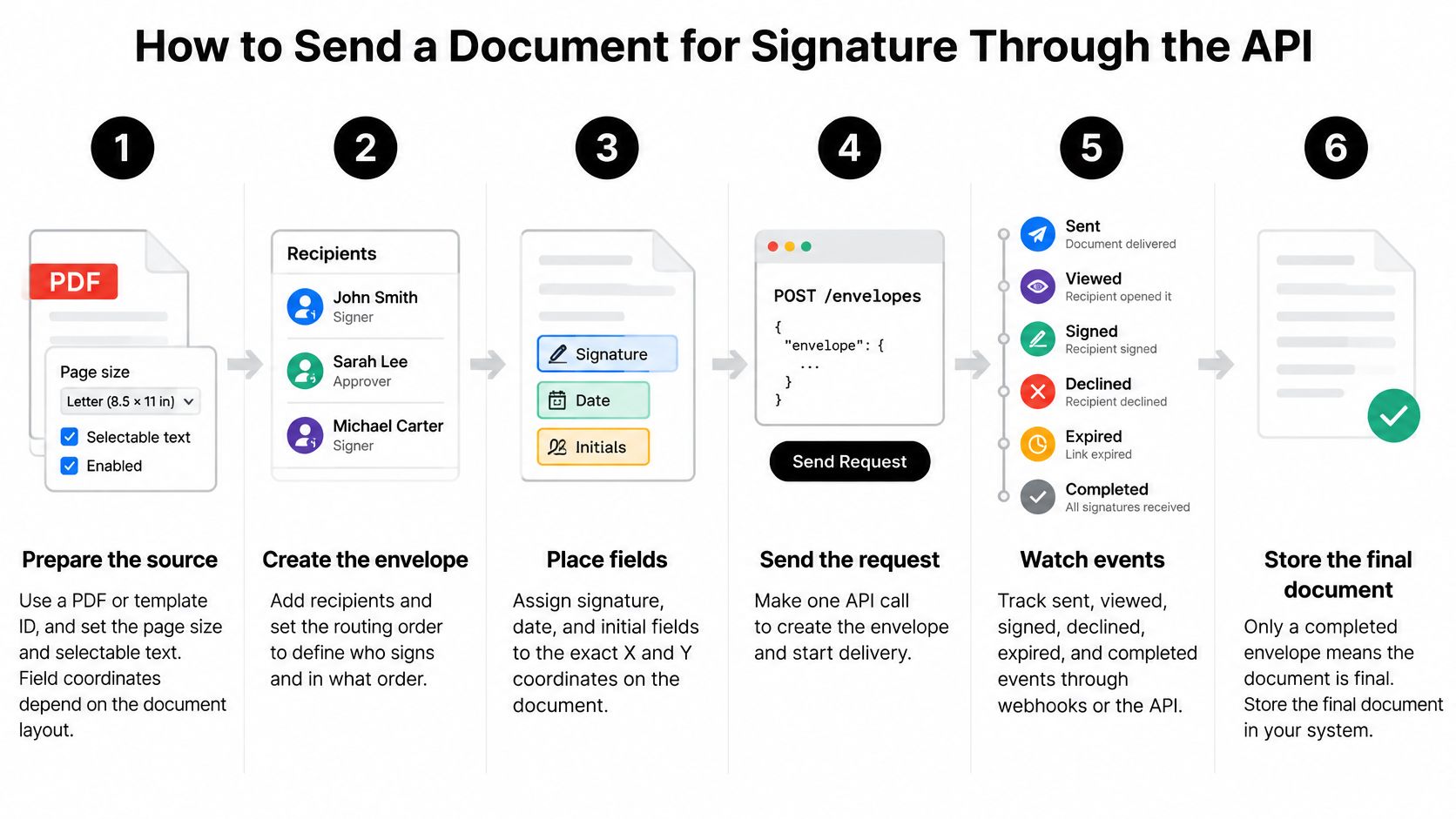
Execute the signing transaction
Prepare the source. Choose a PDF or template ID, inspect the page dimensions and rotation, and check selectable text if you'll use text anchors. Coordinate placement follows page geometry; text availability matters for anchor-based placement, not for every coordinate system.
Choose the signature level before creating the request. Store the business reason for that choice, such as the document category and applicable jurisdiction, so a later reviewer doesn't have to infer policy from a signature image.
Create the document. Upload the PDF or reference an approved template, then persist the returned document ID against your internal contract record. Keep the source version too, because a template name alone won't tell you which wording the signer received.
Define recipients with name, email, role, and signing order using the provider's actual schema. For a lease, use sequential routing when the guarantor must receive the agreement only after the tenant finishes, rather than relying on email timing.
Assign every field to its signer. Place signature, initials, date, text, and checkbox fields by page coordinates or template field names. Render a preview and confirm required fields belong to the intended role, particularly when recipients share a page.
Send the request and persist its delivery state. Mark it sent, not completed, and save the external reference needed to reconcile subsequent events.
For embedded execution, request the signing URL server-side and open it inside the authorized application session. Handle expiry by requesting a replacement session through your server, not by extending or modifying the URL locally.
On completion, retrieve the final PDF. Download the executed artifact through the documented retrieval operation and preserve its bytes unchanged. Don't flatten, optimize, annotate, or regenerate it afterward, because those changes can affect signature validation.
Archive the signed PDF, audit trail, and independent validation result together. Retain relevant certificate, timestamp, revocation, and trust-list context so your archive records what was validated, not merely that a background job ran.
What the payload should communicate
A hypothetical multipart POST might contain a title, a file part, a serialized signers array containing a tenant object and guarantor object, and a callback destination. Each signer object would identify the person, role, and routing order.
The response might carry document_id, status, and created_at. These are illustrative field names, not a claim about BoloSign's endpoint contract; use the actual API documentation for paths, serialization, and supported options.
Keep callback destinations in trusted server configuration. Letting arbitrary clients choose them can expose confidential event data or create unwanted outbound requests.
The archive should answer both questions independently: “Are these bytes cryptographically valid?” and “Does this execution satisfy our legal policy?”
Configure algorithm and key-length policy rather than hard-coding it into application logic. Record cryptographic validation separately from legal acceptance, because a technically valid signature may still use the wrong assurance level for the transaction.
Webhook Events and How to Handle Them Safely
Duplicate and out-of-order events are the failure mode to design for first. If your handler blindly replaces the CRM status with the latest arrival, a delayed sent notification can move an executed agreement backward.
Subscribe to the provider's equivalents of sent, viewed, signer signed, declined, expired, and completed. A signer-level event belongs to that recipient; the completed event belongs to the finished document workflow.
The operational view should expose individual deliveries and processing outcomes, not just the latest document status.
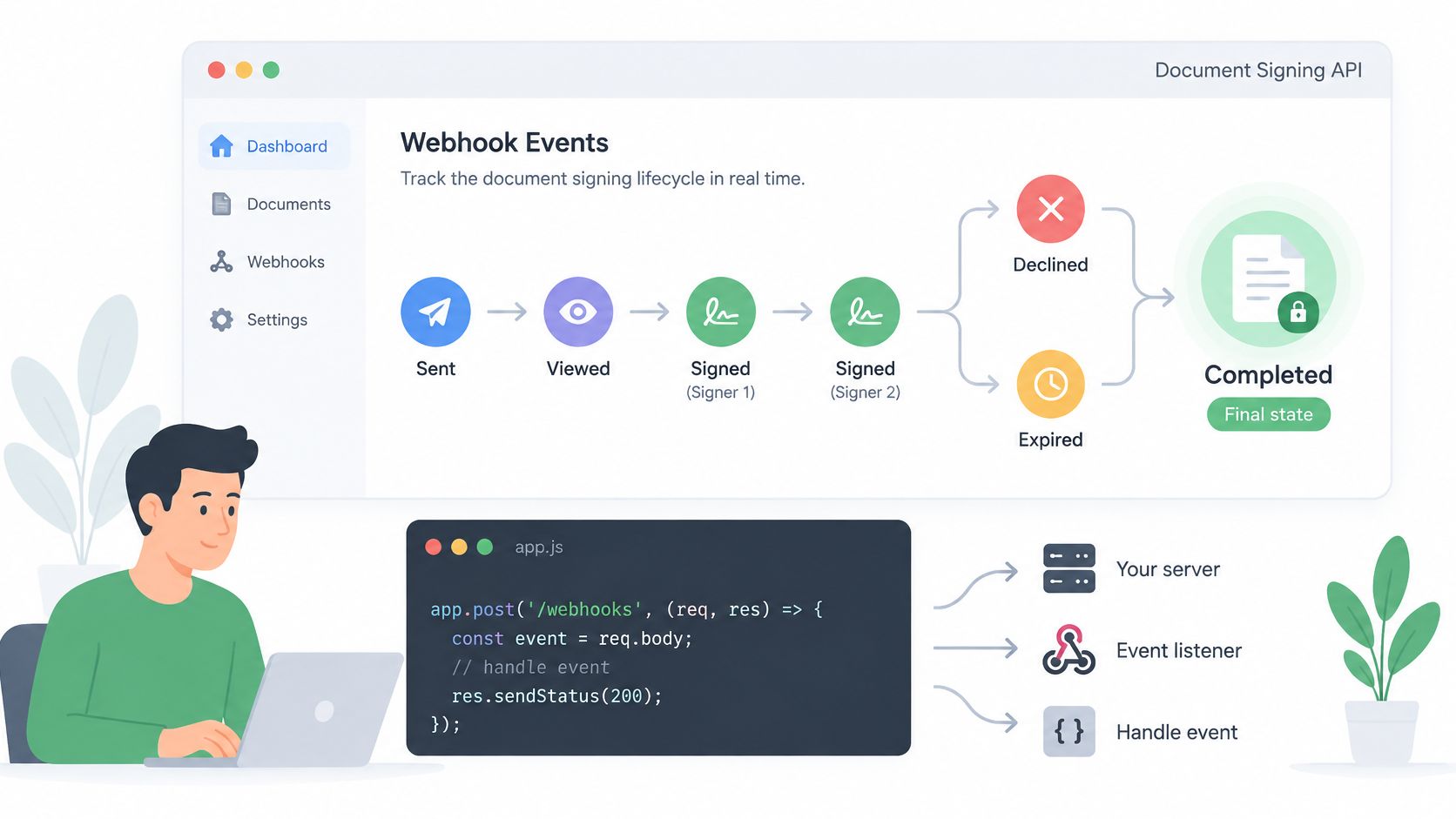
Give each event an identity
An illustrative JSON event could be {"event_id":"evt_example","event_type":"document.completed","document_id":"doc_example","signer_status":"all_completed","timestamp":"<event-time>"}. The exact names and nesting must follow the provider's schema.
Store the event identifier under a uniqueness constraint. A duplicate should return a successful acknowledgement without repeating downstream actions such as creating an employee record or releasing a purchase order.
Use explicit state transitions rather than sorting status names alphabetically or trusting arrival order. If an event conflicts with the stored terminal state, query the authoritative document status and reconcile it.
Use verify, store, enqueue
Verify. Follow the provider's signature scheme. For HMAC-based delivery, calculate the HMAC over the original raw body, compare it with the signature header using a constant-time comparison, and authenticate the timestamp if the scheme includes one.
Store the verified event durably, with its event ID and receipt metadata. Restrict access to raw payloads because they may contain signer information.
Enqueue. Hand processing to a worker, then return a successful HTTP acknowledgement promptly. Don't wait for PDF retrieval, validation, CRM updates, and email delivery inside the webhook request.
Set a narrow replay window appropriate to the documented delivery protocol. For example, a five-minute acceptance window can be an application policy, but it must account for whether retries receive a fresh authenticated delivery timestamp; otherwise, you may reject legitimate redeliveries.
A successful acknowledgement must mean you've accepted responsibility for processing. If durable storage fails, return an error so the sender can retry according to its delivery policy.
Test the failure path
Temporarily force an HTTP 500 response on a staging endpoint and confirm the provider redelivers under its documented retry behavior. Then verify that the integration applies the business action once, even if it receives the notification repeatedly.
Add a reconciliation job for documents stuck between delivery and completion. Webhooks reduce polling; they shouldn't be your only recovery mechanism when an endpoint, queue, or deployment fails.
Embedded Signing, CRM and WordPress Integration Patterns
Choose the integration pattern around where the user already works. A candidate shouldn't need to leave a staffing portal unnecessarily, while a sales team shouldn't need custom application code just to send an approved statement of work from HubSpot.
The important trade-off isn't code versus no code. It's who controls routing, session security, error recovery, and the signer's screen.
Compare the implementation paths
| Pattern | Relative Effort | Signing Screen Control | Best-Fit Workflow |
|---|---|---|---|
| Direct REST calls | Higher engineering effort | Provider-hosted or paired with embedding | Logistics dispatch system sending delivery agreements |
| Embedded signing | Application and session work | Your application surrounds the signing component | Staffing candidate portal |
| CRM connector | Lower initial implementation effort | Usually provider-hosted unless embedding is supported | Real estate team sending from HubSpot deal stages |
| WordPress integration | Site configuration plus secure workflow setup | Site-owned intake with the supported signing experience | Clinic booking and intake site |
A connector launches faster because it already understands the source system's triggers. The cost is reduced freedom around conditional routing, unusual recipient structures, or recovery behavior.
Embedded signing keeps execution inside your product, but your developers must handle session expiry, authorized document access, mobile layouts, and completion callbacks. The embedded eSignature API guide is useful when deciding where the application session ends and the signing session begins.
Connect intake without confusing it with execution
For a clinic using WordPress, separate public intake from access to confidential documents. Generate the agreement server-side, authorize the intended recipient, and avoid exposing signed files through publicly accessible media storage.
For a school that wants to add signature to Google Form workflows, distinguish the questionnaire from the executed agreement. Form answers can populate a PDF, but a submitted form shouldn't automatically become proof that the respondent signed the final wording.
Recipients can open, review, and sign BoloSign documents using any standard email address without a Google Account. That removes an avoidable obstacle for external tenants, candidates, parents, and vendors.
For professional services teams, map the full handoff before choosing a connector: approved scope, correct contracting entity, authorized signer, execution, and project activation. IamVera.AI's document automation guide provides useful context for that broader workflow mapping.
Keep the business record in charge of eligibility to send. Keep the signing service in charge of execution evidence.
Use a connector when the source system already supplies the necessary triggers; embed signing when execution is part of your own product; use the raw API when custom logic or batch processing controls the workflow.
AI Contract Review and Automation Before Signing
Contract automation starts before the signing endpoint. The useful work is turning reliable business inputs into an approved agreement, not asking a model to send whatever it generates.
Treat AI contract review as a review aid with accountable human decisions.
Route the draft through approval
Populate from authoritative data. Pull deal or placement information from the CRM or applicant tracker. A staffing agreement should receive its rate, start date, and worksite from approved fields rather than manual copying.
Run AI contract review on the draft to flag missing clauses, mismatched dates, and non-standard terms. Assign each flag to a named reviewer who approves it, corrects it, or records why no change is needed.
Send only the approved version. Bind the approval to the document version, template reference, and signer roles. If someone changes a material term afterward, require another approval instead of reusing the previous decision.
Use the completion event to activate the next business step. That could start onboarding for a clinic's new staff member or release a logistics delivery schedule after the service agreement is executed.
Keep decisions traceable
Save the reviewer's disposition alongside the draft version. Don't store an AI-generated risk score as though it were a legal conclusion, and don't let the model decide whether a signatory has authority without an established verification process.
The AI-powered contract review and eSignature workflow connects review decisions with execution. The practical goal is one traceable record from business inputs through approval to the archived PDF, with a person responsible for the legal decision.
Common Integration Errors and How to Fix Them
A duplicate document or missing event often appears after the happy-path demo succeeds. The cause is usually an assumption about retries, routing, or state, not a broken signature field.
Start with the symptom, then make the smallest change that addresses the cause.
Integration symptoms, causes and fixes
| Symptom | Likely Cause | Fix |
|---|---|---|
| Same document created twice | Retried POST without an idempotency key | Send a stable idempotency key for each business operation and reuse it on retries |
| Duplicate webhook events | Redelivery after a slow or failed response | Store each event ID and skip repeats |
| Authentication error | Sandbox credential in production or wrong environment configuration | Match the credential, base address, and deployment environment |
| Signature field in the wrong place | Coordinates calculated from a different page size | Calculate positions from the actual PDF page size or use template field names |
| Signing email not received | Sender domain not authenticated, or delivery rejected | Where custom sending is supported, have the domain administrator configure SPF, DKIM, and DMARC, then resend |
| Upload rejected | File too large or not a valid PDF | Convert to PDF, compress before signing, and check documented limits |
| Downloaded PDF has no signature | File downloaded before the completed event | Wait for completion, then retrieve the executed artifact rather than the source file |
Credential selection and coordinate corrections may be quick configuration fixes. Event deduplication usually needs a database constraint and a code deployment, while sender-domain authentication needs the domain administrator and time for DNS changes to propagate.
Don't promise a fixed repair time before identifying the owner. A technically simple change can remain blocked by production access, security approval, or an external mail administrator.
Triage in a consistent order
- Environment and key: Confirm the deployment is calling the intended service environment with the correct credential and permissions.
- Event log: Check whether the provider emitted the event, delivered it, and received an acknowledgement.
- Document status: Read the authoritative state instead of relying on a stale CRM field.
- File itself: Inspect the actual downloaded PDF, its fields, and its validation result.
When an email is missing, distinguish “request accepted” from “message delivered.” Check the recipient address, rejection details, suppression state, and spam handling before resending another agreement.
When a field is missing, inspect whether it was assigned to a different role or placed outside the visible page area. Repeatedly moving coordinates without checking page rotation can make the preview look correct while leaving another page broken.
Log the request ID and document ID for every failure. Pair them with your internal contract reference so support can trace the operation without receiving confidential document contents in a ticket.
Test Your Signing Integration Before You Commit
A pilot that only checks whether someone can sign PDFs online misses the actual risk. Build staging cases that mirror production, with real recipient roles, multi-page documents, and the same access restrictions your compliance team will enforce. The signed, validated PDF and its audit evidence are the product. The API response only starts the process.
BoloSign customers sign more than 150K documents per month, but your acceptance decision should still rest on your own workflow tests.
Make the pilot pass or fail
- Sandbox send and sign: Create a test agreement, send it to your inbox, finish signing, and confirm that the archive contains the executed PDF, audit evidence, and validation outcome. Pass only when the record is retrievable from your business system.
- Embedded signing: Open a server-generated signing session inside the staging application. Pass when the correct recipient can complete it and the application updates the intended test record without exposing server credentials.
- Webhook failure and replay: Force a staging delivery failure, restore the endpoint, and observe recovery. Pass when a redelivered event produces a single business action and leaves an inspectable processing history.
Inspect portability before rollout
Export the evidence and validate the document outside the signing dashboard. Ask the compliance reviewer to inspect the exported record, not merely screenshots of a successful transaction. This matters most when contracts cross EU and US markets, where signature expectations and validation rules diverge.
The European interoperability framework for electronic identification and trust services highlights signing, verification, trust-service interfaces, and wallet interoperability. Portable evidence is a better buying criterion than the appearance of the signing screen alone.
BoloSign's expert support team configures signature workflows, enforces compliance, and enables every feature. Bring them the actual routing and evidence requirements, while keeping jurisdiction-specific legal acceptance with your compliance reviewer.
Before committing, write down the signature level, retention period, and recovery owner your business needs. Then choose the connector, embedded flow, or direct API pattern that fits those requirements. Visit BoloSign to test sending, embedded signing, and webhook recovery against your own workflow.

Paresh Deshmukh
Co-Founder, BoloForms
16 Nov, 2026
Take a Look at Our Featured Articles
These articles will guide you on how to simplify office work, boost your efficiency, and concentrate on expanding your business.