

DocuSign Enterprise Alternative: Top 7 Options Compared
Explore the best DocuSign enterprise alternative options for 2026. Compare features, pricing, compliance, and migration to find your ideal solution.

Tired of nonsense pricing of DocuSign?
Start taking digital signatures with BoloSign and save money.
You've used DocuSign for years, and nobody is complaining about the basic signing experience. Then procurement reviews the renewal. A few power users send most of the agreements, occasional users still occupy paid seats, and the legal team wants contract management that wasn't included in the original purchase. The tool works, but the economics no longer match how your company operates.
That's why the right DocuSign enterprise alternative isn't necessarily the platform with the longest feature list. It's the one that handles legally binding eSignatures, templates, approvals, integrations, and audit trails without turning every additional department into a new cost line. This comparison focuses on that practical question, with BoloSign included for teams that want unlimited usage, AI-powered automation, and a simpler route from PDF creation to digital signing.
Why Teams Are Questioning DocuSign Now
The breaking point usually arrives during a budget meeting, not a technical failure.
A growing staffing company may have a small recruiting operations team sending candidate agreements every day, while finance, sales, and regional managers send documents only occasionally. Under a seat-based structure, those occasional users still contribute to the bill. Under an envelope-based structure, the high-volume team creates a separate problem. Procurement sees a predictable number of users, but operations experiences unpredictable demand.
That mismatch is the hidden cost. The people who need access aren't always the people who generate volume, and a pricing model built around either seats or sends can punish one side of the organization.
DocuSign remains a large and established category leader. DocuSign reported nearly 1.8 million customers and more than 1 billion users worldwide as of January 31, 2026, while fiscal year 2025 revenue reached $2.98 billion, up 8% year over year according to its fiscal 2026 results announcement. That scale matters. Enterprise buyers expect serious compliance, integrations, support, and operational resilience from a platform of that size.
It also raises the standard for comparison. A replacement must be more than a cheaper way to place a signature field on a PDF.
The invoice rarely reflects actual usage
Consider a professional services firm with centralized contract administration. Ten people prepare and send agreements, but dozens of consultants need to review, approve, or occasionally initiate a document. A per-user approach can force the company to choose between restricting access and paying for seats that sit idle. Neither choice supports adoption.
The same issue appears in healthcare onboarding. A small compliance group may manage patient intake or provider agreements, while HR, clinic managers, and administrators need to use templates. If every user requires a paid seat, the company pays for organizational reach even when signing activity is concentrated in one team.
Recent independent coverage also highlights capped sends per user, custom quotes for high-volume teams, and the growing preference for more predictable pricing in coverage of DocuSign alternatives and total cost. The important point isn't that every DocuSign customer will overpay. It's that the billing model can become disconnected from the workflow model.
Procurement rule: Calculate the cost of occasional users, power users, templates, integrations, storage, approvals, and contract management separately. The subscription price is only the starting point.
Feature breadth can create operational friction
DocuSign's core eSignature workflow is familiar. But many organizations need more than upload, prepare, send, and sign. They need document creation, reusable forms, approval routing, searchable records, CRM updates, and contract intelligence.
When those capabilities sit in separate products or require additional services, the workflow becomes modular in a way that procurement may not see at the beginning. Legal teams may buy one system for agreements, sales another for proposals, and HR yet another for onboarding. Users then move documents between platforms, which creates manual work and inconsistent records.
A credible alternative should therefore answer four questions:
- Can it scale across departments? Operations, sales, HR, legal, and field teams should be able to use the same core workflow.
- Can it keep costs predictable? Usage should not become a surprise when signing volume changes.
- Can it support regulated workflows? Audit trails, identity controls, data handling, and legal validity must match the use case.
- Can the team migrate without rebuilding everything? Existing templates and signer processes should move with minimal disruption.
That is the standard used in the comparison below.
Market Dynamics Behind the Search for Alternatives
The eSignature market now serves two buyers with very different priorities. Large enterprises still account for most current platform demand, while smaller and mid-market organizations are expanding faster and often have less patience for complex licensing.
Independent market research estimates that large enterprises represented 62.10% of e-signature platform market size in 2025, while SMEs were the fastest-growing segment at a projected 28.75% CAGR through 2031, according to Mordor Intelligence's e-signature platform market analysis. A separate market report estimates the digital signatures market at USD 9.85 billion in 2025 and projects it to reach USD 154.52 billion by 2034, with North America holding a 38.00% share in 2025. Those figures are projections and market estimates, not a promise of performance from any individual vendor.
Enterprise scale and SME speed require different products
Large organizations tend to prioritize governance, identity assurance, integration depth, procurement controls, and formal support. They may accept a more complicated implementation if the platform integrates with an established technology estate.
SMEs and mid-market companies usually need those controls without a long deployment cycle or a pricing structure that assumes every employee is a frequent sender. They often prefer reusable templates, predictable limits, self-service administration, and integrations with systems already used by the team.
That distinction explains why a smaller platform can outperform a larger suite in a specific department. A healthcare provider may not need every enterprise module if it can securely create patient forms, assign signer roles, preserve an audit trail, and connect completed documents to its existing workflow. A logistics operator may value mobile signing and fast vendor agreements more than an expansive contract lifecycle management configuration.
The market categories themselves support this approach. A buyer's guide to DocuSign alternatives from HyperStart separates standalone eSignature products, full CLM platforms with embedded signatures, document management suites, and free or open-source tools. Those categories aren't interchangeable. A company replacing DocuSign should first decide whether it needs a signing engine, an agreement lifecycle platform, or a broader document workspace.
Pricing predictability is a strategic requirement
A growing team can't forecast technology costs accurately if usage limits are hidden behind department-specific behavior. The finance team needs to know whether adding a new recruiter, sales region, or clinic manager changes the bill. Operations needs to know whether a busy month triggers an upgrade. Legal needs to know whether contract management is included or purchased separately.
That makes unlimited signing, unlimited team members, and unlimited templates more than promotional features. They simplify governance. One policy can cover the organization instead of asking each department to ration sends or request additional access.
The best buying decision also depends on organizational scale. Independent comparison data from Rework classifies Adobe Acrobat Sign as a stronger fit than Dropbox Sign at 300+ employees, while DocuSign is described as the broadest enterprise fit. The same matrix places SignNow closer to startup use than full enterprise use. Review the enterprise eSignature comparison from Rework for that scale-based perspective, but validate each vendor against your own workflow.
Top DocuSign Enterprise Alternatives Compared
The strongest alternative depends on what you're replacing. Adobe Acrobat Sign makes sense for organizations invested in Adobe and PDF workflows. Dropbox Sign fits teams that want a focused signing product with technical integrations. SignNow suits simpler workflows and startup-oriented use cases. Zoho Sign is most logical inside a broader Zoho environment. HyperStart CLM targets teams that need lifecycle management rather than signing alone. BoloSign is designed for organizations that want document creation, forms, eSignatures, templates, and contract workflows under one predictable commercial model.
| Platform | Enterprise Fit | Pricing Model | Compliance Coverage |
|---|---|---|---|
| DocuSign | Broad enterprise fit, established global platform | Seat, envelope, and custom enterprise structures may apply | Enterprise compliance and audit capabilities, validate by plan and region |
| Adobe Acrobat Sign | Strong fit for larger PDF-heavy organizations and Adobe customers | Product and seat-based plans, validate transaction allowances | Strong enterprise compliance positioning, validate required controls |
| Dropbox Sign | Suitable for technical teams and focused eSignature workflows | Plan and seat structures, enterprise options available | Identity verification and audit features, validate regulated-use requirements |
| SignNow | Better suited to startups and smaller teams than complex enterprise estates | Tiered plans and usage allowances | Core eSignature controls, validate advanced regulatory requirements |
| Zoho Sign | Strongest inside organizations already using Zoho applications | Standalone and ecosystem-based plans | Compliance guidance available, validate plan-specific features |
| HyperStart CLM | Appropriate when contract lifecycle management is the central need | Platform and deployment model vary | CLM-oriented governance, validate jurisdiction and identity requirements |
| BoloSign | Designed for small and mid-market teams scaling toward enterprise needs | One fixed price with unlimited documents, users, and templates | ESIGN, UETA, eIDAS, GDPR, HIPAA, ISO 27001, and SOC 2 stated by the publisher |
How the options differ in practice
Adobe Acrobat Sign is the natural shortlist candidate for a company that already manages most documents in Adobe. Its advantage is workflow familiarity and PDF alignment. The tradeoff is that an organization should confirm whether its required integrations, transaction allowances, identity controls, and administrative features are included in the selected plan.
Dropbox Sign is a good fit when the company wants a clean signing layer connected to systems such as Google Workspace, HubSpot, Salesforce, or Dropbox. It may not replace document creation or broader contract management without additional tools.
SignNow offers a straightforward experience for teams that don't need a full contract lifecycle platform. Independent comparison data places it closer to startup use than enterprise use, so larger organizations should test administration, support, integration governance, and compliance requirements before standardizing on it.
Zoho Sign deserves attention from businesses already using Zoho CRM, Zoho Books, Zoho WorkDrive, or Zoho Creator. Its value increases when signing triggers and document storage can remain inside that ecosystem.
HyperStart CLM belongs on the list when the project is really about agreement management. If the legal team needs approvals, repositories, lifecycle controls, and embedded signatures, a CLM platform may be more appropriate than a standalone eSignature tool.
For teams comparing Adobe directly with DocuSign, this DocuSign versus Adobe Sign comparison helps isolate the difference between PDF familiarity and broader workflow needs.
BoloSign takes a different position. It combines reusable PDF templates, forms, multi-recipient requests, integrations, dashboards, audit trails, and contract management. Its commercial promise is especially relevant to mixed-usage teams: unlimited documents, team members, and templates at one fixed price, described as 90% more affordable than traditional tools. Buyers should still confirm the current plan, contract terms, and compliance documentation during procurement.
Migration Steps That Actually Work
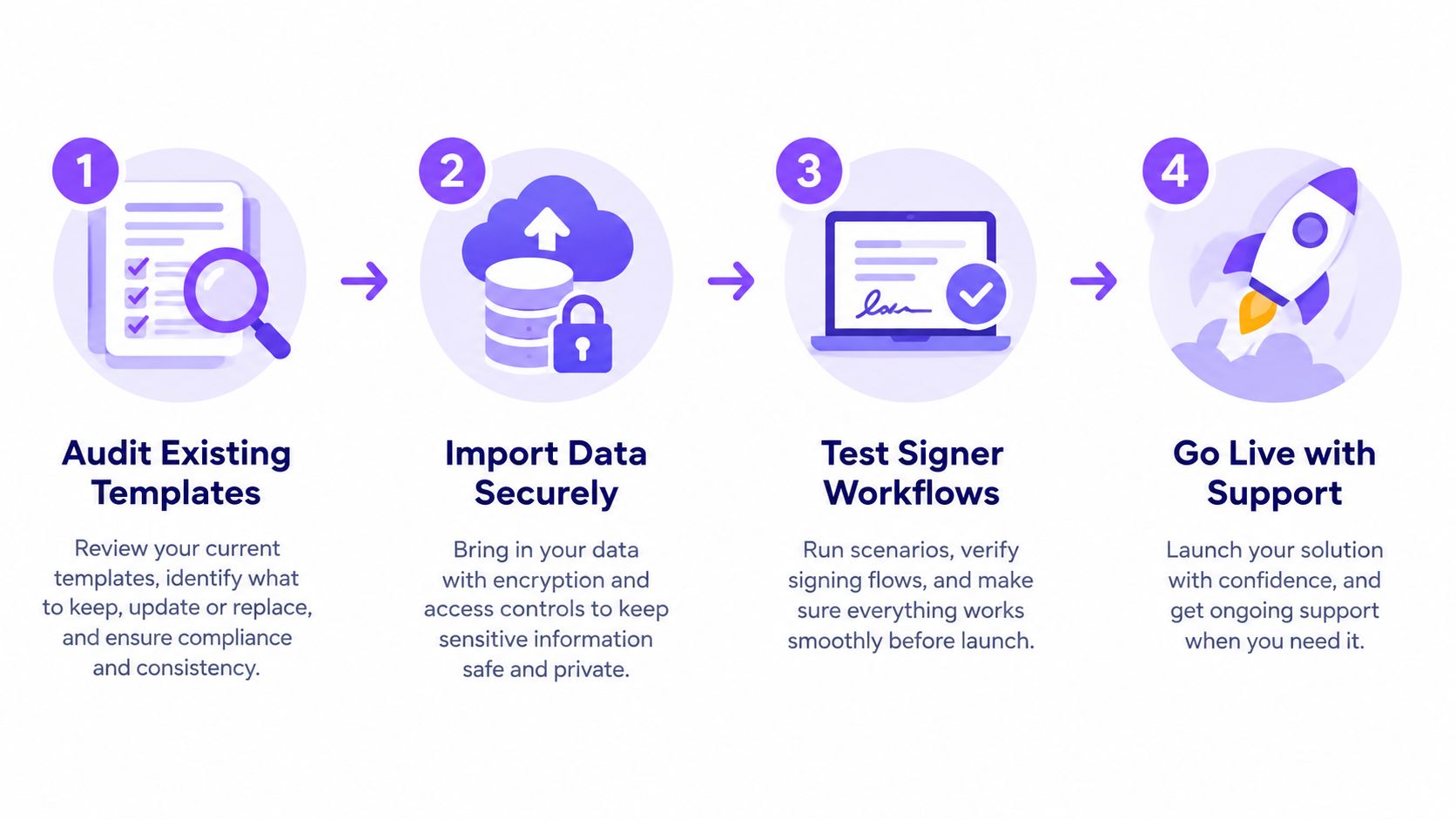
Migration fails when teams treat it as a vendor switch instead of a workflow redesign. The software change may be simple. The difficult parts are identifying which templates still matter, preserving evidence, updating signer communications, and teaching occasional users where to work.
Start with an inventory, not an import button.
Audit before moving anything
Export a list of active templates, completed agreement types, user roles, integrations, and notification rules. Separate documents that are legally or operationally important from templates nobody has used recently. Include HR onboarding, sales contracts, vendor agreements, consent forms, purchase approvals, and field-service documents.
For every important workflow, record:
- Document owner: Identify who can approve template changes.
- Signer sequence: Note whether signing is sequential, parallel, or conditional.
- Required fields: Mark signatures, initials, dates, checkboxes, attachments, and approval fields.
- Connected systems: Record CRM, HR, storage, form, and notification integrations.
- Retention requirements: Confirm where completed documents and audit evidence must be stored.
BoloSign supports one-click DocuSign template import, which reduces manual recreation. That doesn't remove the need to inspect every imported template. Field assignments, signer roles, conditional logic, branding, and notifications still need validation.
Test the evidence, not just the interface
A successful test sends a document to the correct people. A useful test also confirms what happens afterward.
Send representative documents to internal test accounts. Check the signing order, authentication experience, completed PDF, timestamps, IP information, version history, notifications, and storage destination. Confirm that an administrator can retrieve the audit trail without relying on the original sender.
A practical digital signing sequence normally includes uploading and preparing the document, assigning signer roles, authenticating participants, recording an audit trail, and archiving the completed file. This digital signing workflow guide describes that sequence in operational terms.
Compliance checkpoint: Ask legal and compliance reviewers to approve the completed document and its evidence package, not just the signature screen.
During the transition, keep signer communications simple. Tell recipients what changes, what remains legally valid, and whom to contact if an invitation lands in spam. Give internal users a short guide for creating a document, using a template, checking status, and locating the final file.
Use BoloSign's DocuSign migration workflow as a reference point for planning the import and rollout. The goal is zero downtime, not a dramatic cutover. Move one department or agreement family first, review the results, then expand.
Real-World Use Cases Across High-Demand Industries
The right platform proves its value in repetitive workflows. A signature tool that looks impressive in a demo can still fail if recruiters rebuild forms manually, clinic staff can't find completed records, or field teams need a laptop to finish a delivery confirmation.

Staffing and healthcare
A staffing agency can create reusable candidate onboarding templates for employment agreements, tax forms, policy acknowledgments, and client contracts. Recruiters send the correct package, candidates sign from a phone or browser, and the operations team tracks outstanding documents from a central dashboard. Template reuse matters more than visual complexity because the same workflow runs for every new placement.
Healthcare teams need tighter controls. A clinic may use digital signing for patient onboarding, consent forms, provider agreements, and internal approvals. BoloSign supports workflows positioned around HIPAA, GDPR, ESIGN, and eIDAS, but the organization still needs to configure access, retention, identity verification, and vendor agreements correctly. For a healthcare-specific evaluation, review this BoloSign healthcare eSignature workflow.
Under eIDAS, the European Commission describes a single EU-wide framework for electronic identification and trust services, and says qualified electronic signatures have the same legal effect as handwritten signatures. Review the European Commission eIDAS guidance when a cross-border workflow requires a particular signature level.
Real estate and logistics
Real estate teams handle offers, disclosures, leases, inspection acknowledgments, and agency agreements. The practical requirement is not just “add signature to PDF.” Agents need a repeatable way to prepare documents, assign multiple signers, collect attachments, and retain a clear record of completion.
Logistics companies face a different pattern. A dispatcher may send vendor agreements, delivery confirmations, proof-of-service forms, or equipment handover documents. Mobile-friendly signing and form-based data capture reduce the need to print, scan, and email paperwork back to headquarters. Integrations with Google Drive, Google Sheets, Slack, Microsoft Teams, Zapier, Make, Pabbly, HubSpot, Salesforce, and Pipedrive can connect the completed agreement to the system already used by the operations team.
Education and professional services
Schools, universities, and training providers can use signable forms for admissions, consent, enrollment, certification, and staff acknowledgments. A form-based workflow can collect structured information and a legally binding signature in the same interaction. Teams should confirm whether the workflow needs a parent or guardian role, multiple signers, attachments, or region-specific privacy controls.
Professional services firms need speed without sacrificing evidence. A consultancy can prepare a statement of work, route it to the client and internal approver, collect signatures, and store the final agreement with its audit history. Account teams can also connect contract requests to CRM records instead of asking staff to copy status updates between systems.
For U.S. workflows, electronic signatures generally rely on the ESIGN Act and UETA, while compliance teams must still assess the document type, consent process, record retention, and industry rules. This U.S. eSignature compliance overview explains the legal framework and related control considerations.
Why BoloSign Is the Recommended Alternative
BoloSign is the strongest fit in this comparison for small and mid-market organizations that need enterprise-grade controls without enterprise-style billing. The recommendation is practical. These teams usually don't need another system that charges them every time a new department joins. They need a dependable workflow that lets users create, send, sign, track, and store agreements without rationing access.
The commercial model addresses the central procurement problem directly. BoloSign offers unlimited documents, team members, and templates at one fixed price, and its positioning states that it is 90% more affordable than traditional tools. Treat that figure as a vendor claim to validate against your current contract, usage, and total implementation cost. The more important structural benefit is predictability. A recruiter, sales representative, clinic manager, or regional operator can use the platform without forcing procurement to calculate a new seat or envelope impact.
One workflow for PDFs, forms, and agreements
Users can upload PDFs, prepare fields, assign multiple recipients, and send documents for signature. They can also create reusable templates for recurring agreements and collect structured information through forms. For teams asking how to sign PDFs online, the process remains familiar. Upload, place fields, assign roles, send, sign, and retain the completed record.
BoloSign also supports adding legally binding signature fields directly inside Google Forms. That matters for education, healthcare intake, staffing questionnaires, event registration, and vendor data collection. A team can use a form-based experience while still collecting a signature as part of the workflow. AI-powered contract intelligence, dashboards, approval workflows, customizable emails, and integrations extend the process beyond the final signature.
Security and legal validity require more than a badge on a pricing page. BoloSign states adherence to ESIGN, UETA, eIDAS, GDPR, HIPAA, ISO 27001, and SOC 2. Buyers should request the current security documentation, data processing terms, audit controls, identity options, and regional requirements before approving a regulated deployment.
A sensible alternative for mixed-usage teams
BoloSign is not the right answer for every enterprise. A global organization with highly specialized CLM governance may prefer a dedicated lifecycle platform. A company already standardized on Adobe may prioritize ecosystem consolidation. But for teams that want contract automation, reusable templates, form-based signing, CRM connectivity, and predictable pricing in one system, BoloSign addresses the reasons many buyers start searching for a DocuSign replacement.
Closer Innovation Labs Corp. builds BoloSign as an affordable eSignature and contract management platform with unlimited signatures, templates, forms, and team members at one fixed price. Visit Closer Innovation Labs Corp. to start a 7-day free trial, test your PDF and template workflows, and see whether its integrations and compliance controls fit your migration plan.

Paresh Deshmukh
Co-Founder, BoloForms
6 Oct, 2026
Take a Look at Our Featured Articles
These articles will guide you on how to simplify office work, boost your efficiency, and concentrate on expanding your business.



