

CRM Integration API: Endpoints, Auth and Workflows
CRM integration API guide covering OAuth 2.0 setup, REST endpoints, webhooks, data sync rules and AI agent governance for growing teams.

Tired of nonsense pricing of DocuSign?
Start taking digital signatures with BoloSign and save money.
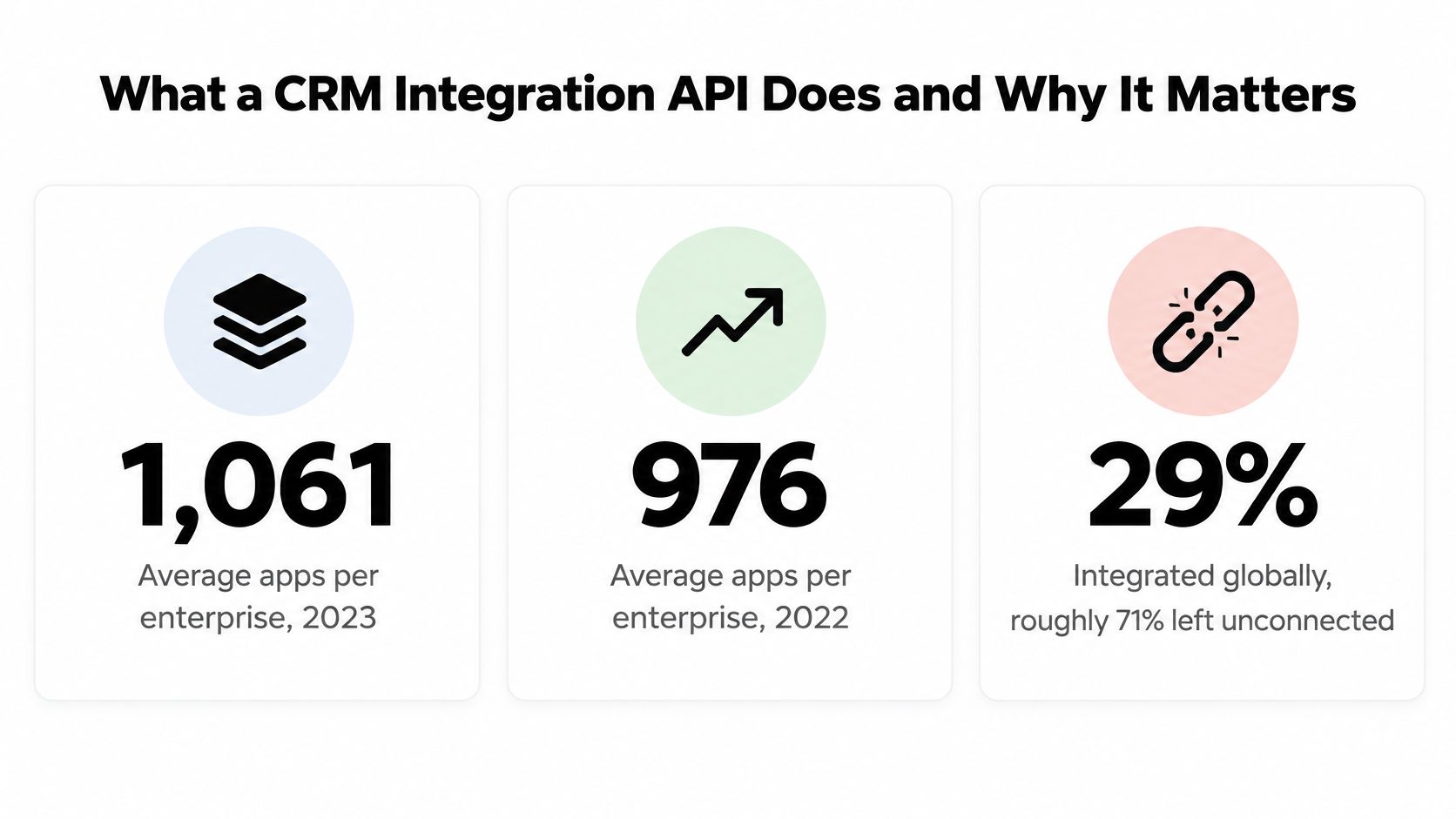
Enterprises ran an average of 1,061 applications in 2023, up from 976 in 2022, and only 29% of those applications were integrated, according to the MuleSoft Connectivity Benchmark report published with Deloitte Digital. Roughly 71% of the software a typical company pays for sits disconnected from everything else.
From the integration layer, that gap explains most of the pain. A CRM integration API is simple to start and hard to keep correct. The failures that reach production are rarely failed authentication tests during the build. They are duplicate signature envelopes created by a retried POST, a sync worker holding a token broad enough to send a contract to the wrong signer, and a support ticket asking which system owns a candidate's start date.
Getting the plumbing right is the easy part. Deciding who is accountable for the data flowing through it, and what an automated agent is allowed to do with it, is where integrations fail.
What a CRM Integration API Does and Why It Matters
A CRM integration API is the programmatic surface a CRM exposes so other systems can read and write its records: contacts, accounts, deals, activities, and increasingly the documents attached to them. Salesforce publishes a REST API for exactly this. HubSpot, Pipedrive and Microsoft Dataverse each do the same with their own conventions, and each one will surprise you in a different place.
If the term itself needs unpacking first, what CRM integration actually means covers the vocabulary before you get anywhere near an endpoint.
Three patterns cover almost all real work:
- Record synchronization. A scheduled or event-driven job copies contacts, deal amounts and stage changes between the CRM and an ERP, a billing platform or a contract repository.
- Workflow triggers. A deal reaching a stage fires an event that creates an offer letter, a vendor agreement or a signature request.
- Document actions. A template renders from CRM fields, goes out for signature, and the executed PDF plus its metadata lands back on the opportunity record.
The same MuleSoft benchmark found that 99% of surveyed organizations used public or private APIs and 53% used them specifically for integrations, while API-related projects generated an average of 38% of organizational revenue, up from 35% in 2022. Nobody needs convincing that connectivity pays. The open question is whether a given connection keeps paying after month six.
The reframe that matters: the issue isn't whether your CRM can talk to a signing platform. It's whether the connection stays correct when a token expires at 2am, a webhook arrives twice, and two teams edit the same deal on the same afternoon.
That is why authentication, error handling, versioning, monitoring and data governance belong in the design document rather than the backlog. The decisions below follow the order a build hits them: HTTP methods and retry safety, OAuth flows, event delivery, data ownership, production errors, agent permissions, and the evidence an executed signature leaves behind.
Core Endpoint Patterns and HTTP Methods
Start with the method map, because most duplicate-record incidents trace back to a retry that should never have been allowed.
| Operation | HTTP method | Idempotent | Typical CRM use |
|---|---|---|---|
| Read records | GET | Yes | Pulling contacts, deals or contract status |
| Create record | POST | No, unless an idempotency key is sent | Creating a contact, deal or signature envelope |
| Full replacement | PUT | Yes | Replacing a complete record with a known payload |
| Partial update | PATCH | Not guaranteed | Changing one field when merge rules are documented |
| Delete record | DELETE | Yes | Removing a record, with soft delete preferred for audit |
| Long-running job | POST | Depends on idempotency key | Document generation, approval or signing |
Reads are the easy column. A contact read filtered by account ($filter=account_id eq ...&$select=email,legal_name) should page deterministically, return only the fields you asked for, and never trigger a side effect. Set an explicit field list. A bare GET that returns 140 columns is how sync jobs become the slowest process in the stack.
Creates are the ones that bite. A POST that times out after 30 seconds may still have committed on the server. Fire it again without protection and you get two deals, two contacts, or two signature envelopes for the same agreement. Send a unique idempotency key derived from the business object, not from a random request ID, so the retry is recognizably the same intent.
Full replacement with PUT works when you hold the complete record and can rebuild it. It is the wrong tool for a sync worker that only knows three fields, because everything it omits gets overwritten or nulled. PATCH is the correct method for a stage change, but only when the provider documents merge semantics and conflict handling. If it doesn't, treat PATCH as best-effort and read the record back to confirm.
Deletes deserve a policy decision before an endpoint decision. Soft delete preserves the audit trail that a contract workflow may later need, and hard deletion of a deal that has an executed agreement attached tends to create a compliance problem nobody budgeted for.
Long-running operations should not hold a connection open. Document generation, approval routing and signing return 202 Accepted with a pending status and a resource you can poll once, then complete asynchronously through an event.
Pin the version and put the retirement date in the calendar
Salesforce states that each API version is supported for at least three years from its initial release, and that versions older than three years may eventually be retired. Its CRM Analytics API documentation lists supported versions from 31.0 through 65.0, which is what a decade of incremental change looks like from the outside. Pin the version you build against, write the retirement date next to it, and schedule the upgrade test while the old version still works.
Every mutation should return three things: a durable resource identifier, a correlation ID, and a machine-readable status. Without all three, a failure that crosses two systems is untraceable at 3am.
Choosing an Authentication Flow for CRM Access
The fastest way to hand a background job permission to send contracts is to reuse a static API key somebody generated in 2021. Don't. Keys can't be scoped to a user, can't be revoked without breaking every other consumer, and leave no record of who authorized what.
| Flow | Best for | Token holder | Key control |
|---|---|---|---|
| Authorization code with PKCE | User-delegated access from a browser or mobile app | The authorized user | PKCE and a registered redirect URI |
| Authorization code | User-delegated access from a server-side app | The authorized user, held by the server | Registered redirect URI and scoped consent |
| Client credentials | Machine-to-machine sync with no user present | The application | Narrow scopes and secret rotation |
| Implicit flow | Not recommended for new integrations | Access token in the URL fragment | Deprecated; avoid |
| Static API key | Legacy tools only | The key holder | Rotate often and restrict; cannot scope per user |
RFC 6749 defines OAuth 2.0 as an authorization framework that lets a third-party application obtain limited access to an HTTP service, either through user approval or through application authentication, as set out in the OAuth 2.0 authorization framework. The operative word is limited.
Design scopes around actions a mistake could cause
Treat scopes as a blast radius, not a checkbox. Split contacts:read, deals:write and documents:send so that a synchronization worker cannot send a contract just because a sales rep can. I would give a sync job read access to contacts and deals, and nothing that can move money or dispatch a signature request.
- Refresh tokens get encrypted at rest, rotated on a schedule, and revoked the moment a customer disconnects the integration.
- Access tokens never appear in browser URLs, log lines or error payloads. A token in a log aggregator is a credential leak with a retention policy.
- Validation happens on every request: audience, issuer, expiry and scope, not just signature.
- PKCE and TLS apply to every public client and every hop. The implicit flow is deprecated and has no place in a new build.
Bind every token to one tenant
Pair OAuth with tenant isolation. Store the authorized CRM account and tenant identifier alongside the token, and add both to every query that touches customer data. In a multi-tenant platform, a token that isn't bound to a tenant is a cross-customer data leak waiting on a caching bug.
The decision rule is short. A signing request started by a named person needs an authorization code flow with PKCE, because consent and identity both matter. A nightly record sync needs client credentials with the narrowest scope that satisfies the job, and a secret rotation calendar someone owns.
Webhooks Idempotency Keys and Safe Retries
Synchronous calls are fine until the work takes minutes. Signing takes minutes. Approval routing takes hours. Holding a connection open for that is how you end up with a client timing out, retrying, and creating the second envelope.
The split is clean. Use REST when the caller needs the record immediately. When a state change may take seconds or minutes, return an accepted or pending response and publish a signed, replayable webhook instead of making clients poll. RFC 9110 anchors the underlying semantics: repeating an identical request should have the same intended server effect as making it once, which is what makes a retry safe in the first place.
OpenAPI treats webhooks as provider-initiated requests described independently of any particular operation, while callbacks are associated with one operation. That distinction matters when you document events: a signature.completed event is not a property of a single create call, it's a fact about the account.
The producer's half of the contract
Document event names and payload schemas, signature verification (usually an HMAC over the raw body with a timestamp), replay protection windows, a retry schedule with exponential backoff, ordering guarantees, and a dead-letter or manual redelivery path. An unsigned webhook is an open endpoint that anyone can POST a fake "contract signed" event to.
The idempotency key belongs on the create side of the same design. The server stores the result of the first POST keyed by that value, so a retry returns the original contact, deal or signature envelope instead of a second one.
Practical rule: if a retry can create a second record, the API isn't idempotent, no matter what the method table says.
The consumer's checklist
- Acknowledge fast. Return 200 in milliseconds and do the work after. A slow consumer triggers retries it never needed.
- Deduplicate by event ID. Persist processed IDs, or rely on a unique index, before acting.
- Persist before processing. Write the raw event to a table first, so a crash mid-handler doesn't lose it.
- Reconcile on a schedule. Delivery is at least once, not exactly once, so a nightly count comparison catches whatever the webhook missed.
Say a staffing agency's candidate signs an offer letter. The signed event arrives twice, three seconds apart. The CRM should mark the placement closed exactly once, because the second delivery carries an event ID already seen. When something does go wrong, trace it with the durable resource ID, correlation ID and status returned by the original mutation rather than guessing from timestamps. For a deeper walk through the API surface behind enterprise signing flows, this eSignature API guide for enterprise REST integrations covers the request and callback shapes.
Who Owns CRM Data Quality After Sync
Here is the inconvenient finding. A 2025 survey of 602 CRM users and administrators across the United States, United Kingdom and Australia, reported through the CRM Center of Excellence community, found that 76% said less than half of their CRM data was accurate and complete.
Most integration content responds to that by proposing another connector. The opposite is usually true: adding systems to a pipeline with undefined field ownership makes accuracy worse and makes the failures harder to attribute.
Write a data contract before you write a mapping
A data contract is a short document that answers six questions: what each canonical field means, which system is the source of truth for it, which fields are required versus optional, how conflicts resolve, how duplicates merge, and how backfills and reconciliation reports work. It takes an afternoon and saves quarters.
| Field | Owner team | Source system | Conflict rule |
|---|---|---|---|
| Deal amount | Sales ops | CRM | CRM wins; contract system read-only |
| Signer legal name | Legal ops | Contract system | Contract system wins; never overwritten by CRM |
| Candidate start date | Recruiting | Recruiting platform | Recruiting wins until placement closes, then CRM |
| Billing entity | Finance | ERP | ERP wins; CRM displays only |
The question every team eventually faces is concrete: when HubSpot, Salesforce, a recruiting platform, an ERP and a contract system disagree on a candidate's start date, which value wins, and where is that decision logged? If the answer is "whoever wrote last", you don't have a sync, you have a race condition with a UI.
Deduplication is its own discipline. For a worked example of matching records before they land in a CRM, see how LeadBeast prevents duplicates during sync rather than as a cleanup job afterwards.
Four metrics that make ownership measurable
- Sync success rate: percentage of records that complete without manual intervention, by object type.
- Duplicate rate: new duplicates created per thousand records per week.
- Stale-record rate: records with no update in the expected window for their lifecycle stage.
- Validation failure share: records rejected by schema rules, which is usually a mapping bug, not a user error.
A real estate example shows why this isn't theoretical. The buyer signs a purchase agreement, the signed event moves the deal to "under contract" in the CRM, but the signer's legal name exists only in the contract system. If someone edits the CRM contact to fix a typo, and that write flows back, the executed document now names a person who never signed it. The rule that prevents this is a conflict rule, not an endpoint.
How to Build Your First CRM Sync Step by Step
The order below is the order that works. Skipping step one is the single most common reason a first sync ships fast and gets switched off in a month.
Map the source of truth for every field before any code. Deal amount from the CRM, signer legal name from the contract system, billing entity from the ERP. The common slip is treating the CRM as truth for everything because it's where the sales team looks. Write the map down and get it signed off by the teams in the ownership matrix.
Create a sandbox app and pick the authentication flow. A user-delegated flow for anything a named person initiates, client credentials for the nightly job. The slip here is testing against production keys, which exposes live customer records to a half-finished script and to whoever reads the logs.
Request only the scopes the first sync needs.
contacts:readanddeals:readis a reasonable start. Requestingdocuments:sendon day one because it might be handy later is how a read-only sync becomes a signing risk.Pull a sample of records and validate against the schema. Fifty records are enough to expose missing required fields, unexpected date formats and country-specific phone shapes. The slip is testing with records created by engineers, which are always the cleanest records in the database.
Build the write path with an idempotency key on every POST. Derive the key from the business object so a retry after a timeout maps back to the same intent. Confirm the second call returns the original resource rather than a new one, then confirm it again after a forced network failure.
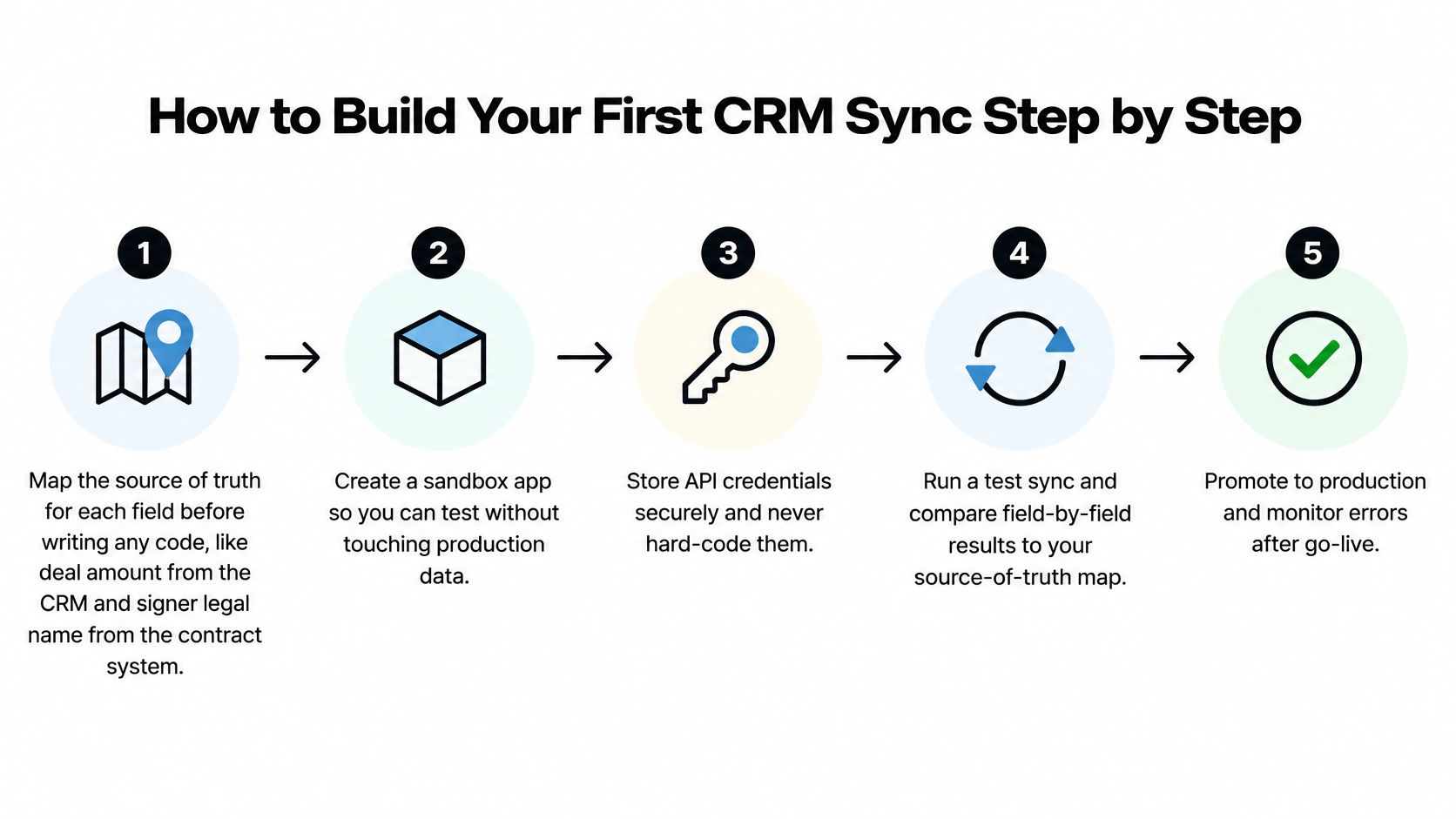
Register a webhook for the signing-completed event and verify its signature before processing. Reject unsigned payloads outright and deduplicate by event ID. The slip is accepting any POST to the endpoint and trusting the body, which turns a public URL into a way to fabricate signed agreements.
Run a reconciliation report after 24 hours and compare counts. Records in, records out, records updated, records failed, per object. A dashboard built on your own logs will always look healthier than the system of record, so compare against the CRM's count, not yours.
Go live with one team before expanding. A staffing agency's recruiter pipeline, a clinic's intake forms, or a logistics team's carrier agreements each make a good pilot because the volume is bounded and the failure is visible. Expand after two clean weeks, not after two clean hours.
Before you start, decide whether the CRM record needs enrichment fields at all; how to enrich CRM records explains what enrichment adds and what it costs in write volume and duplicate risk.
Templates are what make the first week productive. Import your existing contracts, set up clickwrap and eSign templates with the fields the sync will populate, and start tracking status. Teams that do this during onboarding are typically live in under a week rather than in a quarter.
What a healthy first sync looks like
Counts match between systems within an agreed tolerance. No duplicate events in the last 48 hours. Error rate under the threshold the team agreed on before launch, not the threshold that looks acceptable after it. If you replicate document workflows into an ERP later, the eSignature integration approach for ERP systems covers where the approval record should live.
Common CRM API Errors and How to Fix Them
Most production failures fall into five status codes, and each one has a first fix that is safe to automate.
| Status | Usual cause | First fix |
|---|---|---|
| 401 Unauthorized | Expired or revoked access token | Refresh once, then re-authorize if refresh fails |
| 429 Too Many Requests | Rate limit exceeded | Back off with exponential delay and jitter and honor Retry-After |
| 5xx Server Error | Provider outage or timeout | Retry idempotent calls; require an idempotency key before retrying POST |
Read a failed response in a fixed order: status code, error body, correlation ID, and whether the request already carried an idempotency key. That last check decides whether a retry is safe or whether it's how you get two contracts.
401 is a credential lifecycle problem, not a bug. Refresh once. If the refresh fails, stop and surface a re-authorization prompt to the customer. Looping on refresh is how a single expired token turns into a locked integration and a rate-limit violation in the same minute.
403 is a scope problem. A sync token without documents:send will get exactly this on a signing call, and no amount of retrying fixes it. Log the missing scope, alert the team that owns the scope request, and fail the job cleanly.
409 means two systems edited the same deal. Re-read the record, apply the documented merge rule from the data contract, and retry once. If it conflicts again, park it for a human. Silence here is how a signed agreement ends up attached to the wrong opportunity.
429 and 5xx need patience with jitter. Honor Retry-After when it's present, apply exponential backoff with randomized jitter when it isn't, and cap retries. Jitter matters because every worker that failed at the same second will otherwise retry at the same second.
Trade-off worth naming: a retry that returns 200 can still be a data error. If the original POST had no idempotency key, that success may be a duplicate contact, a second envelope, or a double-sent reminder.
One edge case deserves a rule of its own. A 404 after a record was deleted in the CRM should be logged and reconciled, not recreated automatically. Auto-recreating deleted records is how an opt-out reverses itself.
Track error rate by status code per integration. A 401 spike is a token issue, a 429 spike is a throughput issue, and a 409 spike is a process disagreement between two teams. You want to see the difference within hours, not at the next quarterly review.
Governing AI Agents That Call CRM APIs
A dispatcher's AI agent drafts a carrier agreement from a closed CRM deal, fills the lane, rate and delivery window, and stops. Sending it requires a manager. That gate isn't bureaucracy; it's the difference between a workflow and an incident.
Model Context Protocol connectors are becoming a common interface for AI agents to reach CRMs, APIs and databases, as recent coverage of MCP-based CRM integration describes. A standardized connector does not make the integration safe. Documented risks include prompt injection through tool descriptions or business content, excessive permissions, and lookalike tools that imitate trusted capabilities.

An agent that discovers tools at runtime can also discover one it shouldn't have. A contract note containing an instruction phrased like a system prompt is a real attack path, because the agent can't reliably tell business content from operator instructions.
A three-tier permission model that survives audit
- Safe to automate: record lookups, draft creation, summarization, field enrichment, and building a template from an existing deal. Reversible, low blast radius, no external party affected.
- Requires human review: sending an agreement to a signer, changing a deal stage that triggers billing, or issuing a payment request. The action leaves the building.
- Never automate without explicit approval: altering an executed agreement, deleting signature evidence, or touching patient-related or regulated records. Irreversible or evidentiary.
Put AI contract review at the review tier, before anything is sent. Flagging a risky clause while the document is still a draft costs an edit. Flagging it after the counterparty has signed costs a negotiation.
Test adversarially before production. Include a prompt injection hidden in a deal note, a request for a scope the agent wasn't granted, and a lookalike tool name designed to be confused with a real one. If any of the three succeeds, the agent isn't ready.
The controls that enforce all of this are unglamorous: least-privilege scopes, separate read and write credentials, parameter validation on anything the model generates, version pinning so a connector update can't widen capability, a tool allowlist, and complete logs of calls, inputs, outputs and the user identity behind each one.
The unanswered question for many organizations is governance, not capability: when an agent can discover and invoke tools dynamically, who reviews the action it took and against which policy? Sales, staffing, healthcare, real estate and procurement teams all need an answer, because a routine-looking CRM action can expose regulated data or fire off an external contract.
Signature Evidence and Healthcare Access Controls
When a sales, staffing, property or procurement team generates a PDF from a CRM record and routes it for signing, the integration's job doesn't end at "sent". It has to preserve what happened.
Under Article 25 of the EU eIDAS Regulation, an electronic signature cannot be denied legal effect or admissibility as evidence solely because it is electronic or because it isn't a qualified electronic signature, as the European Commission eSignature FAQ sets out. Qualified electronic signatures carry the same legal effect as handwritten signatures, and a qualified certificate issued in one Member State must be recognized in the others.
The European Commission also notes that eIDAS has applied directly across EU Member States since 1 July 2016, replacing the 1999 eSignature Directive and covering signatures, seals, timestamps, electronic delivery and website authentication.
The workflow, in order
- Create the agreement from the CRM record. Employment agreements, property documents, vendor contracts and education forms all start as a template plus fields the sync already knows.
- Send it for digital signing with the signer identity bound to the authorized CRM account, not to a shared mailbox.
- Store signature metadata and timestamps in the CRM or contract repository. A flattened signed PDF with no signer identity, IP record or timestamp is a picture of a signature, not evidence of one.
For clinics, the constraint is tighter. The HIPAA Security Rule technical safeguards require access controls that restrict ePHI to authorized users, unique user identification as a required specification, and audit controls that record and examine activity in systems containing ePHI. Automatic logoff and encryption are addressable specifications. A signing API used by a clinic therefore needs authenticated users, role-based access, activity logs and protected transmission, and the integration should carry that identity through instead of substituting a service account.
- US teams work under ESIGN, with state-level rules layered on top, and need the audit trail to be exportable on request.
- EU teams need eIDAS-grade evidence, especially for cross-border transactions.
- Healthcare, anywhere needs role-based access plus audit logs before a patient form is sent.
- GDPR-facing teams need to know where signature data is stored and how long it's retained.
Where patient documents are involved, this guide to HIPAA-compliant document management covers the retention and access-control side in more depth than a sync checklist can.
Start a 7-Day Free Trial to Test Your Integration
Commit to a 7-day free trial and test the CRM-connected signing path before you commit engineering time to it. You'll learn more in a week of real documents than in a month of reading API references.
The workflow to test is the one the team will use: create, send and sign PDFs, templates and forms without leaving the CRM. Connect Salesforce or HubSpot natively, or call the Document Signing API from a custom build, and confirm that deal data auto-fills into a contract. Then send one test agreement from a clickwrap or eSign template and check that the audit trail keeps signer identity and timestamps, not just a finished PDF.
A practical checklist for the trial week:
- One native connection. Salesforce or HubSpot, whichever your team lives in, wired to a single template.
- One API call. A create-and-send request with an idempotency key, retried on purpose to prove it doesn't duplicate.
- One webhook. A signature-completed event, received twice, processed once.
- One audit export. Signer identity, timestamps and document hash, readable by someone outside engineering.
On cost, the argument is simple. Unlimited documents, templates and team members at one fixed price, up to 90% more affordable than DocuSign or PandaDoc, means a staffing agency adding twenty recruiters, a clinic adding front-desk staff, or a property team adding agents doesn't renegotiate a contract every quarter. Per-seat pricing is what stops a rollout at the pilot.
Compliance coverage spans ESIGN, eIDAS, HIPAA and GDPR, so US, Canadian, Australian, New Zealand and UAE teams can test their own requirements against the same workflow rather than a marketing page. Run the checklist above, keep the failed cases, and start a 7-day free trial when you're ready to see how your own documents behave.
Contracts don't wait on integration projects, and the fastest way to prove a CRM-connected signing workflow is to run one: with BoloSign, teams create, send and sign PDFs, templates and forms from inside the tools they already use, with AI-assisted drafting and review, native Salesforce and HubSpot connections, and a Document Signing API when you need a custom build. Unlimited documents, templates and team members at one fixed price make it practical to test the whole flow with the people who will use it. Start the 7-day free trial and run your first agreement end to end before you write the next line of integration code.

Paresh Deshmukh
Co-Founder, BoloForms
19 Nov, 2026
Take a Look at Our Featured Articles
These articles will guide you on how to simplify office work, boost your efficiency, and concentrate on expanding your business.