

Contract Template Management Best Practices in 2026
Discover contract template management best practices for 2026. Streamline your workflow and reduce legal risks with these actionable tips.

Tired of nonsense pricing of DocuSign?
Start taking digital signatures with BoloSign and save money.
Poor contract management has been estimated to cost businesses up to 9.2% of annual revenue, while manual contract environments can average 3.4 weeks from request to execution. Industry estimates on contract lifecycle automation put the problem in operational terms: a template isn't background paperwork. It's a control point for speed, consistency, compliance, and commercial value.
The practical answer is to stop treating templates as static Word files. A governed template program gives every agreement a named owner, approved language, controlled versions, risk-based routing, and a feedback loop from negotiation back into the library. That model works across staffing, healthcare, real estate, logistics, education, and professional services, especially when teams need to create, send, and sign PDFs, templates, and forms without waiting for legal to rebuild each document.
Why Template Management Is the Hidden Lever
Many legal teams start with a folder of approved agreements and assume the job is done. It isn't. Local copies spread through sales, procurement, HR, and operations, and each copy becomes a possible source of outdated language, missing clauses, or unapproved concessions.
Industry benchmarks report that 71% of organizations still rely on manual contract processes, while only 11% rate their contract management as very effective. The same benchmark source links weak processes with leakage, delays, and inconsistent terms. The issue isn't that drafting takes time. It's that nobody can reliably explain which version produced an agreement, who approved a deviation, or why a fallback position changed.
Three failure modes appear repeatedly:
- Uncontrolled negotiation: Sales or procurement users edit core language because the approved alternative isn't easy to find.
- Provenance blind spots: Teams can't trace an executed agreement back to the template and clause versions used to create it.
- Inconsistent fallback language: Different departments offer different concessions for the same commercial issue, creating avoidable review and negotiation work.
A governed program fixes those problems by assigning a template steward, storing masters in one repository, restricting structural edits, and recording every release. The template should carry metadata such as contract type, jurisdiction, risk tier, approval owner, effective date, and review trigger.
Practitioner rule: If a user can download a master, edit it locally, and circulate it as an approved standard, you don't have governance. You have a recommendation.
The business case extends beyond document hygiene. WorldCC-linked estimates cited in industry reporting place value leakage from inefficient contract processes at up to 9% of annual turnover. The contract automation benchmark source makes the implication clear: template discipline belongs in the operating model, not in an informal legal checklist.
Organizations that move toward formal Contract Lifecycle Management, or CLM, manage creation, execution, analysis, and disposition instead of merely storing files. Benchmark reporting cited by the ACC CLM benchmark report also describes standardized templates and automation as mainstream priorities, with reported administration cost savings of 30% to 50% when teams replace fragmented manual work with governed systems.
The Four Pillars of Template Governance
A useful governance model has four pillars. Each one answers a different operational question, and none works well in isolation.
Ownership
Ownership answers, who can change what? Assign one accountable steward for every template family. Legal or legal operations should control structure, locked provisions, clause approvals, and publication. A business sponsor can own commercial relevance, but shouldn't alter legal-admin sections.
The owner roster should identify the steward, business sponsor, jurisdiction, contract family, risk tier, and escalation path. This prevents the common failure where “legal owns templates” sounds clear but no individual is responsible for retiring an outdated version or responding to user feedback.
Lifecycle
Lifecycle governance defines how a template moves from draft to approved, published, superseded, and archived. Use semantic versions such as major.minor, keep prior releases available for audit, and record the reason for every change. A major revision might change liability architecture or jurisdictional coverage. A minor revision might clarify a variable or correct formatting.
Risk Tiering
Risk tiering determines how much review a request needs. Low-risk forms can follow a guided self-service path. Medium-risk agreements may allow approved clause selections. High-risk agreements or deviations should route to legal, compliance, or another designated reviewer.
The classification should be based on practical signals such as agreement type, data sensitivity, liability exposure, geography, and requested changes. It shouldn't be a label that sits unused in a spreadsheet.
Deviation Loop
The deviation loop turns negotiation data into product feedback. When users request a change, log the clause, proposed fallback, reason, approver, counterparty position, and outcome. Legal can then decide whether the exception should remain exceptional or become a better-supported template option.
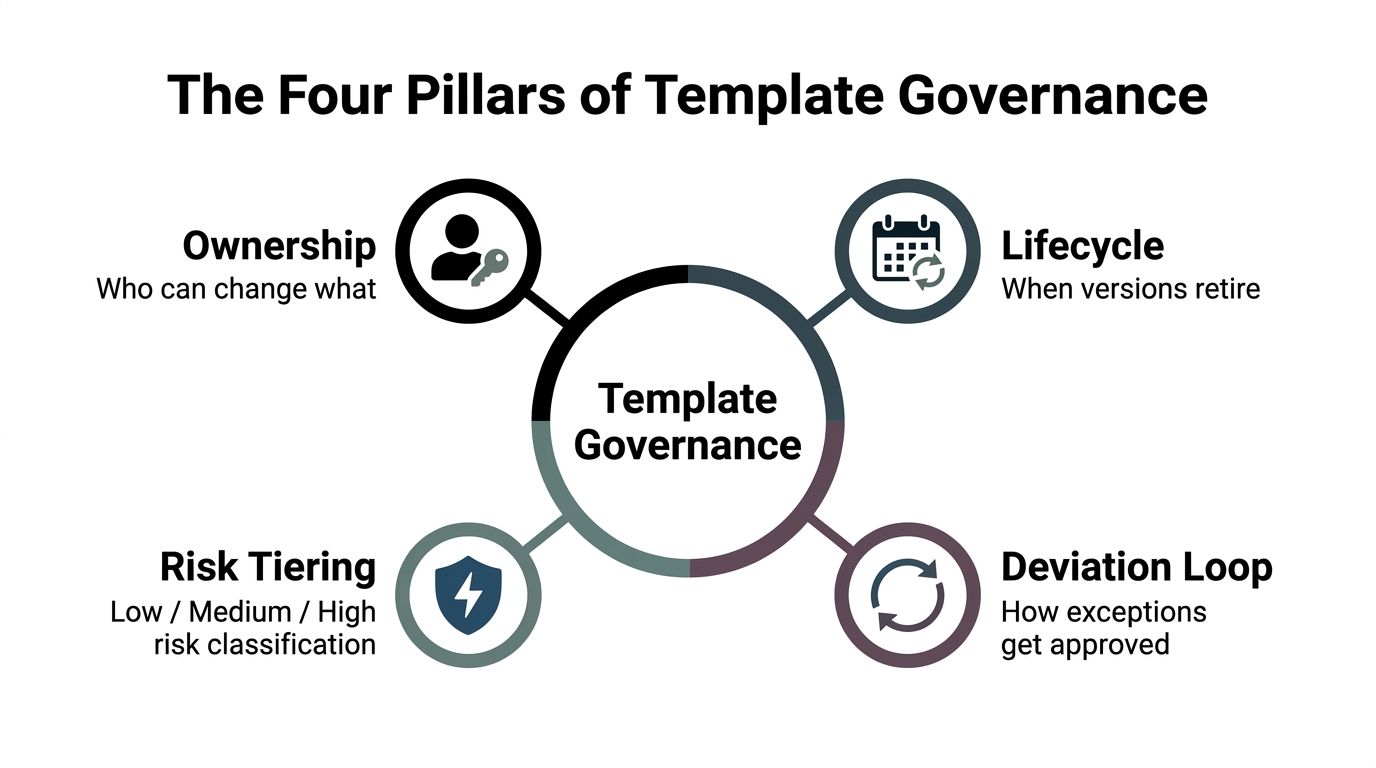
Consider a Sales request to extend payment terms. Risk Tiering identifies the request as requiring review, and the Deviation Loop records the exception. Lifecycle governance ensures the next release retains the correct approved fallback instead of accidentally reverting to an older position. That interaction is the difference between a library that merely stores language and one that improves with use.
Designing Templates That Scale
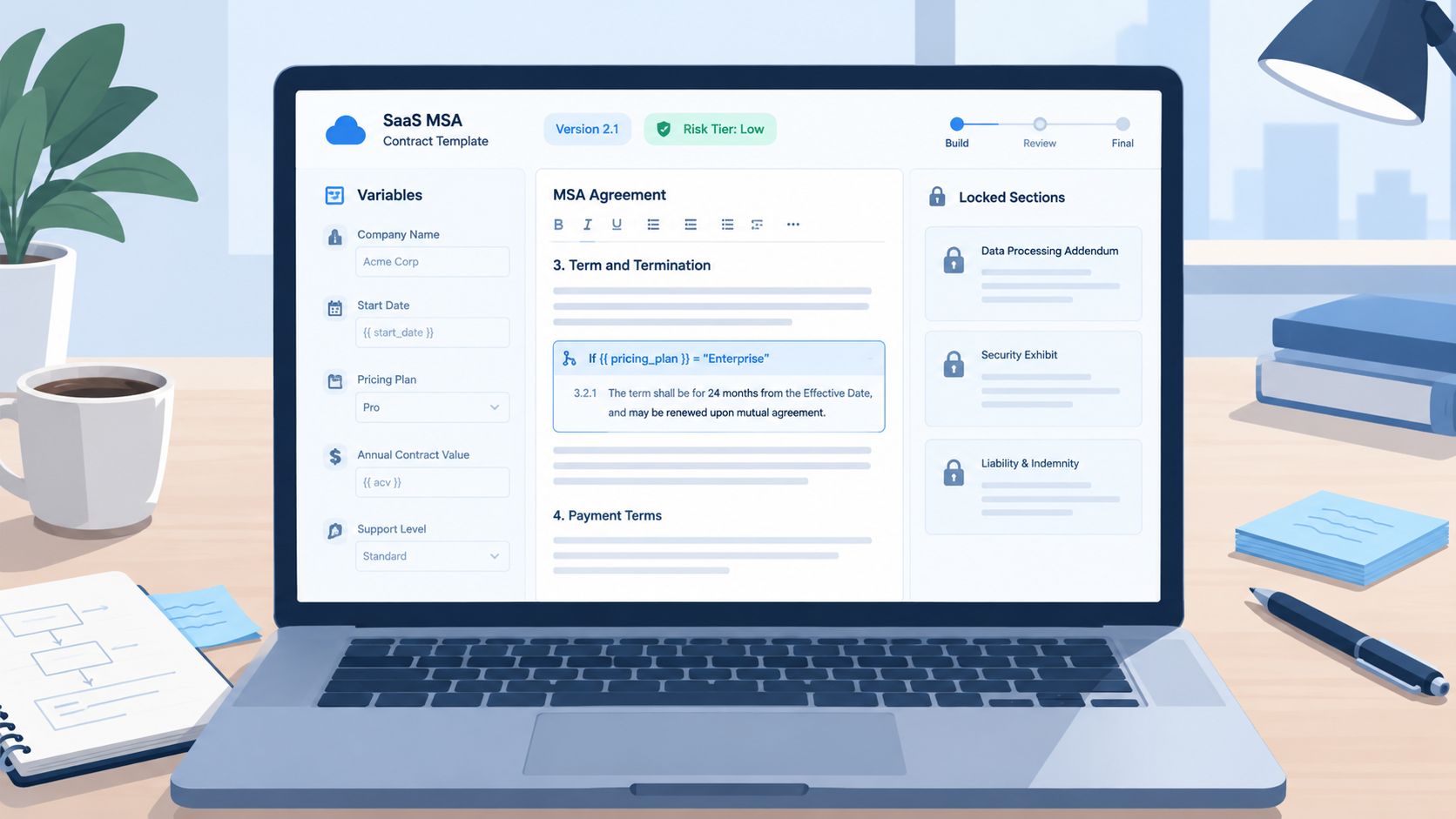
A scalable template is a guided assembly system, not a blank document with highlighted placeholders. Build it so a business user can complete safe fields without gaining permission to rewrite the legal architecture.
Use a SaaS master services agreement as the working example. Start with controlled variables:
- Customer Name: populated from the intake form or CRM record.
- Term: selected from approved options or entered within defined limits.
- Order Form ID: pulled from the commercial record and carried into the agreement metadata.
Conditional clauses should respond to meaningful intake signals. If a transaction involves GDPR-sensitive processing, insert the relevant data-processing language. If a healthcare workflow involves PHI or ePHI, trigger the appropriate review path and supporting provisions. The clause shouldn't appear merely because a user remembered to copy it from another agreement.
Lock negotiation-prone sections such as limitation of liability, indemnity, governing law, and data-security commitments. Legal administrators can edit those areas, while business users can complete variables and select approved alternatives. Hidden characters or visual tricks aren't permissions. Use role-based controls so the boundary is enforced technically.
Stamp each generated agreement with metadata including contract type, risk tier, approval owner, jurisdiction, template version, and effective date. A naming convention such as MSA-US-v3.2-final helps humans identify the asset, but the system should still rely on structured metadata rather than filenames alone.
The same separation applies outside contracts. Teams standardizing customer communications can use creating consistent email signatures as a related example of controlled reusable content. The principle is identical: define what users may personalize, protect what must remain consistent, and keep the approved source easy to access.
For repository design, separate template masters, clause assets, executed agreements, and archived releases. A practical contract repository management approach also makes search fields and ownership visible, so users don't create local workarounds because the approved asset is difficult to locate.
Building a Clause Library That Actually Gets Used
Most clause libraries fail because they're searchable Word documents no one trusts. A useful library gives each clause enough context to support a decision, not just a label that tells a lawyer what topic it concerns.
Tag every clause with at least these operational fields:
- Category: liability, intellectual property, confidentiality, data processing, payment, or termination.
- Risk tier: low, medium, or high.
- Fallback language: the approved alternative position.
- Approved jurisdictions: the countries or regions where the language is usable.
- Last-reviewed date: the point at which the owner must reassess it.
Group clauses around negotiation outcomes rather than isolated legal subjects. Limitation of liability is rarely negotiated alone. It often interacts with indemnity, insurance, exclusions, data loss, and service commitments. Package those related positions so the user sees the commercial trade-off instead of selecting one clause in a vacuum.
Limitation of liability example
| Field | Example Value | Purpose |
|---|---|---|
| Category | Limitation of liability | Makes the clause discoverable by issue |
| Risk tier | High | Routes non-standard use to legal review |
| Preferred position | Contract-value cap with defined exclusions | Establishes the opening position |
| Fallback position | Negotiated cap tied to fees and risk | Gives business users an approved alternative |
| Walk-away position | Escalate to legal and executive owner | Prevents unauthorized acceptance |
| Approved jurisdictions | United States, Canada, Australia, New Zealand, UAE, subject to local review | Limits inappropriate reuse |
| Last-reviewed date | Recorded in the library system | Creates a review trigger |
The fallback chain should be visible to the people who need it, but not every user should be able to select the walk-away position. Risk tags should trigger review when a clause is surfaced outside its permitted boundary.
For related confidentiality language, teams can use this contract confidentiality clause guide as a practical reference point when defining categories and approved alternatives.
Governance needs a maintenance rule. Legal administrators add or retire clauses, template stewards own reviews, and business sponsors submit feedback through the workflow rather than creating private variants. Usage analytics matter more than library length. If nobody selects a clause, determine whether it is obsolete, hard to find, poorly described, or unnecessary.
Approval Workflows, Versioning, and Testing
Templates often fail in production because legal builds them in isolation and assumes the workflow will be obvious. It won't. Define three lanes before configuring the system.
Legal administrators own structure, conditional logic, locked sections, clause metadata, and publication. Business users fill variables and select approved clauses within their permission boundary. Reviewers approve deviations that exceed the relevant risk threshold, including compliance or regional reviewers where the transaction demands it.
Version every template using major.minor notation. Each changelog entry should capture the version, effective date, jurisdiction, policy or regulatory driver, affected clauses, approver, and migration decision for agreements already in progress. Archive prior versions rather than overwriting them.
Test the template as software
Run four validation tests before launch:
- Variable rendering: Use complete, incomplete, unusually long, and special-character inputs to verify that names, dates, roles, and identifiers render correctly.
- Conditional logic: Test both empty and populated data for GDPR, HIPAA, region, product, and risk flags.
- Deviation triggers: Submit a payment term outside the approved position and confirm that it routes to legal.
- Integration smoke tests: Generate from CRM data, send through the eSignature workflow, complete signing, and confirm that the executed PDF and audit record return to the correct repository.
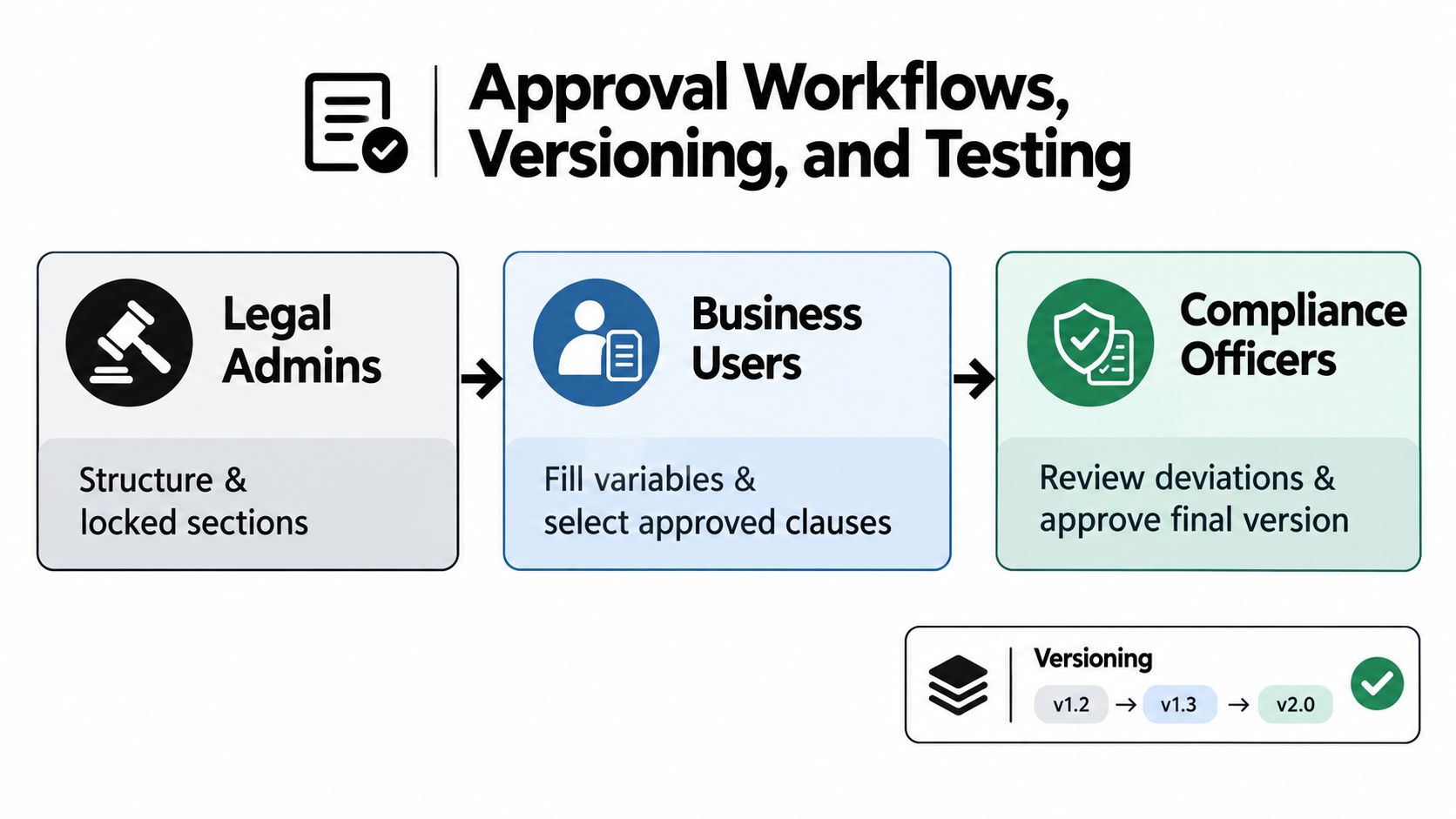
Permissions must be real system controls. Don't “lock” a field with hidden characters, instructions, or formatting that a user can remove. Publish a monthly deviation report showing which clauses are being changed, which teams request exceptions, and where approvals stall.
Teams evaluating workflow automation can also review this automation guide for mid-sized firms for practical considerations around process design, ownership, and adoption. The useful question isn't whether automation exists. It's whether the configured path behaves correctly under ordinary and unusual inputs.
Security, Integrations, and the Metrics That Prove It Works
A template library isn't governed if every user has the same access. Set permissions by role: legal administrators edit, business users complete fields, reviewers approve, and auditors read. Sensitive agreements should also inherit restrictions from the underlying data classification and contract type.
Integration removes the copy-paste step that causes variables to break. Connect templates to Salesforce, HubSpot, or another CRM so customer, opportunity, product, and commercial data enters the document from the source record. Connect the generated agreement to the eSignature platform so users can create, send, and sign PDFs online without downloading files into email threads.
BoloSign can be used as an eSignature and contract automation option for this workflow. It supports reusable templates, intake forms that auto-fill fields such as names, dates, and roles, AI assistance for fields and variables, secure electronic signing, and integrations including its Document Signing API and HubSpot-related workflows. Teams should still validate configuration, permissions, data retention, and regional requirements against their own compliance program.
For regulated workflows, jurisdiction matters. A HIPAA-related process should determine whether PHI or ePHI enters the workflow, identify covered-entity and business-associate roles, execute any required BAA, and apply Privacy, Security, and Breach Notification Rule controls. GDPR-sensitive workflows require a clear basis for processing, limited data collection, controlled access, retention rules, protection measures, and a process for individual rights. eIDAS-oriented signing workflows should address data integrity and non-repudiation, while the referenced guidance also identifies personal-data minimization and breach notification within 72 hours as relevant controls. The eSignature compliance guidance provides the operational context for these checks.
KPI design
Track the measures that expose behavior, not vanity activity.
| KPI | Definition | Year-1 Target |
|---|---|---|
| Template adoption rate | Share of eligible agreements created from approved templates | Set a baseline, then improve consistently |
| Average cycle time per template | Request-to-execution time by template family | Reduce bottlenecks without increasing exceptions |
| Deviation rate by clause | Frequency of changes to each standard clause | Identify clauses that need better fallbacks |
| Approved-language usage | Share of contracts using approved language | Increase visibility into controlled drafting |
| Version publication time | Time from approved change to released version | Make urgent updates operationally repeatable |
| Clause-library usage | Selection and reuse of approved clauses | Retire or redesign assets that users avoid |
Run quarterly audits by sampling 10 contracts per template and comparing each executed agreement with the source-of-truth version. The CLM software overview offers broader context on repositories, workflows, analytics, and integrations.
Interpret the metrics together. If cycle time falls while deviation rates rise, the template may be too rigid or its fallbacks may be commercially unrealistic. If adoption stays low, inspect the integration and intake experience before blaming users.
A 90-Day Rollout Plan With Real Milestones
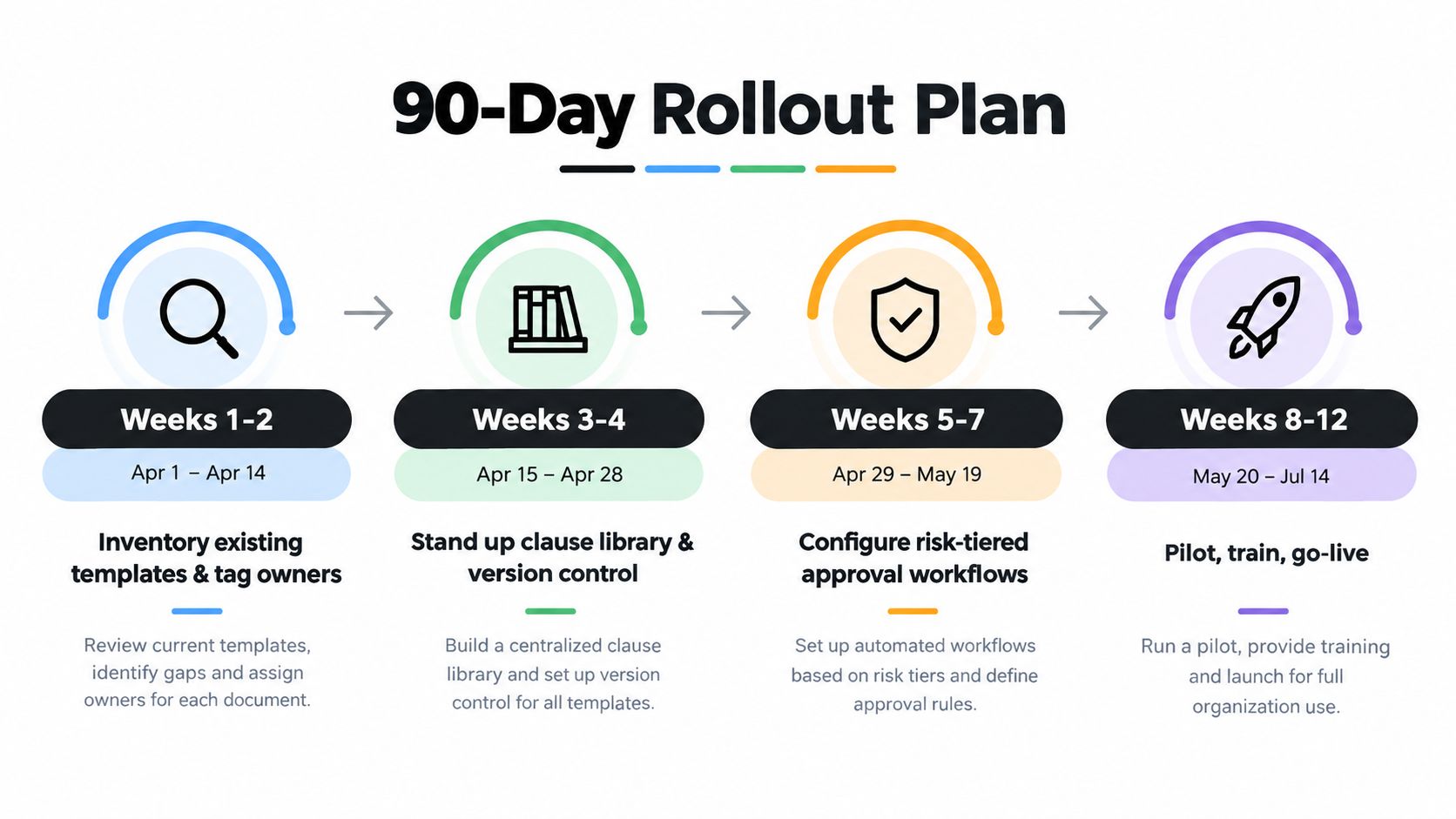
A rollout succeeds when the team treats it as an operating change, not a document migration. The plan below gives each phase an owner and an exit test.
Weeks 1–2
The legal operations lead inventories existing templates across shared drives, email attachments, CRM folders, and department repositories. A template steward assigns each asset a contract family, jurisdiction, risk tier, business sponsor, current owner, and disposition.
The executive sponsor announces the program and explains that local copies will no longer count as approved standards. Exit criteria include a visible inventory, named owners, identified duplicates, and a baseline for cycle time, adoption, and deviation frequency.
Weeks 3–4
The template steward and legal administrators establish the clause library, naming convention, version registry, archive policy, and review triggers. They prioritize high-volume and high-risk families rather than attempting to clean every document simultaneously.
The team also creates the intake fields needed to select the right template. Capture contract type, counterparty, value, department, urgency, requested changes, data sensitivity, business owner, and template source.
Weeks 5–7
The legal operations lead configures risk-tiered approval routes. The IT integration owner connects the CRM and eSignature workflow, maps source fields, tests authentication, and verifies that signed PDFs return to the correct record.
Business users should be able to generate approved agreements without editing protected legal zones. Reviewers should receive deviations with enough context to approve, reject, or propose an approved fallback.
Weeks 8–12
Pilot one sales motion and one procurement motion. Don't launch every department at once. Use the pilot to test real intake requests, incomplete data, regional clauses, redlines, approvals, signing, storage, and renewal metadata.
Change management determines whether the system survives launch:
- Kickoff communication: Explain what changes, who owns decisions, and where approved templates live.
- Self-serve training library: Provide short guides for intake, template selection, clause choices, approvals, and signing.
- Template help channel: Use a Slack-based channel for questions, issue capture, and feedback.
- Post-launch review: At the 30-day mark, review adoption, cycle time, clause deviations, publication time, and library usage.
The executive sponsor decides whether the program is ready to expand. If users bypass the workflow, find the friction point first. Common causes include incomplete CRM data, unclear risk routing, unavailable jurisdictional variants, or a signing flow that requires unnecessary handoffs.
Common Questions Buyers Actually Ask
How long does it take to see cycle-time improvement?
The supplied benchmark material doesn't establish a reliable universal timeline or a verified reduction from 11 days to under 4, so those figures shouldn't be used as a general promise. In practice, teams should expect improvement only after governing the templates that create the most intake and negotiation volume, then comparing the new workflow with a documented baseline.
Start with the top revenue templates and measure request-to-execution time by stage. If drafting speeds up but approval remains slow, the template isn't the bottleneck. If requests arrive incomplete, improve intake before adding more automation.
Can templates remain in Word and still be governed?
Yes, but Word files need surrounding controls. Pair them with a version registry, named owner roster, metadata sheet, controlled repository, approved clause library, and an audit process that identifies which version produced each agreement.
The verified data doesn't support the claimed deviation rates of 18% for Word and 6% for CLM-native setups. The defensible conclusion is qualitative: local Word copies make drift harder to detect and usually create more manual control work than a governed system with permissions and audit trails.
Who owns templates after launch?
A named template steward inside legal operations should own the asset, release process, archive, metadata, and review schedule. Business sponsors should own the commercial content and explain whether the template still reflects how Sales, procurement, HR, or operations work.
Legal counsel remains accountable for legal positions and high-risk changes. IT owns integrations and technical permissions. Compliance participates where data, jurisdiction, signing, or regulatory controls require review.
How should the review cadence be set?
Annual review is a minimum for many templates, but it shouldn't be the only rule. Contract management best-practice guidance supports more frequent review for high-risk contract types and recommends monitoring deviations and legal approvals.
Use a risk-tiered schedule. High-volume, high-liability, and regulated templates need closer attention than low-risk forms. Prioritize the assets with frequent deviations, long cycle times, repeated approval escalations, or changing regulatory requirements.
What does a realistic rollout cost?
The supplied verified data doesn't establish a reliable mid-market cost range or a universal payback period, so a $75,000 to $150,000 estimate and a two-quarter payback claim shouldn't be treated as fact. Build the business case from your own baseline, including platform fees, integrations, migration, configuration, training, legal-admin time, and the cost of continued leakage and delay.
Unlimited usage can simplify vendor comparison. BoloSign offers unlimited documents, templates, and team members at one fixed price, with pricing positioned as up to 90% more affordable than DocuSign or PandaDoc, according to the product requirement stated for this article. Confirm the current commercial terms directly before purchasing.
BoloSign brings reusable templates, intake forms, AI-powered contract review, contract intelligence, secure eSignature, and compliance support for ESIGN, eIDAS, HIPAA, and GDPR into one workflow. Visit BoloSign to start a 7-day free trial, create and send a governed PDF or template, and test the signing experience with your own team.

Paresh Deshmukh
Co-Founder, BoloForms
10 Oct, 2026
Take a Look at Our Featured Articles
These articles will guide you on how to simplify office work, boost your efficiency, and concentrate on expanding your business.



