

CLM Salesforce Native Integration Guide
Master CLM Salesforce native integration to accelerate deal cycles. Compare native vs API setups, explore ROI, and see how BoloSign streamlines eSignatures.

Tired of nonsense pricing of DocuSign?
Start taking digital signatures with BoloSign and save money.
A sales representative has just secured a promising logistics account. The opportunity, pricing, and customer details are already in Salesforce, but the contract still lives in a separate CLM portal. Someone copies the billing address, legal entity name, payment terms, and contact information by hand, then sends the draft to legal through another queue. Twenty minutes later, the team is still checking whether the right version was uploaded.
That workflow creates more than inconvenience. It introduces duplicate data, slows approvals, and makes ownership unclear when something fails. A well-designed CLM Salesforce native integration keeps the commercial record, contract request, approval path, document versions, and signing status connected to the Salesforce environment teams already use.
The Reality of Disconnected Contract Workflows
Disconnected contract workflows usually begin with a reasonable compromise. Sales wants to work in Salesforce, legal prefers a specialist CLM system, procurement has its own repository, and finance needs the final agreement before an invoice can be issued. Each team gets a tool suited to its immediate needs, but the handoffs between those tools become the actual process.
A staffing agency might create a placement agreement from an opportunity, copy candidate and client data into a document portal, ask legal to review it by email, and then paste the signed status back into Salesforce. A healthcare provider may repeat the same process for vendor onboarding, while a real estate team moves lease details between Salesforce, Word files, email threads, and an eSignature platform. The work gets done, but nobody has a dependable view of the latest state.
What native means in practice
A native integration isn't just a button that opens another application. It connects contract actions to Salesforce records, objects, permissions, workflows, and reporting. A user can request a contract from an opportunity, quote, order, or custom object, while legal and operations manage drafting, review, approval, execution, and retention without forcing sales to re-enter the same information.
Salesforce AppExchange currently lists several native or embedded contract-management options. One listed CLM application supports both Lightning and Classic and offers end-to-end lifecycle management inside the CRM, with a starting price of $65 per user per month on its listing. That availability shows that Salesforce-connected CLM is now an established commercial category, not a niche add-on. Salesforce AppExchange's CLM listing provides a useful reference point when comparing products.
Practical rule: If users must leave Salesforce to request, approve, or locate a contract, you're evaluating a connected product, not necessarily a genuinely native workflow.
The operational difference becomes obvious during a busy quarter. A logistics representative can initiate a carrier agreement from the opportunity record. A legal operations manager can see the request, apply the right template, route an exception for review, and monitor the status. Once the agreement is signed, Salesforce can retain the execution state against the relevant account or opportunity.
Teams assessing broader procurement automation may also benefit from caseledge's 2026 procurement guide, particularly when they need to connect contract processes with purchasing controls and legal operations. The important question isn't whether two systems can exchange data. It's whether the combined workflow removes work for the people responsible for revenue, risk, and delivery.
Native Versus Non-Native Integration Approaches
The word “integration” covers several very different architectures. A true native application uses Salesforce objects, permissions, and interface patterns directly. An embedded application may appear inside Salesforce but still depend on an external data model. A standard API connector can connect almost anything, but it may rely on middleware, scheduled jobs, custom scripts, or several separate credentials.
The distinction matters because contract data is rarely static. A sales rep creates the request, legal changes language, procurement adds commercial conditions, a customer negotiates terms, and an authorized signer completes execution. Every transition creates an opportunity for a field mismatch or a status update to land in the wrong system.
A direct pipeline versus a bucket brigade
Think of native integration as a direct pipeline. Salesforce supplies the source record, the contract workflow uses that data, and the result returns to the same commercial context. A non-native connector often resembles a bucket brigade. Salesforce passes data to middleware, middleware transforms it, a CLM platform stores it, a signing service updates it, and another process sends the result back.
That chain can work, especially for narrowly defined use cases. It becomes harder to operate when custom objects, approval rules, user permissions, document versions, and two-way updates enter the picture.
| Feature | Native Integration | Non-Native API Connector |
|---|---|---|
| User experience | Contract actions appear within Salesforce workflows and records | Users may move between Salesforce, middleware, and an external CLM |
| Data model | Reuses Salesforce objects and field relationships | Requires mappings between separate data models |
| Permissions | Can align with Salesforce roles and sharing rules | May require separate access policies and user provisioning |
| Sync behavior | Designed around Salesforce lifecycle events and native resources | Depends on connector logic, polling, webhooks, or middleware jobs |
| Maintenance | Configuration still needs ownership, testing, and release management | Connector updates, transformations, retries, and credentials add responsibilities |
| Best fit | Salesforce-centered deal desks and operations teams | Specialized cross-platform processes or systems with unique requirements |
A connector isn't automatically bad, and native isn't automatically complete. A custom API may be the right choice when a business has unusual approval logic or needs to connect multiple systems. The mistake is buying a product because it advertises Salesforce compatibility without identifying where the contract data lives and who controls the workflow.
Before selecting a platform, ask:
- Where is the source record? Determine whether Salesforce, the CLM, or another system owns each field.
- What triggers the workflow? Clarify whether an opportunity stage, Salesforce Flow, a user action, or an external event starts contract generation.
- What happens during failure? Require visible error states, retry behavior, and an owner for unresolved records.
- Which users need access? Include legal, sales, procurement, external parties, and Customer Community users in the design.
- What changes after launch? Confirm how the vendor handles Salesforce schema changes, API updates, new templates, and permission revisions.
For a broader look at connected deal workflows, see Salesforce integrated contract workflow solutions. The comparison should focus less on feature counts and more on whether the architecture keeps people productive after the initial implementation.
Under the Hood of Salesforce Contract APIs
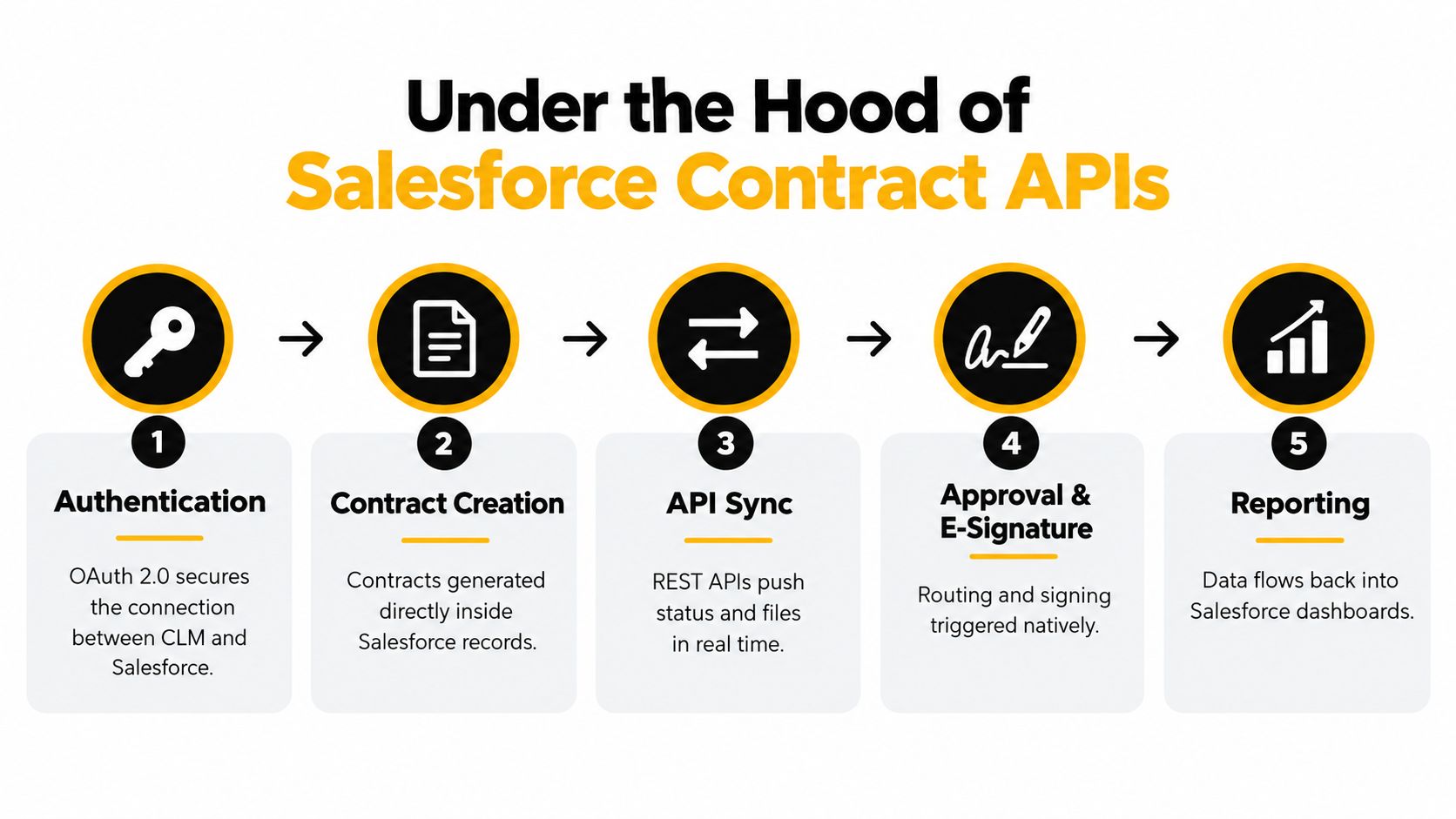
A Salesforce-native CLM workflow has a defined object sequence. It doesn't just create a PDF and attach it to an opportunity. The system needs to know which record initiated the contract, which document version is current, whether the file is editable, and when the agreement can move into an active state.
Salesforce's documented contract sequence can begin with an opportunity, quote, order, or custom object. The integration then creates the contract, generates a document version, manages check-in and check-out, locks or releases the document as needed, and activates the contract when the workflow is complete. Salesforce's contract API sequence documentation also makes an important operational point: document generation and checkout are only allowed in draft or unlocked states.
Why state management matters
A frequent production failure happens when an automation tries to generate or check out a document after another process has locked it. The request may be logically correct, but the contract's current state makes the operation invalid. A dependable integration must read the state, apply the permitted action, and report a useful error when the record isn't ready.
The Contracts API is built on Connect REST APIs and separates resources for contract creation, document-version management, document-generation status, template lookup, contract actions, and content-document access. Salesforce's Contracts API resource guide describes the separation that allows an integration to manage each part of the lifecycle independently.
That separation supports asynchronous processing. Document generation may not finish in the same request that starts it, so the integration should poll the generation-status resource and continue only when the document is ready. This approach avoids race conditions in high-volume workflows, where a signing request or approval action could otherwise run before the correct document version exists.
Questions for the technical evaluation
A technical buyer should ask vendors to demonstrate the complete sequence, not just the happy path:
- Creation: Can a contract start from the Salesforce objects the business uses, including custom objects?
- Version control: Can users distinguish a generated draft from the approved document and the executed version?
- State validation: Does the integration verify draft, editable, and active states before attempting an action?
- Asynchronous handling: Does it poll generation status or listen for a reliable completion event?
- Access control: Can Customer Community users retrieve the latest permitted document version securely?
- Failure visibility: Can administrators see which record failed, why it failed, and what action is safe?
These details separate a demonstration from a deployable system. A workflow that creates documents quickly but loses track of versions will create more legal and operational work than it removes.
Measurable ROI Across Sales Legal and Procurement
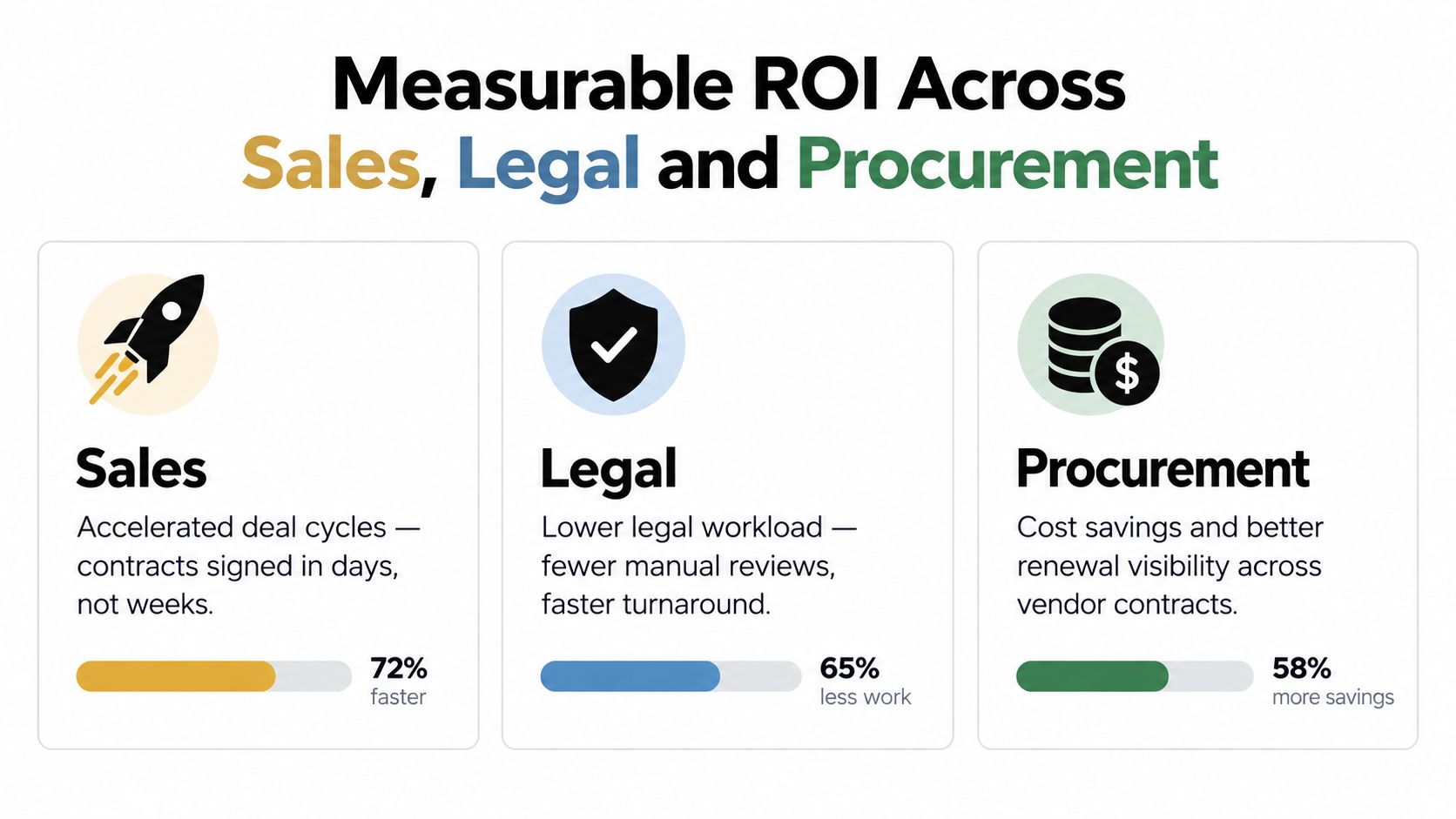
The strongest business case for native CLM isn't a shorter feature list. It's the combined effect of fewer manual handoffs, faster contract processing, lower review effort, and better visibility into obligations and renewals.
A published 2024 paper reported average reductions of 66% in contract processing costs, 54% lower contract-related risk, a cycle-time reduction from 30 days to 3.8 days, and 292% average first-year ROI for digital CLM implementations. These figures come from the paper itself, so they should be treated as reported implementation averages rather than a promise for every Salesforce deployment. The 2024 digital CLM paper provides the underlying context.
Sales gains speed without surrendering control
For a logistics company, a signed shipper agreement can depend on information already stored in an opportunity, such as service scope, customer entity, pricing terms, and contacts. Generating the document from those fields reduces rekeying and lets the representative sign PDFs online from the same commercial workflow.
A real estate agency can apply a similar pattern to lease or management agreements. The property, landlord, tenant, commission terms, and renewal details come from the relevant Salesforce record, while legal reviews only the clauses that fall outside the approved playbook. The result isn't merely a faster signature. It gives the deal team a clearer view of which agreements are waiting for approval, negotiation, or execution.
Legal and procurement reduce avoidable review
AI contract review tools can identify nonstandard, missing, risky, or inconsistent clauses, extract obligations, compare language with approved standards, and flag deviations from templates or known risk patterns. AI contract review capabilities support a practical legal operations model: automation handles first-pass comparison, while counsel focuses on material exceptions and business judgment.
A healthcare clinic could use this approach when onboarding a technology vendor. The workflow can route the agreement through the clinic's approval process, flag unusual data-processing or liability terms, and retain the final version with the vendor record. Compliance still depends on the organization's configuration, review standards, and vendor controls, but the contract team gains a structured starting point.
Procurement benefits from a single view of supplier agreements, renewal dates, pricing commitments, and obligations. Education providers can use the same model for instructor agreements, campus suppliers, and training partners. The value compounds when departments stop maintaining separate spreadsheets and start working from a shared contract record.
Navigating Security Compliance and Data Ownership
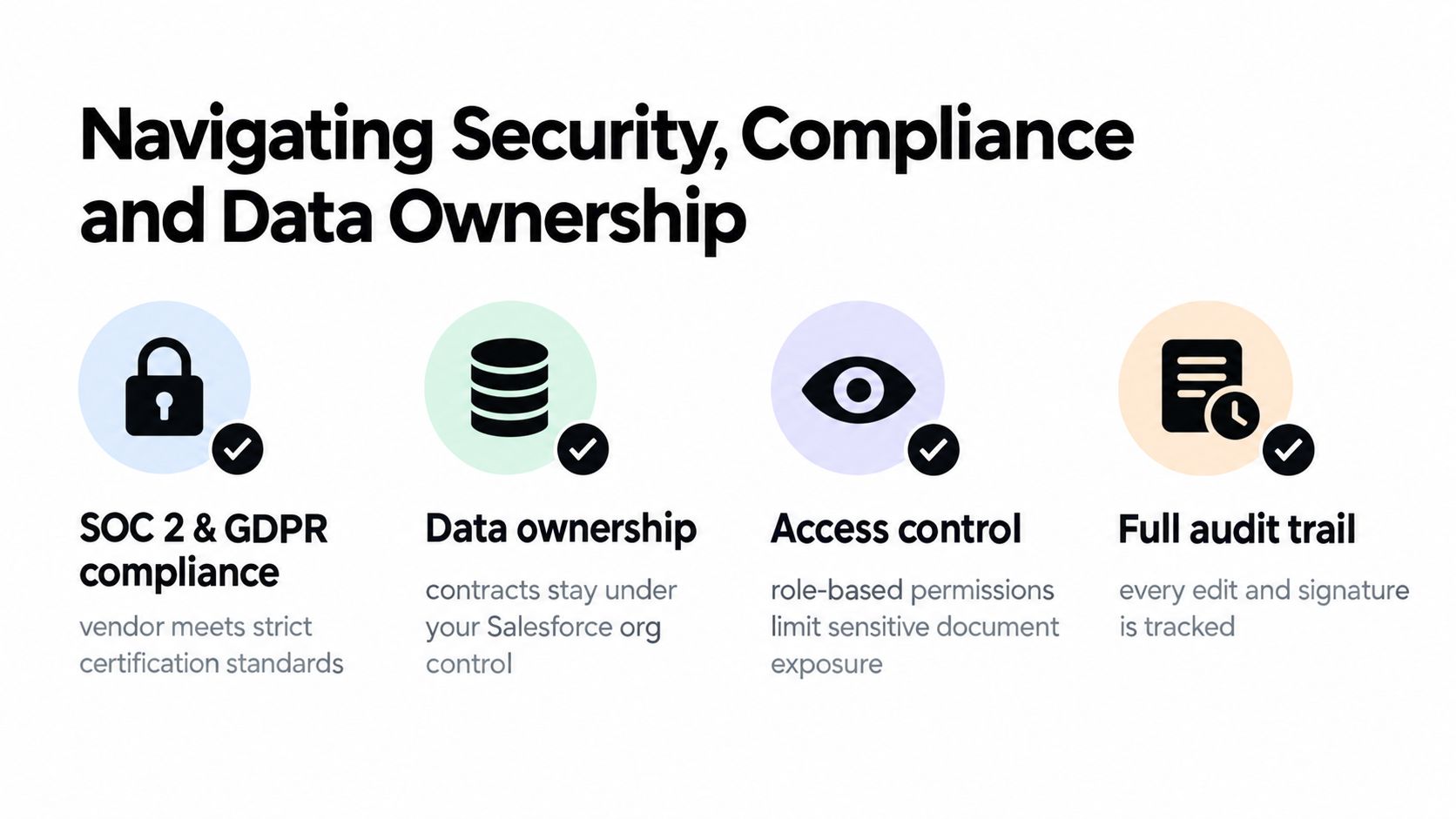
Security isn't achieved by placing a contract inside Salesforce and assuming the problem is solved. The integration must protect the document, preserve the relationship between the signer and the record, and limit access according to role and business need.
Under the U.S. ESIGN Act and state UETA laws, electronic signatures generally carry the same legal weight as handwritten signatures for most business and consumer contracts. A valid workflow should capture signer intent, consent to electronic records, linkage to the relevant agreement, and retrievable record retention. This eSignature compliance guide explains those core requirements for implementation teams.
Global organizations also need to assess eIDAS, GDPR, HIPAA, and local retention rules. A staffing business may process identity and employment information. A healthcare provider may handle protected health information. A UAE, Canadian, Australian, or New Zealand operation may have additional residency, privacy, and sector-specific requirements. The compliance label matters less than the controls, contractual terms, audit evidence, and configuration behind it.
Assign ownership before launch
The most overlooked risk appears after go-live. Teams often confirm that fields map correctly, then fail to assign anyone responsibility for changing those mappings when Salesforce fields, workflows, approval rules, or API behavior change.
An implementation guide on Salesforce CLM integration ownership and maintenance highlights the problem with bidirectional updates. If both systems can change the same value without conflict rules, data integrity drifts over time. Native connectors reduce context switching and can reuse Salesforce permissions, but they still require configuration, testing, monitoring, and a defined source of truth.
Use a written ownership matrix:
- Salesforce admin: Owns objects, fields, flows, permissions, and release coordination.
- Legal operations: Owns templates, clause standards, approval thresholds, and retention rules.
- RevOps: Owns opportunity triggers, commercial field mappings, and adoption reporting.
- Security or privacy: Reviews access, audit evidence, data processing, and regional requirements.
- Integration owner: Monitors failures, manages retries, and coordinates vendor changes.
Data rule: Every shared field needs one authoritative system, one conflict policy, and one named owner.
BoloSign's guidance on GDPR and SOC 2 considerations for global e-sign rollouts is relevant to teams documenting these controls. A secure integration is sustainable only when someone is accountable for what happens after the launch team leaves the room.
Your Implementation and Troubleshooting Playbook
A successful rollout starts with process inventory, not software configuration. Document how a contract enters the business, who reviews it, which fields determine the template, what happens when a customer requests changes, and where the executed agreement must be retained.
Build the workflow in a controlled sequence
Start with one contract family and one Salesforce object. A professional services firm might begin with statements of work from opportunities. A staffing agency might begin with client service agreements. Keep the first workflow narrow enough to test, but representative enough to expose approval, template, signing, and reporting requirements.
- Map the records: List standard and custom objects, required fields, related contacts, and document destinations.
- Define the approval matrix: Identify routine agreements, legal exceptions, commercial approvals, and escalation paths.
- Set the source of truth: Decide which system owns customer identity, pricing, clause selections, signer details, and execution status.
- Configure templates: Map fields deliberately and test empty, unusual, and exceptionally long values.
- Add automation: Use Salesforce Flow or equivalent triggers for contract generation, routing, reminders, and status updates.
- Test realistic scenarios: Include amendments, rejected approvals, customer redlines, reassignment, and expired links.
- Train by role: Give sales, legal, procurement, and administrators instructions that match their actual screens and responsibilities.
Embedded signing can be useful when a customer or employee should complete the process without navigating to a separate signing portal. The implementation patterns in this embedded eSignature API guide can help technical teams assess how signing fits into a Salesforce-centered experience.
Troubleshoot the failures that matter
A locked record usually requires a state check before generation, checkout, or replacement. Don't solve it by repeatedly retrying the same request. Identify which process locked the document, decide whether the workflow should wait, and surface the reason to the administrator.
Permission failures need a different response. Check the user's Salesforce object access, document permissions, sharing rules, community profile, and external signer path. A user who can see an opportunity may not automatically have access to every generated document version.
Template mapping errors often appear as blank fields, malformed clauses, or incorrect signers. Compare the Salesforce field type with the template expectation, test the mapping against real records, and keep a change log for every approved template revision. Treat template updates like controlled operational changes, not casual edits.
Simplifying Execution with BoloSign
Many CLM projects deliver a useful workflow and then lose adoption because every document, user, or signature event creates a new pricing decision. That friction changes behavior. Teams delay low-value agreements, send routine documents by email, or create workarounds outside Salesforce because the approved process feels expensive.
BoloSign offers unlimited documents, templates, and team members at one fixed price, making it up to 90% more affordable than DocuSign or PandaDoc. For teams managing high-volume agreements across staffing, healthcare, logistics, education, real estate, and professional services, unlimited usage removes the per-envelope hesitation that can stall CRM adoption.
From Salesforce record to signed agreement
BoloSign can generate contracts from Salesforce data, map fields, trigger workflows, and return signed document status to the relevant Salesforce record. Teams can create, send, and sign PDFs, reusable templates, and forms instantly, including workflows that support sign PDFs online and automate document generation from Word templates into PDFs.
Its AI-powered features support first-draft creation, contract intelligence, AI contract review, clause risk detection, alternative language, and negotiation workflows. That can help legal teams focus on exceptions while sales and operations use controlled contract automation for routine agreements.
Modern signing APIs also support sending documents, reusable templates, web forms, and automated signing pipelines. The OpenSign API documentation describes these practical operations, including generating PDFs from Word templates and creating forms through the signing API.
BoloSign supports security and compliance requirements described for global operations, including SOC 2 Type I and Type II, ISO 27001:2022, GDPR, eIDAS, the ESIGN Act, HIPAA, and CCPA. Organizations should still validate the configuration, data-processing terms, retention model, and regional obligations that apply to their own workflows.
BoloSign combines Salesforce-connected contract automation, AI-powered review, secure eSignature, and unlimited documents, templates, and team members at one fixed price. Start a 7-day free trial through BoloSign and test a practical CLM Salesforce native integration with the contract workflows your team already runs.

Paresh Deshmukh
Co-Founder, BoloForms
8 Oct, 2026
Take a Look at Our Featured Articles
These articles will guide you on how to simplify office work, boost your efficiency, and concentrate on expanding your business.



