

BoloSign vs Adobe Sign: A Practical Buyer Comparison
BoloSign vs Adobe Sign compared on features, pricing, compliance, AI, and migration to help small businesses pick the right eSignature platform.

Tired of nonsense pricing of DocuSign?
Start taking digital signatures with BoloSign and save money.
You're comparing two quote PDFs, your hiring manager wants a decision this week, and the core question isn't whether both platforms can collect a signature. They can. The question is whether you'll pay for Adobe's PDF and enterprise depth when a flat-fee alternative would handle your team's volume with less administrative friction.
This BoloSign vs Adobe Sign comparison focuses on total cost, workflow fit, compliance, integrations, and migration. BoloSign offers unlimited documents, team members, and templates at one fixed price, and positions that model as 90% more affordable than traditional tools. Adobe Acrobat Sign brings a long PDF-native history, enterprise controls, and deep Acrobat integration. The right choice depends on what your team signs, how often it signs, and which systems must connect.
Who This Comparison Is Really For
This guide is for the operations lead at a growing company, the fractional administrator managing contracts for several departments, and the SMB owner who wants an eSignature platform without a procurement project. It's especially relevant if you're choosing between unlimited signatures at a fixed price and a per-user enterprise platform with strong PDF editing and workflow features.
Start with four questions:
- How many envelopes do you send? Estimate monthly volume and annualize it. Include seasonal hiring, renewals, client onboarding, approvals, and internal forms.
- How many people send documents? Per-user licensing becomes more important as recruiters, managers, sales representatives, and administrators all need sending access.
- What happens before and after signing? A simple contract request differs from a workflow that needs PDF redaction, OCR, Salesforce updates, approval routing, or compliance evidence.
- What would migration disrupt? Count templates, saved recipient rules, integrations, signed-document exports, and audit records before you approve a switch.
The category is already mainstream. Adobe's product lineage began with EchoSign in January 2006, Adobe announced its acquisition in July 2011, and the product became Adobe Acrobat Sign in April 2022, creating a nearly 20-year history in eSignatures. Independent market summaries indicate that 60% to 80% of organizations use some level of eSignature technology, while 95% are using or planning to use it (Adobe Sign history and market context). The buying decision has moved beyond adoption. It's about price predictability, workflow depth, and implementation fit.
Procurement rule: Don't compare plan names. Compare the cost of your actual sender count, document volume, integrations, compliance requirements, and renewal terms.
This guide won't settle bespoke procurement for 5,000-seat rollouts, custom on-premise deployments, or workloads requiring FedRAMP Moderate. It will help you test everyday workflow parity, estimate cost at 20, 50, 150, and 500 envelopes a month, assess regulated and unregulated use cases, and plan a lower-friction migration. Before you shortlist vendors, map your current process with this practical guide to how to eSign documents.
By the end, you'll know which platform to pilot first.
Where Each Platform Comes From
Adobe Sign began as EchoSign, a cloud-signing company that Adobe acquired and folded into its Acrobat ecosystem. The product's history explains its current strengths: Adobe built the signing experience around PDFs, document preparation, Acrobat workflows, and enterprise document management rather than around a lightweight form-first experience.
That origin is useful if your team already works in Acrobat, Adobe Document Cloud, or Microsoft 365. Adobe Acrobat Sign can feel like a natural extension of the PDF tools people already use. It also explains the tradeoff. Adobe's account structure, product naming, licensing layers, and administrative controls can create friction for a small team that only wants to send agreements and track completion.
BoloSign comes from a different direction. It's a newer, AI-forward alternative designed for teams that want document signing, reusable templates, forms, automation, and team collaboration under one predictable commercial model. Its workflow is particularly relevant to Google Workspace-first businesses that collect information in Google Forms, generate agreements, and need recipients to sign without navigating a complicated document stack.
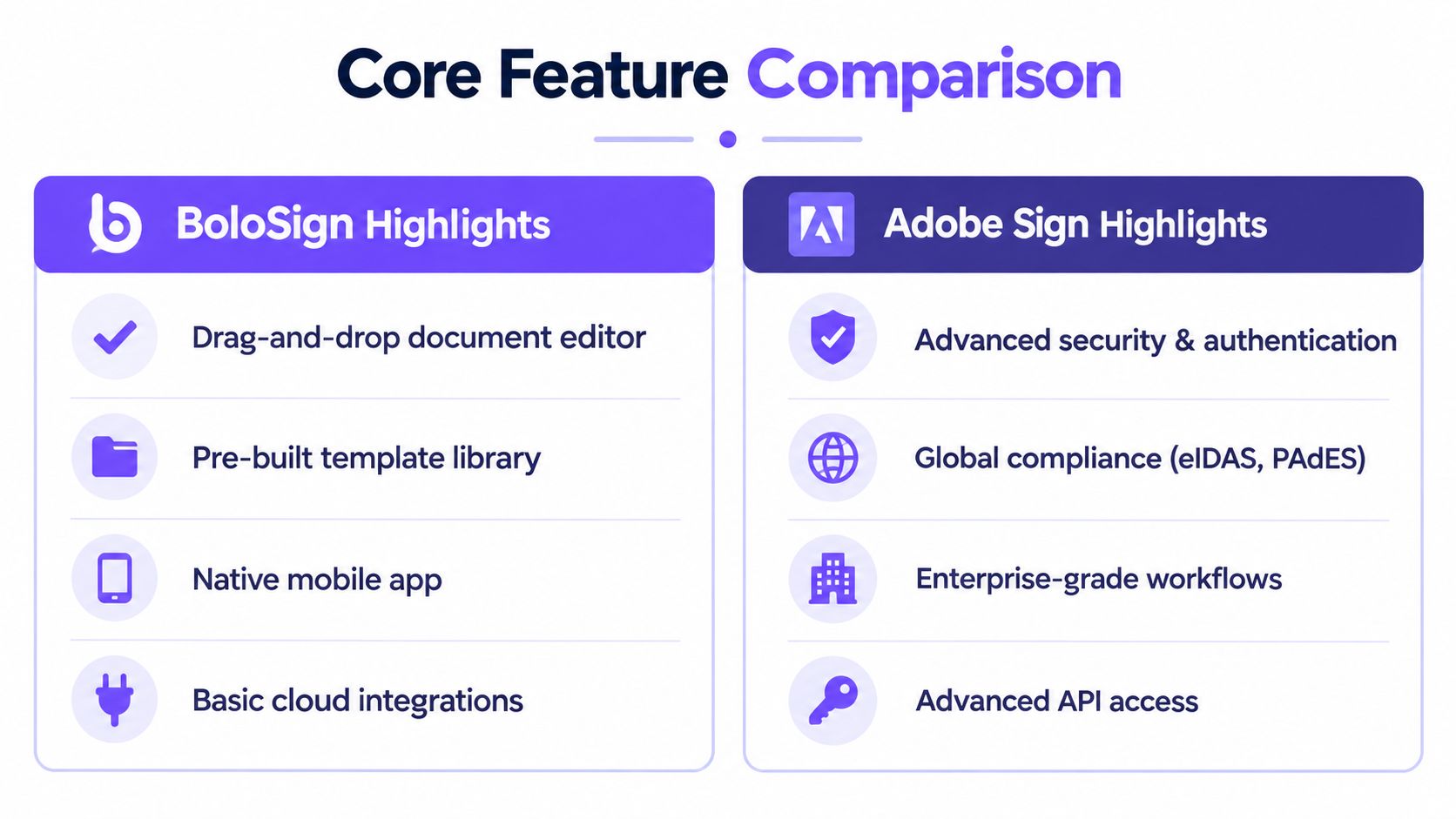
Adobe's heritage is both an advantage and a cost. You get mature PDF handling, enterprise trust, and broad workflow capability, but you may also inherit premium pricing and administration designed for larger organizations. BoloSign's newer architecture prioritizes faster setup, AI-powered automation, Google Forms workflows, and a flat-fee structure.
The evaluation lens is straightforward. Choose Adobe first when PDF manipulation, enterprise identity controls, and complex integrations define the workflow. Choose BoloSign first when your team needs to create, send, and sign PDFs quickly, reuse templates, connect forms to signatures, and avoid a cost curve that rises with every sender and envelope.
Feature Parity for Everyday eSignature Work
For everyday eSignature work, both platforms cover the essential flow. You upload or create a document, place fields, assign recipients, set signing order, send the request, monitor status, and retain the completed file. The difference appears when you move from basic signing into document preparation, automation, and PDF intelligence.
| Capability | BoloSign | Adobe Sign |
|---|---|---|
| Drag-and-drop fields | Fast template and document editor | Strong field placement with Acrobat integration |
| Reusable templates | Unlimited templates and sharing | Reusable templates with enterprise controls |
| Bulk send | Available for repeat workflows | Available, with broader enterprise workflow options |
| Signing order | Multi-recipient routing | Advanced routing and workflow configuration |
| In-person signing | Supported for assisted signing workflows | Supported |
| Mobile signing | Mobile-friendly signing and native mobile access | Mobile signing through Adobe's ecosystem |
| Signed document storage | Centralized document management and status tracking | Adobe Document Cloud and Acrobat-connected storage |
| PDF editing before signing | Practical document preparation | Strong native PDF editing, redaction, comparison, and OCR |
| OCR and scanned agreements | More limited than Adobe's PDF stack | Strong fit for scanned and image-based documents |
| Forms workflow | Google Forms to signed PDF workflows | Broad enterprise form and document integrations |
BoloSign's practical advantage is speed for repeatable business work. Teams can create reusable PDF templates, add signature fields, share templates, and send documents without rebuilding the workflow each time. It also supports a form-first path, including adding a signature to a Google Form workflow and converting captured information into a document ready for signing.
Adobe still leads when the PDF itself needs serious treatment. Independent reviews describe Acrobat Sign as a PDF-native platform that combines eSigning with editing, redaction, comparison, and OCR (PDF-native eSignature comparison). That matters to legal teams, finance departments, and professional services firms that finalize a document inside Acrobat before sending it.
The gap becomes less important when your documents are already prepared. A staffing agency sending offer letters, a property manager collecting lease signatures, or a tutoring provider processing enrollment forms may not need advanced redaction or OCR. Those teams benefit more from unlimited templates, fast field placement, straightforward routing, and predictable administration.
If your staff spends more time preparing PDFs than collecting signatures, Adobe earns closer consideration. If the documents are ready and the bottleneck is volume, routing, or cost, BoloSign is the more practical pilot.
Pricing Models and Total Cost Over Time
Pricing is where many SMB comparisons go wrong. A low starting price can look attractive until you add senders, reach plan limits, require bulk sending, or renew after the introductory period. Adobe's public business pricing lists US$23.99 per month and US$29.99 per month per license, while another buyer guide lists Adobe pricing starting at US$16.99 per user per month (Adobe Sign pricing context). Those figures are not interchangeable quotes, so use them as warning signs rather than as a final estimate.
| Cost variable | BoloSign | Adobe Sign |
|---|---|---|
| Commercial model | One fixed price | Per-license pricing |
| Signature volume | Unlimited signatures under the stated model | Plan limits can constrain high-volume use |
| Team members | Unlimited under the stated model | Additional senders increase licensing cost |
| Templates | Unlimited under the stated model | Included according to plan and configuration |
| Budget predictability | High for stable plan scope | Lower when users, volume, and add-ons grow |
| High-volume fit | Strong for staffing, HR, logistics, and recurring approvals | Strong when enterprise controls justify higher spend |
| Main cost risk | Confirm included features and service terms | Per-user expansion, transaction caps, add-ons, and renewals |
A simple cost-curve exercise exposes the difference. Build four scenarios at 20, 50, 150, and 500 envelopes per month, then repeat each scenario for 5, 10, and 25 senders. BoloSign's fixed-price model keeps the signature count from changing the subscription calculation. Adobe's cost can rise when you add senders or encounter plan ceilings. The available comparison material also notes that Adobe team plans are typically capped at 150 transactions per user per year, making high-volume usage a key diligence point (Adobe and BoloSign pricing comparison).
Don't pretend you can calculate an exact crossover without a written quote. Adobe may price different features, contract terms, delivery methods, and workflow add-ons separately. Ask for the total annual price at your expected sender count and envelope volume, then request the three-year renewal price in writing.
The volume questions buyers miss
Ask these questions before signing:
- Are SMS delivery, bulk send, advanced routing, and API access included?
- What happens when a user exceeds the annual transaction allowance?
- Do inactive users still consume licenses?
- Does the renewal price change after the first term?
- Can your team export templates, signed PDFs, and audit evidence without professional services?
For SMBs, BoloSign's value is clearest when volume is unpredictable. A seasonal staffing surge, a hiring campaign, or a large logistics rollout can make a per-user or per-envelope structure uncomfortable. Adobe can still win economically when the organization already pays for relevant Adobe products and uses the PDF tools heavily enough to replace other software.
The market expectation is speed as well as price. Market summaries report that 79% of agreements are signed within 24 hours and 50% are completed in under 15 minutes with eSignature tools (2025 eSignature market statistics). Your TCO model should therefore include administrative time, not only subscription fees. A cheaper plan that requires manual rework can be expensive. A premium plan that eliminates a separate PDF editor may be reasonable.
Integrations, Automation, and AI Contract Intelligence
Adobe Sign has the deeper enterprise ecosystem. Its Acrobat and Document Cloud connections make sense for organizations that prepare PDFs in Adobe, use Microsoft 365 heavily, or need advanced API and workflow controls. BoloSign takes a more direct route for SMB operations, connecting document templates and signing requests to tools such as Google Drive, Google Sheets, HubSpot, Salesforce, Pipedrive, Slack, Microsoft Teams, Zapier, Make, and Pabbly.
| Capability | BoloSign | Adobe Sign |
|---|---|---|
| CRM connectivity | Salesforce, HubSpot, and Pipedrive workflows | Strong enterprise CRM and Microsoft ecosystem coverage |
| Automation platforms | Zapier, Make, and Pabbly support | Broad enterprise automation and API options |
| Google Workspace | Google Forms to signed PDF workflows | Available through integrations and broader document tools |
| Microsoft 365 | Workflow connections for common business tools | Deep Microsoft and Acrobat integration |
| API access | API support for document and signing workflows | Advanced API and enterprise developer tooling |
| Approval chains | Template and workflow-based routing | Advanced workflow configuration |
| Webhooks | Useful for status and completion events | Strong event and API architecture |
| AI assistance | Contract intelligence for clause tagging, risk flags, and summaries | Acrobat AI features and PDF intelligence |
| Best fit | Fast setup and focused SMB automation | Broad ecosystem and complex enterprise orchestration |
BoloSign's workflow is appealing when the trigger already lives in a form. A new employee completes an onboarding form, the system prepares the relevant PDF, inserts fields, sends it to the right people, and updates the workflow after signing. A sales team can connect a CRM stage to a contract request without forcing an administrator to maintain a separate document process.
The AI distinction is also practical. Adobe offers PDF intelligence through Acrobat features, including AI-assisted document interactions. BoloSign focuses its contract intelligence on operational review, including clause tagging, risk flagging, and summarization. Neither approach removes the need for human approval. AI should identify what deserves attention, not approve an obligation without review.
Use BoloSign's integration options to test your real automation path. Build the recipe that matters most, such as a Google Form to signed PDF, a Salesforce opportunity to agreement, or a completed signature request to a shared drive. Don't approve a vendor because its integration directory looks long. Approve it because the workflow runs with the fields, permissions, and notifications your team needs.
Adobe is the better ecosystem choice when your process crosses Acrobat, Microsoft 365, CRM systems, legal review, and complex approval logic. BoloSign wins when a lean team wants fewer moving parts and a direct path from data capture to digital signing.
Security, Compliance, and Audit Trail Strength
Security decisions should follow the workflow, jurisdiction, document type, signer identity, retention policy, and evidence your organization may need later. A small business handling routine agreements has different requirements from a healthcare provider, financial institution, or multinational company.
In the United States, electronic signing workflows commonly involve ESIGN and UETA. European use cases may require eIDAS, including advanced or qualified electronic signatures. Privacy and sector rules can add GDPR and HIPAA obligations. Buyers should assess ISO 27001, SOC 2 Type II, PCI DSS, and 21 CFR Part 11 against their own requirements rather than treating a vendor's general compliance statement as approval.
A legally defensible workflow needs more than a typed name. It should record signer intent, consent to electronic business, signature attribution, and record retention, which support ESIGN and UETA compliance (eSignature compliance fundamentals). Adobe's enterprise depth pays off when a healthcare, finance, education, or multinational organization needs formal governance, identity controls, and procurement documentation.
BoloSign's baseline targets secure business signing, with stated support for ESIGN, eIDAS, GDPR, HIPAA, ISO 27001, and SOC 2. Review the exact plan, data-handling terms, regional requirements, and contractual commitments before assigning it a regulated workflow. Its audit trail features should also be tested against the evidence your reviewers or counsel require.
The audit trail is the evidence
A complete audit trail should identify who signed, when the document was handled, and which transaction details were recorded. Typical evidence includes timestamps, IP addresses, signer identity records, and a tamper-evident history (audit trail fundamentals).
| Control area | BoloSign | Adobe Sign |
|---|---|---|
| Audit history | Detailed audit trail and completion evidence | Mature enterprise audit and completion records |
| Signer attribution | Identity and transaction records | Broad authentication and identity options |
| Document integrity | Tamper-evident workflow evidence | Strong certificate and document integrity controls |
| Access management | Team management and permissions | Advanced enterprise administration |
| Regulated-workflow fit | Suitable after plan and requirement validation | Strong choice for complex enterprise governance |
| Evidence export | Validate required format during pilot | Validate format and retention policy during procurement |
Evaluate encryption, MFA, SSO, role-based access, signer authentication, access controls, secure storage, and downloadable evidence packages. Compliance guidance also identifies AES-256 at rest and TLS 1.2 or higher in transit as controls buyers may review, alongside audit logs and secure storage (eSignature audit trail and compliance controls).
For routine, unregulated SMB agreements, BoloSign's audit trail and secure workflow can meet practical needs. Adobe's governance depth can justify its premium for healthcare consent, EU identity requirements, complex financial approvals, or enterprise procurement. Ask both vendors to demonstrate the evidence package produced in a dispute, then have counsel or the compliance owner review it.
Best-Fit Scenarios Across Industries and Teams
The clearest decision emerges when you connect the platform to a real workflow.
| Scenario | Profile | BoloSign fit | Adobe Sign fit | Decision trigger |
|---|---|---|---|---|
| Staffing agency | Recurring offer letters and onboarding documents | Strong, especially with unlimited volume and templates | Useful when enterprise client systems require it | Volume and margin pressure |
| Dental or healthcare clinic | Consent forms and privacy-sensitive records | Possible after HIPAA and plan validation | Stronger for formal enterprise compliance requirements | BAA, governance, and identity controls |
| Independent real estate agent | Repeated agreements with a lean team | Strong for predictable setup and template reuse | Valuable if the agent already depends on Acrobat | Existing PDF stack |
| National brokerage | Many agents, centralized administration, CRM processes | Viable for standardized forms | Strong for central controls and enterprise integrations | Salesforce depth and administration |
| Logistics broker | Bills of lading, vendor agreements, delivery workflows | Good for template-led operations | Strong when TMS and API integration are central | API and system complexity |
| Tutoring or education provider | Enrollment, consent, and certification forms | Strong with Google Forms to signed PDF | Useful where enterprise document governance dominates | Google Workspace versus Adobe stack |
| B2B SaaS RevOps | MSA workflows, redlining, approvals, CRM updates | Good for straightforward contract requests | Strong for Acrobat-based redlining and PDF intelligence | Redlining complexity and tool stack |
A staffing agency sending a high volume of offer letters doesn't need every enterprise control. It needs reusable templates, quick recipient routing, mobile signing, reminders, and a price that won't punish a hiring surge. Verdict: pilot BoloSign first. The trigger that could flip the choice is a client requirement for Adobe-specific workflows.
A small dental practice should treat compliance differently. Consent forms may involve sensitive information and stricter operational controls. Verdict: evaluate Adobe first when a formal HIPAA agreement, enterprise authentication, or compliance documentation is mandatory.
Real estate splits into two buying patterns. An independent agent benefits from simple templates and predictable sender economics. A national brokerage may need centralized administration, CRM depth, controlled template publishing, and standardized reporting. Verdict: BoloSign for the independent operator, Adobe for the brokerage when administration and Salesforce complexity drive the purchase.
Logistics teams should test the integration, not just the signing screen. If bills of lading, delivery confirmations, or vendor contracts move through a transportation management system, API behavior and event handling matter more than visual polish. Verdict: Adobe when the TMS integration is complex; BoloSign when the process is template-led and tool connections are straightforward.
Education providers using Google Forms have a natural BoloSign path. They can collect enrollment data, prepare a document, add signature fields, and send it to the learner or guardian. Verdict: BoloSign when Google Workspace is the operating layer.
RevOps teams handling redlined MSAs should look closely at Adobe's PDF capabilities and AI-assisted workflows. Verdict: Adobe when contract review and redlining happen inside Acrobat; BoloSign when sales mainly sends standardized agreements from CRM stages.
Recommendation Checklist and Migration Path
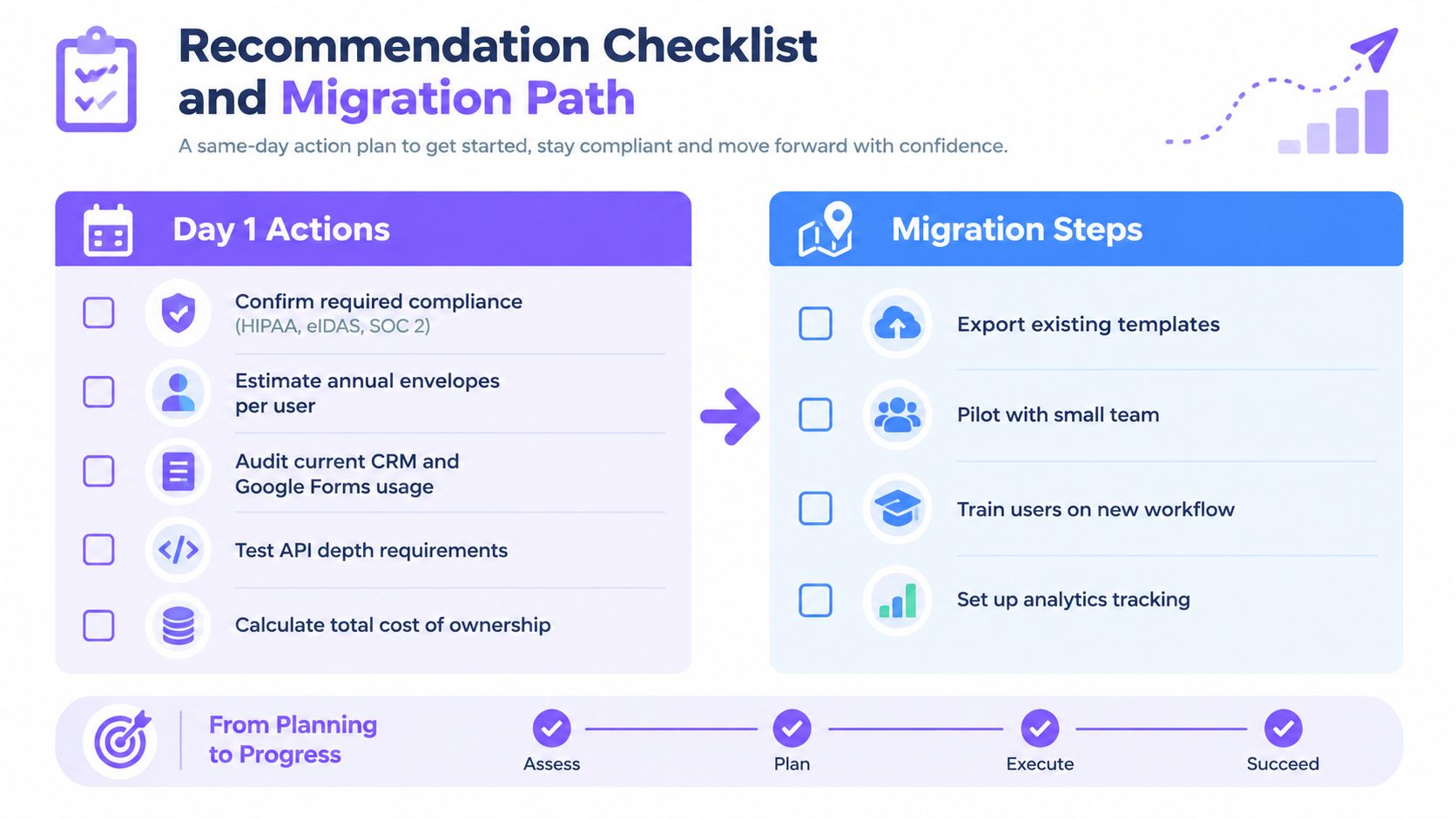
Run the evaluation in one working day. Don't begin with a feature spreadsheet. Begin with the documents and systems your team uses every week.
- Confirm compliance requirements. Identify whether the workflow needs HIPAA, eIDAS, GDPR, SOC 2 evidence, or another control.
- Estimate annual envelopes per user. Separate occasional signers from high-volume senders, and include seasonal peaks.
- Audit your current stack. List Acrobat, Microsoft 365, Google Forms, Salesforce, HubSpot, Pipedrive, Zapier, Make, and storage systems.
- Test the API path. Recreate one important automation, including recipient mapping, status updates, webhooks, and failure handling.
- Export audit evidence. Check whether the downloaded package contains the fields, timestamps, identity data, and document history your team requires.
- Calculate total cost. Compare one-year and three-year costs, including additional users, usage limits, bulk sending, SMS, workflow add-ons, and renewal terms.
- Pressure-test lock-in. Export signed PDFs, templates, recipient data, and audit records before you commit.
Migration is manageable if you treat it as a controlled pilot. Export existing signed PDFs and templates, recreate the highest-use templates first, map recipients and routing rules, then run parallel workflows with a small team. BoloSign supports one-click DocuSign import, including templates, recipients, and audit history, while Adobe migrations can use bulk upload through the Adobe Admin Console. Confirm the exact import scope during your trial.
Migration test: Move one real template, one complex recipient flow, and one completed audit package before migrating the entire library.
Use the checklist below as the acceptance gate for your pilot.
The conditional verdict is clear:
- Under 10 senders with predictable volume: Default to BoloSign, especially when you want unlimited documents, templates, and team members at one fixed price.
- Above 25 users with Salesforce dependence or complex redlining: Default to Adobe Acrobat Sign, because enterprise administration, integration depth, and PDF handling can outweigh subscription cost.
- Healthcare or EU eIDAS-heavy workloads: Lean Adobe unless BoloSign's documented controls, contractual terms, and workflow evidence meet your exact requirements and volume makes the flat-fee model decisive.
Closer Innovation Labs Corp. offers BoloSign for creating, sending, filling, and signing PDFs, building reusable templates and forms, connecting Google Forms and business apps, and managing audit-ready workflows. Start the 7-day free trial to test your highest-volume template and visit Closer Innovation Labs Corp. to see whether the workflow and cost model fit your team.

Paresh Deshmukh
Co-Founder, BoloForms
1 Oct, 2026
Take a Look at Our Featured Articles
These articles will guide you on how to simplify office work, boost your efficiency, and concentrate on expanding your business.



