

How to eSign a PDF Securely and Efficiently
Discover how to eSign a PDF with tools that ensure legal compliance and security. This guide covers the best methods for business-critical documents.

Tired of nonsense pricing of DocuSign?
Start taking digital signatures with BoloSign and save money.
Knowing how to eSign a PDF isn't just a handy skill anymore—it's a core business function. The quickest and most secure way is to use a dedicated digital signing solution like BoloSign. You simply upload your document, drag and drop signature fields, and send it off for instant signing. The entire process takes minutes, and the result is secure, legally binding, and fully trackable.
Why Modern Businesses Rely on eSigning PDFs
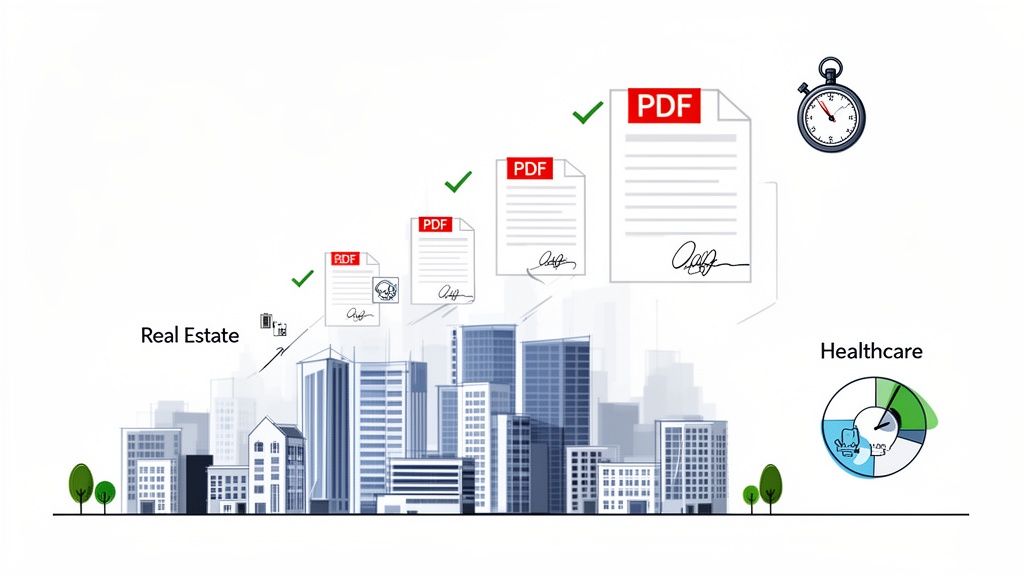
The days of print, sign, scan, and email are officially over. We've all been there, and it’s a productivity killer. Modern companies know that old-school paperwork creates bottlenecks, inflates administrative costs, and frankly, frustrates clients. Moving to a digital signing process isn't just about saving time; it's a strategic move to stay competitive, especially in industries where speed and accuracy are everything.
Speeding Up Workflows in Key Industries
Think about the real-world impact. A real estate agency can close deals in hours instead of days by sending lease agreements for instant signature, avoiding delays that could cost them a sale. In healthcare, patient intake forms and consent documents get signed securely before an appointment, which smooths out the patient experience while maintaining HIPAA compliance.
It's the same story for a staffing firm onboarding a new hire. Offer letters and tax forms can be sent, signed, and returned from any device in minutes. This means new team members can get to work right away. This kind of efficiency is crucial everywhere—from logistics and education to professional services, where automating contracts directly improves operations and client satisfaction.
The Financial and Strategic Edge
The benefits go way beyond just being convenient. Digital signing solutions slash costs tied to paper, ink, printing, and postage. More importantly, they create a secure, auditable trail for every single document, minimizing compliance risks.
The numbers don't lie. The digital signature market has ballooned, growing from USD 4.1 billion in 2020 to a projected USD 19.8 billion by 2026. This explosive growth signals a fundamental shift in how businesses handle their most important documents. You can read the full research about the digital signature market's expansion to get the bigger picture.
For companies on a growth trajectory, the ability to execute agreements quickly and securely isn't just a feature—it's the bedrock of scalable operations. A delayed signature can mean delayed revenue, and a sloppy process opens the door to unnecessary risk.
To give you a clearer picture of just how much things have changed, here’s a quick comparison of the old way versus the new.
Comparing Traditional vs Digital PDF Signing Workflows
| Process Step | Traditional Wet Signature | Modern eSignature (with BoloSign) |
|---|---|---|
| Document Preparation | Manually print, prepare envelope. | Upload PDF to secure platform. |
| Sending | Mail or courier; takes 1-5 business days. | Email a secure link instantly. |
| Signing | Sign with a pen, find a scanner. | Sign on any device (phone, computer) in seconds. |
| Returning | Scan and email back, or mail again. | Document is automatically returned and stored online. |
| Tracking & Status | No real-time visibility; follow up manually. | Real-time tracking with notifications for views & signs. |
| Storage & Retrieval | File in physical cabinets; risk of loss. | Secure, encrypted cloud storage with search. |
| Audit Trail | Minimal record; relies on paper copies. | A complete, legally binding audit trail is auto-generated. |
This table really highlights the efficiency and security gains. What used to be a multi-day, high-touch process is now completed in minutes with full transparency.
Tools like BoloSign take this efficiency to the next level. It’s not just about getting a signature; BoloSign provides a complete, AI-powered contract management system. You can create, send, sign, and manage all your documents from one central hub.
What really makes BoloSign stand out is its pricing model. While competitors like DocuSign or PandaDoc often charge per document or user, BoloSign offers unlimited documents, templates, and team members for one flat fee. This can make your entire eSignature workflow up to 90% more affordable and removes the financial friction that holds back growth.
Ready to see for yourself? You can start a 7-day free trial to see how a smarter, more cost-effective approach can transform your agreements.
Choosing the Right Tool for Signing Your PDFs
Let's be honest, not every method for eSigning a PDF is created equal. It’s tempting to just copy and paste an image of your signature onto a document and call it a day. But that approach comes with serious risks. Think of it like using tape to fix a leaky pipe—it might look fine for a moment, but it’s guaranteed to fail under any real pressure.
For any document that actually matters, from a simple service agreement to a multi-million-dollar commercial lease, the difference between a basic signature image and a secure eSignature is night and day. One is just a picture; the other is a legally enforceable action backed by technology.
The Pitfalls of Simple PDF Editors
Using a standard PDF viewer or a basic online editor to drop in your signature is convenient, but it's missing the core elements that make a signature legally valid. These simple tools fall dangerously short in a few key areas:
- No Legal Standing: They completely fail to meet the requirements of laws like the ESIGN Act in the US or eIDAS in the EU. There's no way to prove who signed the document or that it wasn't tampered with afterward.
- Zero Audit Trail: A valid eSignature isn't just the signature itself—it's the entire history of the document. A proper audit trail is a detailed log that records every single action: who opened it, when they signed, their IP address, and more. Simple editors give you none of this.
- High Security Risks: Without proper encryption and access controls, your sensitive documents are left vulnerable. Just pasting a signature image offers zero protection against tampering.
Relying on these basic methods for important business documents is a huge gamble. If a dispute ever comes up, you'll have a nearly impossible time proving the signature's authenticity in court.
What to Look for in a True eSignature Platform
When you're picking a digital signing solution, you need a platform that does more than just place an image on a page. It needs to transform that signature into a secure, verifiable event. This is non-negotiable for industries like healthcare, real estate, and professional services where compliance and enforceability are everything.
A professional eSignature tool doesn't just place a signature on a document. It wraps the entire file in a layer of security, creating a tamper-evident seal and a comprehensive record of intent that protects everyone involved.
Here are the essential features your chosen platform absolutely must have:
- Legal and Regulatory Compliance: The tool has to adhere to global standards like ESIGN, eIDAS, HIPAA, and GDPR. This ensures your signed PDFs are legally recognized in key markets like the US, Canada, Australia, and the UAE.
- Comprehensive Audit Trails: Look for detailed, court-admissible logs that capture every step of the signing process. This includes timestamps, IP addresses, and a full record of all document activity from start to finish.
- Robust Security Protocols: Your platform should use advanced encryption to protect documents both in transit and while stored. This is what prevents unauthorized access and guarantees the integrity of your signed PDF.
- Scalability for Your Business: The right tool should grow with you. A platform like BoloSign, which offers unlimited documents and team members, gets rid of the barriers to adoption. It lets your entire organization standardize its workflow without ever worrying about surprise costs.
BoloSign was built from the ground up to meet these critical needs, providing an enterprise-grade, compliant, and secure environment for all your agreements. But it goes beyond just signing. BoloSign offers a full suite of tools for contract automation to help you manage the entire document lifecycle. To see how this all connects, you can learn more about the benefits of integrated contract lifecycle management software and how it works with your eSignature process.
By choosing a platform designed for security and compliance, you’re not just finding a way to eSign a PDF. You’re putting a professional system in place that protects your business, speeds up your operations, and builds trust with your clients.
Your Guide to eSigning a PDF with a Secure Platform
Alright, now that we've covered why a dedicated platform is non-negotiable for serious business, let's walk through how BoloSign makes it easy to create, send, and sign documents instantly. This is about building a workflow that’s manageable, trackable, and legally solid.
Think about a common scenario, like a real estate agent finalizing a new lease. The old way involved printing stacks of paper and coordinating schedules. With a secure platform like BoloSign, you can complete that entire process in the time it takes to brew a pot of coffee.
Creating and Sending Your First eSignature Request
It all starts with getting your document into the system. You just log in to your BoloSign account and drag your PDF lease agreement right onto the dashboard. From there, the platform walks you through prepping it for signatures.
You'll add fields for everything you need—not just signatures, but also dates, initials, or even text boxes for tenants to type in their contact info. This is all done with a simple drag-and-drop tool. If you have multiple tenants signing, you can assign each field to a specific person, which guarantees everyone fills out their designated part. No more confusion or missed spots.
Once it's ready, you just hit send. BoloSign then emails a secure, unique link to each signer. They can open and sign the document on any device they have—phone, tablet, computer—without ever needing to print or scan a thing.
This flowchart really drives home the difference between a flimsy, unsafe signature process and a secure, compliant one.
As you can see, pasting a signature image might feel quick, but it leaves you completely exposed. It lacks the audit trails and legal safeguards that a platform like BoloSign builds in automatically.
Unlocking Workflow Efficiency with Advanced Features
The real magic happens when you move beyond just getting a single signature. This is where you start reclaiming hours of admin time and cutting down on human error.
One of the most powerful tools in the arsenal is reusable templates. Let's say you're a staffing agency that sends the same onboarding packet to every new hire. Instead of setting up the document from scratch every single time, you use BoloSign's document templates. You prepare the fields once, save it, and the next time you bring someone on board, the packet is ready to send in seconds.
Here’s how these kinds of features completely change how you operate day-to-day:
- Real-Time Tracking: Remember sending an important email and just… wondering? Those days are over. BoloSign gives you a live dashboard that shows who has viewed, opened, and signed your document. You get instant notifications, so you're never in the dark about where your agreement stands.
- Automated Reminders: Stop being the person who has to chase people for signatures. The platform can send polite, automated reminders to anyone who hasn't signed, keeping your deals moving without you having to micromanage the follow-up.
- Bulk Sending: Need to send a new company policy to your entire team of 50 people for their signature? Instead of creating 50 separate documents, you can upload one PDF and a list of recipients. BoloSign sends a unique, trackable copy to every single person, instantly.
What you're really doing is building a system for your agreements. It’s no longer about just getting a signature; it's about having a reliable, transparent, and professional process for every document that leaves your desk.
This systematic approach is why businesses are the biggest adopters of e-signature tech, projected to hold over 76% of the market share. Enterprises know that a secure eSignature offers far better security and a much clearer audit trail than any old-school method. That's critical, especially as cybercrime continues to rise. Legal frameworks like India's Information Technology Act of 2000 have given electronic signatures full legal backing, which has driven massive adoption in finance, legal, and government.
Of course, when you're handling sensitive documents, you also need robust data leak prevention strategies to protect the information flowing through the system. BoloSign is built with enterprise-grade security from the ground up, including full encryption and compliance with top standards like SOC 2 Type II and ISO 27001:2022, keeping your data safe every step of the way.
By switching to a secure platform, you're turning a simple task—signing a PDF—into a real business advantage. You close deals faster, slash your administrative load, and rest easy knowing every agreement is fully compliant and legally enforceable.
You can see it for yourself by starting a 7-day free trial. It’s a great way to explore how unlimited documents, templates, and team members at one fixed price can truly transform your workflows.
Making Sure Your eSignature Is Legally Binding
When you ask someone to eSign a PDF, you’re creating an agreement that has to be just as enforceable as one signed with pen and ink. This is where a real digital signing solution proves its worth—it’s not about the signature image, but the ironclad legal and technological proof built around it.
So what elevates a simple digital mark into a legally binding signature? It all boils down to a few core principles that are recognized by law across the globe.
Understanding the Legal Bedrock of eSignatures
For anyone doing business in the United States, the cornerstone is the Electronic Signatures in Global and National Commerce (ESIGN) Act. Passed way back in 2000, this federal law officially gave electronic signatures the same legal weight as their handwritten counterparts. Over in the European Union, the eIDAS Regulation (Electronic Identification, Authentication and Trust Services) is the gold standard.
These regulations aren't just bureaucratic red tape; they lay out a clear set of rules that a platform must follow to ensure its signatures can withstand legal challenges. The focus is always on proving who signed, that they intended to sign, and that the document itself hasn't been touched since.
This is exactly why just dropping a saved image of your signature into a PDF editor is such a risky move. It has none of the critical evidence needed to prove who applied it or to confirm the document wasn't altered afterward. A platform like BoloSign is built from the ground up to meet these strict ESIGN and eIDAS standards, giving you peace of mind with every transaction.
The Key Pillars of an Enforceable eSignature
For an electronic signature to be considered legally valid, the process has to demonstrate a few essential things. These aren't just nice-to-haves; they're the pillars holding up your entire agreement.
- Demonstrable Intent to Sign: The signer must clearly know they are entering into a binding agreement. Platforms handle this with explicit actions and clear language, like clicking a button that says "I Agree" or "Sign Here." You can see how intent is captured in our guide on click-wrap contracts.
- Consent to Do Business Electronically: Before anyone signs, all parties have to agree to conduct the transaction using electronic records. This is usually managed with a straightforward disclosure right at the start of the signing process.
- Clear Attribution to the Signer: You have to be able to prove who actually signed the document. This is often done through email verification, unique signing links, or stronger methods like two-factor authentication.
- Record Integrity: Once signed, the document has to be locked down and protected from any tampering. This guarantees that the final version is exactly what everyone agreed to.
The real value of an eSignature isn't the signature itself, but the unchangeable, court-admissible record that comes with it. This digital paper trail is what gives you confidence in every agreement you execute.
How BoloSign Builds a Digital Fortress Around Your Documents
BoloSign doesn't just check the boxes on these legal requirements; it weaves a comprehensive security and compliance framework into every single step. This transforms a simple signature into a powerful tool for managing risk.
At the heart of this is the comprehensive audit trail. For every document that goes through BoloSign, a detailed log is automatically created. This log captures every event in the document's life:
- Creation and Sending: Records precisely when the document was created and sent out.
- Viewing and Opening: Captures the exact time and IP address each time a recipient opens the document.
- Signing Action: Logs the moment the signature is applied, along with the signer's identity verification data.
- Finalization: Applies a tamper-evident seal to the final document, locking in its integrity.
This meticulous trail provides undeniable proof of the entire signing process. On top of that, all data is protected with AES 256-bit encryption, both in transit and at rest, putting it in line with top-tier compliance standards like HIPAA and GDPR.
This level of security is becoming more important every day. While simple electronic signatures (SES) captured 48.10% of the market for internal approvals, the fastest-growing segment is qualified electronic signatures (QES), which are seeing a 28.60% compound annual growth rate. This boom is fueled by high-stakes transactions like loan disbursements and government grants where absolute proof is non-negotiable. You can discover more insights about the global e-signature market and its rapid evolution.
By choosing a platform that puts legal compliance and robust security first, you ensure that every PDF you send isn't just signed—it's secured, verified, and legally sound.
Moving Beyond Signing to Full Document Automation
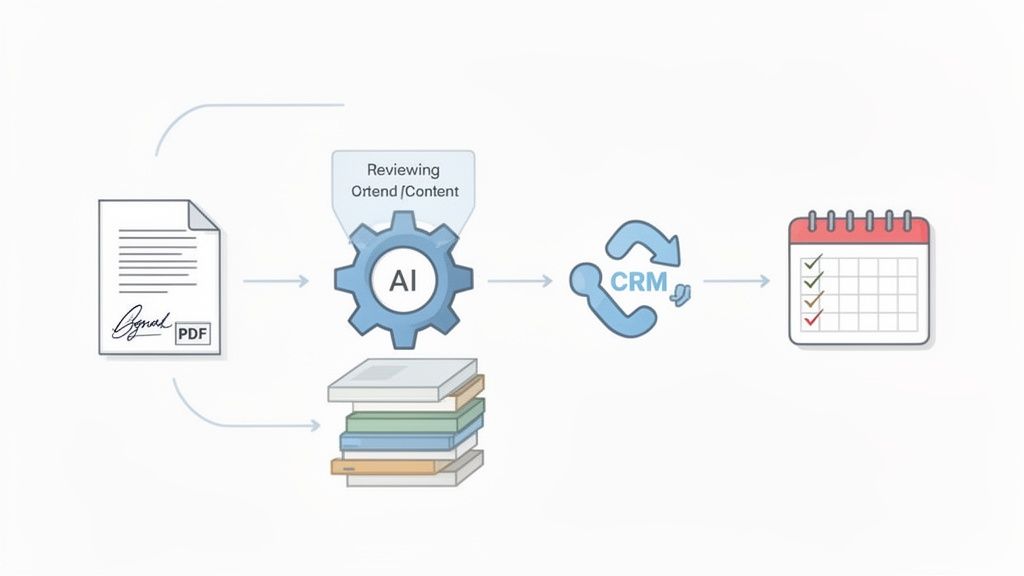
Knowing how to eSign a PDF is a great start, but the signature itself is just one moment in a document's journey. The real efficiency gains come from automating the entire workflow—everything that happens before and after the document gets signed. The goal is to build a smart, seamless process that saves time, cuts down on risk, and gives you a much clearer picture of your operations.
This is where a true contract automation platform changes the game. Instead of just getting a signature faster, it manages the whole lifecycle, from the first draft all the way to post-signature compliance. For fast-moving businesses, this shift from a simple task to an intelligent system is huge.
From Manual Review to AI-Powered Intelligence
Think about a professional services firm drafting a complex client agreement. The old way involves a partner spending hours poring over the document, manually flagging risky clauses or non-standard terms. It’s slow, expensive, and wide open to human error.
An AI-powered platform like BoloSign flips that process on its head. Before the PDF even goes out for a signature, its AI contract review feature analyzes the text. It can automatically flag ambiguous language, spot missing clauses, and even suggest stronger, pre-approved alternatives. That’s proactive risk management, and it’s a massive advantage.
To truly embrace these advanced workflows, it's worth understanding the full capabilities of modern legal document automation software. It's all about building a system that thinks ahead for you.
Connecting eSignatures to Your Business Systems
The next big leap is plugging your digital signing solution directly into the tools your teams use every day. If your sales team lives and breathes in your CRM, forcing them to jump into another app just to send a contract is a serious productivity killer.
BoloSign integrates directly with popular CRMs, so a sales rep can generate a contract using customer data that’s already there, send it for signature, and track its status—all without leaving their pipeline view. Once the contract is signed, the deal status in the CRM can update automatically.
This turns the eSignature from a standalone chore into a connected, data-driven event. It closes the loop between sales, legal, and finance, ensuring everyone is on the same page, in real-time. You can see more examples of this in our guide to the best document automation software on the market.
The smartest eSignature strategy isn't about signing documents faster; it's about making the entire agreement process smarter. Automation connects the dots between drafting, negotiation, execution, and compliance.
We can see the difference clearly when we compare the old, manual approach with an AI-driven one.
Manual vs AI-Powered Contract Workflow Comparison
| Workflow Stage | Standard eSignature Process | BoloSign Automated Workflow |
|---|---|---|
| Drafting | Manually create a new contract from a local template. | Automatically generate a contract using a pre-approved template, populated with CRM data. |
| Legal Review | A lawyer manually reads the document to find risks or non-standard terms. | AI automatically scans the contract, flags risks, and suggests compliant alternatives. |
| Sending | Download the document, upload it to an eSignature tool, and manually enter recipient info. | Send the document for signature directly from the CRM with one click. |
| Tracking | Manually check the eSignature tool for status updates and send email reminders. | Receive real-time status updates in the CRM and automate follow-up reminders. |
| Post-Signature | Download the signed PDF and manually upload it to a storage drive and update the CRM. | The signed contract is automatically stored, and the deal status is updated in the CRM instantly. |
The takeaway is simple: automation doesn't just speed up individual steps; it removes entire layers of manual work and potential error, freeing up your teams to focus on what really matters.
An Industry-Specific Look at Automation
The impact of a fully automated approach is obvious across different sectors:
- Logistics: A freight company can instantly generate carrier agreements from load details, get them signed, and automatically trigger invoicing as soon as the signed proof of delivery is returned.
- Education: A university can automate sending thousands of enrollment agreements, track completions in real-time, and have signed documents feed directly into its student information system.
- Professional Services: A consulting firm can use templates for Statements of Work (SOWs), let AI review client redlines, and get signatures faster to kick off projects without delay.
The growth here is explosive. The E-Signature Platform Market, valued at USD 8.99 billion in 2026, is projected to hit USD 30.46 billion by 2031. This surge is fueled by the demand for smarter workflows and tighter compliance.
By looking beyond just the signature, you position your business to run more intelligently. BoloSign gives you the tools to build these automated workflows with an affordable, all-in-one model: unlimited documents, templates, and team members at one fixed price. This makes advanced automation accessible, helping you save time, reduce risk, and unlock a new level of operational insight.
Common Questions About eSigning PDFs
Even with eSignatures becoming the norm, it's natural to have a few questions. Getting straight answers helps you move forward with confidence, making sure your digital workflows are secure, compliant, and actually efficient. Let's tackle some of the most common things people ask when they're figuring out how to eSign a PDF.
What Is the Difference Between Electronic and Digital Signatures?
This one comes up all the time, and it's a critical distinction.
Think of an electronic signature as the broad umbrella term. It's any digital mark on a document—like your typed name, a scanned image of your signature, or one you draw with a mouse—that shows you intend to sign. Under laws like the ESIGN Act and eIDAS, it's absolutely legally binding.
A digital signature, on the other hand, is a specific, highly secure type of electronic signature. It’s not just a mark; it's a sophisticated cryptographic process. It uses a certificate-based digital ID to encrypt the document and create a tamper-evident seal. If anyone tries to alter the document after it's signed, that digital signature is instantly invalidated.
BoloSign uses this advanced digital signature technology. This is how we provide the highest possible level of security and non-repudiation for your agreements.
How Secure Is It to Sign PDFs Digitally?
When you're using a platform built for security, signing PDFs digitally is worlds more secure than old-school wet ink signatures. A paper contract can be lost, copied, or altered with no one the wiser.
A secure platform like BoloSign wraps your documents in multiple layers of protection:
- AES 256-bit Encryption: This is military-grade encryption that protects your documents both in transit and while stored on our servers.
- Comprehensive Audit Trails: Every single action—from the moment a document is opened to the final signature—is logged with a timestamp and IP address. This creates a detailed, court-admissible record of the entire process.
- Tamper-Evident Seals: Once signed, the document is cryptographically locked down. Any unauthorized changes are immediately detectable, ensuring the integrity of your agreement.
This robust framework means you can trust that your most important documents are confidential and completely intact.
Is It Really More Affordable Than Other Platforms?
Absolutely, and the savings can be dramatic. Many eSignature providers trap you in a per-document or per-user pricing model. This might seem manageable at first, but as your business grows, the costs quickly spiral out of control. You end up rationing signatures or getting hit with surprise overage fees.
We built BoloSign to completely eliminate that barrier. We operate on a straightforward, fixed-price model that includes unlimited documents, templates, and team members. This simple approach can make your eSignature workflows up to 90% more affordable than competitors like DocuSign or PandaDoc. It lets your entire organization adopt a modern, efficient process without having to constantly worry about a ballooning budget.
The global digital signature market is booming, generating USD 5,240.0 million in 2024 and projected to hit USD 38,164.4 million by 2030. As this technology becomes essential, choosing a provider that can scale with you affordably is a critical business decision. You can learn more about the digital signature market's growth and see where the industry is headed.
Ready to experience a simpler, more affordable, and completely secure way to manage your documents? BoloSign offers all the AI-powered automation, contract intelligence, and enterprise-grade compliance you need at one fixed price.
Start your 7-day free trial today to see how unlimited documents, templates, and team members can transform your business workflows.

Paresh Deshmukh
Co-Founder, BoloForms
13 Feb, 2026
Take a Look at Our Featured Articles
These articles will guide you on how to simplify office work, boost your efficiency, and concentrate on expanding your business.



