

A Practical Guide to HIPAA Business Associate Agreement Requirements
Understand HIPAA Business Associate Agreement requirements with our complete guide. Learn who needs a BAA, what it must include, and how to stay compliant.

Tired of nonsense pricing of DocuSign?
Start taking digital signatures with BoloSign and save money.
A HIPAA Business Associate Agreement, or BAA for short, isn't just another piece of paperwork. It's a legally required contract under U.S. law, acting as a critical handshake between a healthcare provider and any outside vendor that comes into contact with their Protected Health Information (PHI).
Essentially, this legal document makes sure that the vendor, known as a business associate, promises to protect sensitive patient data with the same level of care and security as the healthcare provider itself.
What Is a HIPAA Business Associate Agreement?
Let's say a busy hospital hires an IT firm to manage its electronic health records. That partnership immediately kicks a crucial legal requirement into gear: they must sign a HIPAA Business Associate Agreement. Think of a BAA less like a document and more like a mandatory rulebook. It's the formal, legally binding promise a vendor makes to safeguard PHI.
This agreement ensures any partner with access to patient data—whether it's a medical billing company, a cloud storage provider, or an eSignature platform like BoloSign—is held to the same strict privacy and security standards as the hospital. The goal is to build a solid chain of trust and accountability, making sure patient data stays private no matter whose hands it's in.
To really get why BAAs are so important, it helps to first grasp the general healthcare privacy principles that form the foundation of all HIPAA regulations. These principles are what BAAs are built upon.

Defining the Key Players
To understand how a BAA works, you need to know the two main parties at the table:
- Covered Entity: This is the primary healthcare organization, like a hospital, doctor's office, health plan, or healthcare clearinghouse. They're the ones collecting and managing PHI directly from patients.
- Business Associate: This is any outside person or company that performs a service for a covered entity that requires them to handle PHI in some way.
And this isn't just about direct medical services. The definition of a business associate is broad. It could be an accounting firm that audits the hospital's books, a shredding company that disposes of old paper records, or a professional services firm providing legal advice. If they touch PHI, they need a BAA in place before any work begins.
Why a BAA Is More Than Just a Formality
A BAA is a cornerstone of compliance in today's healthcare world. It's not optional. This contract legally binds vendors to HIPAA's tough privacy and security rules, making them directly liable for data breaches on their end. Without a signed BAA, a healthcare provider is flying blind, exposing themselves to massive risks and potentially crippling government fines.
A BAA is the essential handshake that establishes trust and accountability between a healthcare organization and its partners. It transforms a vendor relationship into a compliant partnership, safeguarding patient data and protecting both parties from severe legal and financial consequences.
This is exactly why having a secure, efficient way to manage these agreements is non-negotiable. Fumbling with paper contracts is not only slow but incredibly risky. A modern digital signing solution like BoloSign lets healthcare organizations create, send, and manage their BAAs securely and effortlessly. With features like reusable PDF templates and a complete audit trail, you can guarantee every single agreement is consistent, compliant, and tracked from start to finish. It turns a complex legal necessity into a simple, automated part of your secure document workflow.
Figuring Out Who Needs a Business Associate Agreement
Trying to pinpoint which of your vendors needs a Business Associate Agreement can feel a bit overwhelming, but the rule of thumb is actually quite straightforward. If any third-party partner creates, receives, maintains, or transmits Protected Health Information (PHI) on your behalf, a signed BAA is an absolute must.
Think of it as the chain of custody for sensitive patient data. Every single link in that chain—every vendor, every platform—has to be secured with a BAA. This isn't just about checking a box; it’s about creating a clear line of accountability that protects your organization, your partners, and most importantly, your patients.
Common Partners Who Require a BAA
The term "business associate" casts a much wider net than most people think. It's not just for other healthcare providers. Any vendor that even incidentally touches PHI falls under this umbrella, and organizations often find themselves managing a surprising number of these agreements. It's not uncommon for a mid-sized healthcare provider to juggle over 300 BAAs and related vendor contracts at any given time.
Here are some of the usual suspects—vendors that almost always need a BAA in place:
- IT and Cloud Service Providers: Anyone who manages your electronic health record (EHR) system, handles data backups, or provides cloud storage for patient files.
- Billing and Coding Companies: The third-party services that process your medical bills, manage claims, and handle collections.
- Practice Management Software: The software-as-a-service (SaaS) platforms you rely on for scheduling appointments and maintaining patient records.
- Legal and Accounting Firms: Professionals who might encounter PHI while providing legal advice, auditing your books, or offering financial consulting.
- eSignature Platforms: Any digital signing solution used for patient consent forms, new hire paperwork for clinical staff, or any contract involving PHI.
That last one is a big deal. The moment you use a platform to manage sensitive documents, that platform becomes your business associate, making your choice of partner critically important for compliance.
Do I Need a BAA? Common Vendor Scenarios
It can still be tricky to determine who needs a BAA in the real world. This quick-reference table breaks down some common scenarios to help you make the call.
| Vendor Type | Access to PHI? | BAA Required? | Example Service |
|---|---|---|---|
| EHR/EMR Software Provider | Yes, Direct | Yes | A cloud-based patient records system. |
| Medical Billing Service | Yes, Direct | Yes | A third-party company that processes insurance claims. |
| IT Support / MSP | Yes, Potential | Yes | An IT firm that manages your network and servers. |
| eSignature Platform | Yes, Transmits | Yes | A service used for patient intake or consent forms. |
| Shredding Service | Yes, Incidental | Yes | A company that securely disposes of paper records. |
| Answering Service | Yes, Potential | Yes | A service that takes patient calls after hours. |
| Marketing Agency | No | No | An agency running a general ad campaign without PHI. |
| Office Cleaning Service | No, Incidental | No | A janitorial company with no access to PHI. |
As you can see, the requirement hinges on whether the vendor will handle, store, or transmit PHI as part of their service to you. If the answer is yes, a BAA is non-negotiable.
Why Your eSignature Platform Is a Business Associate
Let's make this real. When a dental clinic uses a platform to send digital intake forms to a new patient, that platform is actively transmitting PHI. Or consider a healthcare staffing agency that uses an eSignature tool to get contracts signed with temporary nurses—those contracts often contain sensitive employee health data.
In both of these everyday scenarios, the eSignature provider is a business associate under HIPAA.
This is exactly why BoloSign is built to be a core part of your compliance strategy. As a business associate, we readily sign a BAA with our healthcare clients, confirming that our AI-powered platform is designed to meet HIPAA's tough security and privacy standards.
With BoloSign, you can create, send, and sign PDFs online with the confidence that your document workflows are secure and compliant. Our platform maintains a detailed audit trail for every single action, giving you a clear, defensible record. Plus, you can use our PDF templates to standardize your BAAs, making sure no critical clauses ever get missed.
A Simple Audit for Your Business
To cut through the noise, just ask yourself one simple question for every vendor you work with: "Will this partner have any access—even accidental—to our patients' protected health information?"
If the answer is yes, you need a BAA signed and sealed before you share any data. It’s the foundational step for any compliant partnership.
With BoloSign, managing these critical agreements stops being a manual headache. Our platform simplifies the entire lifecycle, offering unlimited documents and templates for one fixed price. This makes robust compliance 90% more affordable than legacy tools and turns a complex legal requirement into a smooth, automated workflow.
The Essential Clauses Every BAA Must Include
Think of a Business Associate Agreement less like a single, static document and more like a detailed blueprint. It's built from specific, mandatory parts, and each one has a critical job to do. Together, they create the secure, compliant framework for how Protected Health Information (PHI) gets handled. The U.S. Department of Health and Human Services (HHS) is very clear about what needs to be in a BAA for it to be valid.
If you miss even one of these core elements, the whole agreement could be considered non-compliant. That's a huge risk for both the healthcare provider and the business associate. These clauses are the non-negotiable building blocks that set the rules of engagement for protecting patient data.
Defining the Scope of PHI Use
First things first, a BAA has to draw clear lines in the sand. It must spell out exactly what the business associate is allowed to do with PHI and—just as critically—what they are forbidden from doing. This isn't about vague permissions; it demands specific, detailed instructions.
For instance, a medical billing company's BAA would give them the green light to use PHI for processing claims and sending invoices. But it would slam the door on using that same data for their own marketing campaigns or anything else not directly tied to the service they were hired for.
This clause is all about making sure the business associate only touches PHI to do the job they were hired to do, and nothing more.
Mandating Appropriate Safeguards
Next up, the BAA must legally bind the business associate to put specific safeguards in place to stop any unauthorized use or disclosure of PHI. This is where the agreement points directly to the HIPAA Security Rule, making the vendor responsible for maintaining:
- Administrative Safeguards: Think policies and procedures. This includes things like security training for all employees and designating a specific security official to oversee compliance.
- Physical Safeguards: This is about protecting physical locations and hardware. It means locking up servers in a secure room and controlling who can get into facilities where PHI is stored.
- Technical Safeguards: This covers the tech side of protecting electronic PHI (ePHI). We're talking about essentials like encryption, access controls, and detailed audit logs.
This provision effectively mirrors the security obligations of the covered entity, making the business associate directly accountable for implementing the right protections.
Reporting Security Incidents and Breaches
Every BAA must have a clause forcing the business associate to report any security incident—including a data breach of unsecured PHI—back to the covered entity. The agreement needs to be specific about the timing, requiring the report to be made without unreasonable delay and absolutely no later than 60 days from when the breach was discovered.
This is a critical communication channel. It ensures the covered entity can meet its own deadlines for notifying affected patients and HHS.
A strong BAA operates on the principle of "no surprises." It ensures that if something goes wrong on the vendor's end, the covered entity is notified immediately, allowing for a swift and coordinated response to protect patient data and meet legal obligations.
Extending Compliance to Subcontractors
The chain of trust doesn't end with the vendor you hired. If your business associate brings on a subcontractor who will also handle PHI, the BAA must require them to get a similar agreement signed. This is often called a "flow-down" provision, and it ensures HIPAA protections are passed all the way down the vendor chain.
So, if your cloud storage provider (the business associate) uses a separate third-party data center (the subcontractor), they must have a solid BAA in place with that data center.
Outlining Termination Procedures
Finally, every BAA needs a clear exit strategy. The agreement has to detail exactly what happens to all that sensitive PHI when the contract is over. Typically, the business associate is required to return or destroy all PHI they received. If for some reason that isn't feasible, the BAA must state that the protections will continue to cover that data forever.
The BAA also needs an escape hatch. It must include a clause that allows the covered entity to terminate the contract if the business associate messes up and violates a material term of the agreement. This provides a crucial enforcement tool. The regulatory landscape is also constantly shifting; recent developments highlight the need for regular BAA reviews to incorporate new rules. To learn more about how changes in state and federal law impact these agreements, you can find valuable insights about HIPAA changes coming in 2026.
Trying to manage all these clauses manually is just asking for trouble. Using a contract automation platform like BoloSign is a game-changer. You can create a master BAA template that already includes all these required clauses, so every agreement you send out is buttoned-up and compliant from the start. It takes the guesswork out of the equation and gives you a secure, auditable workflow for one of your most important legal documents.
Navigating the High Cost of Non-Compliance
It's easy to dismiss a Business Associate Agreement as just another piece of administrative paperwork. But in the world of federal regulators, overlooking a BAA is a massive red flag with staggering consequences. We're not just talking about penalties for huge data breaches; you can get hit with crippling fines for simply having a missing or poorly written BAA. Suddenly, this isn't a hypothetical risk—it's a very real threat to your business.
Failing to meet HIPAA business associate agreement requirements isn't just a compliance headache; it’s a direct blow to your bottom line and your reputation. The financial penalties are enough to sink a business. The U.S. Department of Health and Human Services’ Office for Civil Rights (OCR) can levy fines up to $1.5 million per year for BAA failures. These aren't just empty threats. Just ask Advanced Care Hospitalists, who were slapped with a $500,000 fine. More recently, a healthcare provider was fined $100,000 for the sole offense of missing BAA documentation, even without a data breach. You can see the long history of these enforcement actions for yourself.
From Fines to Reputational Ruin
The fallout from a BAA violation goes way beyond government fines. Honestly, the damage to your organization's reputation can be far more severe and long-lasting.
- Loss of Patient Trust: Patients hand over their most private information assuming it will be protected. A compliance failure shatters that trust in an instant, sending patients looking for care elsewhere.
- Damaged Business Relationships: No covered entity wants to partner with a vendor that puts their own compliance in jeopardy. A reputation for being careless with HIPAA makes it nearly impossible to land new contracts or even keep the ones you have.
- Corrective Action Plans: OCR penalties often come with a mandatory, multi-year corrective action plan. These are expensive, incredibly disruptive, and put your entire operation under a regulatory microscope for years to come.
The infographic below breaks down the absolute must-haves for any compliant BAA—the very things that will keep you out of hot water.
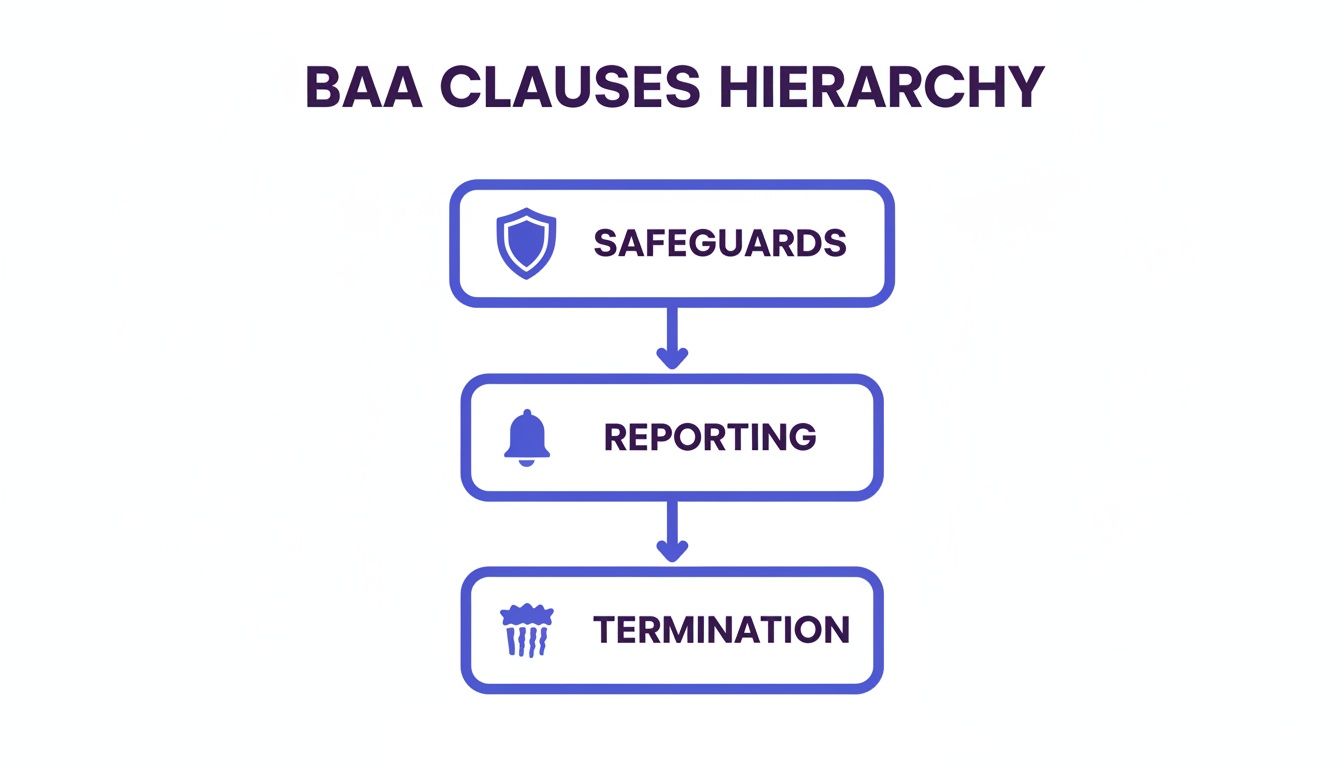
This structure makes it clear: strong safeguards, airtight reporting rules, and clear termination clauses are the foundation of an agreement that will actually protect you.
Proactive Compliance Is the Only Affordable Option
Let's imagine a real-world scenario. A logistics company is hired to transport medical records but never signs a BAA. If those records get lost or stolen, both the logistics company and the healthcare provider are on the hook for massive liability. The cost of the investigation, fines, and lawsuits would absolutely dwarf the small expense of implementing a proper digital signing solution from the start.
The key takeaway here is simple: being proactive about compliance is infinitely cheaper than managing a crisis after the fact. Investing in a solid system to manage your BAAs isn't just an expense—it's an essential insurance policy against catastrophic financial and reputational damage.
This is exactly where a platform like BoloSign becomes so valuable. We live and breathe data protection, as you can see in our detailed privacy policy. By using BoloSign to handle your BAA workflows, you're building a secure, auditable, and compliant process from day one. Our platform gives you unlimited documents and templates for one fixed price, making top-tier compliance 90% more affordable than the old-school tools and ensuring you're always ready for an audit.
Streamlining BAA Management with eSignature Solutions
Managing the complex web of HIPAA business associate agreement requirements can easily feel like a full-time job. Juggling paper contracts, chasing down signatures, and making sure every single vendor has a compliant BAA on file isn't just slow—it's incredibly risky. One misplaced document could expose your entire organization to serious liability.
This is where a modern eSignature solution steps in to turn a daunting legal challenge into a simple, automated process. Forget printing, mailing, and manually filing BAAs. You can create, send, and securely store them all in one centralized, compliant platform.

From Manual Chaos to Automated Compliance
Think about a home healthcare agency that needs to sign BAAs with dozens of vendors, from their IT support team to their medical billing service. The old way meant emailing PDFs back and forth, constantly following up for signatures, and just hoping the final signed copy landed in the right folder. That kind of manual process is a breeding ground for mistakes.
With an eSignature platform like BoloSign, that entire workflow becomes automated and airtight. The agency can take its attorney-approved BAA and turn it into a reusable PDF template. This guarantees that every agreement sent out contains all the mandatory clauses, with zero room for variation or error.
By automating your BAA workflow, you're not just saving time; you're building a fortress of compliance. Every document is tracked, every signature is verified, and every action is recorded, creating an unshakeable audit trail that stands up to scrutiny.
The Power of Templates and Audit Trails
When it comes to compliance, consistency is everything. The most powerful features of an eSignature platform are designed to enforce just that.
- Reusable PDF Templates: Lock in your approved BAA as a master template. This single step eliminates the risk of human error and ensures every vendor signs the exact same compliant agreement.
- Secure Audit Trail: From the moment a document is sent to the final signature, every single action is tracked. This gives you a clear, time-stamped history for compliance checks, showing precisely who signed, when, and where.
- Centralized Storage: All your signed BAAs live in one secure, easily accessible place. No more frantic digging through filing cabinets or scattered email attachments when an auditor comes knocking.
For instance, a logistics company that handles medical supplies can use templates to quickly onboard new transportation partners. They can ensure a BAA is signed before a single piece of PHI is ever exchanged. This proactive approach makes compliance a standard part of operations, not a frantic afterthought.
Making Compliance Affordable and Accessible
Many organizations, especially smaller ones, assume that enterprise-grade compliance tools are financially out of reach. Traditional eSignature platforms often have pricing models that charge per user or per document, making costs unpredictable and hard to manage as you grow. This can force businesses into risky, non-compliant workarounds just to save money.
BoloSign was built to tear down that barrier. We offer a straightforward, fixed-price model with unlimited documents, team members, and templates. This makes our platform 90% more affordable than traditional tools, putting robust, HIPAA-compliant document management within reach for any business. You get all the security and automation you need without the punishing price tag.
By using a dedicated digital signing solution, you can manage your BAAs and other sensitive documents with confidence, upholding the highest standards of HIPAA, ESIGN, and eIDAS. This approach empowers you to handle a critical legal requirement efficiently, turning a potential compliance nightmare into a seamless, automated workflow. Learning more about the core features of a secure eSignature platform can help you choose the right partner for your compliance needs.
Ready to see how simple BAA management can be? Start a 7-day free trial of BoloSign today and experience the peace of mind that comes with automated compliance.
Your Practical BAA Compliance Checklist
Let's be honest, managing HIPAA Business Associate Agreements can feel like a full-time job. It’s easy to get bogged down in the legal jargon and constant worry about compliance gaps.
But it doesn't have to be a source of stress. The trick is to turn this complex legal duty into a simple, repeatable part of your everyday operations. This checklist boils it all down into actionable steps to help you review, strengthen, and take control of your BAA process.
Think of this as your roadmap to turning compliance from a headache into a habit.
Your Step-by-Step Action Plan
A consistent process is your best defense against compliance failures and data breaches. Use these 6 steps as a regular health check for all your vendor relationships.
Map Out Every Vendor with PHI Access
First things first, you need a complete inventory. Create a master list of every single third-party vendor, contractor, or software platform that could possibly create, receive, maintain, or transmit PHI for you. This includes the obvious ones like your billing service and IT provider, but also tools like your eSignature platform.Verify a Signed BAA is on File for Everyone
Go through your list vendor by vendor. Do you have a current, fully signed BAA securely stored and easy to find? If you discover any gaps—and you might be surprised—getting a compliant agreement signed becomes your top priority. Don't share another piece of PHI until you do.Create and Stick to a Standard BAA Template
Using a patchwork of outdated or vendor-supplied agreements is asking for trouble. Work with your legal counsel to develop a rock-solid, standardized BAA template that has all the required clauses. A platform like BoloSign is perfect for managing and deploying these reusable templates.Schedule Annual BAA Reviews
Set it and forget it is not a compliance strategy. Regulations change, and your business relationships evolve. Put a recurring reminder on your calendar to review every active BAA at least once a year. This ensures they stay up-to-date with both federal and state laws.Use a Secure System to Manage Everything
Trying to manage BAAs with a mix of emails and shared folders is a recipe for disaster. You need a secure, centralized system like BoloSign to manage the entire lifecycle of your agreements. It provides a clear, unchangeable audit trail that documents every signature, view, and action. You can see more about the specific BoloSign features that make this possible.Train Your Team on Why This Matters
Your staff is your first line of defense. Make sure they understand what a BAA is, why it’s critical, and their personal role in protecting PHI. This includes knowing when a BAA is needed and handling PHI securely in their daily work. Properly documenting things like a hard drive destruction certificate is a key part of this, proving you're closing the loop on data security as required by your BAAs.
BAA Compliance Action Plan
To put it all together, here’s a simple table you can use to structure your BAA management process and ensure no steps are missed. It outlines what to do, the key action to take, and how a tool like BoloSign can simplify each step.
| Compliance Step | Key Action | Tool to Use (BoloSign Feature) |
|---|---|---|
| 1. Identify Vendors | Create and maintain a master list of all business associates with PHI access. | N/A (Internal audit process) |
| 2. Verify Agreements | Audit the master list to confirm a signed, compliant BAA exists for each vendor. | Centralized Document Storage |
| 3. Standardize | Work with legal counsel to develop a single, approved BAA template for all new vendors. | Reusable Templates |
| 4. Review Annually | Set calendar reminders to review all active BAAs against current regulations. | Automated Reminders & Notifications |
| 5. Manage Securely | Store, send, and track all BAAs in a single, secure platform with a clear audit history. | Audit Trail & Secure Workflow |
| 6. Train Staff | Conduct regular training on PHI security and the importance of BAA compliance. | N/A (Internal training program) |
By following this plan, you transform BAA compliance from a reactive scramble into a proactive, manageable system that protects your organization and your patients.
You’re now ready to implement a secure document workflow. We invite you to experience how easy compliance can be by starting a 7-day free trial of BoloSign.
Frequently Asked Questions About BAAs
When you're dealing with Business Associate Agreements, it's easy to get tangled up in the details. Getting clear, practical answers to common questions is the first step toward building a compliance strategy you can actually feel good about.
Let's break down some of the most frequent questions that pop up when organizations start managing these critical agreements.
What Happens If a Business Associate Violates the BAA?
When a business associate drops the ball and violates a BAA, the consequences are serious and they ripple outwards. Under HIPAA, the business associate is directly liable for the violation. This means they can face hefty fines straight from the Office for Civil Rights (OCR).
But the covered entity isn't off the hook, either. This is where the breach notification clause in your BAA becomes incredibly important. The business associate is required to report the incident to you without unreasonable delay. This shared liability model is exactly why you need to vet your vendors carefully—partnering with organizations that take their HIPAA duties as seriously as you do is non-negotiable.
Can I Use a Generic BAA Template from the Internet?
Grabbing a generic BAA template from a random website is like buying a car without checking under the hood—it’s incredibly risky. These one-size-fits-all documents often miss the specific language needed to cover your unique business relationships. Worse, they might be outdated and not reflect the latest regulatory changes. A weak BAA can leave you just as exposed as having no BAA at all.
A much smarter approach is to start with a vetted, compliant template from a secure platform. This ensures all the mandatory clauses are already in place, but still gives you the flexibility to work with your legal counsel to tailor it to your specific vendor relationships.
For instance, a healthcare staffing agency could use a platform like BoloSign to build a standardized BAA template. Every time they bring on a new partner, they use the same compliant agreement, which eliminates the guesswork and massively strengthens their compliance posture.
How Long Is a BAA Valid?
A BAA doesn’t have a universal expiration date stamped on it by law. Typically, its lifespan is tied directly to the service contract it supports. If your contract with a cloud storage provider is for two years, the BAA stays in effect right alongside it for those two years.
However, you should treat it like a living document, not a file-and-forget piece of paper. It’s crucial to review your BAAs periodically—at least once a year—to make sure they’re still aligned with current regulations and any changes in the services being provided. And once that primary service contract ends, the BAA must clearly spell out how the business associate will securely return or destroy every last bit of PHI.
Ready to stop wrestling with your most important agreements? With BoloSign, you can create, send, and securely store all your BAAs in a platform designed for compliance from the ground up. See for yourself how simple automated workflows, reusable templates, and a complete audit trail can be.
Start your 7-day free trial today and discover just how affordable and straightforward secure document management can be.

Paresh Deshmukh
Co-Founder, BoloForms
21 Jan, 2026
Take a Look at Our Featured Articles
These articles will guide you on how to simplify office work, boost your efficiency, and concentrate on expanding your business.



