

A Guide to Flawless Form to PDF Conversion and Automation
Transform your form to PDF workflow from a manual chore to an automated powerhouse. Learn how to convert, sign, and manage documents with practical strategies.

Tired of nonsense pricing of DocuSign?
Start taking digital signatures with BoloSign and save money.
Turning form responses into PDFs can be as simple as hitting "Print to PDF" in your browser. But for a business, that's just scratching the surface. The real magic happens when you turn that dynamic data into a static, professional, and instantly shareable document—automatically. With tools like BoloSign, businesses can create, send, and sign PDFs, templates, and forms quickly, securely, and affordably.
Why Smart Form to PDF Conversion Is a Business Imperative
Manually converting form submissions into PDFs isn't just an administrative chore; it's a genuine bottleneck that slows your business down. Top-performing organizations know that a smart form to PDF process is a strategic advantage, not just another task to check off a list. It’s all about turning raw data into actionable, professional documents the moment it arrives.
Think about it in the real world. A real estate agency in the US or Australia can’t afford to wait when a client submits an offer through a web form. That data needs to become a polished, branded contract ready for signatures—immediately. In the same way, a busy healthcare clinic in Canada needs to convert patient intake forms into secure, HIPAA-compliant records the second they’re submitted. No delays, no excuses.
Moving Beyond Basic Methods
The old "Print to PDF" trick works fine for a one-off task, but it completely falls apart at scale and lacks the features a real business needs. A truly automated approach brings so much more to the table.
- Guaranteed Data Accuracy: Automation kills the copy-paste errors that sneak into contracts, invoices, or patient records and cause costly mistakes.
- Enhanced Professionalism: Automatically generated PDFs use your consistent branding and formatting, presenting a polished, trustworthy image to every client, partner, and new hire.
- Secure Audit Trails: A proper system creates a tamper-proof record of when a form was submitted and who signed it. This isn't just nice to have; it's critical for compliance (ESIGN, eIDAS) and legal protection.
It's no surprise the global PDF software market is projected to hit USD 5.72 billion by 2033. This growth is fueled by this exact need for robust, reliable digital document workflows. The demand for smart form to PDF conversion is a core part of modern business operations.
Of course, it's not just about converting existing form data. Businesses also need efficient document generation for business needs like creating invoices or receipts from scratch. It all points to the growing importance of integrated digital workflows.
Manual vs Automated Form to PDF Workflows
Let's break down the real-world differences between sticking with old-school methods and embracing a modern, automated solution. The contrast is pretty stark.
| Attribute | Manual Methods (e.g., Print to PDF, Copy-Paste) | Automated Solutions (e.g., BoloSign) |
|---|---|---|
| Speed | Slow, dependent on team availability. Each form is a separate task. | Instant. PDFs are generated the moment a form is submitted. |
| Accuracy | High risk of human error from typos or copy-paste mistakes. | 100% accurate. Data is mapped directly from form to PDF. |
| Branding | Inconsistent. Formatting is often lost or looks unprofessional. | Consistent and professional. Uses pre-designed, branded templates. |
| Security | Minimal. No audit trails or secure storage by default. | High. Includes audit trails, user permissions, and secure cloud storage. |
| Scalability | Poor. Becomes a major bottleneck as form volume increases. | Excellent. Handles hundreds or thousands of submissions effortlessly. |
| Integration | None. Completely siloed from other business tools. | Seamless. Connects to CRMs, cloud storage, and other apps. |
Ultimately, the choice impacts more than just your document workflow. It determines how much time your team wastes on administrative tasks versus focusing on what actually grows the business.
Tools like BoloSign are designed to transform this entire process. Instead of your team spending hours on manual data entry, you can set up a seamless workflow that frees them up for more valuable, strategic work. This isn't just about saving time—it's about building a more efficient, secure, and professional operation from the ground up.
Mastering the Manual Methods That Still Work
Before we jump into sophisticated automation, let's talk about the foundational techniques for turning a form into a PDF. These are the manual and semi-automated methods that most businesses try first. They're perfect for one-off needs or super low-volume tasks, but understanding their limits is key to knowing when it's time to upgrade.
The simplest trick in the book is the good old "Print to PDF" function built right into your browser. Whether you're in Google Forms or Microsoft Forms, once you view a submitted response, you can just hit "Print" and choose "Save as PDF." It’s quick, costs nothing, and gets the job done in a pinch. If you're a small consulting firm that just needs to archive one client questionnaire a month, this might be all you ever need.
Taking a Small Step Toward Automation
For those who don't mind getting their hands a little dirty with code, Google Apps Script offers a neat way to add a layer of automation. You can write a simple script that triggers every time a Google Form is submitted. This script can grab the response data, pop it into a Google Doc template, and then convert that Doc into a PDF, saving it straight to a Google Drive folder.
Sure, it takes some initial setup and a bit of coding know-how, but it beats manually printing every single submission. It's a solid middle ground. However, it’s still missing the heavy-duty features that serious business operations rely on, like:
- Legally binding signatures: The PDF it creates is just a static record, not an enforceable agreement.
- Advanced security: You won't find audit trails or compliance features for regulations like HIPAA or GDPR.
- Scalability: As your business grows, managing a bunch of different scripts can quickly become a tangled mess.
The Hidden Dangers of Browser Extensions and Add-Ons
Another popular route is grabbing a third-party browser extension or form add-on that promises to handle the form to PDF conversion for you. They’re usually marketed as a one-click solution, and at first glance, they can seem like the perfect fix.
But that convenience often comes with some serious baggage. Many of these free or cheap add-ons have glaring security holes, putting sensitive client or patient data at risk. They might also slap you with hidden usage limits, ugly watermarks, or surprise fees once you're already dependent on them.
For anyone in healthcare, real estate, or professional services, data security isn't just a "nice-to-have"—it's a legal mandate. A data breach from an insecure add-on can result in massive fines and destroy the trust you've built with your clients.
Think of these manual methods like using a screwdriver when you really need a power drill. They’ll work for a few simple jobs, but they just can't build anything substantial. As your business scales, these limitations become painfully obvious, pushing you toward integrated and secure digital signing solutions built to handle the real world's complexity and volume.
How No-Code Platforms Can Revolutionize Your Workflows
This is where the real magic happens, especially for businesses ready to scale without hiring a whole dev team. No-code automation platforms like Zapier, Make, and others are the secret sauce. They act as powerful connectors for all the apps you're already using, letting you build a seamless form to PDF workflow that pretty much runs on its own.
The concept behind it is brilliantly simple: a trigger in one app causes one or more actions in another. Think of it like a digital chain reaction that you get to design yourself, no coding needed.
So, imagine a potential client fills out your Typeform or Jotform inquiry—that's your trigger. Instantly, a whole series of actions can fire off: a personalized proposal PDF gets generated from a template, a new lead is created in your CRM like Salesforce, and a notification pings your sales team on Slack. All of that from just one form submission.
Building Powerful Business Processes
This simple trigger-and-action system lets you build surprisingly powerful, multi-step business processes that all start with a simple form. You can shuttle data between thousands of different applications, essentially creating a central nervous system for your entire operation.
Here are a few real-world examples of what this looks like in practice:
- Logistics: A driver in the UAE submits a delivery confirmation form on their phone. This instantly generates a PDF bill of lading, updates a master shipping tracker in Google Sheets, and sends an automated invoice to the client.
- Professional Services: A marketing agency in New Zealand onboards a new client with a detailed questionnaire. That submission triggers the creation of a project folder in Google Drive, generates a signed engagement letter, and adds the client to their Mailchimp sequence.
- Education: A university processes a course registration form. The system automatically generates a PDF confirmation letter, enrolls the student in the learning management system, and sends out a welcome packet via email.
This level of automation is quickly moving from a "nice-to-have" to a "need-to-have." The data extraction market, which absolutely includes form to PDF processing, is expected to hit USD 2.0 billion in 2025. This growth is fueled by this exact need for greater efficiency. Businesses are finally realizing that turning unstructured data into something actionable is a major competitive advantage.
Beyond Basic Conversion
With no-code tools, you're not just converting a form to a PDF anymore; you're building an entire operational workflow from the ground up. You can layer in conditional logic, add delays, and format data on the fly—all within a visual, drag-and-drop interface.
The real power of no-code isn't just saving time on one task. It’s about creating interconnected systems where data flows freely and intelligently, eliminating manual handoffs and the human errors that always come with them.
This approach gives small and medium-sized businesses the kind of contract automation and process efficiency that was, until recently, only available to massive enterprises. By exploring the full range of automation features, you can uncover new ways to make your workflows smarter, faster, and more reliable.
Adding ESignatures and Security with BoloSign
Okay, so turning a form response into a PDF is a solid start. But for most businesses, that's only half the battle. The real goal is to create a secure, legally binding document from that submission—transforming simple data capture into an enforceable workflow.
This is exactly where a tool like BoloSign comes in. It picks up where basic PDF conversion leaves off, embedding the critical security and compliance layers you need right into the tools your team already knows, like Google Forms.
The integration with Google Forms is the real game-changer here. You can drop legally binding eSignature fields directly into your form, which makes collecting signatures feel completely natural for the end-user. Once they hit "submit," BoloSign doesn't just spit out a simple PDF. It generates a professional, tamper-proof document and automatically sends it out for signing. It’s the missing link between collecting information and getting a contract executed.
Building a Secure Document Workflow
Security can't be an afterthought; it has to be the bedrock of any reliable document process. A basic PDF just doesn't have the safeguards needed for sensitive business agreements. BoloSign was built to solve this problem from the ground up.
- Robust Compliance: The platform is designed around global standards like ESIGN, eIDAS, HIPAA, and GDPR. This means the signatures you collect aren't just for show—they're legally recognized in major jurisdictions, including the US, Canada, Australia, and the UAE.
- Comprehensive Audit Trail: Every single action—from the moment a document is created to when it’s viewed and finally signed—is time-stamped and logged. This creates an unchangeable record that provides definitive proof of the signature process, which is invaluable for compliance audits or legal challenges.
For businesses in demanding fields like healthcare or professional services, this isn't a nice-to-have; it's a must-have. Think of a staffing agency. They can automate their entire new-hire packet from a single Google Form, ensuring every I-9 and policy acknowledgment is signed and compliant on day one, with a full audit trail ready to go.
The Power of AI-Powered Automation
Beyond just security, BoloSign brings smart, AI-powered automation into the mix to cut down on manual work and get your workflows moving faster. AI can help analyze documents, automatically identify signature fields, and streamline the entire signing process, giving your team back precious time. You can learn more about how to sign PDFs online using these kinds of advanced tools.
This flow chart gives you a simple visual of how a no-code automation works, from the initial form submission to the final update in your CRM.
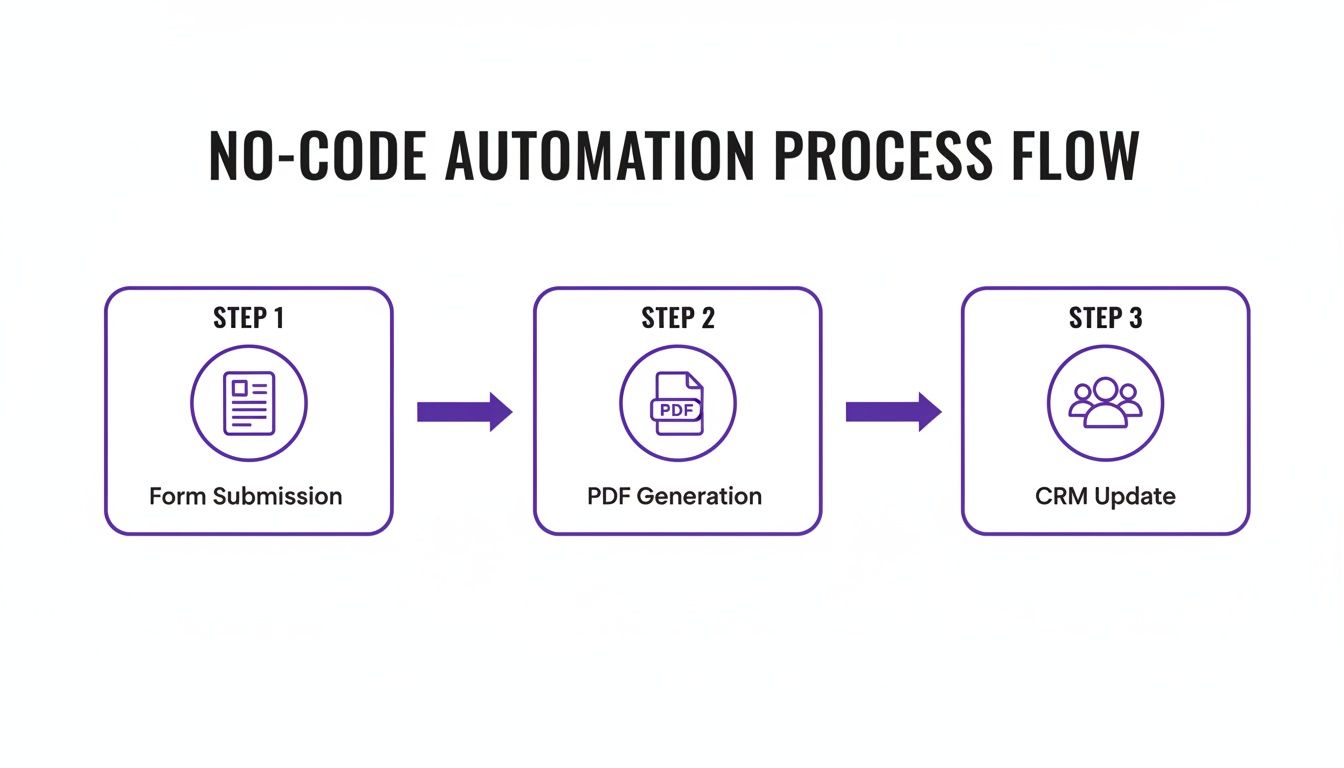
The key takeaway here is how smoothly data can travel through your entire system without anyone needing to manually intervene. This not only speeds everything up but also dramatically reduces the chance of human error.
This kind of contract automation ensures that the moment a form is filled out, the next steps just happen, keeping business moving. A real estate agent could use this to fire off a purchase offer for signing the instant a client submits their details, giving them a huge advantage in a competitive market.
BoloSign wraps all of this up—unlimited documents, team members, and templates—at one fixed price, making it 90% more affordable than legacy tools that nickel and dime you for every user or envelope. It’s a powerful blend of top-tier security, smart automation, and fair pricing.
Making Your Form-to-PDF Workflow Truly Seamless
Having the right tools is a great start, but building a genuinely seamless form to pdf workflow takes a bit more strategy. The real goal here is to create a system that’s not just automated, but also smart, error-proof, and dead simple for your team to manage. This is where good practices transform a clever idea into a rock-solid business process.
Everything kicks off with designing smarter forms. A well-built form is the perfect blueprint for your final PDF. This means using crystal-clear, unambiguous field labels that match up directly with the sections in your PDF template. Ditch generic names like "Field 1" and go for descriptive titles like "Client's Legal Business Name" to eliminate any guesswork.
Conditional logic is another game-changer. It lets you show or hide form fields based on how someone answers a previous question, creating a much cleaner experience. For a logistics company, that might mean only showing international shipping fields if the user picks a destination outside the country. This keeps the form tidy and ensures you only collect the data you actually need, which makes the whole PDF mapping process a breeze.
Create Professional and Reusable Templates
The PDF is often the last thing a client sees, so it needs to look sharp. Building reusable, branded PDF templates inside BoloSign is one of the smartest things you can do for consistency and quality. A solid template should always include:
- Your company logo and branding to keep things looking professional.
- Clearly defined placeholders for every piece of data you'll be pulling from the form.
- Standardized legal text or clauses that have to be on every document, cutting down the risk of someone forgetting to add them.
By using templates, a real estate agency can pump out a perfectly formatted offer letter every single time. No more worrying about an agent forgetting to include critical disclosures.
A well-structured workflow is more than just an efficiency hack; it's a risk management strategy. It minimizes the chance of human error in critical documents, protecting your business from costly mistakes and compliance issues.
Keep the Process Moving with Automation
A workflow will grind to a halt if it depends on someone manually chasing people down. That's why setting up automated reminders and notifications is so critical for keeping things on track.
For instance, if a contract sent out for a signature isn’t signed within 48 hours, you can have an automatic reminder email go out. That gentle nudge is usually all it takes to get an agreement finalized without your team having to play phone tag. If you want to dive deeper into building these kinds of multi-step processes, check out our guide to designing a form approval workflow.
Finally, get your digital filing cabinet in order. Set up a clean, organized cloud storage system in Google Drive or Dropbox. Use your automation to create a standardized naming convention for every single PDF it generates—something like "ClientName_ContractType_Date.pdf." This simple step makes documents ridiculously easy to find later and saves your digital storage from turning into a chaotic mess.
Your Path to Effortless Document Automation
We've covered a lot of ground, from quick "Print to PDF" tricks all the way to sophisticated, eSignature-powered workflows. The core takeaway here is simple: automating your form to PDF process is a massive win for saving time, slashing errors, and looking more professional. If you're serious about efficiency, looking into strategies like marketing automation for law firms can offer some really valuable parallels.
With BoloSign, you can handle unlimited documents, templates, and team members all for one straightforward price. It’s simply a smarter, more scalable way to manage your documents.
When you're finally ready to stop chasing paperwork and start getting things done, the next step is pretty clear. It's time to transform your document process and see the difference for yourself.
Frequently Asked Questions
When you start digging into a form to PDF workflow, the same questions tend to bubble up. Getting these sorted out is the first step to building a system that actually saves you time instead of creating new headaches.
Can I Automatically Populate a PDF with Form Answers?
Absolutely. In fact, that's the whole point. The magic behind this is a process called field mapping. You’re essentially telling the system, "See this 'Client Name' field in my form? I want that answer to go right here in this spot on the PDF."
When someone hits submit, the automation kicks in, grabs the data from the form, and drops it neatly into the correct placeholder on your PDF template.
Tools like BoloSign make this dead simple with a drag-and-drop style interface. You can visually line up your Google Form questions with your PDF fields, making sure every document is filled out instantly and with 100% accuracy.
Are Signatures Collected Through a Form Legally Binding?
Yes, but only if you're using a platform built for compliance. Just slapping an image of a signature onto a PDF won't hold up in court. For an eSignature to be considered legally binding under regulations like the ESIGN Act in the US or eIDAS in the EU, it needs to meet some strict criteria.
A compliant tool like BoloSign ensures every digital signing solution is backed by a bulletproof audit trail. This log meticulously records every single action—when the document was opened, viewed, and signed, along with timestamps and IP addresses. It creates a tamper-proof record that proves the integrity of the entire signing process.
How Can I Connect My Form to Other Business Apps?
Connecting your form to other tools like your CRM or project management software is where you unlock true, hands-off automation. This is all about integrations. Many platforms will have built-in connections to the big players.
For everything else, services like Zapier or Make are your best friends. They act as a universal translator between thousands of different apps. You could set up a workflow where a single form submission doesn't just generate a PDF but also creates a new contact in HubSpot, assigns a task in Trello, and pings your team on Slack.
Suddenly, your form to PDF process isn't just a document generator—it's the trigger that sets your entire business operation in motion.
Ready to stop chasing paperwork and start building systems that work for you? With BoloSign, you can manage unlimited documents, team members, and templates for one fixed price, making it 90% more affordable than traditional tools. See what it can do for your workflow. Start your 7-day free trial today.

Paresh Deshmukh
Co-Founder, BoloForms
16 Jan, 2026
Take a Look at Our Featured Articles
These articles will guide you on how to simplify office work, boost your efficiency, and concentrate on expanding your business.



