

A Guide to Change Order Template Construction
Master your change order template construction process. This guide offers actionable steps to manage changes, control costs, and keep projects on schedule.


Tired of nonsense pricing of DocuSign?
Start taking digital signatures with BoloSign and save money.
In construction, a good change order template is your first line of defense. It’s the tool that keeps scope creep, budget blowouts, and frustrating project delays from becoming your reality. Think of it as a formal, standardized document that captures any deviation from the original contract, making sure every single adjustment is clearly defined, costed, and signed off on before any work gets done.
Why Your Construction Project Needs a Solid Change Order Process

Let's be real—scope creep isn't just a possibility on a job site; it's practically a guarantee. The real test is how you manage it without torpedoing your budget and schedule. When you don't have a consistent change order process, things get messy fast. You end up with heated arguments over surprise invoices and project delays that can sour a great client relationship.
Without a formal system, "handshake deals" take over. A client might casually ask for different light fixtures, or a sub might suggest a "better" way to frame a wall. On their own, they seem small. But these undocumented tweaks stack up, creating major financial and scheduling headaches down the road.
This is exactly why a standardized process becomes your project's most valuable player. It hits the pause button, creating a non-negotiable checkpoint where every proposed change gets put under the microscope.
Creating Accountability and Predictability
A repeatable process built around a consistent change order template makes everyone accountable—the client, the contractor, and even the lenders. It cuts through the noise by documenting the specifics: what’s changing, how it impacts the cost, and what it does to the project timeline. This piece of paper (or digital file) becomes the official record, protecting everyone from future "he said, she said" debates.
This structured approach is non-negotiable for managing risk. With all the volatility in material costs and design specs these days, you need tight controls. A KPMG survey found that a staggering 37% of construction projects failed to meet budget or schedule targets, and a huge part of that came down to weak risk management and sloppy handling of changes. Using a modern template with clear, timestamped approvals brings much-needed transparency and makes everything auditable.
Transforming a Manual Process into a Digital Workflow
The benefits are obvious, but shuffling paper and chasing down signatures via email is a huge time suck. All that printing, scanning, and manual tracking is time you could be spending on-site, actually moving the project forward.
This is where a digital signing solution like BoloSign completely changes the game. Instead of wrestling with paper forms, you create a reusable change order template right inside the platform. When a change comes up, you just pull up the template, fill in the details, and send it off for an online signature.
By digitizing your change order process, you replace a slow, error-prone manual task with a secure, automated, and legally compliant workflow. This ensures that every change is properly documented and approved in minutes, not days.
With AI-powered automation, you can route the document to everyone who needs to see it—from the site supervisor in the US to the project owner in the UAE—and track its status in real-time. This doesn't just speed up approvals; it creates a rock-solid, centralized audit trail for every single agreement, ensuring you're compliant with standards like ESIGN and eIDAS. For a deeper dive into managing project adjustments, check out this comprehensive guide to construction change order management.
The Anatomy of an Effective Change Order Template
A solid change order template is way more than just a form. Think of it as a critical communication tool that shuts down expensive misunderstandings before they can even start. A well-designed template leaves zero room for interpretation, making sure everyone—from the project manager on-site to the client reviewing costs—is on the exact same page.
Without that level of clarity, you're just inviting disputes. A generic or incomplete template is the project management equivalent of building from a sketch on a napkin. It lacks the detail to get the work done right, calculate the true cost, or defend your position if a disagreement pops up.
Essential Project Identifiers
First things first, every change order has to start with the basics. This isn't just about filing things away; it’s about creating an unbreakable link back to the original contract.
Imagine a developer juggling three different apartment complex builds. A change order for "Unit 3B" without a specific project name or address could easily be misapplied to the wrong building. The result? Total chaos.
Your template needs these non-negotiable fields right at the top:
- Project Name and Address: Clearly states which job this change belongs to.
- Change Order Number: Use a simple sequence (like CO-001, CO-002) to create an easy-to-follow paper trail.
- Original Contract Date: Ties the change directly to the master agreement it's amending.
- Date of Request: Documents the exact moment the change was formally kicked off.
These simple details are the foundation of a clean audit trail and the first step toward a document that offers both project clarity and legal protection.
Describing the Change with Absolute Clarity
This is where so many templates fail. A vague description like "Install new windows" is a recipe for disaster. What kind of windows? How many? What finish? The goal is to describe the work so precisely that anyone—contractor or accountant—can understand exactly what’s being added, removed, or changed.
A strong description should nail down two key things:
- The What: Get granular with the details. Instead of "new windows," say something like, "Remove ten (10) existing single-pane aluminum windows in the west wing and replace with Pella Impervia double-pane fiberglass windows, model #456."
- The Why: Explain what prompted the change. Was it a client request? An unforeseen site condition, like hitting bedrock during excavation? A design tweak from the architect? This context is gold for understanding the project's history down the road.
This level of detail eliminates ambiguity. It ensures the client knows exactly what they’re paying for, and your team knows exactly what to deliver.
The Financial and Schedule Impact Breakdown
Now we get to the numbers. A transparent cost breakdown is essential for building trust and helping clients understand the financial side of their decisions. In fact, projects that use detailed change order templates see significant improvements in cost control and predictability.
A proper cost breakdown isn't just a single number. It’s a transparent calculation showing exactly how you arrived at the total, building trust and justifying every dollar.
To help you build a template that leaves no stone unturned, here’s a look at the essential fields that create a legally sound and clear change order.
Key Components for Your Change Order Template
| Component | Why It Matters | Real-World Example |
|---|---|---|
| Materials Breakdown | Shows the client exactly what they are paying for, item by item. It prevents disputes over material quality or quantity. | Itemized list: 50 sheets of 1/2" drywall @ $15/sheet, 3 gallons of Sherwin-Williams paint @ $50/gallon. |
| Labor Breakdown | Justifies the man-hours required for the change. Separating trades (e.g., electrician, plumber) adds another layer of transparency. | 16 hours - Licensed Electrician @ $95/hour; 8 hours - General Labor @ $40/hour. |
| Equipment Costs | If specialized machinery is needed, this field makes it clear that it's a direct cost associated with the change. | Scissor Lift Rental: 1 day @ $250/day. |
| Subcontractor Costs | Clearly separates your costs from third-party vendor costs, which is important for project accounting. | HVAC Subcontractor Quote #54321 - Relocate ductwork: $1,200. |
| Schedule Impact | This is your protection against claims of project delays. It manages expectations and documents the time cost of the change. | "This change will add 5 working days to the project schedule. New estimated completion date: October 15, 2024." |
Capturing these details ensures every aspect of the change is documented, transparent, and agreed upon by all parties. For a deeper dive into common industry practices, you can learn more about construction change order templates.
Finally, every template needs a designated space for signatures. Using a digital signing solution like BoloSign, you can easily add legally binding signature fields for the client, contractor, and architect. This final step turns your proposal into a formal, enforceable contract amendment—all handled in a secure and efficient workflow.
Building Your Own Reusable Change Order Template
Ready to build a change order template that actually works as hard as you do? Let's move past the theory and get practical. This is your guide to creating a user-friendly, fillable template that will slash errors and speed up the entire change order process.
Think of it this way: a reusable template isn't just about saving a few minutes here and there. It’s about building consistency across every single project, making sure nothing critical ever gets missed.
The real goal is to create one master document that becomes your single source of truth. When every change order follows the same format, your team knows exactly what to provide, and clients know exactly what to expect. That kind of consistency is priceless, especially when you're juggling multiple jobs at once.
Choosing Your Template Format
You've got a couple of common starting points for building your template: a basic spreadsheet or a dynamic PDF.
Spreadsheets are familiar territory for most, and they’re fine for simple calculations. But let's be honest, they can be clunky to share and a nightmare for version control. Who has the latest file? Did someone on the team accidentally break a formula again? It happens all the time.
A fillable PDF is a huge step up. It gives you a professional, locked-down format that prevents people from accidentally messing with the core structure. You can set up specific fields for text, dates, and numbers, basically guiding everyone to put the right info in the right place.
But the real magic happens when you use a platform built specifically for this. With a tool like BoloSign, you can upload an existing PDF or build a template from scratch and turn it into a smart, reusable tool. This is where you go from just saving time to truly making your process efficient.
Creating an Intelligent and Fillable Template
Imagine creating a change order template with pre-set dropdown menus for common materials or labor categories. This one simple feature can dramatically cut down on typos and make sure your terminology is consistent across all documents.
For example, a residential builder could create a dropdown with standard flooring options like "LVP - Oak Finish" or "Carpet - Berber," completely eliminating guesswork for project managers filling out the form.
With BoloSign, setting up these kinds of interactive fields is a matter of minutes. You can:
- Define Fillable Fields: Mark specific areas for text, numbers, and dates.
- Implement Dropdown Menus: Standardize your inputs for materials, equipment, or even subcontractor names.
- Set Up Auto-Calculations: Create fields that automatically total up material costs, labor hours, and add your predefined markup. This takes human error out of the equation.
- Add Signature Blocks: Simply drag and drop legally binding eSignature fields for every person who needs to sign off.
This process turns a flat, static document into an active part of your workflow. For real estate developers, this is a total game-changer. I know one firm that uses a single BoloSign master template for all of its multi-family projects across different states. The template ensures all the core information is captured every time, while the fillable fields allow for site-specific details.
Making Your Template Accessible and Secure
So, you've built the perfect template. Now what? How do you manage and share it? This is where cloud-based solutions really prove their worth.
Storing your master template in a secure platform like BoloSign means your entire team—whether they're in the office in the US or on-site in Australia—always has access to the most current version. No more hunting through email chains.
A centralized, digital template eliminates the risk of an outdated form being used on a new project. It guarantees that every change order initiated follows your company’s approved, legally vetted format.
This approach is also far more secure than just emailing files around. BoloSign provides enterprise-grade security and a full audit trail, showing you exactly who accessed, viewed, and signed the document and when. This is absolutely critical for maintaining compliance with regulations like HIPAA or GDPR, especially in sectors like healthcare construction where data privacy is non-negotiable.
By embracing a more organized system, you'll quickly see how your organization can use digital forms to automate business processes that go far beyond just change orders.
Ultimately, building a reusable template is about creating a predictable, scalable system. It shifts your operations from being reactive and chaotic to proactive and controlled, giving you a blueprint for a tool you can start using immediately.
Automating Approvals with an eSignature Workflow
Creating the perfect reusable template is a huge win, but let’s be honest—that's only half the battle. The other half, where most projects get bogged down, is getting that document filled out correctly, sent to the right people, and signed off on without a week of follow-up calls. This is where we shift from just creating a tool to actually optimizing the entire approval workflow.
Say goodbye to the endless cycle of printing a change order, hunting down a signature on-site, scanning it, emailing it to the client, and then chasing them for a signature. That whole manual process is slow, full of potential errors, and creates costly bottlenecks that can bring a project to a grinding halt. A single lost document or a missed email can easily cost you days of progress.
The Modern Change Order Lifecycle
A modern, digital workflow completely transforms this clunky sequence into a smooth, automated process. Instead of a series of manual handoffs that can break at any point, you get a clear, traceable path from initiation to final, legally binding approval.
It typically looks something like this:
- Initiation: A project manager sees a change is needed and fills out the standardized change order template right on their tablet or laptop.
- Internal Review: The document is automatically routed to the internal team—maybe the head contractor or finance—for a quick review.
- Client Approval: Once it’s greenlit internally, it’s instantly sent to the client and any other key stakeholders (like an architect or designer) for their eSignature.
- Execution and Archiving: The moment that final signature is captured, every single person involved gets a fully executed copy, and the document is automatically filed away in a secure, central location.
This whole sequence is managed digitally, giving you a real-time dashboard view of where every change order is in the approval process. No more guessing games.
How an eSignature Platform Automates the Process
This is where a secure eSignature platform like BoloSign becomes the engine for your workflow. It takes that sequence we just talked about and puts it on autopilot, removing the manual steps and making sure nothing ever falls through the cracks.
Think about what this means in practice:
- Automated Reminders: You can stop chasing down signatures. The system automatically sends polite, persistent reminders to anyone who hasn't signed, keeping things moving without you having to play phone tag.
- Centralized Audit Trail: Every single action taken on the document—opened, viewed, signed—is time-stamped and recorded. You get a tamper-proof record of the entire process, which is absolutely critical for compliance and settling any disputes down the road.
- Defined Signing Order: You can set a specific order for approvals. For instance, the document won't even go to the client until the project lead has signed off first. This ensures your internal checks and balances are always followed. You can find out more about setting up these kinds of multi-step approvals in our guide on how to create a form approval workflow.
This diagram gives a simple view of how you move from just creating a document to truly automating its entire lifecycle.
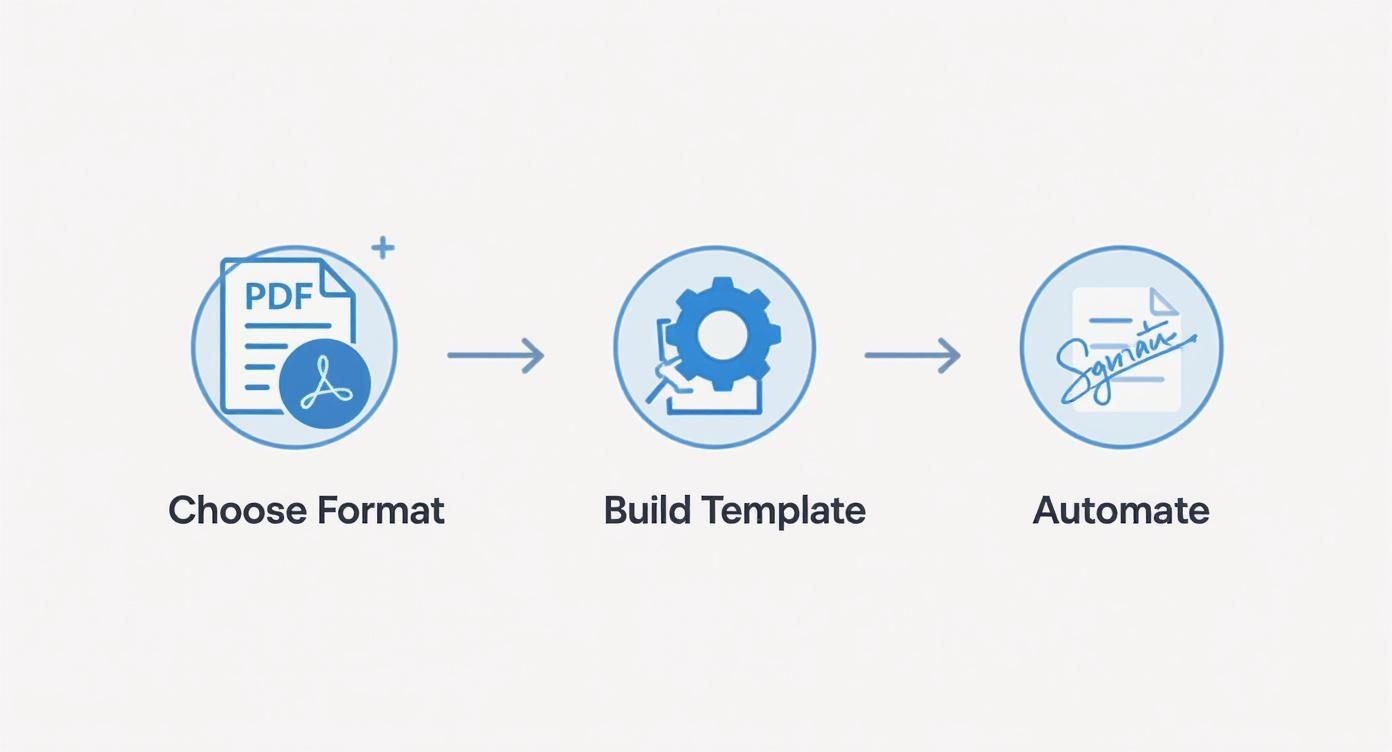
It really highlights that a great template only unlocks its true power when you connect it to an automated system for execution and signing.
A Real-World Scenario in Healthcare Construction
Let's put this into a real-world context. Imagine a team building a new hospital wing in the US. Mid-project, the medical staff requests a change to a patient room layout to accommodate some specialized diagnostic equipment that wasn't in the original plans. This single change affects electrical, plumbing, and framing.
The old way of doing things would set off a storm of paperwork, phone calls, and meetings. It could easily take a week or more to get everyone—the contractor, the hospital administrator, and the architect—to sign off.
With BoloSign, the project manager fills out the pre-built change order template on their tablet, right there on-site. The platform instantly calculates the cost adjustments based on the inputs and sends the form to the lead contractor for internal review.
Once approved, the document is immediately forwarded to the hospital administrator, who might be in another city entirely. They get a secure link, review the detailed changes and costs, and provide their legally binding eSignature from their desktop. The entire process, from initiation to final approval, is done in just a few hours.
And because BoloSign is HIPAA compliant, the healthcare provider has total peace of mind that all project documents are handled with the required level of security. This combination of speed and security means the construction team can get to work on the changes right away, keeping a complex, high-stakes project on track without costly delays. That’s the real power of an automated contract automation workflow.
Navigating the Legal Side of Change Orders
Let's get one thing straight: every signed change order is a legally binding amendment to your original contract. Treating it as anything less is a massive financial and legal gamble. The fine print in your initial agreement really sets the stage for how every future change gets handled, so you have to get this part right from the very beginning.
A well-drafted construction contract will always include a specific clause that spells out the exact procedure for submitting, reviewing, and approving changes. This isn’t just boilerplate text; it’s your project’s rulebook for managing the unexpected. It removes ambiguity and gives everyone a clear roadmap to follow, which drastically reduces the chances of a simple disagreement blowing up into a major dispute down the road.
Your Contract Is Your First Line of Defense
Think of your primary contract as your first and most important legal safeguard. It needs to clearly define what actually constitutes a valid change and the formal process for making it official. This is crucial for protecting you from informal "constructive changes"—those tricky situations where a client's actions or instructions imply a change, even if a formal order was never signed.
For instance, picture an owner who is always on-site and starts directing your team to use higher-grade materials than what was specified in the plans. Legally, that could be interpreted as a constructive change. If you don't have a process to immediately document this and get a signature, you could easily be on the hook for the extra cost. A strong contract clause forces these "by the way" conversations into a formal, documented workflow.
Beyond your own agreements, you also have to keep an eye on the bigger picture. Significant project modifications can sometimes trigger new local permits or council approval requirements, adding another layer of legal complexity you'll need to manage.
The Power of Meticulous Digital Documentation
When a dispute does arise, the party with the most thorough documentation almost always has the upper hand. This is where a systematic, digital approach becomes a game-changer. A platform like BoloSign doesn't just get you a signature; it creates a comprehensive, timestamped audit trail for every single document.
This audit trail captures every interaction:
- Who created the document and the exact time they did it.
- Who viewed the document and from what location.
- Who signed the document, complete with a precise timestamp.
This digital record is your irrefutable proof of agreement, massively strengthening your position in any potential claim or conflict. The history of construction paperwork shows a clear evolution toward standardization to avoid these exact problems. What started as informal handshake deals led to standardized AIA forms and has now progressed to digital solutions that offer real-time tracking and risk management.
A digital workflow transforms your change order from a simple form into a secure, legally defensible record. It provides a clear, unalterable history of every agreement, which is essential for legal protection and compliance.
With BoloSign, you can be confident that every eSignature is fully compliant with strict legal standards like the ESIGN Act in the U.S. and eIDAS in the European Union. This ensures your digitally signed change order template construction documents carry the exact same legal weight as their ink-and-paper counterparts. By building your process around a secure platform, you can manage your contracts with confidence, knowing every change is properly documented and legally sound.
Ready to Modernize Your Change Order Process?
We’ve walked through the entire process, from understanding why a solid system is non-negotiable to the nitty-gritty of building and automating your change order workflow. A standardized, digital approach isn't just about moving faster—it's about getting a firm grip on your costs, stamping out unnecessary risks, and ultimately, building more trust with your clients.
If you're tired of chasing down paperwork and getting lost in confusing email chains, it's time to see what a dedicated platform can do. BoloSign makes it incredibly simple to create, send, and sign PDFs online, turning what used to be a multi-day headache into just a few clicks.
Imagine creating a reusable change order template construction pros on your team can actually rely on. Picture automated signature workflows and legally binding approvals happening in minutes, not days. That's the goal.
Our platform is built to make sure every change is compliant and easy to track, with secure document workflows and AI-powered automation. We designed BoloSign to be 90% more affordable than the traditional tools out there, offering unlimited documents, templates, and team members for one flat price. This straightforward pricing is a game-changer for businesses in demanding fields like professional services and logistics, where budget predictability is everything.
Ready to take back control? Start your 7-day free trial of BoloSign and experience how much smoother your projects can run.
Common Questions, Answered
Let's tackle a few of the most common questions that pop up when you're dealing with change orders and shifting to a more digital workflow.
What’s the Difference Between a Change Order and a Construction Change Directive?
This one trips people up all the time. Think of it like this: a Change Order is a team decision. It’s a formal, written agreement that the owner, contractor, and architect have all signed off on. Everyone agrees on the new scope, the cost, and any schedule changes before the work starts. It’s collaborative.
A Construction Change Directive (CCD), on the other hand, is more of a top-down instruction. The owner issues a CCD when a change is needed immediately to keep the project on track, but everyone hasn't agreed on the final cost or time extension yet. It’s a way to say, "Do this now, and we'll settle the numbers later," preventing costly delays while negotiations continue.
How Do I Make Sure My Digital Change Order Is Legally Binding?
The short answer? Use a secure eSignature platform built for the job, like BoloSign. The legality isn't just about getting a signature on a PDF; it's about the entire process behind it.
Legitimate platforms are designed to comply with laws like the ESIGN Act in the U.S. and eIDAS in Europe. They create a complete, tamper-proof audit trail that captures every detail: who signed, the exact timestamp, and their location. This rock-solid, verifiable record is what gives a digital signature the same legal standing as one signed with wet ink.
A legally binding digital change order isn't just a signed file. It's the product of a secure, auditable, and compliant signature process that turns your digital document into an enforceable contract amendment.
Can I Actually Manage Change Orders for Multiple Projects at Once?
Absolutely. In fact, this is where a digital system really shines. Forget juggling different Word documents and email chains for every job site.
With a platform like BoloSign, you can create a master change order template and deploy it across all your projects, whether you're running a commercial build in Canada or a handful of residential jobs in Australia. This creates total consistency in your paperwork and cuts down administrative busywork. Centralized dashboards are built to handle multiple workflows at once, making it a perfect solution for construction firms overseeing a portfolio of projects.
Ready to finally get your change order process under control? With BoloSign, you can create reusable templates, automate your approval workflows, and get legally binding signatures back in minutes. Start a 7-day free trial of BoloSign and see just how much simpler your projects can be.

Paresh Deshmukh
Co-Founder, BoloForms
4 Dec, 2025
Take a Look at Our Featured Articles
These articles will guide you on how to simplify office work, boost your efficiency, and concentrate on expanding your business.



