

How to Add a Digital Signature to PDF Securely
Learn how to add a digital signature to PDF documents. This guide covers the secure, legally binding way to sign PDFs online and streamline your workflow.

Tired of nonsense pricing of DocuSign?
Start taking digital signatures with BoloSign and save money.
It’s incredibly tempting to just copy and paste a picture of your signature onto a PDF and call it a day. We’ve all thought about it. But from a security standpoint, this is one of the biggest mistakes you can make.
That simple image offers zero legal protection. Worse, it can be easily copied, altered, or forged by anyone with basic editing software, leaving no digital trace of the fraud. A real digital signature, on the other hand, is a powerful cryptographic tool that acts as a secure, tamper-evident seal on your documents.
Why Pasting a Signature Image Is a Huge Security Risk
Think of it this way: pasting an image of your signature is the digital equivalent of leaving a rubber stamp of your signature on a public desk. Anyone can walk by, pick it up, and use it however they please. This method provides absolutely no way to verify who the signer is or to confirm that the document hasn't been changed since it was "signed."
This distinction isn't just academic; it's absolutely critical in industries like finance, legal, and real estate, where the integrity of a document is everything.
A Real-World Scenario in Real Estate
Let’s play this out. Imagine a real estate agent emails a purchase agreement to a client. If they just use a pasted signature image, a dishonest person could easily intercept that email, lift the signature, and slap it onto a fraudulent contract with completely different terms.
Because there’s no digital evidence to prove the document was altered, you’re looking at a massive legal and financial nightmare.
Now, contrast that with a secure digital signing solution like BoloSign. When you sign with a tool like this, it embeds a unique, encrypted certificate directly into the PDF. This certificate is like a digital fingerprint. If anyone changes so much as a single comma after it's signed, the digital signature is immediately invalidated, instantly alerting all parties that something is wrong.
Key Differences at a Glance
So, what really separates a true digital signature from a pasted image? Let's break it down.
- Authentication: A digital signature verifies the signer's identity through a secure, traceable process. An image provides zero authentication.
- Integrity: Digital signatures are tamper-evident. Any modification to the document after signing breaks the signature's validity. An image offers no protection against post-signature edits.
- Legal Standing: Platforms like BoloSign are built to comply with global standards like the ESIGN Act and eIDAS, which makes their signatures legally binding. A pasted image holds virtually no legal weight in a dispute.
The entire point of a true digital signature is to create trust. It provides an undeniable, verifiable link between a specific person, a document, and a precise moment in time, ensuring the agreement is authentic and completely unaltered.
Ultimately, when you need to add a digital signature to a PDF, you need more than just a picture—you need a secure, traceable, and legally compliant process. BoloSign delivers that assurance by creating a detailed audit trail that records every single step of the signing workflow, from the moment the document was opened to the final, secure signature.
Digital Signatures vs. Electronic Signatures: What’s the Difference?
You’ll often hear the terms “electronic signature” and “digital signature” thrown around as if they’re the same thing. They’re not. While they both get your documents signed online, understanding the key differences is critical for your business's security and legal protection.
Think of electronic signatures (or e-signatures) as the big, broad category. An e-signature is essentially any electronic mark made with the intent to sign something. It could be your typed name at the end of an email, a scanned image of your handwritten signature, or even just clicking an "I Agree" box on a website.
These are great for everyday, low-risk agreements. But a simple e-signature doesn't offer much in the way of real security. It proves you intended to sign, but it often lacks a strong, verifiable link back to your identity and does little to stop someone from sneakily altering the document after the fact.
The Real Power of a Digital Signature
A digital signature, on the other hand, is a very specific, highly secure type of electronic signature. It’s the heavyweight champion of the signing world.
Instead of just being an image on a page, a digital signature uses a sophisticated encryption technology called Public Key Infrastructure (PKI). This process embeds a unique, certificate-based digital ID directly into the PDF, creating a tamper-evident seal.
Here’s what that seal actually does:
- Authentication: It confirms the signer’s identity has been verified. You know exactly who signed it.
- Integrity: The moment the document is signed, it’s locked. If anyone tries to change anything—even just a comma—the signature is instantly broken and invalidated.
- Non-Repudiation: It creates a rock-solid, legally admissible audit trail. This prevents the signer from ever claiming, "That wasn't me," or "The document was changed after I signed."
With a digital signature, you’re not just putting a name on a document; you're creating a secure, unchangeable, and legally-binding record of the agreement. It's the gold standard for high-stakes contracts and sensitive information.
For instance, a design team might use a simple e-signature for an internal project brief—no big deal. But for a $50,000 client contract, that same team needs the assurance of a digital signature to make sure the terms are locked in and fully enforceable.
Digital Signature vs Electronic Signature: A Quick Comparison
To put it all into perspective, let's break down the core differences in a simple table. This should help you see at a glance why one is built for convenience and the other is built for security.
| Feature | Electronic Signature | Digital Signature |
|---|---|---|
| Security Level | Basic; often just a user-generated image or text. | High; uses encrypted, certificate-based digital IDs. |
| Authentication | Minimal or no identity verification. | Strong, verifiable identity confirmation of the signer. |
| Tamper Evidence | None. Documents can be altered without anyone knowing. | Instantly invalidates if the document is altered post-signing. |
| Legal Standing | Legally binding for many uses, but easier to challenge. | Much stronger legal weight due to the verifiable audit trail. |
Ultimately, the choice depends on what you're signing. For documents where security and legal proof are non-negotiable, a true digital signature is the only way to go.
Tools like BoloSign bridge the gap by offering the robust security of a digital signing solution with the simple user experience of an e-signature. Every document signed through BoloSign is backed by a complete audit trail that meets strict compliance standards like ESIGN, eIDAS, and HIPAA, giving you total confidence in every agreement you send.
Your Guide to Adding a Digital Signature with BoloSign
Now that we’ve sorted out the critical differences between signature types, let's get practical. I want to walk you through just how simple and secure it is to add a digital signature to a PDF using a dedicated platform. The whole point is to make the process intuitive and fast, removing headaches for both you and your signers. With a tool like BoloSign, you can get the entire document workflow done in minutes, not hours.
Think about a real-world scenario. Let's say you're an HR manager at a fast-growing staffing agency. It’s the end of the month, and you have five new remote employees starting on Monday. The old way meant a storm of emails, printing, scanning, and chasing people down just to get employment contracts and onboarding paperwork signed. It was a nightmare.
With BoloSign, that whole mess is automated. You upload the master contract once, place the signature and text fields where they need to go, and send it to all five new hires at the same time. Each person gets a secure, personalized link to sign right on their phone or laptop. No printing, no scanning, no fuss.
A Simplified Document Signing Workflow
A modern digital signing solution should feel effortless. You shouldn't need to pull out a technical manual just to get a simple document signed.
The workflow is designed to be completely straightforward:
- Upload Your Document: Just grab any PDF file from your computer or a cloud drive to get started.
- Add Signers: Type in the names and email addresses for everyone who needs to sign. You can even set a specific signing order if approvals need to happen sequentially.
- Place Fields: This is the fun part. Simply drag and drop fields for signatures, initials, dates, and text right onto the document. This visually tells your signers exactly what you need from them.
- Customize and Send: Add a personal touch to the email invitation with your own message and branding, then just hit send.
Once it's out, BoloSign’s real-time dashboard gives you a complete overview of your document's status. You’ll know instantly who has opened, viewed, and signed it, which means no more manual check-ins or follow-up emails.
Real-World Application in Logistics
Here's another example I've seen. A logistics company was struggling with proof of delivery for hundreds of shipments every day. By switching to BoloSign, their drivers can now have clients sign directly on a tablet. The signature is instantly captured with a timestamp and location data. The completed, tamper-proof PDF is then automatically filed and sent straight to the billing department. This one change eliminated lost paperwork and dramatically sped up their invoicing cycle.
BoloSign transforms document signing from a tedious, multi-step chore into a single, automated action. It’s designed to save you time and provide a legally-binding audit trail for every agreement, ensuring full compliance and peace of mind.
This diagram breaks down the difference between a simple electronic signature and a secure digital one, showing how each step adds more security.
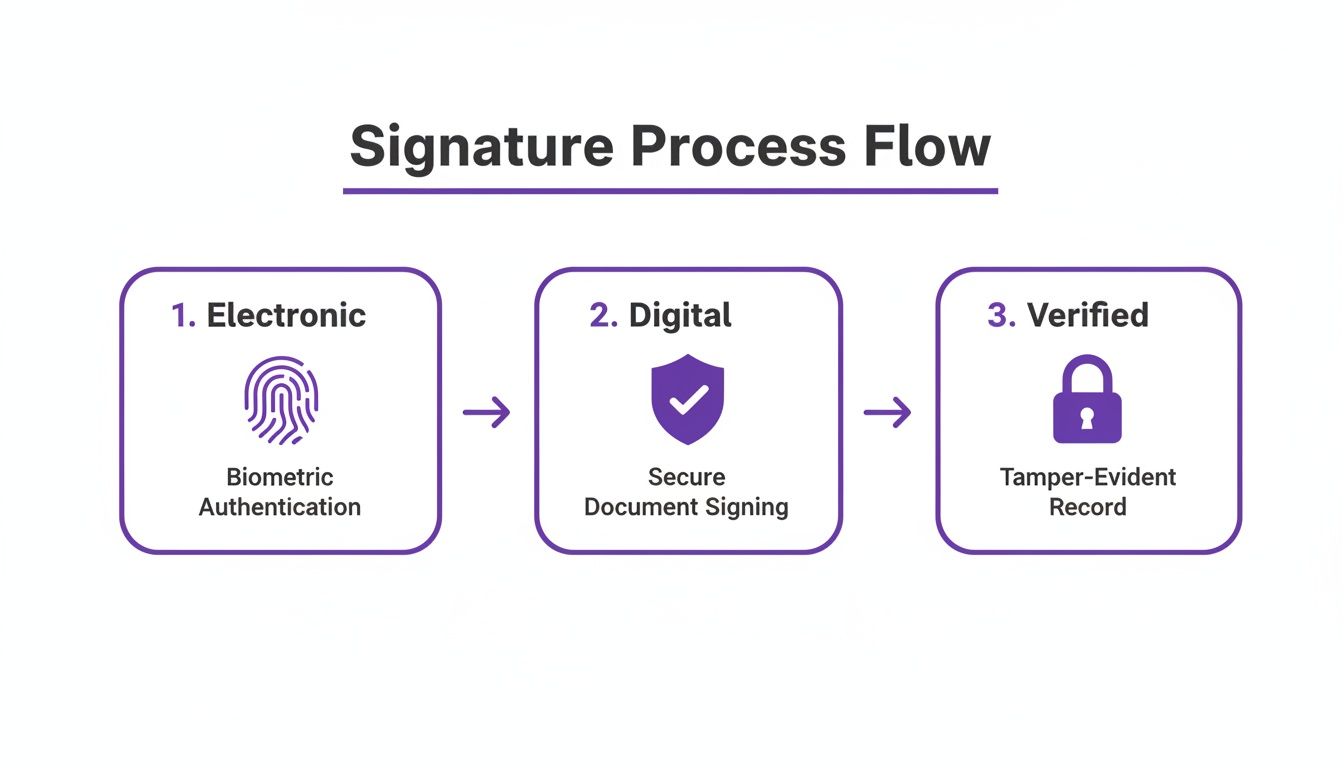
As you can see, a digital signature adds a verifiable, secure layer on top of a basic electronic intent to sign, which is crucial for high-stakes documents.
Making Advanced Features Accessible
What really makes this process so powerful is the technology running in the background. Every signature is backed by an AI-powered platform that ensures compliance with major regulations like ESIGN, eIDAS, and industry-specific rules like HIPAA. For anyone in professional services, healthcare, or education, this means you can handle sensitive client or student information with total confidence.
And here’s the best part: this level of technology is actually affordable. BoloSign runs on a fixed-price model, offering unlimited documents, team members, and templates. This approach makes it up to 90% more affordable than traditional tools that nickel-and-dime you for every signature or user. It puts enterprise-grade security within reach for businesses of any size.
Feel free to learn more about our product and see how it all works with a tour of the BoloSign platform.
Ready to see how simple this can be for yourself? You can get started right away and watch how BoloSign can completely change your document workflows for the better.
Ensuring Your Signed Documents Are Legally Compliant
When you add a digital signature to a PDF, you're doing more than just putting your name on a file—you're creating a legally enforceable record. For any business, understanding the rules that govern these signatures isn't just a good idea; it's absolutely essential for protecting yourself in any agreement. If you get it wrong, you risk having your contracts challenged or even thrown out entirely.
This is precisely why modern platforms like BoloSign are built with compliance baked right into their DNA. They’re designed to automatically meet major international regulations, so you don’t have to become a legal scholar just to send a document.
Navigating Global and Industry Regulations
Depending on where you and your signers are, different laws come into play. A trusted digital signing solution has to navigate this complex legal landscape for you, taking the guesswork out of the equation.
Here are the key regulations BoloSign is built to handle:
- ESIGN Act (U.S.): The Electronic Signatures in Global and National Commerce Act is what gives electronic signatures the same legal weight as a wet-ink signature across the United States.
- eIDAS (EU): This regulation creates a consistent legal framework for electronic signatures across the European Union, making cross-border business seamless and secure.
- HIPAA (U.S. Healthcare): The Health Insurance Portability and Accountability Act sets incredibly strict standards for protecting patient health information. Compliant e-signatures are non-negotiable for anyone in the healthcare space.
For businesses in demanding fields like professional services or education in places like Canada, Australia, or the UAE, BoloSign ensures every document workflow meets both local and international data security standards like GDPR.
The Power of a Comprehensive Audit Trail
What really gives a digital signature its legal teeth is the evidence backing it up. This proof is captured in a comprehensive audit trail—a detailed, tamper-evident log of every single action taken from the moment a document is sent to the final signature. Think of it as the digital version of a notary witnessing and recording every step.
A strong audit trail is your ultimate proof in a legal dispute. It provides a clear, chronological record that proves who signed the document, when they signed it, and that its contents have remained unchanged.
BoloSign’s audit trail captures critical data for every document, including:
- The signer's full name and email address
- The IP address where the document was accessed and signed
- A precise timestamp for every action (like viewed, signed, and completed)
- A unique digital fingerprint (checksum) of the document to prove its integrity
This detailed record is automatically attached to every completed PDF, giving you an undeniable log of the entire signing event. This is especially crucial for professional services firms needing to show due diligence or educational institutions managing enrollment agreements. For businesses juggling high volumes of paperwork, you can learn more about our tools for contract automation.
BoloSign combines these enterprise-grade security features with a dead-simple interface, making compliance effortless. Better yet, it all comes at one fixed price, with unlimited documents, team members, and templates. This makes it up to 90% more affordable than the traditional tools you might be used to.
Ready to see this level of security and simplicity for yourself? You can explore all these features and more by starting a 7-day free trial today.
Moving Beyond Single Signatures to Full Workflow Automation
Learning how to add a digital signature to a PDF is a fantastic start, but honestly, it’s just scratching the surface. The real game-changer is when you stop thinking about signing one document at a time and start automating your entire document workflow. This is where you actually start reclaiming hours from your week and kill off the tedious manual tasks that bog down your business.
Instead of just signing, you need to be building an efficient, repeatable process. This is exactly where AI-powered contract automation steps in.
From Single Document to Automated Workflow
Picture this: you run a professional services firm. Every time a new client comes on board, you draft the same old engagement letter. With BoloSign, you can build a reusable template for that letter. Now, instead of starting from scratch every single time, you just plug in a few key details, and the document is ready to send for a secure signature. It's a simple tweak that saves time, cuts down on errors, and keeps all your client agreements consistent.
Here’s how this plays out in the real world:
- For Sales Teams: You can hook BoloSign right into your CRM. The second a deal is marked "won," a contract is automatically generated with the client's info and shot out for a signature. No one has to lift a finger.
- For Staffing Agencies: Use templates to blast out standardized onboarding packets to multiple new hires at once. This streamlines everything from the offer letter to policy acknowledgments.
- For Education: Automate sending out and collecting signed permission slips or enrollment forms. Think of the hours that saves your administrative staff.
This shift in mindset is what’s fueling the massive boom in the digital signature market. The industry was valued at around USD 7.56 billion in 2023 and is on track to hit USD 70.2 billion by 2030. You can get more insights on this trend and its business impact over at Fortune Business Insights.
A smart workflow does more than just get a signature; it handles the generation, sending, tracking, and filing of documents, freeing your team to focus on more important work.
And this kind of automation isn't just for the big corporate players anymore. BoloSign makes it completely accessible with a straightforward, fixed-price model. For one price, you get unlimited documents, team members, and templates. This makes it up to 90% more affordable than the old-school tools that nickel-and-dime you for every user or signature.
For an even deeper dive into automating signature collection, check out our guide on how to add a digital signature on Google Forms.
You can start building these powerful workflows yourself with a 7-day free trial of BoloSign.
Common Questions About Digital Signatures
Moving your business to a new way of doing things, especially something as important as signing documents, naturally brings up a few questions. You need straightforward answers to feel confident in the process. Let's dig into some of the most common things businesses ask when they start to add a digital signature to a PDF.
Can I Just Paste an Image of My Signature into a PDF?
You can, but you absolutely shouldn't. Think of it this way: pasting a picture of your signature is like leaving a rubber stamp of it on your desk for anyone to use. It has zero security.
Anyone can copy, alter, or lift that image and place it on another document without your knowledge. A true digital signature from a platform like BoloSign is completely different. It’s cryptographically locked to the document, making it tamper-proof and creating a detailed audit trail that stands up in court.
Are Digital Signatures Actually Legally Binding?
Yes, they are. In most parts of the world, digital and electronic signatures carry the same legal weight as a wet-ink signature.
This is backed by major legislation like the ESIGN Act in the United States and eIDAS in the European Union. Reputable platforms are built specifically to meet these international standards, so you can be confident your agreements are enforceable, whether your client is across the street or across the globe.
What Happens if Someone Tries to Edit the PDF After It’s Signed?
This is where the real power of a digital signature comes into play. When a document is signed, the technology creates a unique digital "fingerprint" of the file at that exact moment.
If anyone changes anything—and I mean anything, even just adding a single comma—that digital fingerprint is broken. The signature is immediately invalidated, which instantly alerts everyone that the document has been tampered with. It's a level of security that paper just can't match.
Do I Need to Install Special Software to Make This Work?
Not anymore. With a modern, cloud-based tool like BoloSign, there’s nothing to download or install for you or your signers.
The entire process happens right in a standard web browser on any device—computer, tablet, or phone. This makes it incredibly easy for everyone involved. A sales rep can get a contract signed from their car, or a new hire can complete their onboarding paperwork from their couch. It's designed to be simple.
Ready to see how straightforward and secure a real digital signing solution can be? With BoloSign, you get unlimited documents, team members, and templates for one flat price, making it up to 90% more affordable than other tools.
Start your 7-day free trial today and discover a better way to manage your document workflows.

Paresh Deshmukh
Co-Founder, BoloForms
23 Jan, 2026
Take a Look at Our Featured Articles
These articles will guide you on how to simplify office work, boost your efficiency, and concentrate on expanding your business.



