

How to Create PDF Forms That Get Results
Learn how to create PDF forms that are fillable, secure, and eSignature-ready. Our guide covers everyday tools and advanced automation for modern businesses.

Tired of nonsense pricing of DocuSign?
Start taking digital signatures with BoloSign and save money.
Staring at another mountain of paperwork? It feels like we should be past this, right? The truth is, in today's business world, fillable PDF forms are the real engine behind smooth operations. They're more than just a digital version of a paper document—they're a dead-simple, powerful way to standardize how you gather information, stay compliant, and seriously speed up your workflows.
Why Modern Businesses Run on Fillable PDF Forms
Making the jump from paper to digital isn't just about saving a few trees; it's about gaining a serious competitive edge. Fillable PDFs have become the gold standard for this shift. Why? Because they offer a reliable, universal format that looks and works the same on any device, anywhere. That kind of consistency is non-negotiable for critical business functions.
The rise of digital agreements and the widespread adoption of eSignature solutions have been explosive, with PDFs leading the charge. In fact, by 2025, it's estimated that 78% of all digital agreements will be finalized using PDF documents. This cements their role as the go-to format for legally binding transactions. And security is paramount; a whopping 94% of enterprises that rely on PDF workflows encrypt them before sharing, a must-have practice in sensitive fields like law and healthcare.
Standardizing Data Collection Across Industries
One of the biggest wins with a fillable PDF is its power to standardize how you collect information. No more deciphering messy handwriting or chasing down missing details. Every person fills out the exact same fields in the exact same format, which kills confusion and ensures you get the precise data you need, every single time.
This consistency is a game-changer across a ton of different industries:
- Staffing Agencies: A uniform application form means every candidate provides their work history, skills, and references in the same structure. This makes comparing applicants incredibly fast and fair.
- Healthcare Clinics: New patient intake forms capture vital medical history, insurance details, and consent signatures in a structured, HIPAA-compliant way.
- Real Estate: Rental applications and lease agreements use fillable fields to gather applicant info and lock in legally binding signatures without the back-and-forth delays.
- Professional Services: Client onboarding questionnaires collect project requirements and contact details systematically, paving the way for a successful project right from the start.
The real value of fillable PDF forms isn't just about collecting data—it's about creating a predictable, repeatable, and scalable process for your most important workflows. It’s the first step toward true contract automation.
The BoloSign Advantage: A Smarter Approach
While the benefits are crystal clear, the old-school way of creating, sending, and tracking these forms can be surprisingly clunky and expensive. This is exactly where a modern platform like BoloSign comes in. We built it to eliminate that friction.
Instead of getting nickeled and dimed for every document or every user you add, BoloSign operates on a single, fixed price. That gives you unlimited documents, unlimited team members, and unlimited templates. This model makes it up to 90% more affordable than traditional tools, giving you predictable costs that don't balloon as your business grows. It’s time to move toward a smarter way of managing documents, turning a simple form into a powerful business asset.
Ready to see just how simple and affordable your workflows can be? Start your 7-day free trial today and experience the difference firsthand.
Making Fillable PDF Forms with Software You Already Have
You probably don't need to buy anything new to create a basic fillable form. Chances are, the tools to get started are already on your computer. Common software like Adobe Acrobat Pro, Microsoft Word, and the free, open-source LibreOffice suite have built-in features for this.
This route is perfect when you have a simple, one-off need. It also gives you a great hands-on feel for how form fields actually work. But as we'll get into, these traditional methods have some serious limitations that can really bog down a growing business.
Let’s walk through how to build a form in each of these apps.
Using Adobe Acrobat Pro to Build Forms
When it comes to serious PDF editing, Adobe Acrobat Pro is pretty much the industry standard, and for good reason. It’s packed with a powerful set of tools designed specifically for creating interactive, professional-looking forms either from scratch or by converting a static document.
If you have an Acrobat Pro subscription, the process is straightforward. You can open an existing PDF or even a scanned document. Acrobat’s "Prepare Form" tool is surprisingly smart—it automatically scans the document and detects areas that look like form fields. Think lines next to text like "Name:" or "Address:". It will often convert them into fillable text boxes for you.
Once you’re in the form editor, a toolbar pops up with every field type you could possibly need:
- Text Fields: The basics for names, addresses, or any short answer.
- Checkboxes: Perfect for "yes/no" questions or when you need to let someone pick multiple options.
- Radio Buttons: Use these when you want a user to select only one choice from a group (like "Full-Time" vs. "Part-Time").
- Dropdown Lists: A much cleaner way to present a long list of options, like states or countries, without cluttering the page.
- Signature Fields: A dedicated spot for a user to place their digital signature.
Despite its power, this method isn’t for everyone. The main hurdle is the cost. Acrobat Pro is a subscription service, and that recurring fee can be a tough pill to swallow for a small business. Plus, its eSignature features are often part of the more expensive plans, and trying to manage a document for multiple signers can get messy without a real workflow tool.
Creating Forms in Microsoft Word
So many businesses live inside the Microsoft Office ecosystem, which makes Word a natural place to start. And yes, you absolutely can create a fillable form right in Word and then save it as a PDF.
The magic happens in the "Developer" tab, which you might have to enable first in your Word options. Once you have it, you'll find "Legacy Tools" and "ActiveX Controls." This is where you'll find the building blocks for your form—things like text boxes, combo boxes, and checkboxes. You design your document, pop in the controls you need, and then use the "restrict editing" feature to lock everything down except the fields you want people to fill.
When you're done, just save the document as a PDF. The trick is to make sure you choose the option "Best for electronic distribution and accessibility," as this is what keeps the form fields functional.
A Critical Limitation: You can make the form in Word, but getting it signed and returned is a completely manual headache. You're stuck emailing copies back and forth, and there’s no built-in, legally binding eSignature capability. This is a fast track to version control chaos.
LibreOffice as a Free Alternative
If you're looking for a no-cost option, LibreOffice Writer is a fantastic open-source alternative to Microsoft Word. It has a surprisingly capable set of form creation tools that work much like Word's.
You'll find a dedicated "Form" menu where you can add all the standard fields—text boxes, list boxes, checkboxes, and more. Once your design is complete, you can export it directly as a fillable PDF that works in any standard reader. LibreOffice does a great job of creating a perfectly functional document.
But, just like with Word, LibreOffice is a creation tool, not a workflow solution. It stops right where the real work begins. You'll still be wrestling with the same manual process of distributing, tracking, and collecting signatures. For any business handling more than a handful of documents, this manual work becomes a major bottleneck, fast.
The Inevitable Bottlenecks of Traditional Methods
Using everyday software is a great way to dip your toes in the water, but it quickly highlights the gaps that modern businesses simply can’t ignore. The global PDF software market is projected to hit $6.2 billion by 2032 for a reason: companies are moving past basic creation tools. With 98% of businesses using PDFs for external communication, the real need isn't just for static documents, but for efficient, end-to-end solutions. You can dig deeper into these trends and the future of PDF technology to see where things are headed.
These old-school methods just don't have the features needed for a professional workflow:
- No Centralized Tracking: You have no visibility. You can't see who has opened, viewed, or started filling out your form until they decide to email it back.
- Clunky Sharing: Emailing attachments to a group is a recipe for confusion. It’s impossible to keep track of who has the latest version.
- Lack of Automation: A signed form just lands in your inbox and dies. It doesn’t automatically update your CRM, notify the right team members, or kick off the next step in a process.
This is exactly why businesses in high-stakes fields like healthcare, real estate, and professional services eventually move to platforms like BoloSign. It’s not just about creating a form anymore. It's about managing the entire document lifecycle with AI-powered automation, staying compliant with standards like HIPAA and GDPR, and securing every signature with a verifiable audit trail. For businesses that start with large paper records, choosing the right A3 photo scanner for digitizing large documents is a crucial first step. The ultimate goal is to build a seamless digital workflow from beginning to end.
Building and Signing PDF Forms Effortlessly with BoloSign
Let's be honest. The tools we use every day, like Microsoft Word or even Adobe Acrobat, can get you started with creating a PDF form. But they often hit a wall right where the real work begins. Creating a fillable document is one thing; getting it sent, signed, tracked, and plugged into your actual business workflow is a completely different ballgame. This is where you graduate from manual grunt work to smart automation, and a tool like BoloSign is built for exactly that leap.
Instead of patching together different programs, BoloSign gives you a complete digital signing solution from start to finish. You can create, send, and sign PDFs, templates, and forms quickly and securely.
From Static Document to Dynamic Form
The process of creating a signable PDF form with BoloSign is designed for speed and simplicity.
- Start a Document: From your BoloSign dashboard, click 'Start Document' and upload your existing file (PDF, Word, etc.).
- Add Recipients: Enter the names and email addresses of everyone who needs to sign or fill out the form.
- Place the Fields: The intuitive drag-and-drop editor appears. This is where you turn your static document into an interactive one. Add all the building blocks you need for clean data collection:
- Text Fields: For essentials like names, addresses, and other key details.
- Checkboxes and Radio Buttons: Perfect for clear, multiple-choice options.
- Date Pickers: To get rid of formatting mistakes and keep dates consistent.
- eSignature Fields: For collecting compliant, legally binding signatures.
- Send and Track: Once all fields are placed, click 'Send'. BoloSign automatically routes the document to each person, and you can track its progress in real-time from your dashboard.
Because the process is so visual, it takes all the guesswork out of the equation. You see exactly what your form will look like and how it will work before it ever reaches a client, partner, or new hire.
A Real-World Scenario in Real Estate
Imagine you're a real estate agent with a multi-page lease agreement. It needs to be filled out and signed by two tenants and a co-signer, and each person has to sign in a specific order.
Trying to manage this manually is a recipe for a headache. You’d email the PDF to the first tenant, then wait for them to print, sign, scan it (probably crooked), and email it back. Then you have to forward that version to the next person, and on and on. The process is slow, confusing, and practically begging for errors.
With BoloSign, that entire workflow gets automated:
- Upload and Prep: You upload the lease agreement. The drag-and-drop editor lets you place text fields for all the tenant information and create dedicated signature blocks for each person.
- Set the Signing Order: You simply specify the sequence—Tenant A signs first, followed by Tenant B, and then the co-signer gets it last.
- Send It Off: With one click, BoloSign routes the document to each person in the correct order. No more playing email traffic controller.
- Track Everything in Real-Time: From your dashboard, you can see the document's exact status—who’s opened it, who’s signed it, and who’s up next. You get instant alerts as the document moves through the chain.
This simple diagram shows just how clunky the traditional steps can be when you’re juggling different programs.
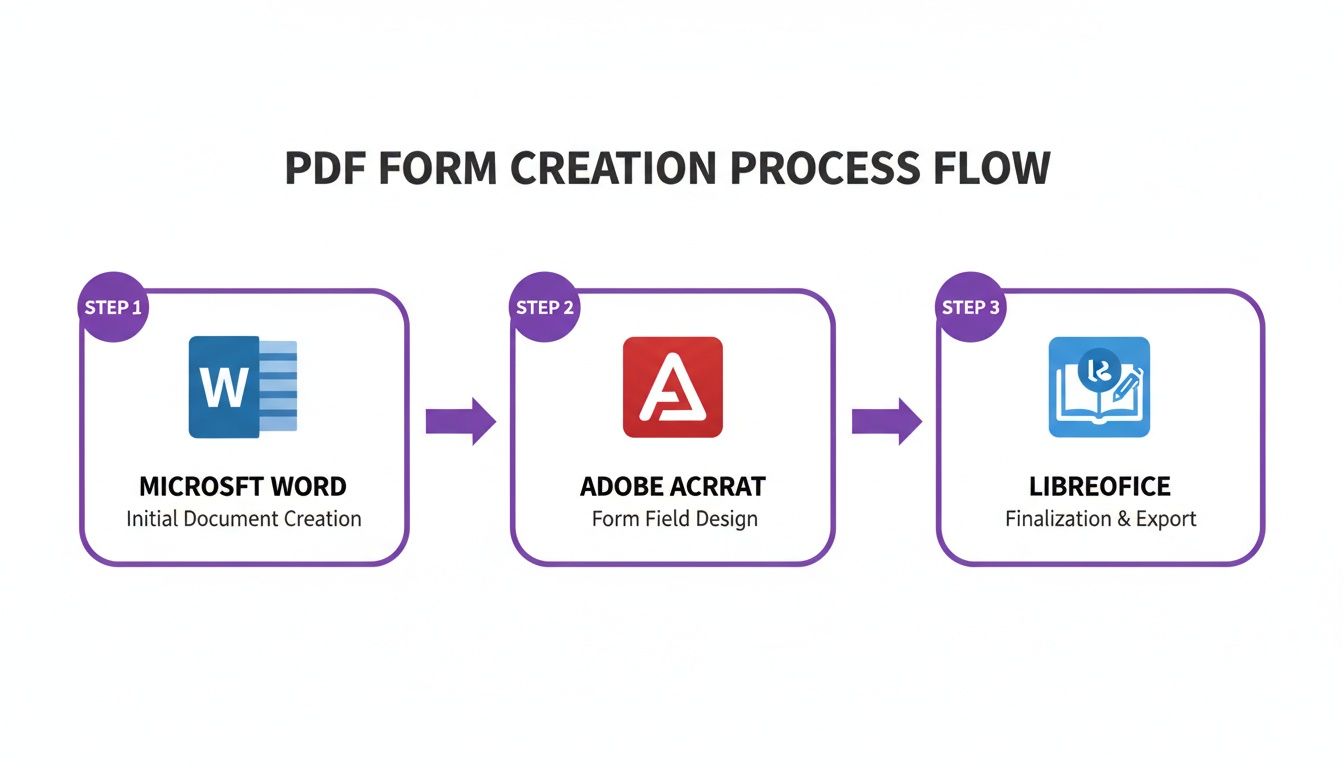
It really highlights the disconnected stages of using tools like Word, Acrobat, and LibreOffice separately, which is exactly why an all-in-one platform makes so much more sense.
What used to take days of follow-up emails and phone calls can now be done in minutes. This isn't just a nice-to-have; it's about closing deals faster and giving your clients a far better experience.
Beyond Creation: A Secure and Compliant Workflow
BoloSign is much more than a form builder. It’s a secure platform built for industries where compliance isn't optional. Every signature collected is backed by a detailed audit trail that logs every single action taken on the document.
This means your agreements are not only easy to sign PDFs online but are also fully compliant with major global standards, including:
- ESIGN and UETA in the United States
- eIDAS in the European Union
- HIPAA for protecting sensitive health information
- GDPR for data privacy
A Financial Game-Changer for Growing Businesses
Maybe the biggest difference-maker is BoloSign’s straightforward pricing. A lot of the big-name eSignature tools charge you per document or per user, which means your costs balloon unpredictably as your business grows.
BoloSign flips that script. We offer a single fixed price for unlimited documents, unlimited team members, and unlimited templates. This predictable cost makes BoloSign up to 90% more affordable than many alternatives, taking the financial guesswork out of automating workflows across your entire company. You can explore the full range of BoloSign's powerful features that are all included at no extra cost.
Ready to stop fighting with clunky software and start building efficient, automated form workflows? You can see how it all works for yourself. Start your 7-day free trial of BoloSign today and see just how simple creating, sending, and signing documents can be.
Advanced Tips for Professional and Secure Forms
Once you've nailed the basics of creating a fillable form, you're halfway there. But a truly professional form does more than just collect information—it actively prevents mistakes and protects sensitive data. It's time to move beyond simple text boxes and checkboxes to build an experience that's both intuitive for the user and rock-solid for your business.
This is where the advanced features come in. Think of them as the guardrails for your data collection process. They make sure the information you get is accurate, complete, and properly formatted right from the start, saving you countless hours of chasing down corrections and cleaning up data later.
Building Smarter Forms With Validation and Required Fields
One of the easiest yet most powerful ways to improve your data quality is by setting rules for what people can enter into a field. This is called field validation. Instead of just hoping someone types their email address correctly, you can set a rule that forces the entry to look like a real email (e.g., name@domain.com).
That simple step alone can drastically cut down on typos and bounced emails. The same idea works wonders for other common fields:
- Phone Numbers: You can enforce a specific format, like (555) 555-5555, to keep all your contact data clean and consistent.
- Dates: Using a date picker removes all ambiguity, ensuring every date is entered in the same format, such as MM/DD/YYYY.
- Numeric Fields: For things like zip codes or invoice amounts, you can restrict the field to numbers only. No more accidental letters messing up your spreadsheets.
Another game-changer is making critical fields required. By flagging fields like "Name" or "Signature" as mandatory, you make it impossible for someone to submit the form until all the crucial information is there. This small tweak puts a full stop to incomplete applications and contracts, which is a massive time-saver for any team.
Security and Compliance: The Bedrock of Trust
In any business, the security of your documents is non-negotiable. This is especially true in fields like healthcare, real estate, and professional services where you're handling highly sensitive client data. A fillable form is often the first point of contact, so it absolutely must be part of a secure, compliant workflow.
This is why just emailing an unencrypted PDF is a huge risk and where a dedicated platform like BoloSign becomes essential. It provides a secure document journey from the moment you create the form to the final signature.
Every document managed through BoloSign is shielded with enterprise-grade security, ensuring that sensitive information stays confidential. More importantly, the entire platform is built from the ground up to meet strict global compliance standards.
This built-in compliance gives both you and your clients peace of mind. Your forms, and the data inside them, are handled according to the rules that matter:
- HIPAA: For protecting sensitive patient health information in healthcare.
- GDPR: Ensuring data privacy for individuals within the European Union.
- ESIGN & eIDAS: These acts provide the legal framework that makes your online PDF signatures legally binding in the US and EU.
Designing for Accessibility and a Better User Experience
A form isn't truly professional unless everyone can use it easily. Designing for accessibility means making sure that people with disabilities, who might rely on screen readers or other assistive tech, can navigate and fill out your form without hitting a wall.
A few best practices make all the difference. Always use clear, descriptive labels for every single form field. Never rely on color alone to convey important information, and double-check that the tab order is logical so users can move through the form sequentially using just their keyboard. Platforms like BoloSign are designed with these principles in mind, helping you create forms that deliver a seamless experience for every user.
By combining smart validation, mandatory fields, and a secure, compliant platform, you elevate your PDFs from simple data collectors into professional, error-proof assets for your business.
Ready to build forms that are as secure and professional as your business? Start a 7-day free trial of BoloSign and experience a truly secure document workflow.
Taking Your Forms from Static to Strategic
Creating a great-looking fillable PDF is a solid first step. But let's be honest, the real magic happens after someone hits "submit." A signed form just sitting in your inbox is a dead end—it's a task waiting for you to handle. The goal is to make that form the starting line for a process that runs itself.
This is where you move beyond simple data collection and into serious business automation. By connecting your forms to your other systems, you save an incredible amount of time and cut out the human errors that inevitably creep in with manual data entry.
Moving Beyond Email Attachments
The way you get your form to people—and what happens when you get it back—makes all the difference. You can graduate from basic, time-consuming methods to a fully integrated system that does the heavy lifting for you.
- The Old Way (Emailing): Just attaching a PDF to an email works for a one-off task, but it’s a terrible system. There’s no tracking, it's not secure, and you end up drowning in a messy sea of replies and attachments.
- A Better Way (Website Embedding): Putting your form right on your website is a much smarter move. It's perfect for things like client intake or lead generation, letting people fill out and send information directly from your site.
- The Best Way (Integrated Workflows): This is where the real impact is. You connect your form directly to the other tools you use every day. Platforms like BoloSign are built for this, turning a simple signature into an immediate trigger for action.
By linking up with tools like Zapier, HubSpot, or Salesforce, BoloSign becomes the hub of your document process. This AI-powered automation connects the dots between your forms and your core business software, creating a seamless flow of information.
What Automation Looks Like in the Real World
Let's look at a common scenario. Imagine a marketing agency sending out a project proposal.
In the past, a signed proposal kicked off a flurry of manual work. Someone had to download the PDF, save it to the right folder, create a new client in the CRM, set up a new project in Asana, and then ping the project manager on Slack to get things rolling. Every single step is a chance for something to get missed.
With BoloSign, that whole chain reaction is automated. The second the client signs, the integration can instantly create a new deal in HubSpot, spin up a new project folder in Google Drive, and drop a notification in the project team’s Slack channel. The workflow is instant, flawless, and requires zero manual effort.
This kind of contract automation is a total game-changer. For a logistics company, a signed delivery confirmation could automatically update inventory. For a university, a submitted enrollment form could instantly create a new student profile and trigger a welcome email sequence. The possibilities are everywhere. If you want to get deeper into managing these handoffs, you can learn more about building a solid form approval workflow.
Ready to turn your static forms into automated workhorses? Start your 7-day free trial of BoloSign and see how easy it is to connect your documents to your daily workflows.
Common Questions About Creating PDF Forms
Stepping into the world of digital documents always brings up a few questions. As you start building smarter workflows, it's totally normal to wonder about the little details that make these forms tick. Let's walk through some of the most common things people ask when they're getting started with fillable PDFs.
How Can I Make an Existing PDF Fillable?
So you have a static, flat PDF—maybe it’s a scanned application or an old template you need people to complete. The old way meant printing it out, filling it in by hand, and scanning it back in. What a hassle.
Modern tools have a much better way. With a platform like BoloSign, you just upload that existing PDF. Its smart engine automatically spots the areas that look like form fields—like lines for names, dates, or checkboxes—and overlays interactive, fillable fields right on top. This means you can turn a totally static document into a fully functional form in just a few minutes, no redesign needed.
Are eSignatures on PDF Forms Legally Binding?
This is a big one, and the answer is a resounding yes—as long as you're using a compliant platform. An eSignature is far more than just a picture of your handwriting; it's a secure and verifiable process. Tools like BoloSign are built from the ground up to follow strict global standards like the ESIGN Act in the United States and eIDAS in the European Union.
Every signature is captured with a comprehensive, court-admissible audit trail. This log records every single action taken on the document—who opened it, when they viewed it, and the precise moment they signed—making sure each signature is legally sound and fully defensible.
Can I Send a Form to Multiple People to Sign?
Absolutely, and this is where a real digital signing solution really proves its worth. Trying to email a PDF to a bunch of people and keep track of who has signed is a recipe for chaos. A modern workflow tool completely eliminates that headache.
In BoloSign, for instance, you can easily add multiple recipients and even set a specific signing order. The platform handles the rest, automatically routing the document from one person to the next and sending notifications along the way until the entire sequence is complete. No more manual chasing.
How Do I Track the Status of a Sent Form?
Forget sending those awkward "just checking in" emails. The days of wondering if your document was even received, let alone opened or signed, are over.
Modern platforms give you a real-time dashboard that offers total visibility into your document's journey. You can see instantly who has viewed, opened, and signed your form. You're always in the loop and know exactly when it’s time to follow up (or celebrate a completed form).
Ready to stop wondering and start doing? BoloSign makes creating, sending, and managing secure, fillable PDF forms straightforward and affordable. With unlimited documents, users, and templates at one fixed price, you can transform your workflows without ever worrying about surprise costs.
Start your 7-day free trial today and discover a smarter way to handle your documents.

Paresh Deshmukh
Co-Founder, BoloForms
30 Dec, 2025
Take a Look at Our Featured Articles
These articles will guide you on how to simplify office work, boost your efficiency, and concentrate on expanding your business.



